
Product Overview
The AQQA LED Aquarium Light is designed to provide comprehensive lighting solutions for your aquarium, supporting both fish and plant life. It features advanced LED technology, multiple operating modes, and user-friendly controls for a customized lighting experience.
- High-Quality Construction: Features a widened and thickened aluminum shell for enhanced durability and heat dissipation. Premium 5050 and 2835 LEDs ensure optimal light for plant growth.
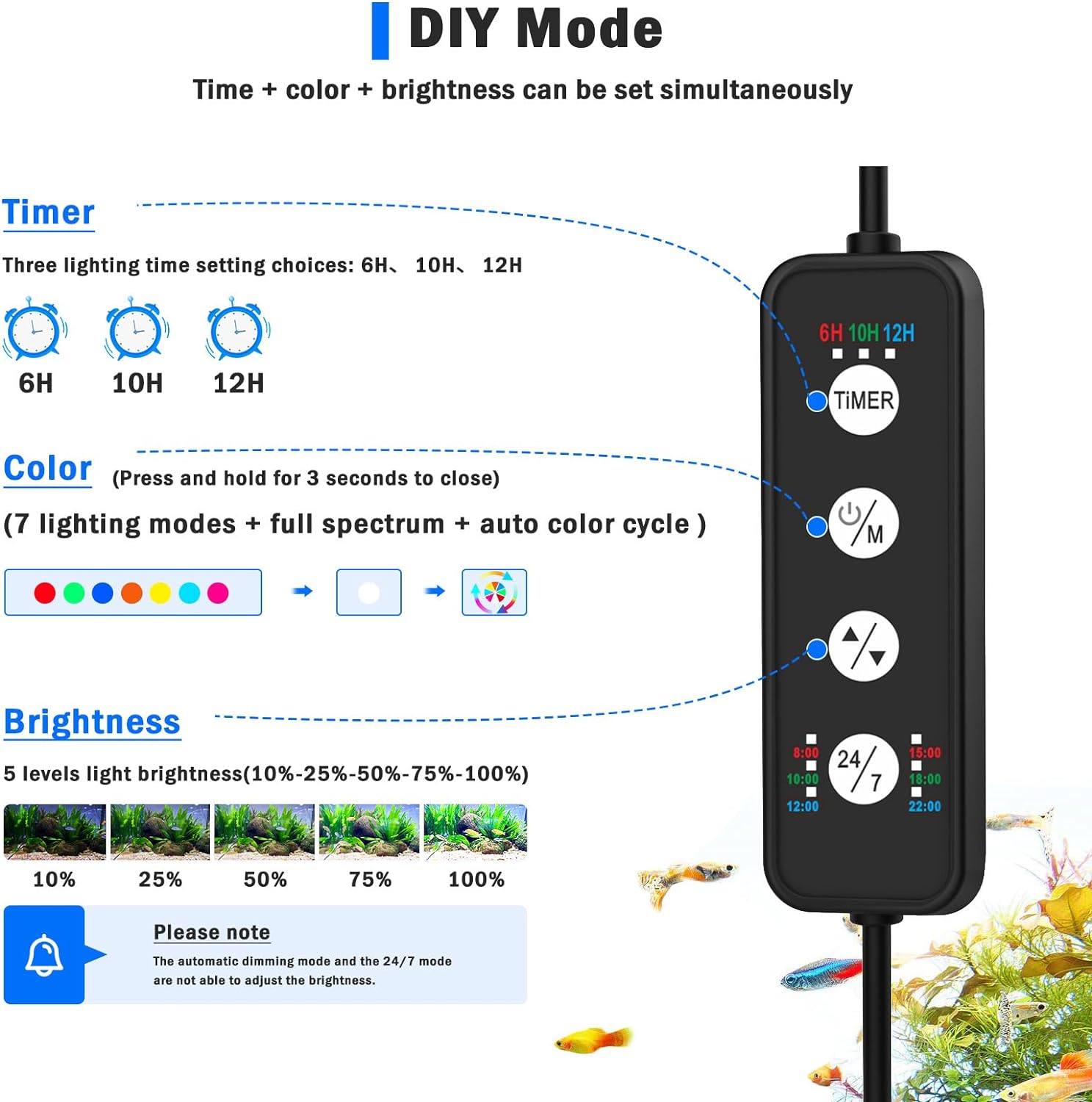
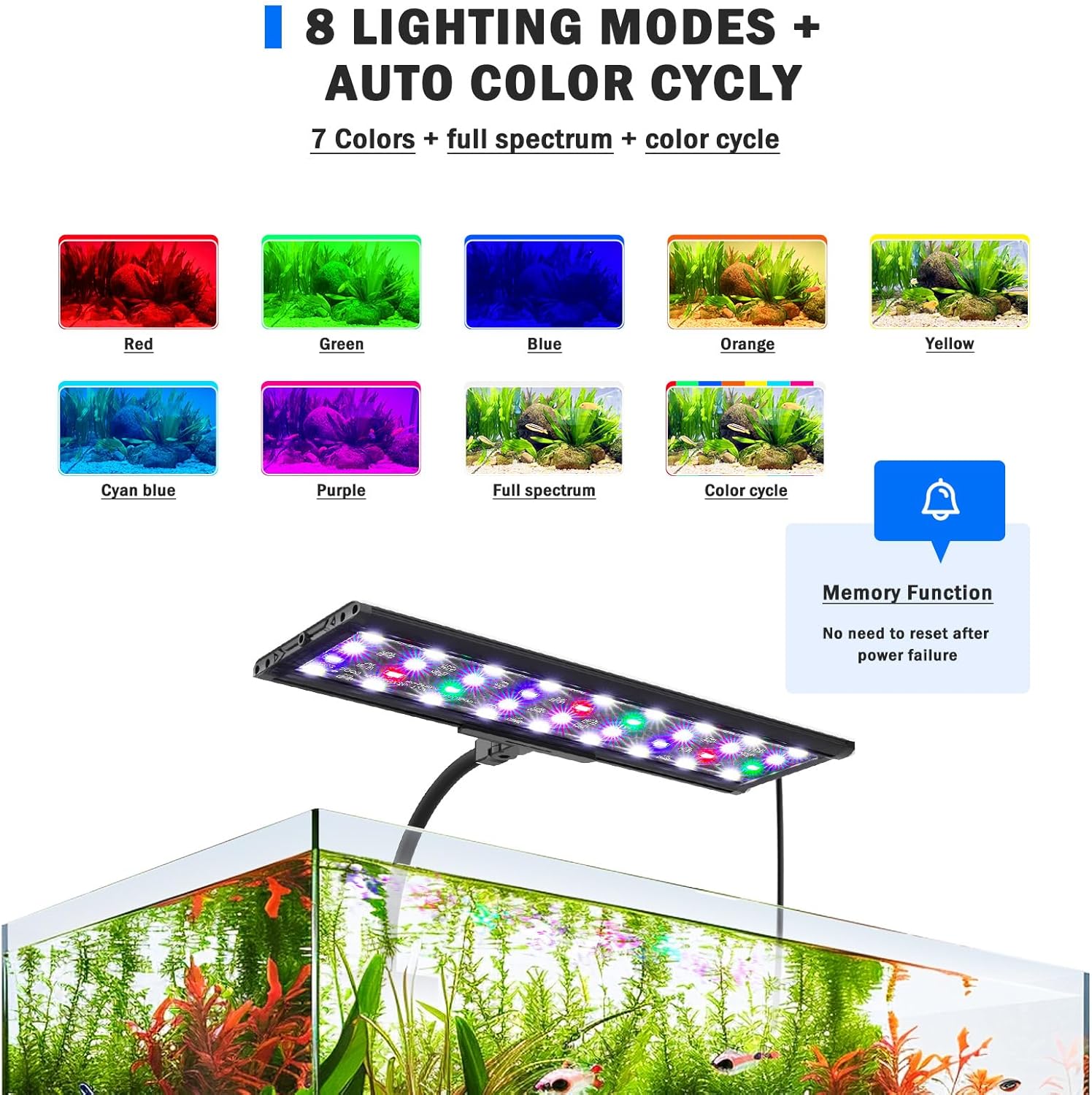
- DIY Mode: Allows customization of light color, brightness, and timer settings. Offers 5 levels of brightness, 3 timer choices (6H/10H/12H), and 7 light colors plus full spectrum and auto color cycle.
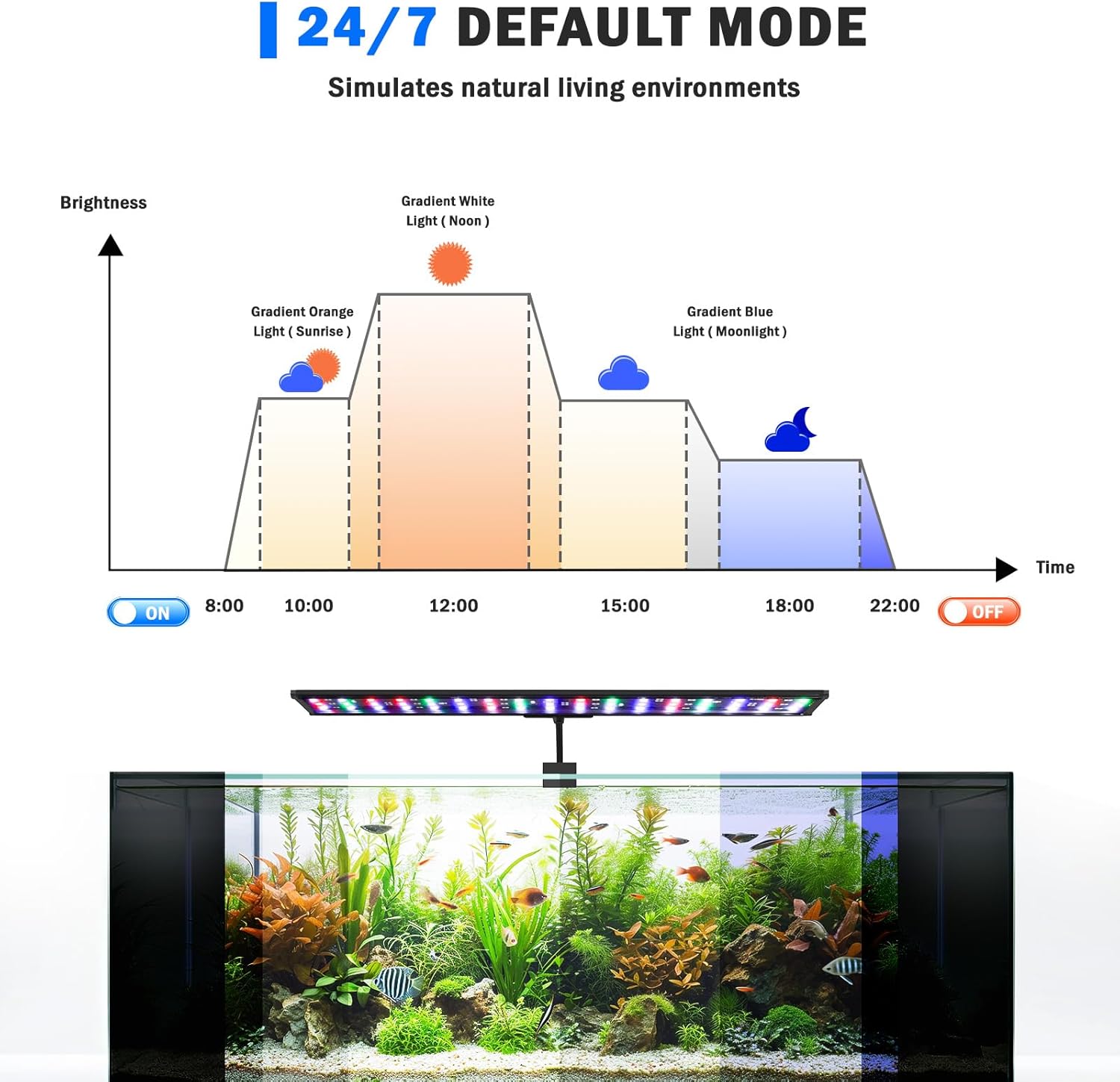
- 24/7 Default Mode: Simulates natural daylight cycles, transitioning from warm orange at sunrise to bright full-spectrum at noon, and starry blue at night. Automatically turns on at 6 a.m. and off at 10:58 p.m., with adjustable overall timing.
- Flexible Design: Equipped with a 7-inch 360° flexible gooseneck tube and an aluminum alloy clip, suitable for framed or frameless aquariums up to 0.9 inches thick.
- Memory Function: Retains previous settings (color, brightness, timing) after a power outage, eliminating the need for re-setup.
Setup and Installation
Follow these steps to correctly install your AQQA LED Aquarium Light:
- Assemble the Clip: Attach the adjustable clip to the gooseneck tube. Ensure all screws are tightened securely.
- Attach to Aquarium: Position the light on the edge of your aquarium. The aluminum alloy clip is designed for tanks up to 0.9 inches (2.3 cm) thick. Gently tighten the screw on the clip until the light is firmly secured. Avoid over-tightening, especially on rimless glass tanks.
- Adjust Position: Use the 360° flexible gooseneck tube to adjust the angle and direction of the light over your aquarium.
- Connect Power: Plug the power adapter into a suitable electrical outlet.

Operating Instructions
The AQQA LED Aquarium Light offers various modes and settings for optimal aquarium environment control.
Control Panel Overview
The inline controller allows you to manage all light functions:
- TIMER Button: Sets the lighting duration (6H/10H/12H).
- ON/OFF & Mode (M) Button: Turns the light on/off and cycles through color modes in DIY mode.
- Brightness (+/-) Buttons: Adjusts light intensity.
- 24/7 Button: Activates or deactivates the 24/7 natural mode.
1. 24/7 Default Mode
This mode simulates a natural 24-hour light cycle, promoting a healthy environment for your aquatic life. The default cycle starts with warm orange light at 6 a.m., transitions to 100% bright full-spectrum light at noon, and then to starry blue light at night, turning off at 10:58 p.m.
- Activation: Press the '24/7' button on the controller. The indicator light for 24/7 mode will illuminate.
- Time Adjustment: The automatic on/off time can be postponed or advanced to shift the entire default time period. Refer to the specific instructions in the video for detailed time setting.
2. DIY Mode
Customize your aquarium lighting with specific colors, brightness, and timer settings.
- Brightness Adjustment: Press the '+' or '-' buttons to cycle through 5 levels of light brightness (10%, 25%, 50%, 75%, 100%).
- Color Selection: Press the 'M' button to cycle through 7 distinct colors (Red, Green, Blue, Orange, Yellow, Cyan Blue, Purple), Full Spectrum, and an Auto Color Cycle mode.
- Timer Setting: Press the 'TIMER' button to select a lighting duration of 6 hours, 10 hours, or 12 hours. The light will automatically turn off after the selected duration.
Maintenance
Regular maintenance ensures the longevity and optimal performance of your aquarium light.
- Cleaning: Periodically wipe the light fixture with a soft, damp cloth to remove dust, water spots, and algae buildup. Ensure the light is unplugged before cleaning.
- Check Connections: Regularly inspect the power cord and connections for any signs of damage or wear.
- Water Exposure: While the light is IP68 waterproof, avoid submerging the power adapter or controller. Ensure the light is securely mounted to prevent accidental submersion.
Troubleshooting
| Problem | Possible Cause | Solution |
|---|---|---|
| Light does not turn on. | No power, loose connection, timer setting. | Check power outlet and connections. Verify timer settings are correct. |
| Light flickers or dims unexpectedly. | Unstable power, damaged cable, overheating. | Ensure stable power supply. Inspect cable for damage. Ensure proper heat dissipation (clean fixture). |
| Settings are lost after power outage. | This model features a memory function. If settings are lost, ensure the power outage was not prolonged or severe enough to reset internal components. Re-enter desired settings. |
Specifications
| Feature | Detail |
|---|---|
| Brand | AQQA |
| Model Number | AQ061-26W |
| Power (as per variant) | 28W |
| Product Dimensions | 55.88 x 9.91 x 9.4 cm |
| Item Weight | 726 g |
| Material | Aluminum |
| Finish Type | Gloss |
| Lamp Type | LED (Premium 5050 and 2835) |
| Waterproof Rating | IP68 |
| Max Tank Thickness | 0.9 inches (2.3 cm) |
Warranty and Support
For warranty information or technical support, please refer to the product packaging or contact AQQA customer service directly. Keep your purchase receipt for any warranty claims.


