
ANNFUZ 6206C
ANNFUZ Mechanical Keyless Keypad Entry Door Knob Lock (Model 6206C) - Instruction Manual
Single-Sided Passcode Combination Door Handle Lever Set
Introduction
This manual provides detailed instructions for the installation, operation, maintenance, and troubleshooting of your ANNFUZ Mechanical Keyless Keypad Entry Door Knob Lock. This single-sided passcode combination door handle lever set is designed for interior and exterior use, offering manual locking without electronic components. Please read these instructions carefully before installation and use to ensure proper function and longevity of your lock.
Product Overview
The ANNFUZ Mechanical Keyless Keypad Entry Door Knob Lock is a robust, non-electronic locking solution. It features a single-sided keypad for exterior access and a manual unlock mechanism from the interior. This lock is suitable for various applications including homes, professional buildings, garages, warehouses, and gates.
Key Features:
- Manually Locked: Requires manual locking and unlocking.
- Single-Side Keypad: Allows interior unlocking without a code.
- Adjustable Handle: Works with both left and right-handed doors.
- Mechanical Operation: No batteries, power, or wiring required.
- Durable Construction: Made of solid zinc alloy with long-lasting plating.
- Passage Mode: Allows temporary code-free access.
Package Contents:
Verify that all components are present before beginning installation.

- Exterior Panel with Lever
- Interior Panel with Lever
- Spindle
- 60mm Latch
- Strike Plate
- Strike Box
- Rubber Seal
- Instruction Manual (this document)
- Screw pack
Specifications
| Brand | ANNFUZ |
| Model Number | 6206C |
| Material | Zinc Alloy |
| Lock Type | Combination Lock, Keypad |
| Backset Compatibility | 60 mm (2.36") only. Not compatible with 70 mm (2.75") backset. |
| Door Thickness | 30mm-55mm (1.2in-2.2in) |
| Special Features | Lockable, Resettable, Rustproof, Waterproof, Sun Resistant, Dustproof |
| Dimensions (L x W x H) | 3.3 x 5.5 x 5.5 inches |
| Item Weight | 2.6 Pounds |
Note: This lock is not applicable to glass doors.
Setup and Installation
Before installation, ensure your door's backset is 60mm (2.36") and its thickness is between 30mm-55mm (1.2in-2.2in). This lock is not compatible with 70mm (2.75") backsets or glass doors.
1. Check Door Dimensions and Compatibility

Confirm your door's dimensions match the specifications shown in Figure 2. The lock is designed for a 60mm backset. Two types of strikers are provided for your door.
2. Changing Handle Orientation (Left or Right Handed Doors)
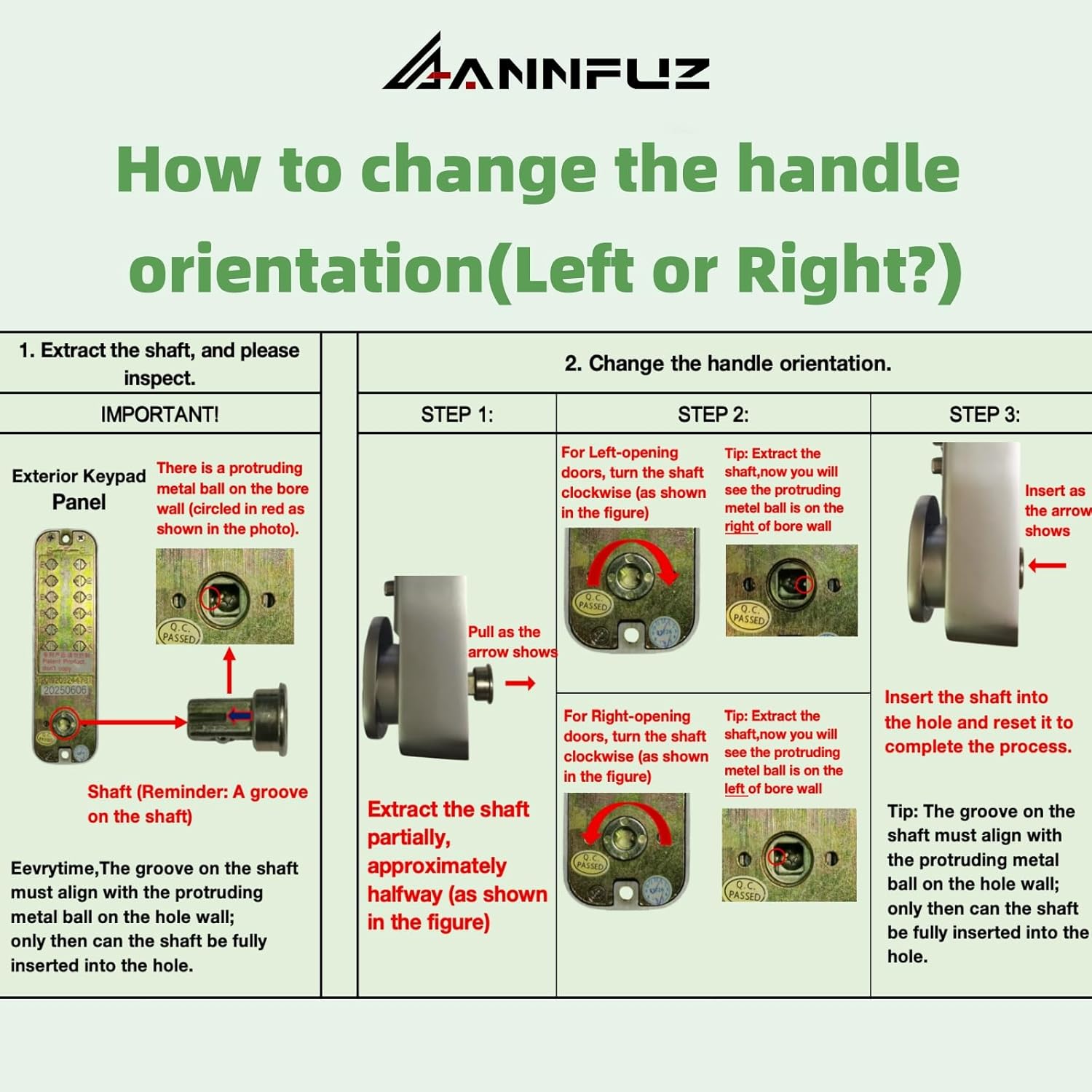
The lock handle can be adjusted for both left and right-opening doors. Follow these steps to change the handle orientation:
- Extract the Shaft: Carefully pull the shaft partially out of the exterior keypad panel. Observe the protruding metal ball on the bore wall.
- Change Orientation:
- For Left-opening doors, turn the shaft clockwise.
- For Right-opening doors, turn the shaft counter-clockwise.
- Re-insert Shaft: Insert the shaft fully into the hole. The groove on the shaft must align with the protruding metal ball for full insertion.
Video Tutorial: How to change the direction of the lock.
Video 1: This video demonstrates the process of changing the handle direction on the ANNFUZ mechanical keyless lock, showing how to disassemble, flip the latch, and reassemble the internal panel.
3. Changing the Latch Direction (Internal Panel)
To ensure the latch operates correctly with your door's swing, you may need to reverse its direction. This involves disassembling the internal panel, flipping the latch, and reassembling.
- Remove Iron Plate: Use a screwdriver to remove the screws securing the iron plate on the internal panel.
- Flip the Latch: Carefully remove the iron plate. Locate the latch mechanism and flip it to the desired orientation. Do not touch the spring mechanism.
- Reassemble: Reattach the iron plate and secure it with the screws. Ensure the latch moves freely.

Operating Instructions
1. Setting the Passcode
The passcode can be 4-7 digits long, composed of numbers or letters (excluding 'C'). Digits cannot be repeated within the code. Always press button "C" before entering the code.

- Remove the back panel of the keypad.
- Locate the numbered tumblers.
- To include a digit in the passcode, turn its corresponding tumbler so the "fish eye" faces outwards (towards the 'G' in the diagram).
- To exclude a digit, turn its tumbler so the "fish eye" faces inwards (towards the 'I' in the diagram).
- Ensure the 'C' button tumbler is always set to "inwards" as it is a clear button, not part of the code.
- Replace the back panel.
Codes with 4 digits provide maximum security.
2. Unlocking with Passcode
To unlock the door:
- Press the "C" button to clear any previous entries.
- Enter your passcode. The digits can be pressed in any order.
- Turn the handle to open the door.
3. Passage Mode
Passage mode allows the door to be opened without entering a code, functioning as a regular door handle. This is useful for periods of frequent entry and exit.

To activate Passage Mode:
- Press "C" and then enter your passcode.
- While holding the handle with your right hand, press "Y" with your left hand.
- Reset the handle. The lock is now in passage mode.
To deactivate Passage Mode:
- Press the handle with your right hand.
- Press "C" to cancel passage mode.
After deactivating, the lock will require the passcode for entry.
Video 2: This video demonstrates how to set and cancel the "Passage Mode" on the ANNFUZ mechanical keyless lock, allowing temporary code-free access.
Maintenance
- Cleaning: Wipe the lock surface with a soft, damp cloth. Avoid abrasive cleaners or solvents that could damage the finish.
- Lubrication: Periodically apply a small amount of graphite lubricant to the internal mechanisms to ensure smooth operation. Do not use oil-based lubricants as they can attract dust and debris.
- Inspection: Regularly check all screws and components for tightness. Tighten any loose screws to prevent malfunction.
- Environmental Protection: The lock is rustproof, waterproof, sun resistant, and dustproof, making it suitable for outdoor use. However, extreme conditions may require more frequent inspection and maintenance.
Troubleshooting
| Problem | Possible Cause | Solution |
|---|---|---|
| Lock does not open with correct code. |
|
|
| Handle is stiff or difficult to turn. |
|
|
| Latch does not extend or retract properly. |
|
|
Warranty and Support
For warranty information or technical support, please contact ANNFUZ customer service. Refer to your purchase documentation for specific warranty terms and contact details.
ANNFUZ LOCK & HARDWARE
For additional support, visit the ANNFUZ Store on Amazon.
Related documents6206C


Ask a question about this manual
Ask about setup, troubleshooting, compatibility, parts, safety, or missing instructions. Manuals+ will review the question and use this page’s manual context to help answer it.