
GULFLINK CS05
Gulflink CS05 Camera User Manual
Model: CS05
Brand: GULFLINK
1. Introduction
Thank you for choosing the Gulflink CS05 Camera. This compact and versatile device is designed for discreet audio and video recording, featuring 1080P resolution, motion detection, Wi-Fi hotspot connectivity, and enhanced night vision. This manual provides detailed instructions to help you set up, operate, and maintain your camera for optimal performance.
2. Package Contents
Please verify that all items are present in your package:
- Gulflink CS05 Camera
- USB Charging Cable
- User Manual
- Mounting Accessories (if included)
3. Product Overview

Figure 3.1: Front view of the Gulflink CS05 Camera. This image displays the camera's main body, the rotatable lens at the top, and the indicator lights on the front panel.

Figure 3.2: Side view of the Gulflink CS05 Camera. This image shows the integrated back clip for easy attachment and the various control buttons located on the side of the device.
The Gulflink CS05 features a compact design with independent keys for easy operation. Its 180-degree rotating lens allows for flexible recording angles, and the small back clip design makes it convenient for portable use.
4. Setup
4.1. Charging the Battery
Before first use, fully charge the camera. Connect the camera to a USB power source (e.g., computer USB port or wall adapter) using the provided USB cable. The indicator light will show charging status and turn off when fully charged. The built-in 500mAh lithium battery provides approximately 2 hours of continuous recording.
4.2. Inserting the TF Card

Figure 4.1: Inserting a Micro SD (TF) card into the Gulflink CS05 Camera. The camera supports up to 128GB TF cards.
The camera requires a Micro SD (TF) card for storing recordings (not included). Locate the TF card slot on the side of the camera. Gently insert the TF card with the gold contacts facing down until it clicks into place. The camera supports up to 128GB TF cards.
4.3. Power On/Off
- Power On: Press and hold the Power button for a few seconds until the indicator light illuminates.
- Power Off: Press and hold the Power button for a few seconds until the indicator light turns off. The system will automatically save the current file before shutting down if low power is detected.
4.4. Wi-Fi Hotspot Connection

Figure 4.2: Remote viewing of Gulflink CS05 Camera footage on a mobile phone. The camera's Wi-Fi hotspot allows for direct connection and multi-user viewing.
The CS05 camera features a built-in Wi-Fi hotspot, allowing you to connect directly with your mobile phone for remote viewing and control. Refer to the specific app instructions (usually provided via QR code in the package) for detailed steps on connecting your mobile device and enabling multi-user viewing.
5. Operating Instructions
5.1. Video Recording (1080P)
To start 1080P video recording, press the dedicated video recording button. The indicator light will change to confirm recording has begun. Press the button again to stop recording. The camera supports loop video recording, automatically overwriting the oldest files when the memory card is full.
5.2. Audio Recording
The camera is equipped with an advanced noise reduction microphone to capture clear audio. Audio is recorded simultaneously with video. For audio-only recording, refer to the specific mode selection in the camera's companion app or manual.
5.3. Motion Detection
When motion detection is enabled, the camera will automatically begin recording when it detects movement within its field of view. This feature helps conserve battery life and storage space by only recording when activity is present. Activate motion detection via the camera's settings, typically through the mobile application.
5.4. HD Infrared Night Vision
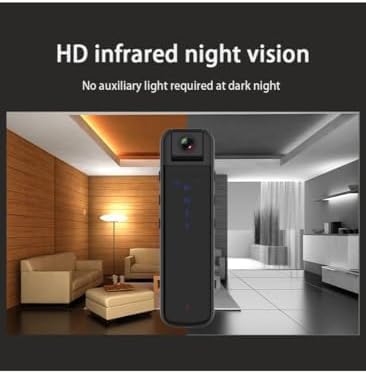
Figure 5.1: Depiction of the Gulflink CS05 Camera's HD infrared night vision in a low-light environment. No auxiliary light is required for operation in the dark.
The CS05 camera features HD infrared night vision, allowing it to record clearly in low-light or completely dark conditions without the need for auxiliary lighting. This feature is typically enabled automatically or can be toggled through the camera's settings.
5.5. 180-Degree Rotating Lens
The camera's lens can be manually rotated up to 180 degrees. This allows you to adjust the recording angle to capture the desired view, whether it's forward, backward, or to the sides, providing panoramic flexibility.
5.6. Low Power Auto-Save
To prevent data loss, the camera is designed to automatically save the current recording file and shut down when the battery level becomes critically low.
6. Maintenance
- Cleaning: Use a soft, dry cloth to clean the camera body. For the lens, use a specialized lens cleaning cloth and solution. Avoid abrasive materials or harsh chemicals.
- Storage: Store the camera in a cool, dry place away from direct sunlight, extreme temperatures, and high humidity.
- Battery Care: For long-term storage, charge the battery to about 50% every few months to maintain battery health.
7. Troubleshooting
- Camera not turning on: Ensure the battery is charged. Connect to a power source and try again.
- Cannot record: Check if a TF card is inserted and if it has sufficient free space. Format the TF card if necessary (this will erase all data).
- Wi-Fi connection issues: Ensure the camera's Wi-Fi hotspot is active. Try restarting both the camera and your mobile device. Ensure you are within range of the camera's hotspot.
- Poor video quality: Ensure the lens is clean. Check lighting conditions. For night vision, ensure it is enabled or automatically activating.
- Short battery life: Ensure the camera is fully charged. Continuous recording, Wi-Fi usage, and motion detection can consume more power.
8. Specifications
| Feature | Detail |
|---|---|
| Model Number | CS05 |
| Video Capture Resolution | 1080p |
| Video Capture Format | AVI |
| Supported Audio Format | AAC, MP3 |
| Flash Memory Type | Micro SD (up to 128GB) |
| Connectivity Technology | Wi-Fi |
| Photo Sensor Technology | CMOS |
| Battery | 1 Lithium Polymer (500mAh, included) |
| Product Dimensions | 2.8 x 1.6 x 7.6 cm |
| Item Weight | 250 g |
| Special Features | Night Vision, Lightweight, Motion Detection, 180° Rotating Lens |
9. Warranty and Support
For warranty information and technical support, please refer to the documentation provided with your purchase or contact the seller/manufacturer directly. Keep your proof of purchase for warranty claims.
Ask a question about this manual
Ask about setup, troubleshooting, compatibility, parts, safety, or missing instructions. Manuals+ will review the question and use this page’s manual context to help answer it.