
1. Introduction
This manual provides instructions for the safe and effective use of your VGR 972 Professional Hair Trimmers. Please read all instructions carefully before use and retain this manual for future reference.
2. Safety Information
Warning:
- Use caution near face and eyes.
- Keep out of reach of children.
- Clean properly after use.
- Avoid ingestion or inhalation of small parts.
- This device complies with part 15 of the FCC Rules. Operation is subject to the following two conditions: (1) This device may not cause harmful interference, and (2) this device must accept any interference received, including interference that may cause undesired operation.
3. Package Contents
Verify that all items are present in your package:
- VGR 972 Hair Clipper
- 4 Guide Combs (1.5mm, 3mm, 4.5mm, 6mm)
- Cleaning Brush
- Lubricating Oil
- USB Charge Cable
- Protection Cap
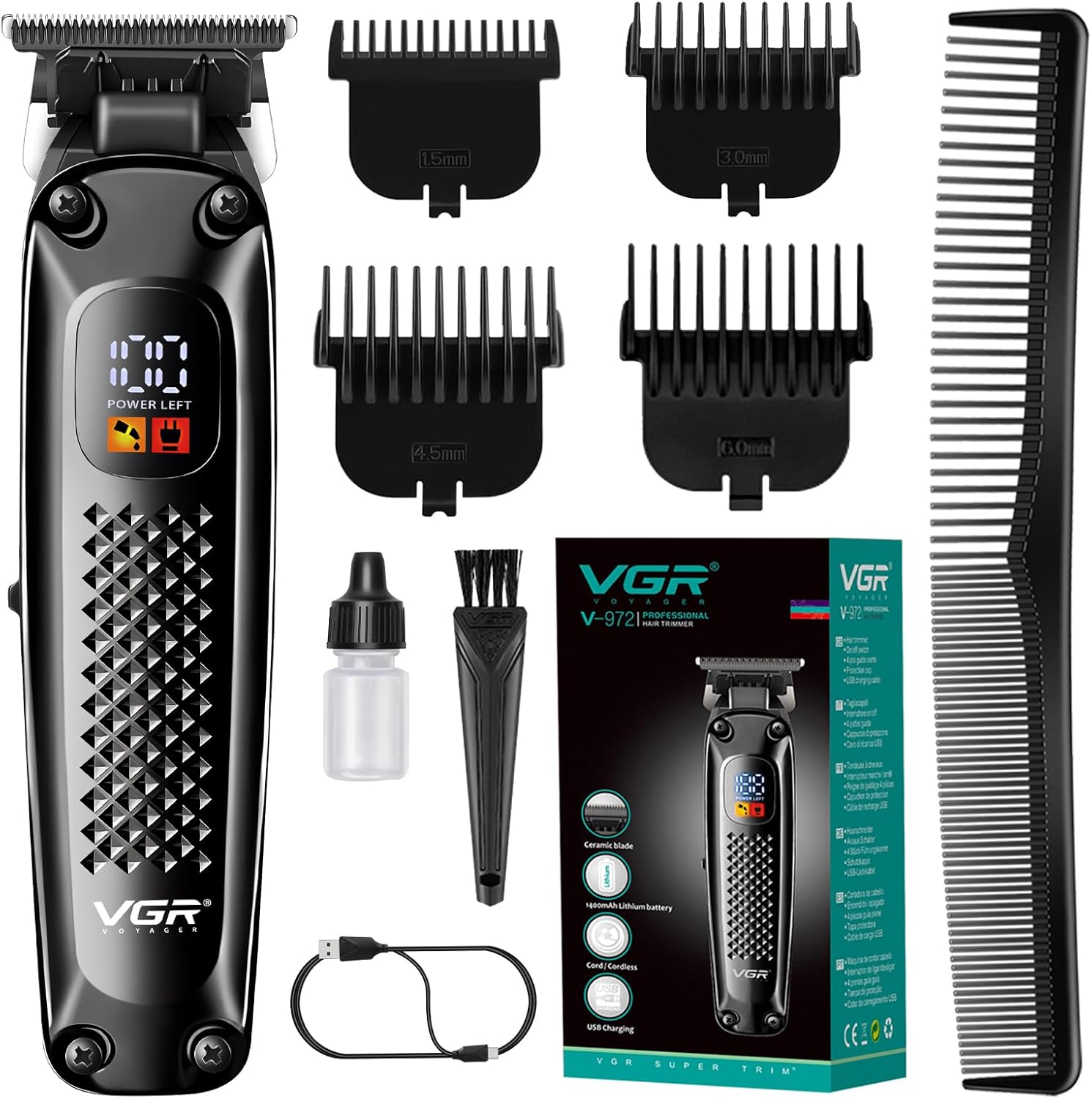
Image: The VGR 972 Hair Trimmer shown with its complete set of accessories, including four guide combs, a cleaning brush, lubricating oil, and a USB charging cable.
4. Setup
4.1 Initial Charging
Before first use, fully charge the trimmer. The LED display will indicate the battery percentage.
- Connect the USB charging cable to the trimmer's charging port.
- Connect the other end of the USB cable to a compatible USB power source (e.g., laptop, power bank, car charger, or wall adapter).
- A full charge takes approximately 2 hours and provides up to 180 minutes of operating time. The LED display will show charging status and battery level.

Image: The VGR 972 Trimmer connected via its USB charging cable to a power source, illustrating the charging process.

Image: A close-up of the VGR 972 Trimmer's LED display showing battery percentage and charging indicators, along with text highlighting 2 hours charge time and 180 minutes work time.
4.2 Attaching Guide Combs
The trimmer comes with 4 guide combs for various cutting lengths (1.5mm, 3mm, 4.5mm, 6mm).
- Select the desired guide comb.
- Align the comb with the trimmer blade and push it firmly until it clicks into place.
- To remove, gently pull the comb away from the blade.
Video: This video demonstrates the physical appearance of the VGR 972 trimmer, how to attach and remove the guide combs, and basic functions like powering on and off. It also shows the LED display and the blade in action.
5. Operating Instructions
5.1 Powering On/Off
Press the power button located on the front of the trimmer to turn it on or off. The LED display will illuminate when the device is active.

Image: The VGR 972 Trimmer held in hand, showcasing its ergonomic design and the illuminated LED display indicating power status.
5.2 Trimming
For best results, ensure hair is clean and dry. Use the appropriate guide comb for your desired length. Always trim against the direction of hair growth for an even cut.
- Start with a longer guide comb if you are unsure of the desired length.
- Move the trimmer slowly and steadily through the hair.
- For detailing and edging, remove the guide comb and use the bare blade carefully.
6. Maintenance
6.1 Cleaning the Blades
Regular cleaning ensures optimal performance and extends the life of your trimmer.
- Turn off the trimmer and remove any attached guide comb.
- Use the provided cleaning brush to remove loose hairs from the blades.
- For a more thorough clean, the blade assembly can be carefully detached (refer to video for demonstration).
6.2 Oiling the Blades
Apply a few drops of the included lubricating oil to the blades after every few uses or when the trimmer feels sluggish.
- Apply 1-2 drops of oil evenly across the top of the blades.
- Turn on the trimmer for a few seconds to allow the oil to distribute.
- Wipe off any excess oil with a soft cloth.
Video: This video demonstrates how to clean and oil the blades of the VGR 972 trimmer for optimal performance and longevity.
7. Troubleshooting
| Problem | Possible Cause | Solution |
|---|---|---|
| Trimmer does not turn on. | Low battery or not charged. | Charge the trimmer fully. |
| Trimmer pulls hair. | Blades are dull, dirty, or not oiled. | Clean and oil the blades. If problem persists, consider blade replacement. |
| Trimmer is noisy. | Blades require lubrication. | Apply lubricating oil to the blades. |
| LED display not working. | Device malfunction or extremely low battery. | Charge the device. If still not working, contact customer support. |
| Uneven cut. | Incorrect comb attachment or improper technique. | Ensure comb is securely attached. Trim against hair growth. |
8. Specifications
| Feature | Detail |
|---|---|
| Model Number | V-972 |
| Product Dimensions | 1.77 x 1.57 x 6.1 inches |
| Weight | 6.08 ounces |
| Battery Type | 1400mAh Lithium-Ion (included) |
| Charging Time | 2 Hours |
| Operating Time | Up to 180 minutes |
| Blade Material | Ceramic |
| Input Voltage | 5V 1A |
| Manufacturer | VGR |
9. Warranty & Support
VGR offers a 1-year warranty on this product. For any issues or support, please contact VGR-VOVAGER, the seller, directly through your purchase platform.
While the product is designed for global use, please note that warranty service may vary by region. As per customer feedback, direct warranty support from the manufacturer might be limited to specific regions like India. For customers outside these regions, please rely on the seller's support channels.

Image: Icons indicating 1 Year Warranty and 24 Hour Support, representing VGR's commitment to customer service.


