
1. Introduction
Thank you for choosing the Charmast C05S 5000mAh Portable Power Bank. This device is designed to provide convenient and fast charging for your mobile devices on the go. Its compact size, built-in cable, and digital display make it an essential accessory for daily use and travel.
2. Package Contents
- Charmast C05S 5000mAh Portable Power Bank with built-in Lightning cable (x1)
- USB-C to USB-C charging cable (x1)
- User Manual (x1)

3. Product Overview
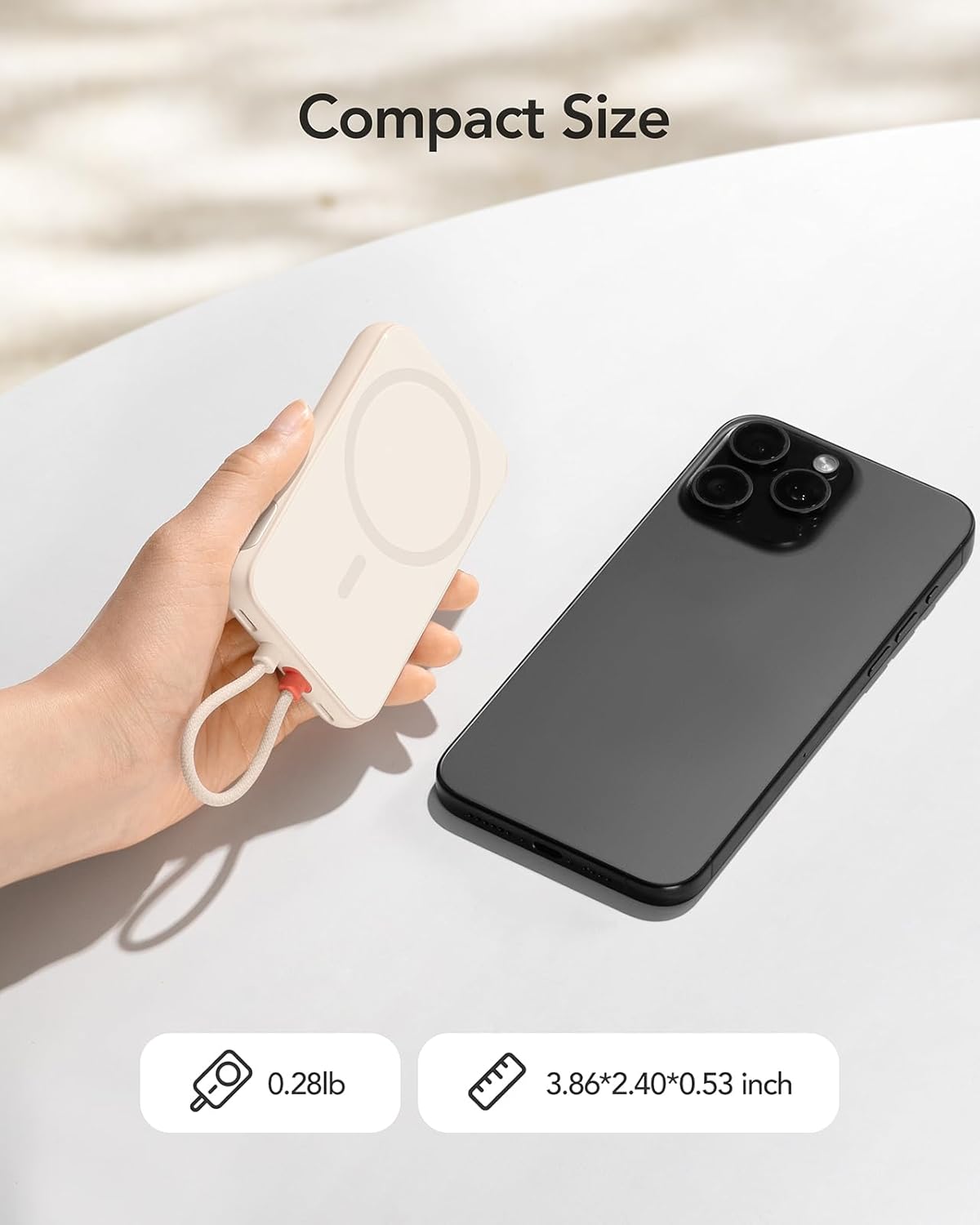
The Charmast C05S is a slim and lightweight power bank designed for portability and efficiency.
- Dimensions: 3.86 x 2.40 x 0.53 inches
- Weight: Approximately 0.28 pounds (5.9 ounces)
- Built-in Cable: Features an integrated Lightning cable for direct connection to compatible Apple devices.
- USB-C Port: A versatile USB-C port for both input (recharging the power bank) and output (charging other devices).
- Digital Display: An LED screen on the side indicates the remaining battery percentage.

4. Setup and Recharging the Power Bank
Before first use, fully charge your Charmast C05S Power Bank.
- Using the USB-C Port: Connect the provided USB-C to USB-C cable to the power bank's USB-C port and to a compatible USB wall adapter (not included). The power bank will fully recharge in approximately 2.0 hours.
- Using the Built-in Lightning Cable: Connect the built-in Lightning cable to a compatible Lightning input port on a wall adapter. The power bank will fully recharge in approximately 3.5 hours.
The digital display will show the charging progress, indicating 100% when fully charged.

5. Operating Instructions
To charge your devices:
- For iPhone (Lightning devices): Pull out the built-in Lightning cable and connect it directly to your iPhone or other compatible Lightning device.
- For USB-C devices: Use the provided USB-C to USB-C cable. Connect one end to the power bank's USB-C port and the other end to your USB-C compatible device.
The power bank will automatically begin charging your device. The digital display will show the remaining battery percentage of the power bank.


6. Digital Display
The integrated digital display provides real-time information about the power bank's battery level. It shows the remaining percentage, allowing you to easily monitor when it's time to recharge the power bank.
- To activate the display, press the on/off button located on the side of the power bank.
- The display will automatically turn off after a short period of inactivity to conserve power.
7. Universal Compatibility and Charging Speed
The Charmast C05S Power Bank offers broad compatibility and fast charging capabilities.
- Built-in Lightning Cable: Universally compatible with iPhone 14, 13, 12, 11, 8, 7 series, and other Lightning-enabled devices.
- USB-C Port: Compatible with iPhone 15 series, Samsung S24/S23/S22/S21/S20, Google Pixel series, other Android phones, and various low-current devices such as portable fans, neck fans, Bluetooth headphones, and heated vests.
- 20W PD Fast Charging: Supports Power Delivery (PD) 20W fast charging, significantly reducing charging times for both your devices and the power bank itself.


8. Maintenance and Care
To ensure the longevity and optimal performance of your power bank:
- Battery Level: Keep the power bank's battery level above 40% to improve overall battery life and maintain efficient charging speeds.
- Storage: Store the power bank in a cool, dry place away from direct sunlight and extreme temperatures.
- Cleaning: Use a soft, dry cloth to clean the exterior of the power bank. Avoid using harsh chemicals or abrasive materials.
- Avoid Drops: Protect the device from drops and impacts, which can damage internal components.
9. Troubleshooting
If you encounter issues with your Charmast C05S Power Bank, please refer to the following common solutions:
- Device not charging: Ensure the power bank is sufficiently charged. Check that the charging cable (built-in Lightning or USB-C) is securely connected to both the power bank and your device. Try a different cable or device to isolate the issue.
- Power bank not recharging: Verify that the charging cable and wall adapter are functioning correctly. Ensure the cable is properly inserted into the power bank's input port.
- Digital display not showing: Press the on/off button on the side of the power bank to reactivate the display. If it remains off, the power bank might be fully depleted and requires recharging.
- Slow charging: Ensure you are using a 20W PD compatible wall adapter for optimal fast charging. Charging speed can also be affected by the device being charged and its current battery level.
10. Specifications
| Feature | Detail |
|---|---|
| Model Number | C05S |
| Battery Capacity | 5000 Milliamp Hours (mAh) |
| Product Dimensions | 3.86 x 2.4 x 0.53 inches |
| Item Weight | 5.9 ounces |
| Input (USB-C) | 20W PD (Max) |
| Input (Lightning) | 10W (Max) |
| Output (Built-in Lightning Cable) | 20W PD (Max) |
| Output (USB-C Port) | 20W PD (Max) |
| Special Features | Built-in Cable, Digital Display, Fast Charging, Pocket Size, Ultra Slim |
11. Warranty and Support
Charmast provides 24-month support for this product. If you encounter any problems or have questions, please contact us through Amazon. We are committed to resolving any issues within 24 hours.
12. Safety Information
Please read and follow these safety guidelines to prevent damage to the product or injury to yourself:
- Do not expose the power bank to water, moisture, or extreme temperatures.
- Do not disassemble, modify, or attempt to repair the device.
- Keep out of reach of children.
- Avoid dropping or subjecting the power bank to heavy impacts.
- Dispose of the power bank responsibly according to local regulations. Do not dispose of it in household waste.


