
1. Introduction
This manual provides detailed instructions for the installation and operation of the GeeekPi Armor Lite V5 Active Cooler, designed specifically for the Raspberry Pi 5 (4GB/8GB models). This active cooling solution combines an aluminum heatsink with a cooling fan to efficiently dissipate heat and maintain optimal performance for your Raspberry Pi 5.
Compatibility: This cooler is exclusively compatible with Raspberry Pi 5 4GB and 8GB models.
2. Package Contents
Verify that all items listed below are included in your package:
- 1 x Armor Lite V5 Active Cooler (Aluminum Heatsink with Integrated Fan)
- 1 x Screwdriver
- 2 x M2.5 Screws
- 4 x Thermal Pads (various sizes/thicknesses for different components)
- 1 x User Manual (this document)

Figure 2.1: Contents of the GeeekPi Armor Lite V5 Cooler package, showing the heatsink with fan, screwdriver, screws, and thermal pads.
3. Installation Guide
Follow these steps to install the Armor Lite V5 Active Cooler on your Raspberry Pi 5:
- Prepare Thermal Pads: Identify the correct thermal pads for each component on your Raspberry Pi 5. The included diagram (Figure 3.1) illustrates the placement and recommended thickness (1.5mm for all indicated areas). Carefully peel off the protective film from both sides of each thermal pad.
- Apply Thermal Pads: Gently place the thermal pads onto the designated chips on the Raspberry Pi 5 board. Ensure they are centered and make good contact with the chip surfaces.
- Position the Cooler: Align the GeeekPi Armor Lite V5 cooler over the Raspberry Pi 5 board, ensuring the heatsink fins and fan are correctly positioned above the thermal pads. The mounting holes on the cooler should align with the corresponding holes on the Raspberry Pi 5 board.
- Secure the Cooler: Use the provided M2.5 screws and screwdriver to gently secure the cooler to the Raspberry Pi 5 board. Do not overtighten the screws to avoid damaging the board.
- Connect the Fan: Locate the 4-pin JST fan connector on your Raspberry Pi 5 board. Carefully plug the cooler's fan cable into this connector. Ensure the connector is fully seated.

Figure 3.1: Diagram showing the placement of thermal pads on the Raspberry Pi 5's main components for optimal heat transfer to the heatsink.
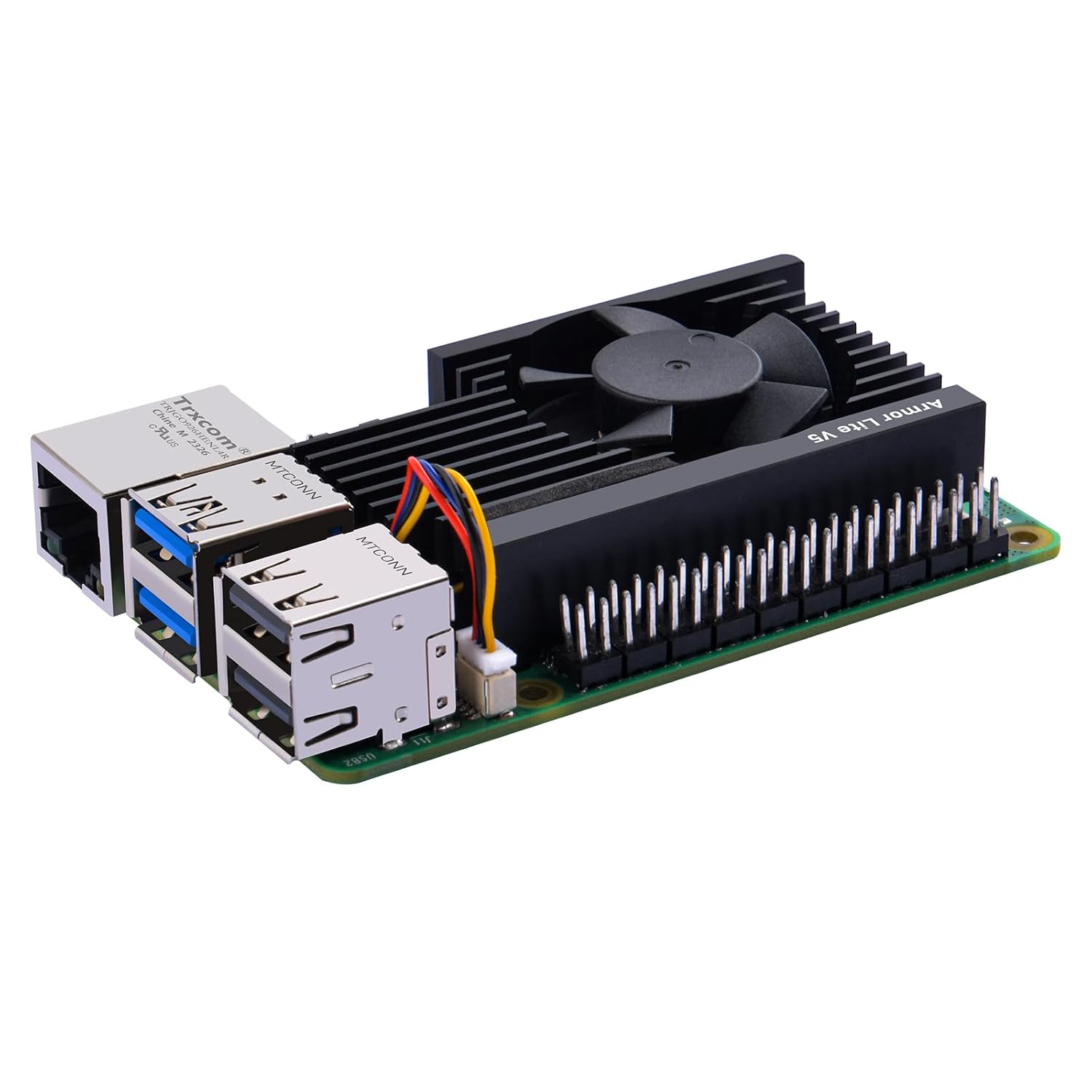
Figure 3.2: The Armor Lite V5 cooler mounted on a Raspberry Pi 5, showcasing its low-profile design and coverage of key components.

Figure 3.3: Detailed view of the 4-pin JST connector on the Raspberry Pi 5, where the cooler's fan cable is connected.
4. Operating Instructions
The GeeekPi Armor Lite V5 cooler features a fan that supports Pulse Width Modulation (PWM) speed control. When connected to the Raspberry Pi 5's dedicated fan header, the fan speed will automatically adjust based on the CPU temperature, as managed by the Raspberry Pi OS.
- Automatic Speed Control: The fan will spin up or down as needed to maintain optimal operating temperatures, reducing noise when the system is idle.
- Monitoring: You can monitor the CPU temperature and fan speed through the Raspberry Pi OS interface or command line tools.

Figure 4.1: A benchmark graph illustrating CPU temperature performance with and without the Armor Lite V5 heatsink, demonstrating effective cooling.
5. Care and Maintenance
To ensure the longevity and optimal performance of your GeeekPi Armor Lite V5 cooler:
- Cleaning: Periodically inspect the heatsink fins and fan blades for dust accumulation. Use a soft brush or compressed air to gently remove any dust. Ensure the Raspberry Pi is powered off before cleaning.
- Avoid Obstructions: Ensure that the fan's airflow is not obstructed by cables or other components within your Raspberry Pi enclosure.
6. Specifications
| Feature | Detail |
|---|---|
| Brand | GeeekPi |
| Model Number | 0166 |
| Compatible Devices | Raspberry Pi 5 |
| Cooling Method | Air, Conduction |
| Material | Aluminum |
| Power Connector Type | 4-Pin |
| Noise Level | 16.6 Decibels |
| Maximum Rotational Speed | 3510 RPM |
| Product Dimensions | 3.15"L x 0.71"W x 4.13"H |

Figure 6.1: Dimensional specifications of the GeeekPi Armor Lite V5 Active Cooler.
7. Troubleshooting
- Fan Not Spinning:
- Ensure the 4-pin JST connector is securely plugged into the Raspberry Pi 5's fan header.
- Verify that the Raspberry Pi 5 is powered on and operating.
- Check Raspberry Pi OS settings to ensure fan control is enabled and configured correctly (if manual configuration is desired). The fan typically activates when the CPU reaches a certain temperature threshold.
- High Temperatures:
- Confirm that the thermal pads are correctly placed on all designated components and are making firm contact with both the chips and the heatsink.
- Ensure there is adequate airflow around the Raspberry Pi and the cooler. Avoid placing the Pi in confined spaces without ventilation.
- Verify that the fan is spinning freely and not obstructed by dust or debris.
- Excessive Fan Noise:
- While designed to be quiet (16.6 dB), ensure no cables or foreign objects are touching the fan blades.
- Dust accumulation can sometimes cause noise; clean the fan as described in the Care and Maintenance section.
8. Warranty and Support
For warranty information or technical support, please refer to the official GeeekPi website or contact their customer service directly. Details are typically provided on the product packaging or their official online channels.
Website: www.geeekpi.com
Email: support@geeekpi.com