
1. Introduction
This manual provides detailed instructions for the GRYVOZE 3/4 Inch Digital Diesel Fuel Flow Meter, Model DTFM-IN3/4-RWP. This device is designed for accurate measurement of various liquids, featuring EMI protection, a waterproof IPX8 rating, and a clear digital LCD display. It supports a flow range of 4-50 LPM (1-13.2 GPM) and a working pressure of 6 Bar. Compatible liquids include water, diesel, gas oil, gasoline, kerosene, methanol, and E15.
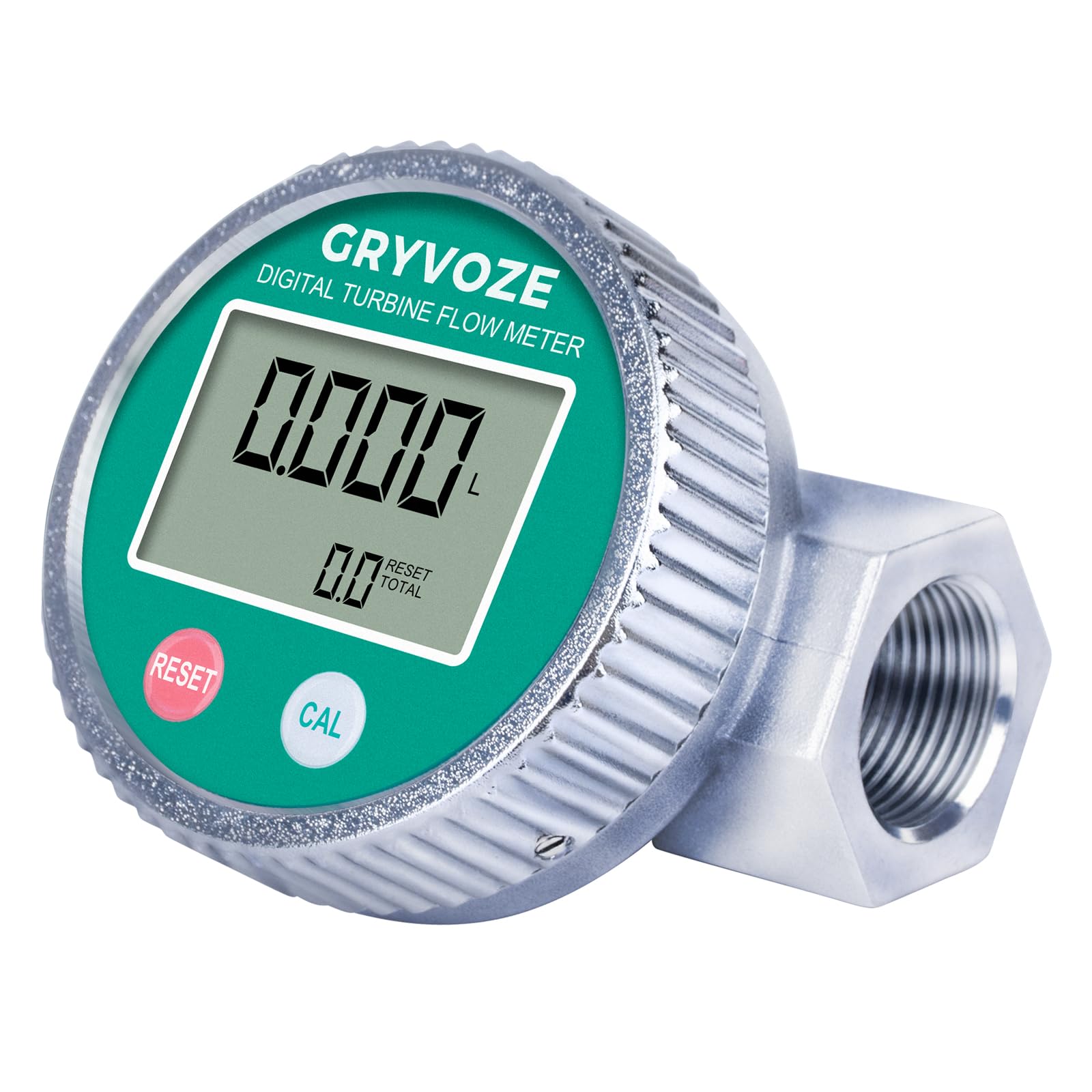
Figure 1: GRYVOZE 3/4 Inch Digital Diesel Fuel Flow Meter
2. Safety Instructions
- Read all instructions carefully before installation and operation to ensure safe and correct usage.
- Ensure proper installation direction as indicated by the flow arrow on the meter body. Incorrect installation can lead to inaccurate readings or device malfunction.
- The meter's main body has an IPX8 waterproof rating. However, the internal PCB circuit board is not waterproof. Do not expose internal components to water during maintenance or battery replacement. Ensure the display panel is securely sealed after any service.
- This product is not NSF approved for potable water. If used with drinking water systems, be aware of potential risks related to material leaching.
- The meter features EMI protection to prevent false readings from nearby pumps or motors. However, always ensure a stable electromagnetic environment for optimal accuracy.
- Do not use this turbine flow meter with high-viscosity liquids such as lubricating oil or engine oil. For such applications, a gear flow meter is recommended for accurate measurement.

Figure 2: Waterproof Design and PCB Protection Note
3. Product Overview
The GRYVOZE Digital Diesel Fuel Flow Meter features a robust die-cast aluminum housing, providing corrosion resistance and high strength. The clear digital LCD screen displays instantaneous flow, single cumulative flow, and total cumulative flow. It includes 'CALIBRATE' and 'DISPLAY' buttons for operation and settings adjustment.

Figure 3: Flow Meter Display Components

Figure 4: Internal PCB and Aluminum Housing
4. Setup and Installation
The flow meter must be installed in the direction indicated by the arrow on the meter body to ensure accurate readings. The meter features NPT threads for secure connection to your pipeline system. The display panel can be rotated 360 degrees for optimal viewing after installation. To adjust, press and hold the center screen, set your preferred viewing angle, then tighten the bezel to lock it in place.

Figure 5: Correct Flow Direction for Installation
Video 1: Demonstrates how to rotate the flow meter display panel 180 degrees for optimal viewing after installation, ensuring it works perfectly regardless of pipe orientation.
5. Operating Instructions
5.1 Power On/Off
The display automatically turns off after 10 minutes of inactivity to save power. It will turn on when liquid flows through the meter or by pressing any key.
5.2 LCD Display
The LCD shows real-time instantaneous flow rates, a resettable single cumulative total, and a non-resettable total cumulative flow. The selected unit is also displayed.

Figure 6: LCD Monitor Display
5.3 Unit Switching
To switch between measurement units (GAL - US Gallons, QTS - Quarts, PTS - Pints, L - Liters), follow these steps:
- Simultaneously press and hold both the 'CALIBRATE' (red) and 'DISPLAY' (white) buttons for 5 seconds to enter 'unit switching mode'. The current unit will flash on the display.
- Click the 'DISPLAY' (white) button to cycle through the available units (m³, Qts, Pts, L, Gal (US)).
- Long press the 'CALIBRATE' (red) button to save your selection and exit the unit switching mode.

Figure 7: Metering Unit Setting
5.4 Calibration
The flow meter is factory-calibrated to an accuracy of ±1%. For specific applications or to fine-tune accuracy, on-site calibration may be performed. Refer to the detailed product manual for comprehensive calibration procedures and formulas.
Video 2: Provides an overview of the GRYVOZE flowmeter's product functions and operating steps, including display modes and basic usage.
6. Maintenance
6.1 Battery Replacement
The meter uses 2 x AAA LR03 batteries. The display panel can be removed to replace batteries without disconnecting the meter from the pipeline. The memory is non-volatile, ensuring data retention during battery replacement. A low battery icon will appear on the display screen, indicating the need for battery replacement.
6.2 Cleaning
Wipe the exterior of the flow meter with a damp cloth. Do not use harsh chemicals or abrasive cleaners. Ensure no liquids enter the internal PCB area, especially during cleaning of the display panel.
Video 3: Illustrates the easy maintenance of the GRYVOZE flow meter, specifically showing how to remove the display panel for battery replacement without disconnecting the unit from the pipeline.
7. Troubleshooting
- Inaccurate Readings: Ensure the meter is installed in the correct flow direction. Verify the selected unit is appropriate for your measurement needs. If discrepancies persist, perform on-site calibration following the detailed manual's instructions.
- No Display/Power Issues: Check the battery level. Replace batteries if a low battery icon is displayed or if the screen is blank. Remember the display automatically turns off after 10 minutes of inactivity; activate it by pressing a button or initiating liquid flow.
- Interference: The meter is equipped with EMI protection. However, if unusual or false readings occur, check for strong electromagnetic sources (e.g., pumps, motors) in close proximity that might be causing interference.
- Water Damage: While the meter is IPX8 waterproof, the internal PCB is not. Ensure the display panel is securely sealed after battery replacement or maintenance to prevent water ingress to the circuit board, which can cause short circuits.

Figure 8: Anti-Electromagnetic Interference Feature

Figure 9: Common Questions and Answers
8. Specifications
| Feature | Specification |
|---|---|
| Manufacturer | GRYVOZE |
| Model Number | DTFM-IN3/4-RWP |
| Item Weight | 310 g |
| Product Dimensions | 9.4 x 7.64 x 5.95 cm |
| Style | IPX8 |
| Item Package Quantity | 1 |
| Measurement Accuracy | ±1% |
| Included Components | 3/4 Inch NPT Waterproof Digital Turbine Flow Meter |
| Batteries Included? | No (Requires 2 x AAA LR03 batteries) |
| Length | 9.4 Centimetres |
| Width | 7.64 Centimetres |
| Height | 5.95 Centimetres |
| Country of Origin | China |
9. Support
For technical support, inquiries, or assistance with your GRYVOZE Digital Diesel Fuel Flow Meter, please contact GRYVOZE customer service via email:
sunflower.smile20130401@hotmail.com
Please provide your product model number (DTFM-IN3/4-RWP) and a detailed description of your issue when contacting support to ensure a prompt and effective resolution.


