
Nature's Generator NGPHPTK2
Nature's Generator Transfer Switch User Manual
Model: NGPHPTK2
Brand: Nature's Generator
Introduction
This manual provides essential information for the safe and efficient installation, operation, and maintenance of your Nature's Generator 12-Circuit 120/240V 30A Non-Automatic Power Transfer Kit. This transfer switch is designed to safely connect a portable generator to your home's electrical system, allowing you to power essential circuits during an outage. Please read this manual thoroughly before installation or use.
Product Features
- 12 circuits transfer switch kit.
- Compatible with other branded generators featuring a NEMA L14-30R receptacle.
- Contains all necessary components to safely power up to 12 single-pole or two 2-pole & 8 single-pole circuits by a portable generator during a power outage.
- Designed for installation adjacent to an existing load center.
- Completely pre-wired for ease of installation.
- Accommodates generators with up to 7500W continuous output.
What's in the Box
Your Nature's Generator Transfer Switch kit includes the following components:
- 12-Circuit Transfer Switch Unit
- Power Cable (for generator connection)
- Flexible Conduit
- Cable Clamps
- Installation Hardware
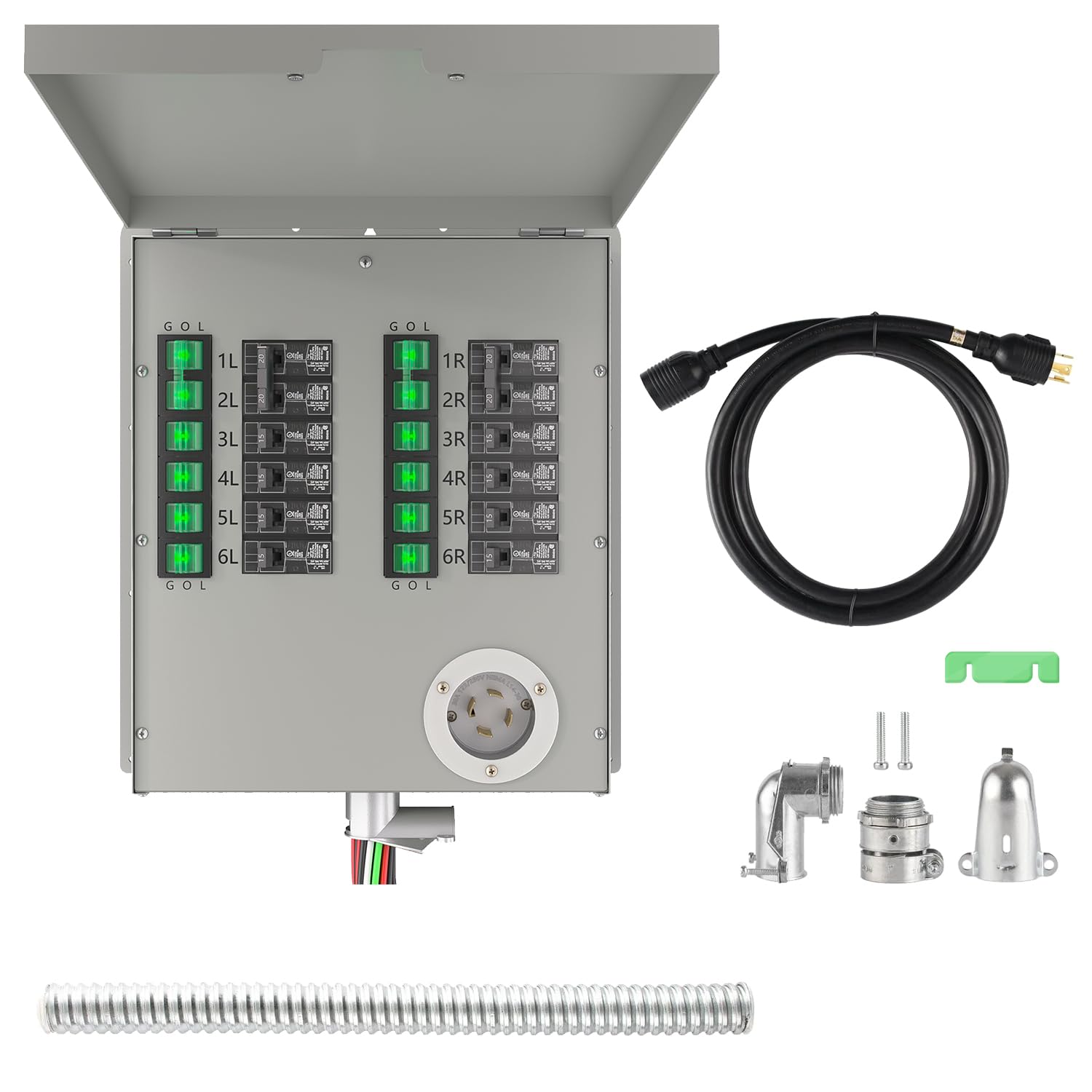
Image: Overview of the Nature's Generator 12-Circuit Transfer Switch and its included components, including the main unit, power cable, flexible conduit, and various connectors.
Setup and Installation
The Nature's Generator Transfer Switch is designed for straightforward installation, coming pre-wired with color-coded and clearly labeled wires. However, due to the electrical nature of this product, installation should only be performed by a qualified electrician to ensure safety and compliance with local electrical codes.
Key Installation Points:
- Mounting: The transfer switch unit should be mounted adjacent to your existing main electrical load center.
- Wiring: The pre-wired cables are color-coded for easy identification. Red wires connect to circuit breakers, black wires connect to electrical devices, white to the neutral bus bar, and green to the ground bus bar in your house panel.
- Power Inlet: Each transfer kit includes a specific power inlet designed for compatibility with Nature's Generator products (e.g., NEMA L5-30P for Elite Generator Series). Ensure your generator has the corresponding receptacle (e.g., NEMA L14-30R).

Image: Detailed diagram illustrating the internal layout of the transfer switch, showing the 240V breakers, rocker switches, and the L14-30 power inlet.

Image: Side view of the transfer switch, highlighting the conduit connection point for wiring integration.
Installation Video Guide:
For a visual guide on connecting the transfer switch to your generator and understanding its components, please refer to the official installation video below. Remember, professional installation is recommended.
Video: Official Nature's Generator Power Transfer Switch overview and connection guide. This video demonstrates the components and the process of connecting the transfer switch to a generator and household circuits.
Operating Instructions
The transfer switch allows you to safely switch selected circuits from utility power to generator power during an outage. Each circuit on the transfer switch has a rocker switch with three positions: G (Generator), O (Off), and L (Line/Grid Power).
Switching to Generator Power:
- Ensure your generator is running and stable.
- Connect the power cable from the transfer switch to your generator's power output.
- For each circuit you wish to power with the generator, move its corresponding rocker switch from the 'L' (Line) position to the 'O' (Off) position, and then to the 'G' (Generator) position. The switch will illuminate green when successfully switched to generator power.
Switching back to Utility Power:
- Once utility power is restored, for each circuit, move its rocker switch from the 'G' (Generator) position to the 'O' (Off) position.
- Then, move the switch from the 'O' (Off) position to the 'L' (Line) position. The green illumination will turn off, indicating it's back on grid power.
- Disconnect the power cable from your generator and store it safely.

Image: Close-up view of the rocker switches on the transfer switch, showing the green illumination when a circuit is active on generator power.
Maintenance
The Nature's Generator Transfer Switch is designed for durability and minimal maintenance. However, regular inspection by a qualified electrician is recommended to ensure continued safe operation.
- Annual Inspection: Have a qualified electrician inspect the unit and all connections annually.
- Cleaning: Keep the exterior of the unit clean and free from dust and debris. Do not use abrasive cleaners or solvents.
- Environmental Conditions: Ensure the unit is installed in a dry, protected location as per installation guidelines.
Troubleshooting
If you experience issues with your Nature's Generator Transfer Switch, consider the following common points. For any complex electrical issues, always contact a qualified electrician.
- No Power to Circuits:
- Ensure the generator is running and producing power.
- Verify the power cable is securely connected to both the generator and the transfer switch.
- Check that the rocker switches for the desired circuits are in the 'G' (Generator) position and illuminated green.
- Inspect the circuit breakers on both the transfer switch and your main electrical panel for tripped breakers.
- Rocker Switch Not Illuminating:
- This indicates no power is being supplied from the generator to that circuit. Recheck generator operation and cable connections.
Important Safety Note: Do not attempt to open the transfer switch unit or perform any internal repairs yourself. Always consult a qualified electrician for service.
Specifications
| Specification | Detail |
|---|---|
| Product Dimensions | 9 x 4 x 14 inches; 29.55 Pounds |
| Item Model Number | NGPHPTK2 |
| Manufacturer | HUNTKEY USA INC |
| Country of Origin | China |
| Operation Mode | ON-ON-OFF |
| Current Rating | 30 Amps |
| Operating Voltage | 120 Volts |
| Contact Type | Normally Open |
| Connector Type | Plug In |
| Terminal | Through Hole |
| Circuit Type | 12-way |
| Actuator Type | Push Button |

Image: Front and side view of the transfer switch with key dimensions labeled in inches and centimeters.
Warranty and Support
For warranty information and technical support, please refer to the documentation included with your product or visit the official Nature's Generator website. It is recommended to register your product to receive updates and support.
Contact Information: For specific support inquiries, please visit the Nature's Generator Store on Amazon or their official website.
Related documentsNGPHPTK2


Ask a question about this manual
Ask about setup, troubleshooting, compatibility, parts, safety, or missing instructions. Manuals+ will review the question and use this page’s manual context to help answer it.