
Important Safety Instructions
- Read all instructions carefully before using the product.
- Keep this manual for future reference.
- Do not expose the instrument to rain or moisture to prevent fire or electric shock.
- Do not block any ventilation openings. Install in accordance with the manufacturer's instructions.
- Use only attachments/accessories specified by the manufacturer.
- Unplug the apparatus during lightning storms or when unused for long periods.
- Refer all servicing to qualified service personnel.
Package Contents
Verify that all items listed below are included in your package. If any items are missing or damaged, please contact customer support.
- Starfavor SP-88S Digital Piano Keyboard
- Piano Stand (X-style)
- Sustain Pedal
- Carrying Bag
- Headphones
- Music Holder
- Book Clip
- Piano Key Stickers
- User Manual (this document)
- Cleaning Cloth
- Power Adapter
- USB Cable

Image: The Starfavor SP-88S digital piano keyboard displayed with all its included accessories, such as the stand, sustain pedal, headphones, music holder, carrying bag, and power adapter.
Setup Guide
1. Assembling the Stand
- Unfold the X-style piano stand to its desired height. Ensure the locking mechanism is securely engaged.
- Place the Starfavor SP-88S keyboard securely on top of the stand.
2. Connecting the Piano
- Power Connection: Connect the power adapter to the DC IN port on the back of the keyboard and then plug it into a wall outlet.
- Sustain Pedal: Insert the sustain pedal cable into the 'Sustain Pedal Jack' on the rear panel.
- Headphones: For private practice, plug the included headphones into the 'Headphone Jack'.
- Music Holder: Insert the music holder into the designated slots on the top panel of the keyboard.

Image: The Starfavor SP-88S digital piano keyboard set up on its stand, with the music holder in place and various accessories laid out, illustrating a complete setup.
Operating Instructions
1. Powering On/Off
Press the ON/OFF button located on the control panel to power the keyboard on or off.
2. Adjusting Volume
Rotate the Volume Knob to increase or decrease the overall sound level.
3. Selecting Tones and Rhythms
- Press the TONE button, then use the number keys or +/- buttons to select from 198 available timbres.
- Press the RHYTHM button, then use the number keys or +/- buttons to select from 198 available rhythms.
4. Using Metronome
Press the METRONOME button to activate the metronome. Press again to cycle through different time signatures or turn off.
5. Recording and Playback
The keyboard features a recording function. Consult the detailed instructions in the included user manual for specific steps on how to record and play back your performances.
6. Bluetooth Connectivity
Activate Bluetooth on your external device (phone, tablet). On the keyboard, ensure Bluetooth is enabled (refer to the main manual for specific button presses). Select 'Starfavor SP-88S' from your device's Bluetooth list to pair. This allows you to play along with music from your device.
7. USB MIDI Functionality
Connect the keyboard to a computer or other MIDI-compatible device using the USB cable. The keyboard will function as a MIDI controller, allowing you to use music software for recording, composing, and learning.

Image: A close-up view of the Starfavor SP-88S digital piano's control panel, showing the various buttons and display for functions like tone, rhythm, metronome, and power.
Features Overview
- 88 Semi-Weighted Keys: Provides a realistic playing feel similar to an acoustic piano.
- 128-Note Polyphony: Allows for complex musical passages without notes cutting off.
- 198 Timbres & 198 Rhythms: A wide selection of sounds and accompaniment styles.
- 80 Demo Songs: Pre-loaded songs for listening and learning.
- Recording Function: Capture and review your performances.
- Metronome & Transpose: Essential tools for practice and performance.
- Bluetooth & USB MIDI: Versatile connectivity for modern music production and learning.
- Portable Design: Lightweight (11 lbs) and slim (2.36 inches thick) for easy transport.
- Rechargeable Battery: Built-in lithium battery provides over 10 hours of playtime on a single charge.

Image: A person's hands playing the full-size 88 semi-weighted keys of the Starfavor SP-88S digital piano, demonstrating its realistic touch.
Connectivity Options
The Starfavor SP-88S offers a range of ports for various connections:
| Port | Function |
|---|---|
| Headphone Jack (3.5mm) | For connecting headphones for private practice. |
| Aux Out Jack | For connecting to external amplifiers or speakers. |
| Power Jack (DC IN) | For connecting the power adapter. |
| Microphone Jack | For connecting a microphone. |
| MP3 Jack | For connecting an external audio player. |
| Sustain Pedal Jack (Single) | For connecting a single sustain pedal. |
| Triple Pedal Jack | For connecting a triple pedal unit (if applicable). |
| MIDI Jack (USB MIDI) | For connecting to a computer or other MIDI devices. |
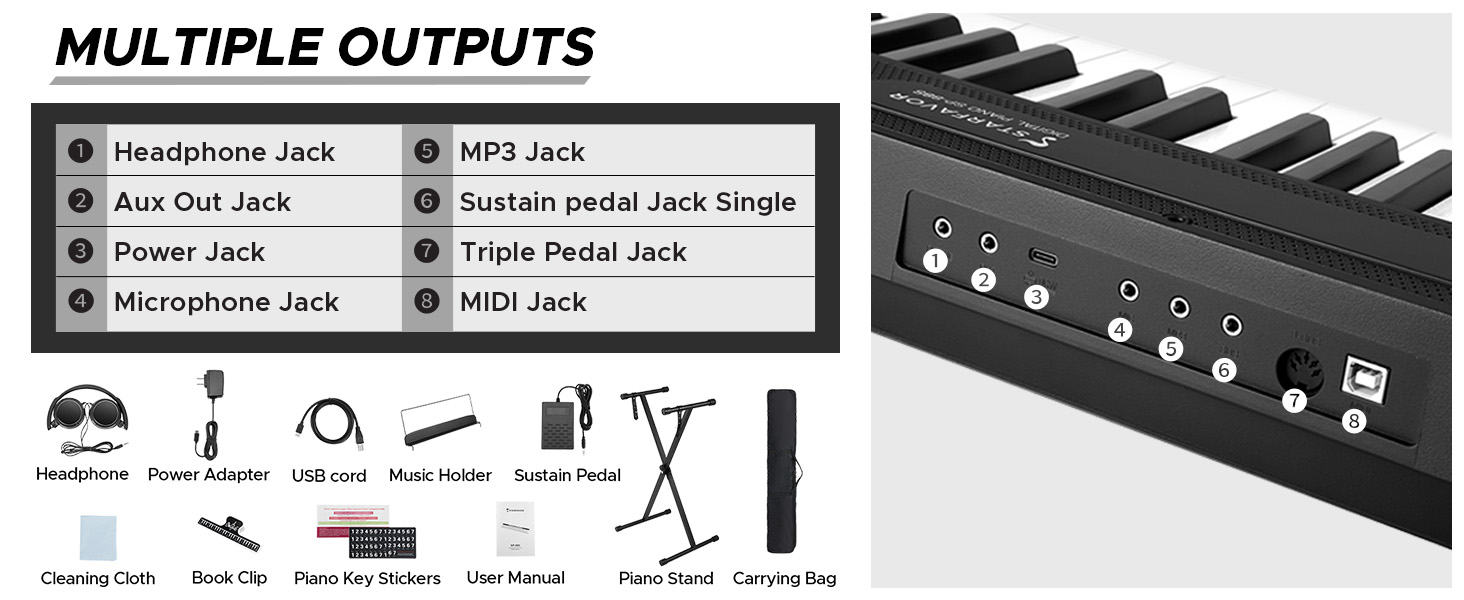
Image: A visual diagram illustrating the various input and output ports available on the Starfavor SP-88S digital piano, including headphone, Aux, power, microphone, MP3, sustain pedal, triple pedal, and MIDI jacks.
Maintenance
- Cleaning: Use the provided cleaning cloth or a soft, dry cloth to wipe the surface of the keyboard. Do not use abrasive cleaners, waxes, or solvents.
- Storage: When not in use, store the keyboard in its carrying bag to protect it from dust and moisture. Avoid storing in direct sunlight or extreme temperatures.
- Battery Care: For optimal battery life, fully charge the keyboard before its first use. If storing for an extended period, charge the battery periodically to prevent deep discharge.
Troubleshooting
If you encounter any issues, refer to the table below for common problems and solutions.
| Problem | Possible Cause | Solution |
|---|---|---|
| No sound | Volume too low; headphones connected; power issue. | Increase volume; disconnect headphones; check power adapter connection or battery charge. |
| Keys not responding | Keyboard not powered on; internal malfunction. | Ensure power is on; if problem persists, contact customer support. |
| Bluetooth not connecting | Bluetooth not enabled on device/keyboard; device too far. | Ensure Bluetooth is active on both devices; move devices closer; try re-pairing. |
| Sustain pedal not working | Pedal not connected properly; faulty pedal. | Ensure pedal is fully inserted into the correct jack; test with another pedal if available. |
Specifications
| Feature | Detail |
|---|---|
| Model Name | SP-88S |
| Number of Keys | 88 |
| Key Type | Full-size Semi-Weighted |
| Polyphony | 128-note |
| Timbres | 198 |
| Rhythms | 198 |
| Demo Songs | 80 |
| Connectivity | Bluetooth, USB MIDI, Headphone Jack, Aux Out, Microphone, MP3, Sustain Pedal, Triple Pedal |
| Power Source | Battery Powered (Lithium Battery) / Power Adapter |
| Battery Life | Over 10 hours per charge |
| Item Weight | 15.4 pounds (7 Kilograms) |
| Product Dimensions | 55.31 x 14.96 x 4.53 inches |
| Color | Black |
Warranty and Support
Starfavor products are designed for reliability and performance. This product comes with a standard manufacturer's warranty against defects in materials and workmanship. The specific terms and duration of your warranty may vary by region and purchase date.
For detailed warranty information, technical support, or service inquiries, please refer to the official Starfavor website or contact their customer service department directly. Please have your product model number (SP-88S) and proof of purchase ready when contacting support.
Online Support: Visit the Starfavor Store on Amazon for product information and support resources.


