
1. Introduction
Welcome to the user manual for your Hoco W37 Wireless Stereo Headset. This manual provides detailed instructions on how to set up, operate, maintain, and troubleshoot your headset to ensure optimal performance and a superior audio experience.
The Hoco W37 headset delivers clear, high-quality sound with active noise reduction (ANC) of ≥ 20dB, allowing for undisturbed listening even in busy environments. With a long battery life of up to 46 hours without ANC and 33 hours with ANC, and a quick 2-hour charging time, you can enjoy your favorite audio anytime, anywhere. Its portable design makes it easy to carry in your bag or backpack.
Key Features:
- Clear and high-quality sound
- Active Noise Cancellation (ANC) ≥ 20dB
- Easy to store and transport
- Long battery life: 46 hours (without ANC), 33 hours (with ANC)
- Fast charging: 2 hours for full charge (500 mAh battery capacity)
2. Setup Guide
Package Contents:
- Hoco W37 Wireless Stereo Headset
- USB-C Charging Cable
- User Manual
Charging the Headset:
Before first use, fully charge your Hoco W37 headset.
- Connect the USB-C charging cable to the charging port on the headset.
- Connect the other end of the cable to a USB power adapter (not included) or a computer's USB port.
- The indicator light will show charging status (e.g., red while charging, blue/off when fully charged).
- A full charge takes approximately 2 hours.

The Hoco W37 headset connected to a USB-C charging cable, illustrating the charging port location.
Bluetooth Pairing:
To connect your headset to a device via Bluetooth:
- Ensure the headset is turned off.
- Press and hold the Power button for approximately 3-5 seconds until the indicator light flashes blue and red alternately, indicating pairing mode.
- On your device (smartphone, tablet, laptop), enable Bluetooth and search for available devices.
- Select "Hoco W37" from the list of found devices.
- Once connected, the indicator light will turn solid blue or flash blue slowly.
- If prompted for a password, enter "0000".
3. Operating Your Headset
Power On/Off:
- To power on: Press and hold the Power button for 2 seconds.
- To power off: Press and hold the Power button for 3 seconds.
Volume Control:
- Volume Up: Press the "+" button.
- Volume Down: Press the "-" button.
Music Playback:
- Play/Pause: Press the Multi-function button.
- Next Track: Press and hold the "+" button.
- Previous Track: Press and hold the "-" button.
Active Noise Cancellation (ANC):
- To activate ANC: Press the ANC button. The ANC indicator light will illuminate.
- To deactivate ANC: Press the ANC button again. The ANC indicator light will turn off.
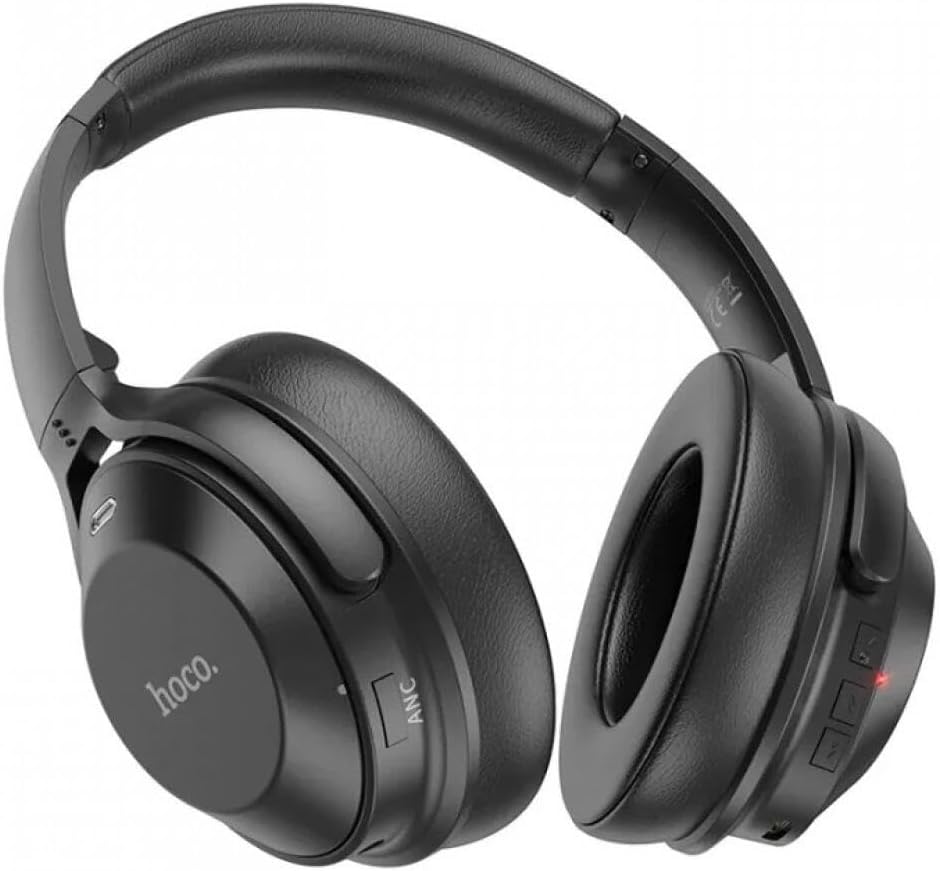
Side view of the Hoco W37 headset, highlighting the ANC button and other controls.
Call Management:
- Answer/End Call: Press the Multi-function button.
- Reject Call: Press and hold the Multi-function button for 2 seconds.
- Redial Last Number: Double-press the Multi-function button.
4. Maintenance and Care
Proper care will extend the life of your Hoco W37 headset.
- Cleaning: Use a soft, dry, lint-free cloth to clean the headset. Do not use abrasive cleaners, alcohol, or chemical solvents.
- Storage: When not in use, store the headset in a cool, dry place, away from direct sunlight and extreme temperatures.
- Avoid Moisture: Do not expose the headset to water or excessive moisture.
- Handle with Care: Avoid dropping or subjecting the headset to strong impacts.
5. Troubleshooting
| Problem | Possible Cause | Solution |
|---|---|---|
| Headset does not power on. | Low battery. | Charge the headset fully. |
| Cannot pair with device. | Headset not in pairing mode; Bluetooth off on device; device too far. | Ensure headset is in pairing mode (flashing red/blue). Turn on Bluetooth on your device. Move headset closer to device (within 10 meters). |
| No sound or low volume. | Volume too low; headset not connected; incorrect audio output selected. | Increase volume on both headset and device. Re-pair the headset. Check device's audio output settings. |
| ANC not working effectively. | ANC not activated; very high-frequency noise. | Ensure ANC is turned on. ANC is most effective against low-frequency ambient noise. |
| Disconnections during use. | Device too far; interference. | Move headset closer to the device. Avoid strong electromagnetic interference. |
6. Product Specifications
| Feature | Specification |
|---|---|
| Model | W37 |
| Brand | Hoco |
| Connectivity | Wireless Bluetooth |
| Active Noise Cancellation (ANC) | ≥ 20dB |
| Battery Capacity | 500 mAh |
| Music/Talk Time (without ANC) | 46 hours |
| Music/Talk Time (with ANC) | 33 hours |
| Charging Time | 2 hours |
| Frequency Range | 20 Hz - 20,000 Hz |
| Form Factor | Over-Ear (Circum-Auricular) |
| Material | Faux Leather |
| Compatible Devices | Desktops, Car Audio Systems, Phones, Game Consoles, Music Production Equipment, Smart Speakers, TVs, Laptops, Tablets, Motorcycles, Mobile Phones |
7. Warranty and Support
The Hoco W37 headset comes with a standard manufacturer's warranty. Please refer to the warranty card included with your purchase for specific terms and conditions.
For technical support, troubleshooting assistance, or warranty claims, please contact Hoco customer service through their official website or your point of purchase.

The Hoco W37 product packaging, which typically contains warranty and support contact information.


