
Smartby Universal Voice Remote Control User Manual
Model: BN59-01363A
Compatible with Samsung Smart TVs
1. Introduction
This manual provides detailed instructions for the Smartby Universal Voice Remote Control, model BN59-01363A. This remote is designed to be fully compatible with various Samsung Smart TV models, including QLED, UHD, LED, LCD, 4K, and 8K TVs. It features voice control capabilities and dedicated buttons for popular streaming services like Netflix, Prime Video, and Samsung TV Plus.
Please read this manual carefully before using the remote control to ensure proper setup and operation.

Image 1: Front view of the Smartby Universal Voice Remote Control. The remote is black with a sleek design, featuring a circular directional pad, dedicated buttons for streaming services, and a voice control button.
2. Setup
2.1 Battery Installation
The remote control requires two (2) AAA batteries for operation. Batteries are not included with the remote.
- Locate the battery compartment cover on the back of the remote control.
- Slide the cover downwards or press the latch (if present) to open the compartment.
- Insert two AAA batteries, ensuring the positive (+) and negative (-) terminals align correctly with the markings inside the compartment.
- Close the battery compartment cover securely.
2.2 Pairing the Remote Control with Your TV
Before using the remote, it must be paired with your Samsung Smart TV. Follow these steps to establish a connection:
- Ensure your TV is powered on.
- Point the remote control directly at the front of your Samsung TV.
- Simultaneously press and hold the Return button and the Play/Pause button for approximately 5 seconds.
- Release the buttons when a pairing message appears on your TV screen, indicating successful pairing.
If pairing is unsuccessful, repeat the steps. Ensure there are no obstructions between the remote and the TV.

Image 2: Visual guide for pairing the remote control. It shows the remote and highlights the Return and Play/Pause buttons, indicating they should be pressed simultaneously for 5 seconds to initiate pairing.
3. Operating Instructions
3.1 Button Functions
Familiarize yourself with the functions of each button on your remote control:
- Power: Press to turn the TV ON or OFF.
- Number Button (123): When pressed, a number strip appears on the bottom of the TV screen. Select numbers and then select Done to enter a numeric value.
- EXTRA (Four colored dots): While watching content, press to display extra information from the content provider.
- Select (Center of directional pad): When pressed while you are watching content, detailed program information appears.
- Directional Pad (Up / Down / Left / Right): Moves the focus and changes the values seen on the TV's menu.
- Return: Returns to the previous menu. When pressed for 1 second or more, the running function is terminated. When pressed while you are watching a program, the previous channel appears.
- Play / Pause: When pressed, the playback controls appear. Using these controls, you can control the media content that is playing.
- Smart Hub: Returns to the Home Screen.
- Volume (VOL): Move the button up or down to adjust the volume. To mute the sound, press the button. When pressed for 1 second or more, the Accessibility Shortcuts menu appears.
- Channel (CH): Move the button up or down to change the channel. To see the Guide screen, press the button.
- Netflix Button: Launches the Netflix application.
- Prime Video Button: Launches the Prime Video application.
- Samsung TV Plus Button: Launches the Samsung TV Plus application.

Image 3: Diagram illustrating the various function buttons on the remote control, including Power, Number, EXTRA, Select, Directional Pad, Return, Play/Pause, Smart Hub, Volume, Channel, Netflix, Prime Video, and Samsung TV Plus. Each button is labeled with its primary function.
3.2 Voice Control Feature
The remote control includes a voice control feature for convenient operation.
- Press and hold the Voice Control Button.
- Speak your command clearly into the microphone on the remote.
- Release the button when you have finished speaking.
Examples of voice commands include "Open Netflix," "Change to Channel 5," or "Search for action movies."
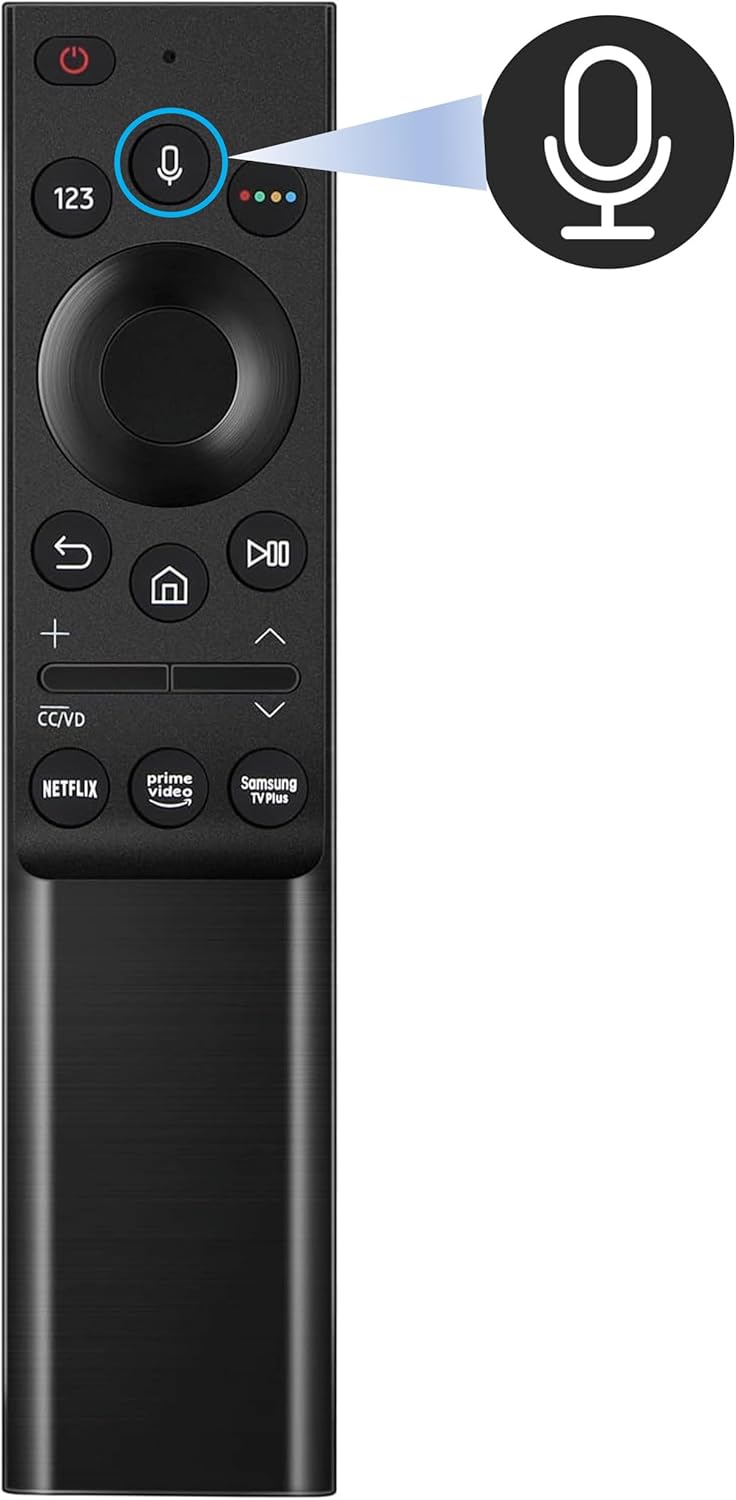
Image 4: The remote control with the voice control button highlighted. This button activates the microphone for voice commands.
4. Maintenance
To ensure the longevity and optimal performance of your remote control, follow these maintenance guidelines:
- Cleaning: Wipe the remote control with a soft, dry cloth. Do not use liquid cleaners or abrasive materials, as they may damage the surface or internal components.
- Battery Care:
- Replace batteries when the remote's performance degrades or it becomes unresponsive.
- Remove batteries if the remote will not be used for an extended period to prevent leakage.
- Dispose of used batteries responsibly according to local regulations.
- Storage: Store the remote in a cool, dry place away from direct sunlight and extreme temperatures.
- Avoid Drops: Protect the remote from physical impact, as drops can damage internal circuitry.
5. Troubleshooting
If you encounter issues with your remote control, refer to the following common troubleshooting steps:
- Remote Not Responding:
- Check if the batteries are inserted correctly with the correct polarity.
- Replace the batteries with new AAA batteries.
- Ensure there are no obstructions between the remote and the TV's infrared receiver.
- Remote Not Pairing:
- Ensure the TV is powered on.
- Repeat the pairing process as described in Section 2.2.
- Try moving closer to the TV during the pairing process.
- Voice Control Not Working:
- Ensure the remote is properly paired with the TV.
- Speak clearly and directly into the microphone.
- Check your TV's settings to ensure voice control is enabled.
- Specific Buttons Not Working:
- Clean the remote control, especially around the unresponsive buttons, to remove any dirt or debris.
- If only specific app buttons (Netflix, Prime Video) are not working, ensure your TV has an active internet connection and the apps are installed and updated.
If the issue persists after trying these steps, please contact customer support.
6. Specifications
| Feature | Detail |
|---|---|
| Model Number | BN59-01363A |
| Brand | Smartby |
| Compatibility | Universal for Samsung Smart TVs (QLED, UHD, LED, LCD, 4K, 8K) |
| Special Features | Voice Search, Ergonomic Design, Dedicated Streaming Buttons (Netflix, Prime Video, Samsung TV Plus) |
| Color | Black |
| Power Source | 2 x AAA Batteries (not included) |
| Product Dimensions | 6.5 x 1.5 x 0.75 inches |
| Item Weight | 2.11 ounces |
This remote is compatible with a wide range of Samsung TV remote control models, including but not limited to: BN59-01259E, BN59-01259B, BN59-01260A, BN59-01241A, BN59-01265A, BN59-01259D, BN59-01266A, BN59-01242A, BN59-01292A, BN59-01312A, BN59-01199F, BN59-01301A, AA59-00594A, AA59-00666A, AA59-00741A, AA59-00784C, AA59-00666A, BN59-01178W.

Image 5: A visual representation of various Samsung remote control models, indicating the broad compatibility of the Smartby BN59-01363A remote.
7. Warranty and Support
For specific warranty information regarding your Smartby Universal Voice Remote Control, please refer to the documentation provided at the time of purchase or contact the seller directly. Warranty terms may vary depending on the retailer and region.
If you require further assistance or have questions not covered in this manual, please contact Smartby customer support through their official channels or the retailer from whom you purchased the product.