
1. Introduction
This user manual provides detailed instructions for the installation, operation, and maintenance of your ieGeek ZS-GX7S 1080P HD Indoor Battery Wi-Fi Security Camera. Please read this manual thoroughly before using the product to ensure proper function and safety. Keep this manual for future reference.
Safety Precautions
- Ensure the camera is used within its specified operating temperature and humidity ranges.
- Use only the recommended charging cable and power adapter to prevent damage.
- Do not expose the camera to extreme temperatures, direct sunlight, or water.
- Keep the camera away from strong magnetic fields.
- Do not attempt to disassemble or modify the camera. This will void the warranty.
2. Product Overview
The ieGeek ZS-GX7S is a compact, wireless indoor security camera designed for easy installation and versatile monitoring. It features 1080P HD video, infrared night vision, two-way audio, and PIR motion detection.
Key Features
- 1080P HD Video: Captures clear and detailed footage.
- Rechargeable Battery: Provides up to 90 days of operation on a full charge, or 24/7 recording when connected via Type-C cable.
- Infrared Night Vision: Equipped with 850nm infrared lights for clear images up to 8 meters in low-light conditions.
- PIR Motion Detection: Advanced human detection with adjustable sensitivity to reduce false alarms. Sends real-time alerts to your phone.
- Two-Way Audio: Built-in microphone and speaker for communication through the camera. Compatible with Alexa.
- Flexible Storage: Supports Micro SD card (up to 128GB) and cloud storage with AES128 encryption for data security.
- Wireless Connectivity: Operates on 2.4 GHz Wi-Fi for easy setup and placement.
Package Contents
- ieGeek ZS-GX7S Camera (2 units)
- Mounting Accessories (e.g., 3M adhesives, stands)
- USB Type-C Charging Cable
- User Manual
Camera Components

Figure 2.1: ieGeek ZS-GX7S camera in hand, demonstrating its compact size and a smartphone displaying its live monitoring capability.

Figure 2.2: Front view of the ieGeek ZS-GX7S camera on its conical stand, showing the lens, PIR sensor, and indicator lights.

Figure 2.3: Visual representation of the camera's main features: HD 2K Full HD, Wireless 2.4-GHz WLAN, Extended Night Vision, PIR Motion Detection, Two-Way Audio, Simple DIY Installation, Built-in Siren, and Local/Cloud Storage.
3. Setup Guide
3.1 Charging the Camera
Before initial use, fully charge the camera using the provided USB Type-C cable and a compatible 5V/1A or 5V/2A power adapter. The charging indicator light will show the charging status.
3.2 App Download and Installation
Download the official ieGeek app from your smartphone's app store (iOS or Android). Search for "ieGeek Cam" or scan the QR code provided in the quick start guide (if available).
3.3 Wi-Fi Connection and Pairing
- Ensure your smartphone is connected to a 2.4 GHz Wi-Fi network. The camera does not support 5 GHz Wi-Fi.
- Open the ieGeek app and create an account or log in.
- Follow the in-app instructions to add a new device. This typically involves scanning a QR code displayed on your phone with the camera lens.
- Wait for the camera to connect to your Wi-Fi network. A voice prompt or indicator light will confirm successful connection.
3.4 Camera Placement and Installation
The compact design allows for flexible placement. Use the included 3M adhesives for easy, drill-free installation on flat surfaces. The camera can also be placed on a desk or shelf using its stand.

Figure 3.1: Various installation options for the ieGeek ZS-GX7S camera, demonstrating its versatility for desk, wall, or ceiling mounting without complex wiring.
4. Operating Instructions
4.1 Live View
Open the ieGeek app and select your camera to access the live video feed. You can view real-time footage from anywhere with an internet connection.

Figure 4.1: Demonstration of the camera's sharp 2K video quality and effective night vision capabilities, capturing clear images both day and night.
4.2 Two-Way Audio
While in live view, tap the microphone icon in the app to speak through the camera's speaker. Tap the speaker icon to listen to audio from the camera's surroundings. This feature allows for direct communication with individuals near the camera.

Figure 4.2: Illustration of the two-way audio function, enabling users to speak and listen through the camera via the mobile application.
4.3 Motion Detection and Alerts
The camera uses a PIR sensor for motion detection. When motion is detected, the camera will record an event and send a real-time notification to your smartphone.
- Adjust Sensitivity: In the app settings, you can adjust the PIR detection sensitivity to minimize false alarms.
- Set Alarm Periods/Zones: Configure specific times or areas for motion detection to be active.
- Manual Siren: The app allows you to manually activate a siren on the camera for deterrence.

Figure 4.3: Visual explanation of PIR motion detection, showing how the camera detects movement, triggers an alert, and records the event for review in the app.
4.4 Recording and Storage
The camera supports two primary recording modes:
- Triggered Recording: Records short clips when motion is detected.
- 24/7 Recording: Continuous recording. For this mode, it is recommended to keep the camera connected to a power source via the Type-C cable.
Recorded footage can be stored in two ways:
- Micro SD Card: Insert a Micro SD card (up to 128GB, not included) into the camera's slot. Footage is stored locally.
- Cloud Storage: Subscribe to the ieGeek cloud service for secure, encrypted storage of your recordings.

Figure 4.4: Explanation of the two available monitoring modes: motion-triggered recording for event-based capture and 24/7 continuous recording for constant surveillance.
4.5 Alexa Compatibility
The ieGeek ZS-GX7S camera is compatible with Amazon Alexa. Follow the instructions in the ieGeek app or your Alexa app to link your camera and enable voice commands for live viewing on compatible Alexa devices.
5. Maintenance
5.1 Battery Management
The camera features a rechargeable battery. To maximize battery life:
- Charge the camera fully before first use.
- Avoid frequent full discharges.
- If using 24/7 recording, keep the camera connected to a power source.
- Battery life can vary based on usage, motion detection frequency, and environmental factors.
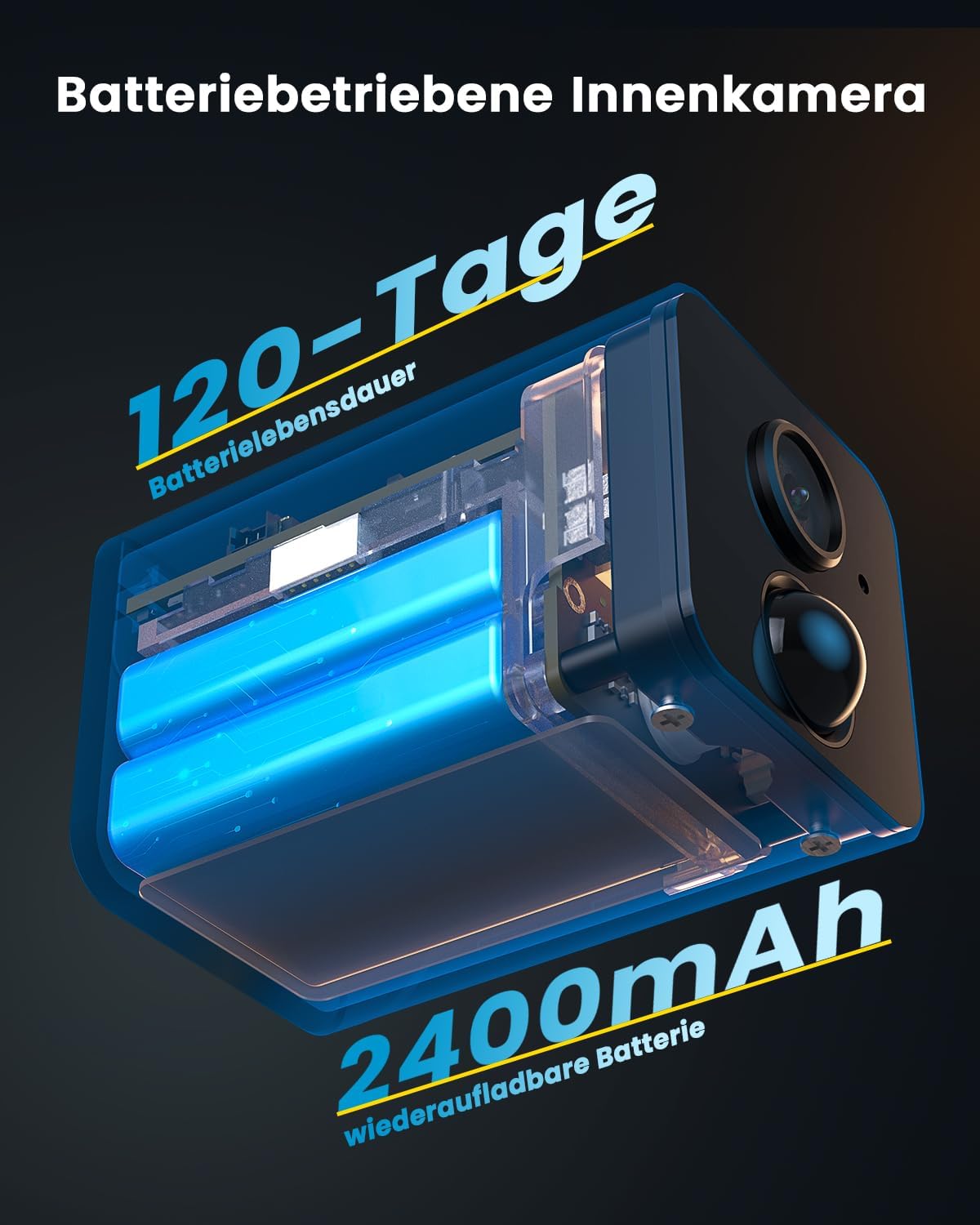
Figure 5.1: Internal view of the camera's battery compartment, illustrating the 2400mAh rechargeable battery and its extended operational life.
5.2 Cleaning
To clean the camera, gently wipe the exterior with a soft, dry cloth. Do not use liquid cleaners or abrasive materials, as they may damage the lens or casing.
5.3 Storage
If storing the camera for an extended period, ensure it is fully charged and stored in a cool, dry place. Recharge the battery periodically (e.g., every 3-6 months) to maintain its health.
6. Troubleshooting
| Problem | Possible Cause | Solution |
|---|---|---|
| Camera fails to connect to Wi-Fi | Incorrect Wi-Fi password; 5 GHz Wi-Fi network; camera too far from router; weak signal. | Verify password; ensure 2.4 GHz network; move camera closer to router; check router status. |
| Poor video quality | Weak Wi-Fi signal; dirty lens; insufficient lighting. | Improve Wi-Fi signal; clean lens with a soft cloth; ensure adequate lighting or rely on night vision. |
| Battery drains quickly | Frequent motion detection events; 24/7 recording without power; cold environment. | Adjust PIR sensitivity; enable 24/7 recording only when connected to power; ensure optimal operating temperature. |
| No motion detection alerts | PIR sensitivity too low; detection zone/schedule incorrect; app notifications disabled. | Increase PIR sensitivity; check detection settings in app; enable app notifications in phone settings. |
| Two-way audio not working | Microphone/speaker muted in app; network issues; app permissions. | Check mute settings in app; ensure stable internet connection; grant microphone permissions to the app. |
7. Specifications
| Feature | Specification |
|---|---|
| Model Number | ZS-GX7S |
| Brand | ieGeek |
| Dimensions (L x W x H) | 6 x 3.8 x 8.8 cm (2.36 x 1.5 x 3.46 inches) |
| Weight | 360 grams (0.79 lbs) |
| Color | White |
| Material | Metal |
| Video Resolution | 1080P HD |
| Night Vision Distance | Up to 8 meters (26 feet) |
| Wireless Connectivity | Wi-Fi (2.4 GHz only) |
| Battery Type | Rechargeable Lithium |
| Battery Life | Up to 90 days (usage dependent) |
| Storage Options | Micro SD card (max 128GB), Cloud Storage |
| Audio | Two-Way Audio |
| Motion Detection | PIR Sensor |
| Compatibility | Amazon Alexa |
8. Warranty and Support
For warranty information, technical support, or further assistance, please refer to the official ieGeek website or contact their customer service directly. Details are typically provided on the product packaging or within the ieGeek application.


