
1. Introduction
This instruction manual provides essential information for the proper setup, operation, and maintenance of your MoVols Charge Dock CH1822. This charging dock is designed as a replacement or spare part for compatible ECOVACS Deebot OZMO T8 AIVI, T8+, T9+, N8+, N8 Pro, and T9 AIVI robotic vacuum cleaners. Please read this manual thoroughly before use to ensure optimal performance and safety.
2. Safety Information
To reduce the risk of injury or damage, please observe the following safety precautions:
- Use only with the specified ECOVACS Deebot models.
- Do not expose the charge dock to water or moisture.
- Avoid placing the dock near heat sources or in direct sunlight.
- Ensure the power cable is not damaged or pinched.
- Keep out of reach of children and pets.
- Unplug the dock from the power outlet before cleaning or if it will not be used for an extended period.
- Do not attempt to disassemble or repair the charge dock yourself. Contact qualified personnel for service.
3. Package Contents
Verify that all items are present in your package:
- 1 x MoVols Charge Dock CH1822
- 1 x EU Power Cable

Figure 3.1: Front view of the MoVols Charge Dock CH1822. This image shows the main charging station unit.
4. Setup
- Choose a Location: Select a flat, stable surface against a wall. Ensure there is at least 0.5 meters (1.6 feet) of clear space on either side of the dock and 1.5 meters (4.9 feet) in front of it for the robot to easily dock. Avoid areas with direct sunlight or strong electromagnetic interference.
- Connect Power: Insert the EU power cable into the power input port at the back of the charge dock. Plug the other end of the power cable into a suitable wall outlet.
- Power On: Once connected, the indicator light on the charge dock (if present) should illuminate, indicating it is powered on and ready.

Figure 4.1: Rear view of the charge dock, illustrating the power cable connection point.
5. Operating the Charge Dock
The MoVols Charge Dock CH1822 functions as the home base for your ECOVACS Deebot robotic vacuum cleaner. The robot will automatically return to the dock to recharge its battery when it is low or after completing a cleaning cycle.
- Automatic Charging: Ensure the charge dock is powered on and correctly positioned. The robot will navigate to the dock and align its charging contacts with those on the dock.
- Manual Docking: If necessary, you can manually place the robot onto the charge dock, ensuring the charging contacts align properly.
- Charging Indicator: Refer to your ECOVACS Deebot's user manual for specific charging indicator behaviors (e.g., LED colors or patterns) to confirm it is charging correctly.
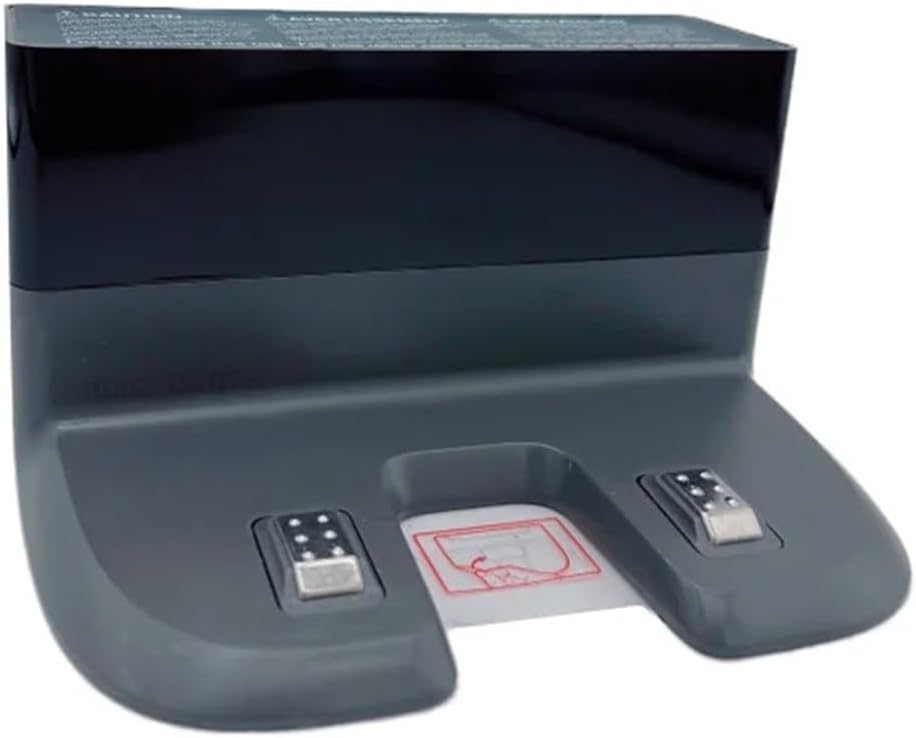
Figure 5.1: Close-up of the charging contacts on the dock. These contacts must align with the robot's contacts for successful charging.
6. Maintenance
Regular maintenance of your charge dock ensures efficient charging and extends its lifespan.
- Cleaning the Charging Contacts: Periodically wipe the metal charging contacts on the dock with a clean, dry cloth. Ensure no dust or debris accumulates on them, as this can interfere with charging.
- General Cleaning: Wipe the exterior of the charge dock with a soft, dry cloth to remove dust. Do not use abrasive cleaners or solvents.
- Cable Inspection: Regularly check the power cable for any signs of damage, fraying, or kinks. Replace if damaged.
7. Troubleshooting
| Problem | Possible Cause | Solution |
|---|---|---|
| Robot not docking successfully. | Obstructions around the dock; dock not properly positioned; dirty charging contacts. | Clear the area around the dock. Ensure the dock is against a wall with sufficient clear space. Clean the charging contacts on both the dock and the robot. |
| Robot not charging when docked. | Power cable disconnected; power outlet not working; dirty charging contacts; faulty dock. | Check if the power cable is securely plugged into the dock and the wall outlet. Test the outlet with another device. Clean charging contacts. If the issue persists, the dock may be faulty. |
| Dock indicator light is off. | No power supply; faulty power cable or dock. | Verify the power cable connection and wall outlet. Try a different power outlet. If still off, the power cable or dock may be damaged. |
For further assistance, please refer to your ECOVACS Deebot robotic vacuum cleaner's main instruction manual or contact customer support.
8. Specifications
| Feature | Detail |
|---|---|
| Model | CH1822 |
| Compatibility | ECOVACS Deebot OZMO T8 AIVI, T8+, T9+, N8+, N8 Pro, T9 AIVI |
| Package Dimensions | 1.18 x 0.79 x 0.39 inches |
| Item Weight | 1.76 ounces |
| Manufacturer | lujiano |

Figure 8.1: Bottom view of the charge dock, displaying the product label with model and electrical specifications.
9. Warranty and Support
For warranty information or technical support, please refer to the documentation provided with your original ECOVACS Deebot robotic vacuum cleaner or contact the seller directly. Keep your purchase receipt as proof of purchase.