
1. Product Overview
The Fszdorj 20-inch Low Profile Ceiling Fan with Light (Model F098) is designed to provide efficient air circulation and versatile lighting for indoor spaces such as bedrooms and living rooms. This modern ceiling fan features a quiet DC motor, 6 adjustable fan speeds, and a dimmable LED light with adjustable color temperature. It can be conveniently controlled via both a remote control and a smartphone application.
Key Features:
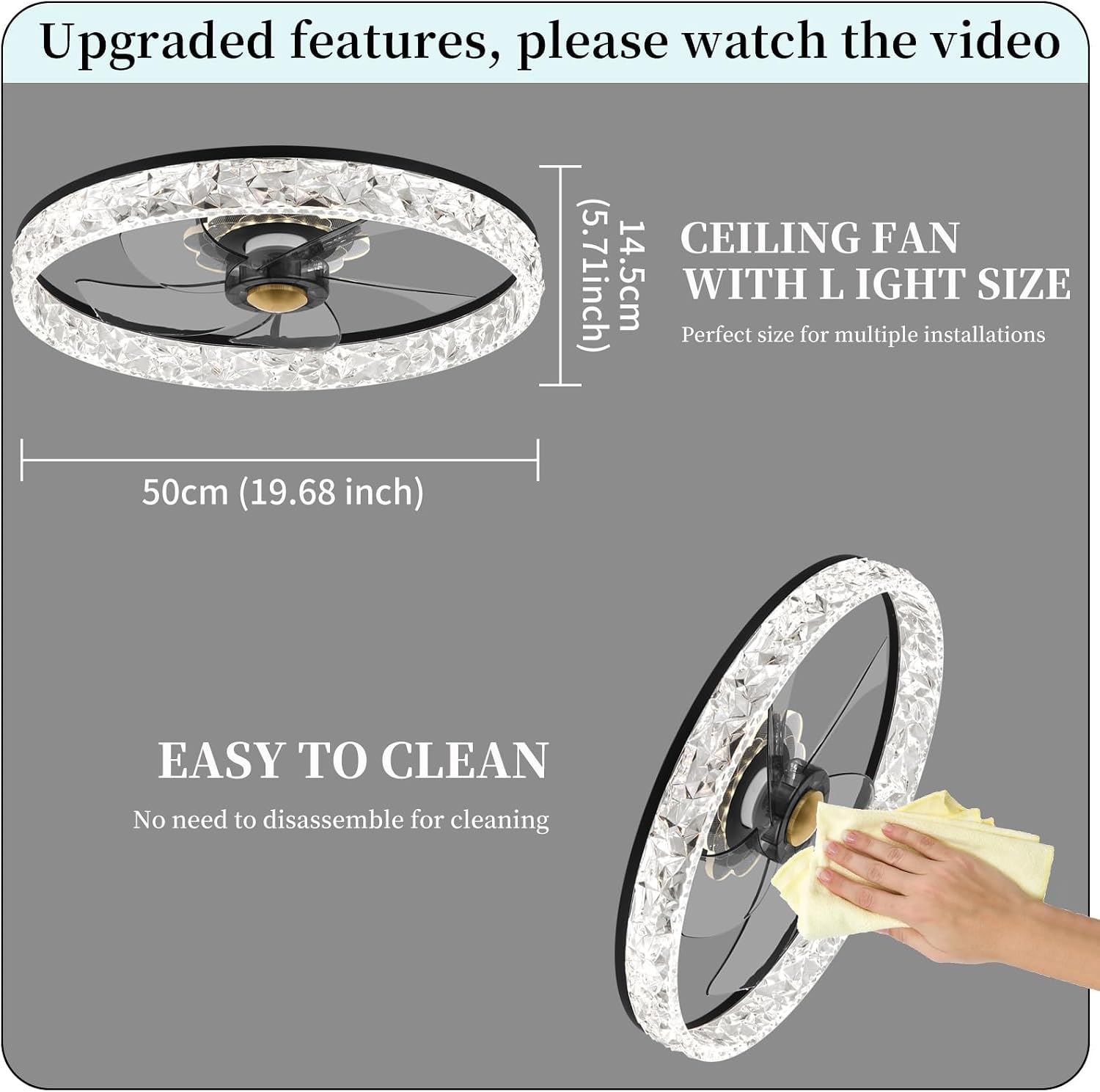
- Low Profile Design: Ideal for rooms with lower ceilings, measuring 19.7 x 19.7 x 5.7 inches.
- Quiet DC Motor: Operates at less than 30dB, ensuring a peaceful environment.
- 6 Fan Speeds: Offers a range of airflow options from gentle breeze to strong circulation.
- Reversible Airflow: Supports both summer (forward) and winter (reverse) modes for year-round comfort.
- Dimmable LED Light: Adjust brightness from 0% to 100%.
- Adjustable Color Temperature: Choose from Warm (3000K), Neutral (4500K), and Bright (6000K) light.
- 3 Night Lighting Colors: Includes Natural Light, Violet, and Warm Blue for ambient lighting.
- Dual Control: Operate with the included remote control or a smartphone app.
- Timer Function: Set the fan to turn off automatically.
- Memory Function: Recalls previous settings for fan speed and light.


2. Safety Information
Please read all safety instructions carefully before installing or operating your ceiling fan. Failure to follow these instructions may result in electric shock, fire, or personal injury.
- Electrical Safety: Ensure the power is turned off at the circuit breaker before installation or maintenance. All electrical wiring must be performed by a qualified electrician and comply with local codes.
- Mounting: The mounting structure must be capable of supporting the weight of the fan (approximately 8.68 pounds) plus the dynamic load during operation.
- Blade Clearance: Ensure there is adequate clearance between the fan blades and any obstacles, including walls and furniture.
- Ventilation: Do not operate the fan in areas with high humidity or where it may come into contact with water. This fan is designed for indoor use only.
- Children and Pets: Keep children and pets away from the fan during operation and installation.
- Cleaning: Always disconnect power before cleaning the fan. Use a soft, damp cloth; avoid harsh chemicals.
3. Package Contents
Verify that all components are present and undamaged before beginning installation. If any parts are missing or damaged, contact customer support immediately.
- Ceiling Fan Body with Integrated LED Light
- Remote Control
- Mounting Bracket
- Hardware Kit (screws, wire nuts, washers)
- User Manual
4. Setup & Installation
This ceiling fan requires hardwired installation. It is recommended that installation be performed by a licensed electrician to ensure proper wiring and safety compliance.
Installation Steps (General Overview):
- Turn Off Power: Locate the circuit breaker for the fan's intended location and turn off the power. Verify power is off using a voltage tester.
- Mounting Bracket Installation: Secure the mounting bracket to the ceiling junction box. Ensure the bracket is firmly attached and can support the fan's weight.
- Wiring Connections: Connect the fan's electrical wires to the household wiring according to the wiring diagram provided in the full manual. Typically, this involves connecting live, neutral, and ground wires.
- Attach Fan Body: Carefully lift the fan body and attach it to the mounting bracket, ensuring all connections are secure.
- Secure Fan: Fasten the fan body to the mounting bracket using the provided screws.
- Restore Power: Once installation is complete and all connections are secure, restore power at the circuit breaker.
For detailed, step-by-step instructions and wiring diagrams, please refer to the comprehensive installation guide included in your product packaging.
5. Operating Instructions
Your Fszdorj ceiling fan can be controlled using the included remote control or a dedicated smartphone application.
Remote Control Operation:
The remote control provides full functionality for your fan and light.
- Light On/Off: Toggle the light on or off.
- Color Temperature: Adjust the light color between Warm (3000K), Neutral (4500K), and Bright (6000K).
- Speed Adjustment (1-6): Select from 6 fan speeds. '1' is the lowest, '6' is the highest.
- Dimming: Adjust light brightness from 0% to 100%.
- Fan F/R (Reverse): Switch between forward (summer) and reverse (winter) airflow modes.
- Night Light: Activate a low-intensity night light mode.
- Timer (1H/3H/5H): Set the fan to turn off after 1, 3, or 5 hours.
- Pair Button: Used for pairing the remote with the fan if needed.
Smartphone App Control:
For advanced control and convenience, download the dedicated smartphone application.
- Download App: Scan the QR code provided in the manual or on the product packaging to download the 'Smart Home' app.
- Enable Bluetooth: Ensure Bluetooth is enabled on your smartphone.
- Pairing: Follow the in-app instructions to pair your fan.
- Control: Once paired, you can control all fan and light functions, including speed, dimming, color temperature, and modes, directly from your phone.


6. Maintenance
Regular maintenance ensures the longevity and optimal performance of your ceiling fan.
Cleaning:
- Power Off: Always turn off the power to the fan at the circuit breaker before cleaning.
- Dusting: Use a soft, lint-free cloth to dust the fan blades, motor housing, and light fixture.
- Wiping: For more stubborn dirt, lightly dampen the cloth with water. Do not use abrasive cleaners, solvents, or harsh chemicals, as these can damage the finish or electrical components.
- No Disassembly: The fan is designed for easy cleaning without the need for disassembly.
7. Troubleshooting
If you encounter issues with your ceiling fan, refer to the following common problems and solutions:
| Problem | Possible Cause | Solution |
|---|---|---|
| Fan does not operate | No power to the fan; Loose wire connections; Remote control battery low or not paired. | Check circuit breaker; Ensure all wire connections are secure; Replace remote battery or re-pair remote. |
| Light does not work | No power to the light; Loose wire connections; LED driver issue. | Check power supply; Verify light wiring connections; Contact customer support if LED driver is suspected. |
| Fan wobbles | Loose mounting screws; Unbalanced blades. | Tighten all mounting screws; Ensure blades are securely attached and balanced (refer to full manual for balancing kit instructions if needed). |
| Remote control not responding | Battery depleted; Not paired with fan; Interference. | Replace battery; Re-pair remote control with the fan; Ensure no strong interference sources nearby. |
| App control not working | Bluetooth not enabled; Fan not paired with app; App outdated. | Enable Bluetooth on your device; Re-pair fan in the app; Update the app to the latest version. |
If the problem persists after trying these solutions, please contact Fszdorj customer support for further assistance.
8. Specifications
| Feature | Detail |
|---|---|
| Brand | Fszdorj |
| Model Number | 2-F098 |
| Dimensions | 19.7 x 19.7 x 5.7 inches (50 x 50 x 14.5 cm) |
| Item Weight | 8.68 pounds |
| Power Source | Hardwired |
| Voltage | 110-120V, 60Hz |
| Wattage | 80 Watts |
| Control Method | App, Remote Control |
| Light Source Type | Integrated LED |
| Dimmable | Yes (0%-100% stepless dimming) |
| Color Temperature | 3000K (Warm), 4500K (Neutral), 6000K (Bright) |
| Night Light Colors | Natural Light, Violet, Warm Blue |
| Fan Speeds | 6 Speeds |
| Noise Level | <30dB(A) |
| Applicable Area | 107-269 sq ft |
| Shade Material | Acrylic |
| Finish Type | Black |
| Indoor/Outdoor Usage | Indoor |
9. Warranty & Support
Fszdorj is committed to providing high-quality products and customer satisfaction. This product comes with a standard manufacturer's warranty against defects in materials and workmanship.
Warranty Information:
Please refer to the warranty card included in your product packaging for specific terms, conditions, and duration of the warranty. Keep your purchase receipt as proof of purchase for warranty claims.
Customer Support:
If you have any questions, require technical assistance, or need to make a warranty claim, please contact Fszdorj customer support through the retailer where you purchased the product or visit the official Fszdorj brand store online for contact information.