
1. Introduction
This manual provides detailed instructions for the safe installation, operation, and maintenance of your Fszdorj 20'' Ceiling Fan with Light. Please read this manual thoroughly before installation and use, and retain it for future reference. Proper installation and adherence to these instructions will ensure optimal performance and longevity of your product.

Figure 1.1: Fszdorj 20'' Ceiling Fan with Light (Model F098 White)
2. Safety Information
To reduce the risk of fire, electric shock, or personal injury, always follow these basic safety precautions:
- Ensure the power supply is disconnected before installation, cleaning, or maintenance.
- All electrical connections must be performed by a qualified electrician and comply with local codes and ordinances.
- Mount the fan only to an outlet box marked "Acceptable for Fan Support of 35 lbs (15.9 kg) or less" and use the mounting screws provided with the outlet box.
- Do not bend the fan blades or attempt to stop the fan by hand during operation.
- Keep foreign objects away from the rotating fan blades.
- This appliance is not intended for use by persons (including children) with reduced physical, sensory or mental capabilities, or lack of experience and knowledge, unless they have been given supervision or instruction concerning use of the appliance by a person responsible for their safety.
- Children should be supervised to ensure that they do not play with the appliance.
3. Package Contents
Carefully unpack your ceiling fan and inspect the contents. Please ensure all items listed below are present and undamaged. If any parts are missing or damaged, contact customer support immediately.
- Ceiling Fan with Integrated Light Fixture
- Remote Control
- Mounting Hardware Kit (screws, wire nuts, etc.)
- User Manual (this document)
4. Product Features
Your Fszdorj Ceiling Fan with Light is designed with advanced features for comfort and convenience:
- Revolutionary Night Light: Features a standalone night light with independent control. Choose from three preset colors: violet, warm blue, and soft warm.
- APP & Remote Control: Control the fan and light functions separately via the included remote or a dedicated Bluetooth app. Functions include light color, brightness, fan speed, and timer settings. The remote's beep noise is cancelled for quiet operation.
- Stepless Dimming & Color Temperature: Smoothly adjust light brightness from 10% to 100% and color temperature from warm light (3000K) to cool white (6500K) via remote or app.
- Memory Function: All light and fan settings are automatically saved when the unit is turned off and restored upon the next power-on.
- Reversible Fan Motor with 6 Fan Speeds: Offers two airflow modes: downdraft for cooling in summer and updraft for enhanced air circulation in winter. Equipped with a pure copper silent DC motor for quiet, smooth, and stable airflow across 6 adjustable speeds.
- Easy Installation: Designed for straightforward installation with included user manual.

Figure 4.1: Independent Control Night Light

Figure 4.2: Stepless Dimming and Color Temperature Adjustment
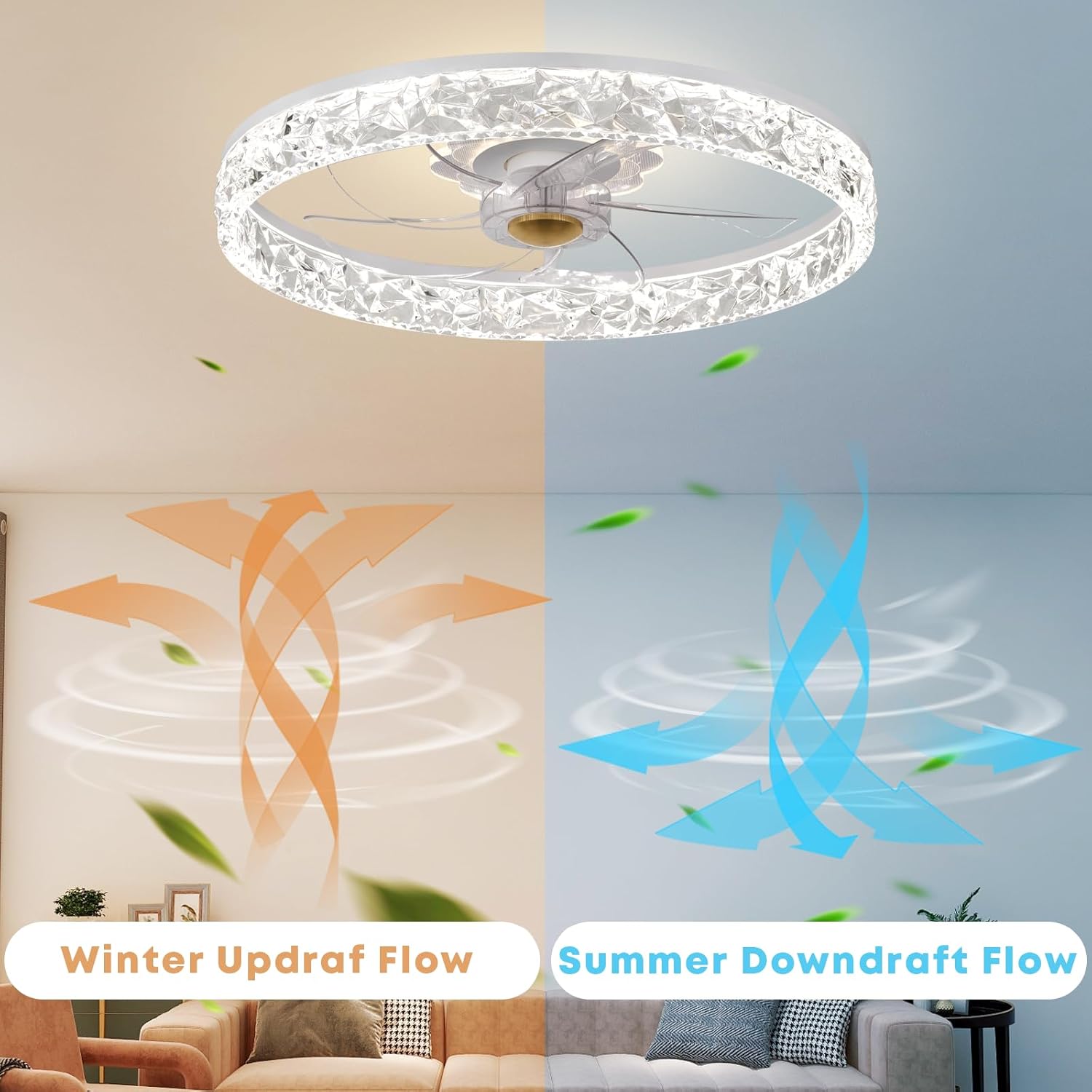
Figure 4.3: Reversible Fan Motor for Summer Downdraft and Winter Updraft Flow
5. Specifications
| Specification | Value |
|---|---|
| Brand | Fszdorj |
| Model Name | 1-F098-D |
| Color | White F098 |
| Material | Acrylic, Iron |
| Style | Modern |
| Product Dimensions | 19.7"L x 19.7"W x 5.7"H (50cm x 50cm x 14.5cm) |
| Power Source | Corded Electric |
| Installation Type | Flush Mount |
| Control Method | App, Remote |
| Light Source Type | LED |
| Voltage | 110 Volts |
| Wattage | 80 watts |
| Brightness | 3000K-6500K Lumen (3200 LM) |
| Fan Speeds | 6 Speeds |
| Noise Level | <30 dB(A) |
| Connectivity Protocol | Bluetooth |
| Suitable Area | ±20m² (approx. 215 sq ft) |
| Item Weight | 8 Pounds |
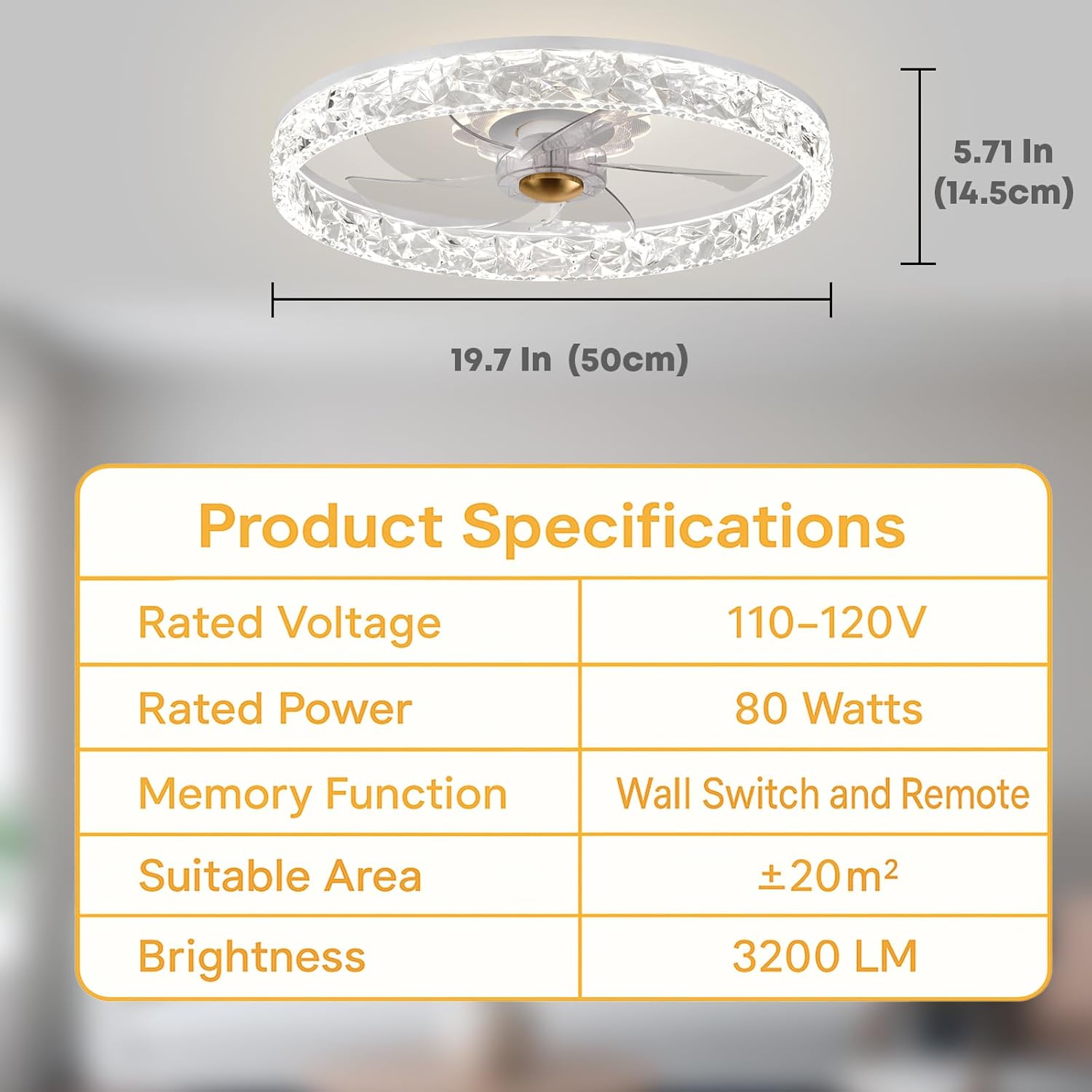
Figure 5.1: Key Product Specifications
6. Installation
This ceiling fan is designed for flush mount installation. While the installation process is straightforward, it is recommended that installation be performed by a qualified electrician to ensure safety and compliance with all electrical codes.
6.1 Pre-Installation Checklist
- Ensure power is turned off at the circuit breaker before beginning.
- Verify that the mounting location can support the fan's weight (8 lbs).
- Gather all necessary tools: screwdriver, wire strippers, electrical tape, ladder.
6.2 Installation Steps
- Prepare the Mounting Location: Secure the mounting bracket to the ceiling electrical box. Ensure the box is rated for fan support.
- Make Electrical Connections: Connect the fan's electrical wires to the household wiring according to standard electrical codes (typically black to black, white to white, and ground to ground). Use wire nuts to secure connections.
- Mount the Fan: Carefully lift the fan assembly and attach it to the mounting bracket using the provided screws. Ensure all connections are secure.
- Secure the Light Fixture: If the light fixture is separate, connect its wiring and secure it to the fan body.
- Final Check: Ensure all screws are tightened and the fan is securely mounted. Restore power at the circuit breaker.
Refer to the detailed diagrams in the included paper manual for visual guidance during installation.
7. Operation
Your Fszdorj Ceiling Fan can be operated using the included remote control or a dedicated smartphone application.
7.1 Remote Control Operation
The remote control provides full functionality for your ceiling fan and light. Ensure batteries are installed correctly (not included).

Figure 7.1: APP & Remote Control Overview

Figure 7.2: Remote Control Functions and App Download
- Light On/Off: Press the light button to toggle the main light.
- Color Temperature: Adjust between warm (3000K), natural (4500K), and cool (6500K) light.
- Dimming: Use the dimming buttons to adjust brightness from 10% to 100%.
- Fan Speed: Select from 6 fan speeds (1-6).
- Fan F/R Reverse: Toggle between summer (downdraft) and winter (updraft) modes.
- Night Light: Activate the independent night light with preset color options (violet, warm blue, soft warm).
- Timer: Set a timer for automatic fan or light shut-off.
- Pair Button: Used for pairing the remote with the fan if needed.
7.2 App Control
Download the dedicated app by scanning the QR code provided in the manual or on the product packaging. The app connects via Bluetooth and offers comprehensive control over all fan and light functions, mirroring the remote control capabilities.
- Bluetooth Connection: Ensure Bluetooth is enabled on your smartphone and follow the app's instructions to pair with the fan.
- Full Control: Adjust light brightness, color temperature, fan speed, set timers, and control the night light function directly from your phone.
8. Maintenance
Regular maintenance ensures the longevity and optimal performance of your ceiling fan.
- Cleaning: Before cleaning, ensure the power is turned off at the circuit breaker. Use a soft, damp cloth to wipe down the fan and light fixture. Do not use abrasive cleaners or solvents, as they may damage the finish or electrical components.
- Blade Cleaning: Gently wipe the fan blades to remove dust buildup.
- Tighten Fasteners: Periodically check and tighten all screws and fasteners on the fan and mounting hardware to ensure secure operation.
- No Lubrication Required: The DC motor is permanently lubricated and does not require additional oiling.
9. Troubleshooting
If you encounter issues with your ceiling fan, refer to the following common problems and solutions:
| Problem | Possible Cause | Solution |
|---|---|---|
| Fan does not start | No power to the fan; Loose wire connections; Remote control battery low/dead. | Check circuit breaker; Verify all wire connections are secure (power off first); Replace remote control batteries. |
| Light does not work | No power to the light; Loose wire connections; LED driver issue. | Check power supply; Verify light wiring connections; Contact customer support if LED driver is suspected. |
| Remote control not working | Batteries are dead or inserted incorrectly; Remote not paired with fan; Obstruction between remote and fan. | Replace batteries, ensuring correct polarity; Follow pairing instructions in the manual; Ensure clear line of sight. |
| Fan makes noise | Loose screws; Mounting bracket not secure; Obstruction in fan blades. | Tighten all screws on the fan and mounting bracket; Ensure no objects are interfering with the blades. |
| Fan wobbles | Loose mounting screws; Unbalanced blades. | Ensure mounting screws are tight; Check if blades are securely attached and balanced. |
If the problem persists after attempting these solutions, please contact Fszdorj customer support for assistance.
10. Warranty and Support
Fszdorj stands behind the quality of its products. Your 20'' Ceiling Fan with Light comes with the following warranty and support:
- 2-Year Warranty: A 2-year warranty covers all parts of the ceiling fan from the date of purchase.
- 10-Year Motor Support: The DC motor is covered by a 10-year support period.
- Customer Support: For any questions, issues, or warranty claims, please contact the Fszdorj after-sales team. We are committed to ensuring your satisfaction and provide 7/24 professional support.
Please retain your proof of purchase for warranty service.