
NuPrime STA-9X
NuPrime STA-9X Stereo Power Amplifier User Manual
Model: STA-9X | Brand: NuPrime
1. Product Overview
The NuPrime STA-9X is a high-performance stereo power amplifier, an improved version of the STA-9. It features an advanced Class A and Class D amplifier design, delivering exceptional detail and high resolution audio. This amplifier is versatile, capable of operating in both stereo and monoblock modes to suit various audio setups.
- NuPrime's STA-9X is an A+D class stereo amplifier with an output of 2 x 130W @ 8 ohms. It can also operate as a 330W monoblock amplifier in bridged mode.
- The STA-9X features a single-ended non-negative feedback Class A and dual-feedback Class D amplifier design derived from the AMG STA. This design allows the STA-9X to achieve greater detail and higher resolution than the STA-9.
- Switchable between stereo and monoblock modes.
- Enhanced H2 (even-order harmonic) circuit achieves a warm, natural sound characteristic.
- High reliability at no load, with enhanced short-circuit protection.
- 130% improvement in output current drive capability compared to STA-9, delivering powerful sound even with low-impedance speakers.
- Operates at a 750kHz switching frequency, extending frequency response for high resolution.
- Newly developed linear power supply with high-efficiency toroidal transformer reduces high-frequency noise and enhances low-frequency performance. Additionally, by avoiding capacitor cross-links in the signal path, it achieves DC-level frequency characteristics for pure musical enjoyment.
2. Package Contents
Please ensure all items are present in the package:
- NuPrime STA-9X Main Unit
- Power Cable
- User Manual (this document)
3. Safety Instructions
Before operating the NuPrime STA-9X, please read and understand the following safety precautions to prevent electric shock, fire, or damage to the unit:
- Do not expose the unit to rain or moisture.
- Do not block ventilation openings. Ensure adequate airflow around the unit.
- Do not place the unit near heat sources such as radiators, heat registers, stoves, or other apparatus (including amplifiers) that produce heat.
- Only use attachments/accessories specified by the manufacturer.
- Unplug the unit during lightning storms or when unused for long periods.
- Refer all servicing to qualified service personnel. Servicing is required when the apparatus has been damaged in any way, such as power-supply cord or plug is damaged, liquid has been spilled or objects have fallen into the apparatus, the apparatus has been exposed to rain or moisture, does not operate normally, or has been dropped.
4. Setup and Connections
Follow these steps to set up your NuPrime STA-9X amplifier:
- Placement: Place the amplifier on a stable, flat surface with sufficient ventilation. Avoid placing it directly on top of other heat-generating components.
- Power Connection: Ensure the AC voltage selector switch (if present) is set to your local voltage (115 VAC or 230 VAC). Connect the supplied power cable to the AC inlet on the rear panel and then to a wall outlet.
- Input Connections:
- For unbalanced sources (e.g., CD player, DAC with RCA outputs), connect an RCA cable from your source to the RCA input on the STA-9X.
- For balanced sources (e.g., high-end DAC with XLR outputs), connect an XLR cable from your source to the XLR input on the STA-9X.
- Speaker Connections:
- Stereo Mode: Connect your left and right speakers to the corresponding stereo speaker outputs using high-quality speaker cables. Ensure correct polarity (+ to + and - to -).
- Monoblock Mode: If using two STA-9X units for monoblock operation, refer to the specific instructions for bridging the amplifier. Each amplifier will then power one speaker.
- Trigger Connections (Optional): If you have other components with 12V trigger functionality, connect a 12V trigger cable from your source component's trigger out to the STA-9X's trigger in, and from the STA-9X's trigger out to other components' trigger in for synchronized power on/off.

Figure 4.1: Rear panel connections of the NuPrime STA-9X. This image displays the RCA and XLR input terminals, stereo and monoblock speaker outputs, and 12V trigger connections, along with the AC power inlet and voltage selector switch.
5. Operating Instructions
Once all connections are made, you can begin operating your NuPrime STA-9X:
- Power On: Flip the main power switch on the rear panel to the 'ON' position. The front panel indicator light will illuminate.
- Source Selection: The STA-9X automatically detects the active input. Ensure your source component is powered on and playing audio.
- Volume Control: The STA-9X is a power amplifier and does not have its own volume control. Volume must be controlled by your preamplifier or source component. Start with a low volume setting on your preamplifier before increasing it.
- Stereo/Monoblock Mode: The STA-9X has a switch to select between stereo and monoblock (bridged) operation. Ensure this switch is set correctly according to your setup. Refer to the diagram near the switch for proper configuration.
- Power Off: To turn off the amplifier, flip the main power switch on the rear panel to the 'OFF' position.

Figure 5.1: Front view of the NuPrime STA-9X. This image shows the minimalist front panel design with the NuPrime logo and a small indicator light.
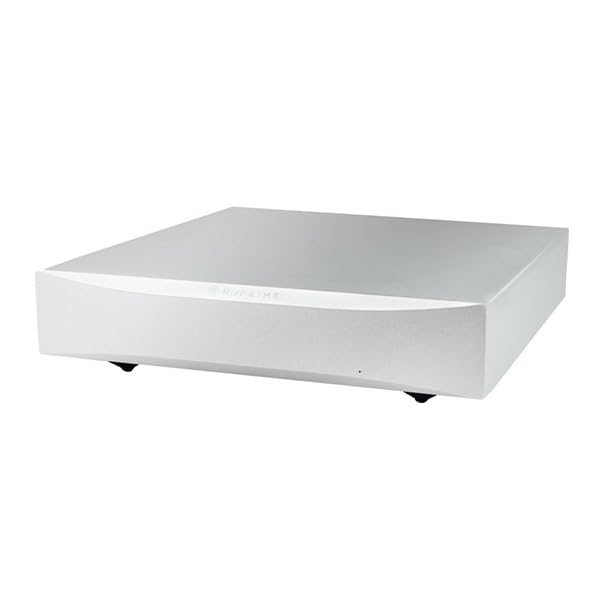
Figure 5.2: Angled front view of the NuPrime STA-9X. This perspective highlights the sleek, modern design of the amplifier chassis.
6. Maintenance
Proper maintenance ensures the longevity and optimal performance of your NuPrime STA-9X amplifier:
- Cleaning: Use a soft, dry cloth to wipe the exterior of the unit. Do not use liquid cleaners or aerosol sprays, as they may damage the finish or internal components.
- Ventilation: Regularly check that the ventilation openings are clear of dust and debris. Blocked vents can lead to overheating.
- Connections: Periodically check all cable connections to ensure they are secure. Loose connections can degrade sound quality.
- Storage: If storing the unit for an extended period, disconnect it from power and store it in a cool, dry place, preferably in its original packaging.

Figure 6.1: Internal view of the NuPrime STA-9X. This image provides a glimpse into the amplifier's internal components, including the high-efficiency toroidal transformer and the meticulously designed circuit board.
7. Troubleshooting
If you encounter issues with your NuPrime STA-9X, refer to the following common problems and solutions:
| Problem | Possible Cause | Solution |
|---|---|---|
| No power | Power cable not connected; Power switch off; Blown fuse | Ensure power cable is securely connected. Turn power switch ON. Check AC fuse (refer to specifications for type). If fuse is blown, replace with the correct type. If problem persists, contact support. |
| No sound | Incorrect input/output connections; Preamplifier/source not powered on or muted; Speaker cables loose or incorrect polarity; Amplifier in wrong mode (stereo/monoblock) | Verify all audio connections. Ensure preamplifier/source is on and volume is up. Check speaker cable connections and polarity. Confirm amplifier mode switch is set correctly. |
| Distorted sound | Overdriving input signal; Loose connections; Damaged speaker/cable | Reduce input volume from source/preamplifier. Check all cable connections. Inspect speaker cables and speakers for damage. |
| Unit gets hot | Insufficient ventilation; Prolonged high-volume operation | Ensure adequate space around the unit for airflow. Avoid blocking vents. If operating at very high volumes for extended periods, some heat is normal. If it's excessively hot or shuts down, contact support. |
If the problem persists after attempting these solutions, please contact NuPrime customer support.
8. Specifications
| Feature | Detail |
|---|---|
| Manufacturer | NuPrime |
| Model Number | NP-STA-9-SVR |
| Color | Black/Silver |
| Input Terminals | RCA (Unbalanced) x1, XLR (Balanced) x1, Trigger Input (12V) |
| Output Terminals | Stereo Speaker Output x1, Monoblock Speaker Output x1, Trigger Output (12V) |
| Output Power | 2 x 130W / 1 x 330W @ 8 ohms |
| Peak Output Power | 2 x 170W / 1 x 370W @ 8 ohms |
| Input Impedance | 47k ohms |
| Gain | x 28.5 |
| S/N Ratio | > 90dB (at 1W, 10W, 100W) |
| THD+N | 0.005% (Stereo) / 0.005% (Mono) |
| Frequency Response | 10Hz - 50kHz |
| AC Voltage | 115 VAC / 230 VAC (with voltage selector switch) |
| AC Fuse | Slow blow, 3A, 250VAC |
| Dimensions (W x D x H) | 235 mm x 281 mm x 60 mm (including terminals, feet) |
| Weight | 4kg |
| Included Components | Main unit, power cable |
| ASIN | B0CMQQTH95 |
| First Available Date on Amazon.co.jp | 2023/11/6 |
9. Warranty and Support
NuPrime products are designed for reliability and performance. For warranty information and technical support, please refer to the official NuPrime website or contact your authorized dealer.
Keep your proof of purchase for warranty claims. Do not attempt to service the unit yourself, as this may void the warranty and pose a safety risk.
For further assistance, please visit: NuPrime Official Website
Related documentsSTA-9X


Ask a question about this manual
Ask about setup, troubleshooting, compatibility, parts, safety, or missing instructions. Manuals+ will review the question and use this page’s manual context to help answer it.