
Introduction
This manual provides essential information for setting up, operating, and maintaining your Apple iPhone 15. Designed for intuitive use, the iPhone 15 combines powerful performance with advanced features to enhance your daily communication and productivity.
Please read this manual thoroughly to ensure proper use and to maximize your device's capabilities.
What's in the Box
Upon unboxing your Apple iPhone 15, you should find the following items:
- Apple iPhone 15 (128GB, Black)
- USB-C Charging Cable
Note: A power adapter is not included in the box and must be purchased separately.
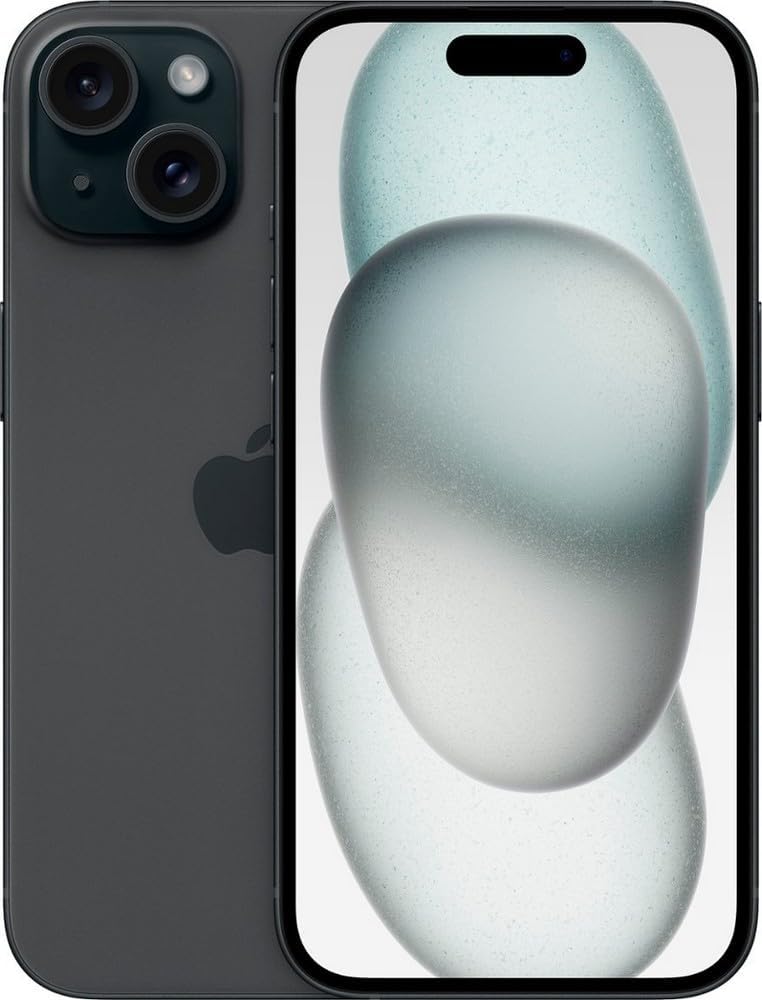
Image: Apple iPhone 15 and its included USB-C charging cable within the packaging.
Setup
Initial Setup
- Power On: Press and hold the Side button until the Apple logo appears.
- Language & Region: Follow the on-screen prompts to select your language and region.
- Quick Start: If you have another iPhone or iPad, you can use Quick Start to set up your new iPhone automatically. Place your current device near your new iPhone and follow the instructions.
- Wi-Fi Network: Connect to a Wi-Fi network to proceed with the setup.
- Face ID & Passcode: Set up Face ID for secure facial recognition and create a passcode for additional security.
- Data Transfer: Choose to restore from an iCloud backup, restore from a Mac or PC backup, transfer directly from another iPhone, or set up as a new iPhone.
- Apple ID: Sign in with your Apple ID or create a new one.
SIM/eSIM Activation
The iPhone 15 supports eSIM technology. Contact your carrier to activate an eSIM profile for cellular service. Physical SIM cards are not supported on this model.
Operating Your iPhone
Basic Navigation
- Home Screen: Swipe up from the bottom edge of the screen to go to the Home Screen.
- App Switcher: Swipe up from the bottom edge and pause in the middle of the screen to view open apps.
- Control Center: Swipe down from the top-right corner of the screen to access Control Center.
- Dynamic Island: The Dynamic Island adapts in real-time to show important alerts, notifications, and activities, such as incoming calls, Face ID authentication, and music playback.
Camera Features
The iPhone 15 features an advanced dual-camera system:
- 48MP Main Camera: Capture incredibly detailed photos with the high-resolution main camera.
- Ultra Wide Camera: Expand your view with the Ultra Wide lens, perfect for landscapes and group shots.
- Portrait Mode: Create stunning portraits with beautiful depth effect and focus control.
- 4X Optical Zoom Range: Zoom in on your subjects with clarity.

Image: Close-up view of the iPhone 15's dual camera system on the rear.
Connectivity
- USB-C: The iPhone 15 features a USB-C port for charging, data transfer, and connecting accessories. It supports USB 2 speeds.
- Bluetooth & Wi-Fi: Connect to wireless accessories and networks seamlessly.
Emergency Features
- Emergency SOS via Satellite: In areas without cellular and Wi-Fi coverage, your iPhone can connect to a satellite to text emergency services.
- Crash Detection: Your iPhone can detect a severe car crash and automatically call emergency services if you're unresponsive.
- Roadside Assistance via Satellite: Get help with car troubles in remote areas.
Maintenance
Battery Care
To maximize battery lifespan, avoid extreme temperatures. Optimize battery charging by enabling "Optimized Battery Charging" in Settings > Battery > Battery Health & Charging. The iPhone 15 offers up to 26 hours of video playback.
Cleaning
Use a soft, lint-free cloth to clean your iPhone. Avoid abrasive materials or harsh chemicals. Do not submerge your iPhone in cleaning solutions.
Software Updates
Keep your iPhone's software up to date by going to Settings > General > Software Update. Regular updates provide new features, security enhancements, and bug fixes.
Storage Management
Your iPhone 15 comes with 128GB of storage. To manage storage, go to Settings > General > iPhone Storage. You can offload unused apps or delete large files to free up space.
Troubleshooting
Common Issues
- Device Unresponsive: Force restart your iPhone by quickly pressing and releasing the Volume Up button, then quickly pressing and releasing the Volume Down button, then press and hold the Side button until the Apple logo appears.
- Connectivity Problems: Try toggling Wi-Fi or Bluetooth off and on. For cellular issues, ensure your eSIM is active and contact your carrier if problems persist.
- Battery Drain: Check Battery Usage in Settings > Battery to identify apps consuming significant power. Reduce screen brightness and disable unnecessary background app refresh.
Factory Reset
If you experience persistent issues, you may need to erase all content and settings. Go to Settings > General > Transfer or Reset iPhone > Erase All Content and Settings. This will return your iPhone to its factory state.
Specifications
| Feature | Detail |
|---|---|
| Display | 6.1-inch Super Retina XDR display |
| Processor | A16 Bionic chip with 5-core GPU |
| Storage | 128GB |
| Rear Camera System | 48MP Main, Ultra Wide |
| Front Camera | Face ID enabled |
| Connectivity | USB-C (USB 2), Bluetooth, Wi-Fi, Cellular (eSIM) |
| Operating System | iOS 17 |
| Battery Life | Up to 26 hours video playback |
| Dimensions | 5.81 x 2.82 x 0.31 inches |
| Weight | 5.9 ounces |
Warranty and Support
Your Apple iPhone 15 (Renewed) is covered by the Amazon Renewed Guarantee, which provides a replacement or refund within 90 days of receipt if the product does not work as expected. For further support, please refer to the Amazon Renewed program details or contact Amazon customer service.
For general Apple product support, visit the official Apple Support website.