
Smartby Universal Remote for All TVs
Smartby Universal Remote Control Instruction Manual
Model: Universal Remote for All TVs
Introduction
This manual provides instructions for setting up and operating your Smartby Universal Remote Control. This remote is designed to control a wide range of television brands, including LG, Samsung, Sony, Hisense, TCL, Philips, Vizio, Panasonic, Sanyo, Insignia, Toshiba, Sharp, and many others. Please read this manual thoroughly before use to ensure proper setup and functionality.
Safety Information
- Keep batteries out of reach of children.
- Do not mix old and new batteries, or different types of batteries.
- Remove batteries if the remote will not be used for an extended period.
- Dispose of batteries according to local regulations.
- Avoid exposing the remote to extreme temperatures, direct sunlight, or moisture.
Package Contents
- 1 x Smartby Universal Remote Control
- 1 x Instruction Manual (this document)
Note: Two (2) AAA batteries are required and not included.
Product Overview
Familiarize yourself with the buttons and layout of your universal remote control.
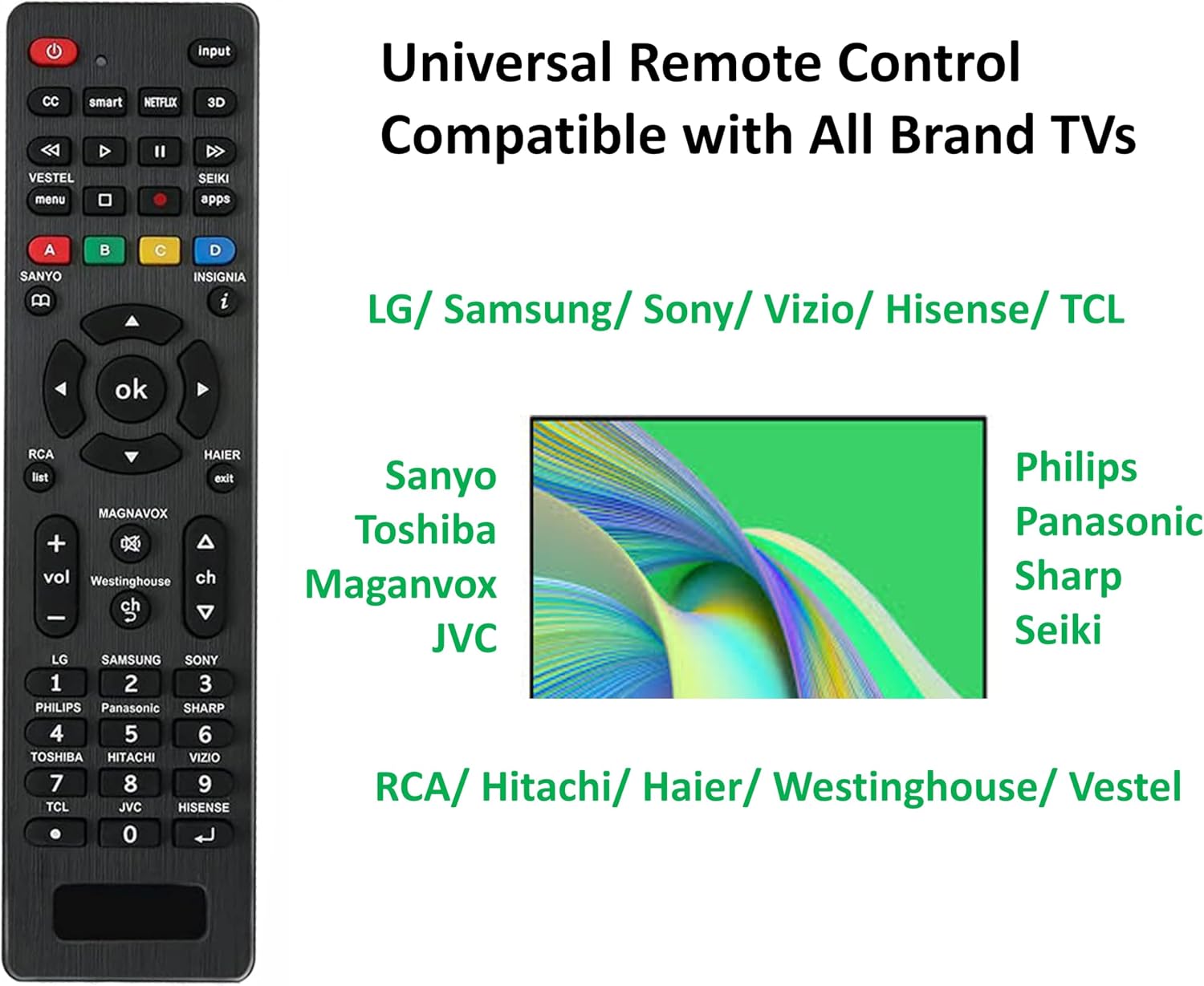
This image displays the front of the Smartby Universal Remote Control, highlighting its various buttons such as Power, Input, CC, Smart, Netflix, 3D, Menu, Apps, directional pad with OK button, Volume, Channel, and number pad. It also shows dedicated brand buttons for LG, Samsung, Sony, Philips, Panasonic, Sharp, Toshiba, Hitachi, Vizio, TCL, JVC, Hisense, Sanyo, Insignia, Magnavox, RCA, Haier, Westinghouse, and Vestel.

This image shows the side profile and the back of the Smartby Universal Remote Control. The back view includes the battery compartment cover and a small label with setting instructions for preprogrammed and other brands.
Setup Instructions
1. Battery Installation
- Open the battery compartment cover on the back of the remote control.
- Insert two (2) AAA batteries, ensuring correct polarity (+/-).
- Close the battery compartment cover.
2. Setting Up Your TV
The Smartby Universal Remote Control offers two primary methods for setting up your television: Code Setup and Brand Search. Some popular brands like LG, Samsung, Sony, Panasonic, Philips, and Sharp may be preprogrammed for direct control.
Method A: Code Setup (Recommended for specific models)
- Press and hold the MUTE and POWER buttons simultaneously for 3 seconds until the LED indicator light illuminates.
- Release both buttons. The LED light will remain on.
- Refer to the provided code list (see image below) and input the 3-digit TV code for your television brand.
- If the code is correct, the LED light will turn off, indicating successful setup.
- If the LED light remains on, the code was incorrect. Repeat the process from step 1 with a different code from the list for your brand.

This image provides a comprehensive guide for setting up the universal remote. It details the steps for code setup, including a table of 3-digit codes for brands like LG, Samsung, Sony, Philips, Panasonic, Sharp, Toshiba, Hitachi, Vizio, TCL, JVC, Hisense, Sanyo, Insignia, Magnavox, RCA, Haier, and Westinghouse. It also illustrates the brand search method.
Method B: Brand Search (For quick setup or if code is unknown)
- Locate the corresponding brand button on the remote (e.g., LG, Samsung, Sony, etc.).
- Press and hold the brand button for 5 seconds.
- The LED indicator light on the remote will flash three times.
- Release the button. The setting is now complete. Test the remote's functions.

This image shows the universal remote and explains that it is preprogrammed for direct control of many TV brands like LG, Samsung, Sony, Panasonic, Philips, and Sharp. It also describes the "Other Brand Setting" method, which involves pressing a brand button for 5 seconds until the LED flashes three times.
Operating Instructions
Once set up, your Smartby Universal Remote Control functions similarly to your original TV remote. Below are common button functions:
- Power Button: Turns your TV on or off.
- Input Button: Cycles through video input sources (HDMI 1, HDMI 2, AV, etc.).
- Number Pad (0-9): Directly enter channel numbers.
- Volume Up/Down (VOL +/-): Adjusts the television's volume.
- Channel Up/Down (CH +/-): Changes the television channel.
- Mute Button: Mutes or unmutes the television's audio.
- Directional Pad (Up/Down/Left/Right) & OK Button: Navigate menus and confirm selections.
- Smart/Netflix/3D Buttons: Access specific smart TV features or streaming services, if supported by your TV.
- Menu/Apps Buttons: Access your TV's main menu or application list.
- CC (Closed Captioning): Toggles closed captions on or off.
- Playback Controls (Play, Pause, Stop, Rewind, Fast Forward): Control media playback.
- Color Buttons (A, B, C, D): Function as context-sensitive buttons within TV menus or apps.
Note: Specific button functions may vary slightly depending on your TV model and brand.
Maintenance
- Clean the remote control regularly with a soft, dry cloth. Do not use liquid cleaners.
- Avoid dropping the remote or subjecting it to strong impacts.
- If the remote becomes unresponsive or less sensitive, replace the batteries.
- Store the remote in a cool, dry place when not in use for extended periods.
Troubleshooting
- Remote not working after setup:
- Ensure batteries are inserted correctly with proper polarity.
- Replace old batteries with new AAA batteries.
- Try re-entering the 3-digit code for your TV brand.
- If using Brand Search, ensure you held the button for the full 5 seconds until the LED flashed three times.
- Ensure there are no obstructions between the remote and the TV's infrared receiver.
- Some functions not working:
- Not all functions of your original TV remote may be supported by a universal remote.
- Ensure the remote is correctly programmed for your specific TV model. Try alternative codes if available.
- LED light stays on after code entry:
- This indicates an incorrect code. Re-enter the code or try a different one from the list.
- Remote controls another device unintentionally:
- If programming in a multi-device environment, temporarily unplug other devices (e.g., other TVs) to prevent interference during the setup process.
Specifications
- Product Dimensions: 6 x 1.6 x 0.7 inches
- Item Weight: 2.08 ounces
- Power Source: 2 x AAA Batteries (not included)
- Compatible Devices: Television
- Max Number of Supported Devices: 1
- Color: Black
- Special Feature: Lightweight, Universal
- Model Number: Universal Remote for All TVs
- Manufacturer: Smartby
Warranty Information
Specific warranty details are not provided in the product information. Please refer to the retailer's return policy or contact Smartby customer support for warranty inquiries.
Support
For further assistance or troubleshooting not covered in this manual, please contact Smartby customer support.
Contact information was not available in the provided product data. Please refer to the product packaging or retailer's website for support details.
Ask a question about this manual
Ask about setup, troubleshooting, compatibility, parts, safety, or missing instructions. Manuals+ will review the question and use this page’s manual context to help answer it.