
1. Introduction
This manual provides instructions for the ALLIMITY XMRM-M3 Voice Remote Control. This remote is designed for use with specific Xiaomi Smart TV models, offering convenient control and voice command functionality. Please read this manual carefully before using the remote control.
2. Product Overview
The ALLIMITY XMRM-M3 is a replacement voice remote control for various Xiaomi Smart TV models. It features dedicated buttons for popular streaming services and a built-in microphone for voice commands.

Figure 1: Front view of the ALLIMITY XMRM-M3 Voice Remote Control, showing power, voice assistant, navigation, and app buttons.
Key Features:
- Voice control capability for hands-free operation.
- Dedicated buttons for quick access to popular applications like Netflix and YouTube.
- Ergonomic design for comfortable handling.
- No programming required after battery installation for basic functions.
3. Setup
3.1 Battery Installation
The remote control requires two AAA alkaline batteries (not included).
- Locate the battery compartment cover on the back of the remote control.
- Slide the cover downwards or press the latch to open it.
- Insert two AAA alkaline batteries, ensuring the positive (+) and negative (-) terminals match the diagrams inside the compartment.
- Replace the battery compartment cover, sliding it back into place until it clicks securely.
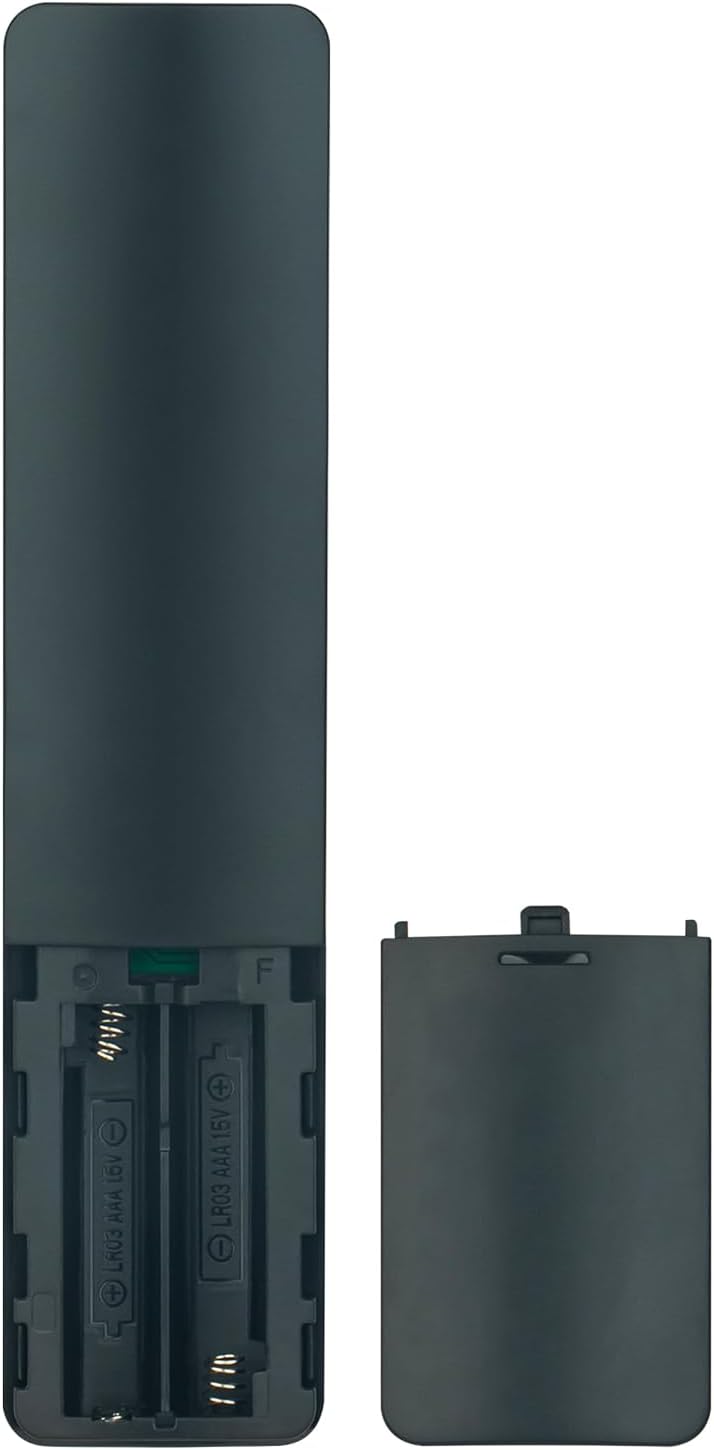
Figure 2: Battery compartment of the remote control, illustrating correct battery insertion.
3.2 Pairing for Voice Functionality
While basic functions work immediately after battery installation, the voice control feature requires pairing the remote with your Xiaomi Smart TV.
- Ensure your TV is powered on.
- Navigate to the TV's settings menu.
- Look for options related to "Remotes & Accessories" or "Bluetooth Devices."
- Select "Add device" or "Pair new remote."
- Follow the on-screen instructions to put the remote into pairing mode (often by holding specific buttons, refer to your TV's manual for exact steps if needed).
- Once paired, the voice control function will be active.
4. Operating the Remote Control
This section describes the primary functions of the remote control buttons.

Figure 3: Remote control with an emphasis on the voice command button.
- Power Button (⏻): Turns the TV on or off.
- Voice Assistant Button (Microphone icon): Activates the voice control feature. Press and hold to speak commands.
- Navigation Pad (Circular buttons): Use the directional arrows to move through menus and the center button to confirm selections.
- Back Button (↩): Returns to the previous screen or menu.
- Home Button (🏠): Returns to the TV's home screen.
- Volume Buttons (+/-): Adjusts the TV volume.
- Netflix Button: Direct access to the Netflix application.
- YouTube Button: Direct access to the YouTube application.
- Prime Video Button: Direct access to the Prime Video application.
- Apps Button: Opens the TV's application menu.
5. Maintenance
5.1 Battery Replacement
Replace batteries when the remote control's response becomes sluggish or stops working. Always replace both batteries at the same time with new AAA alkaline batteries. Do not mix old and new batteries, or different types of batteries.
5.2 Cleaning
To clean the remote control, use a soft, dry cloth. Do not use liquid cleaners, sprays, or abrasive materials, as these can damage the remote's surface or internal components.
6. Troubleshooting
- Remote not responding:
- Check if the batteries are inserted correctly with the correct polarity.
- Replace the batteries with new AAA alkaline batteries.
- Ensure there are no obstructions between the remote and the TV's infrared receiver.
- Voice control not working:
- Confirm that the remote control is properly paired with your TV (refer to Section 3.2).
- Ensure the TV's internet connection is stable, as voice commands often require online processing.
- Speak clearly and directly into the remote's microphone.
- Specific app buttons not working:
- Ensure the respective applications are installed and updated on your Xiaomi Smart TV.
- Check your TV's network connection.
7. Specifications
| Feature | Detail |
|---|---|
| Model | XMRM-M3 |
| Brand | ALLIMITY |
| Compatible TV Models | Xiaomi Smart TV L55M6-ESG, L55M6-ARG, MDZ-24-AA |
| Connectivity Technology | Infrared (IR) and Bluetooth (for voice function) |
| Battery Type | 2 x AAA Alkaline Batteries (not included) |
| Special Feature | Voice Control, Ergonomic Design |
| Maximum Range | 33 Feet (approx. 10 meters) |
8. Warranty and Support
For warranty information or technical support, please refer to the documentation provided with your purchase or contact the seller directly. Keep your purchase receipt as proof of purchase.