1. Introduction and Overview
The MOMAN PC8 On-Camera RGB LED Video Light is a compact and versatile lighting solution designed for photographers, videographers, and content creators. It offers extensive control over lighting conditions with adjustable color temperature, brightness, and a variety of built-in lighting effects. Its portable design and long-lasting battery make it an ideal companion for on-the-go shooting.

Figure 1.1: MOMAN PC8 On-Camera RGB LED Video Light, showing its compact size, compatibility with a camera, and app control interface.
2. What's in the Box
Upon opening your MOMAN PC8 package, please ensure all the following items are present:
- 1 x PC8 Video Light
- 1 x Light Diffuser
- 1 x Cold Shoe Mount
- 1 x Type-C Charging Cable
- 1 x User Manual
- 1 x Pack Bag

Figure 2.1: Visual representation of the items included in the MOMAN PC8 product package.
3. Key Features
- Dimmable RGB LED Light: 91 LEDs with CRI ≥95 for authentic and vibrant color reproduction. Dimmable from 2500K to 9000K, offering cool and warm atmospheres. Brightness control from 0%-100%.
- Long-lasting Battery: Built-in 3100mAh rechargeable lithium battery provides up to 2 hours of full brightness output and up to 15 hours at minimum brightness. Can be used while charging via Type-C port.
- Portable & Durable: Lightweight (125g) and compact design (4.53 x 2.68 x 0.63 inches) for easy portability. Supports 5V 2A output to power other devices (cables excluded).
- 13 Built-in Lighting Effects: Features effects like Fire, CCT chase, TV, Explosion, Faulty Bulb, Welding, Strobe, Lightning, and SOS for diverse cinematic scenarios.
- Easy Control & Installation: Wheel design for step-less and fast adjustment. Remote control via MOMAN Light APP. OLED display shows working status, battery life, brightness, etc. Includes a 1/4" screw hole and cold shoe mount for versatile installation on cameras, camcorders, light stands, and tripods.

Figure 3.1: The MOMAN PC8 light demonstrating its wide color temperature range (2500K-9000K) and brightness adjustment capabilities.
4. Setup
4.1 Initial Charging
Before first use, fully charge the MOMAN PC8 light. Connect the provided Type-C charging cable to the light's charging port and the other end to a compatible USB power source (e.g., wall adapter, power bank, computer USB port). The OLED display will indicate charging status.
4.2 Attaching the Cold Shoe Mount
To attach the cold shoe mount, screw it into the 1/4" screw hole located on the bottom of the light. Once secured, slide the cold shoe mount into your camera's hot shoe or any compatible cold shoe accessory.
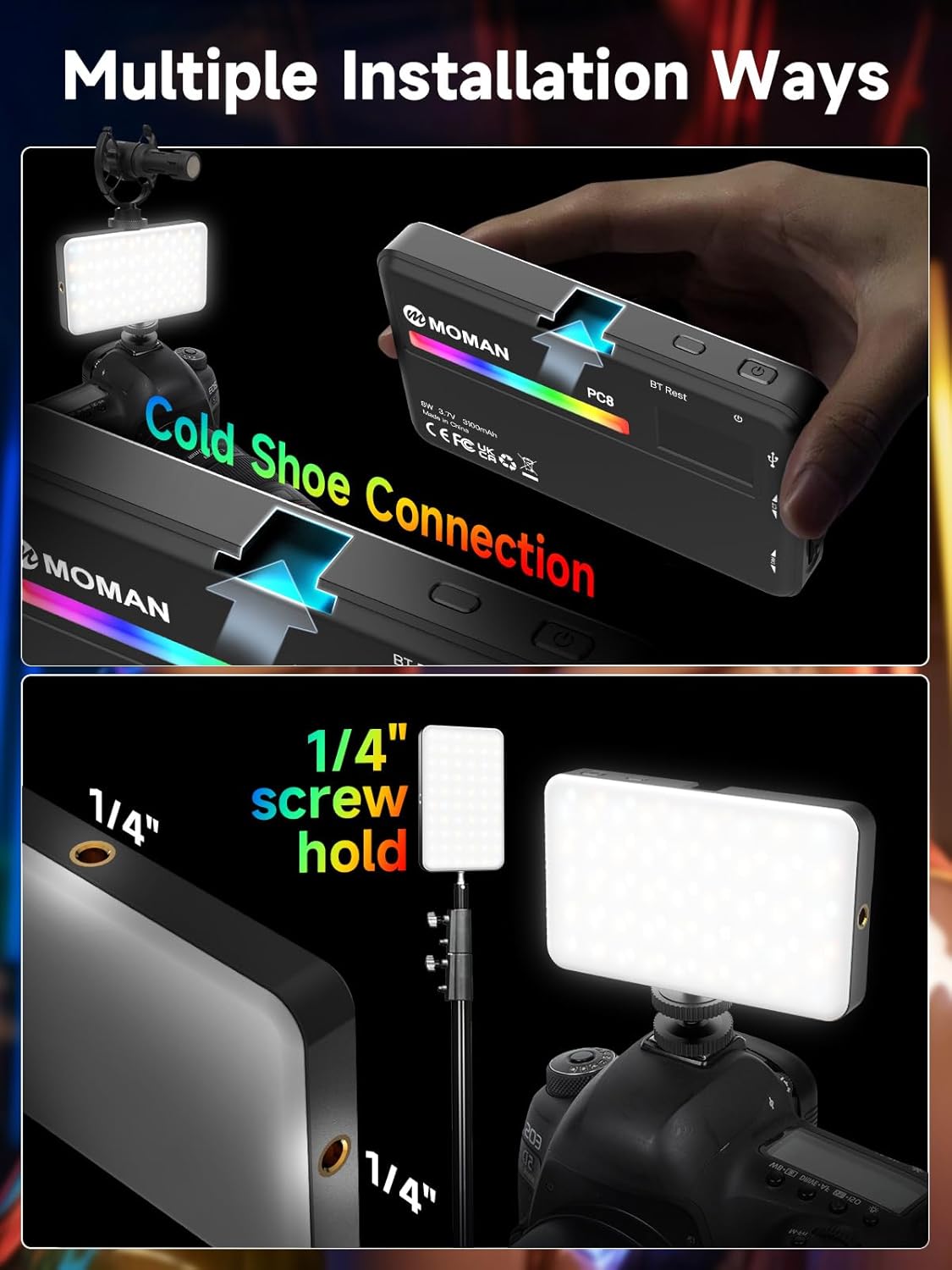
Figure 4.1: Illustration of how to connect the cold shoe mount to the light and attach it to a camera, or use the 1/4" screw hole for other mounting options.
4.3 App Connection (Optional)
For remote control, download the MOMAN Light APP (available for iOS systems). Short press the APP Pairing Button on the light to initiate wireless connection. Follow the in-app instructions to pair your device.
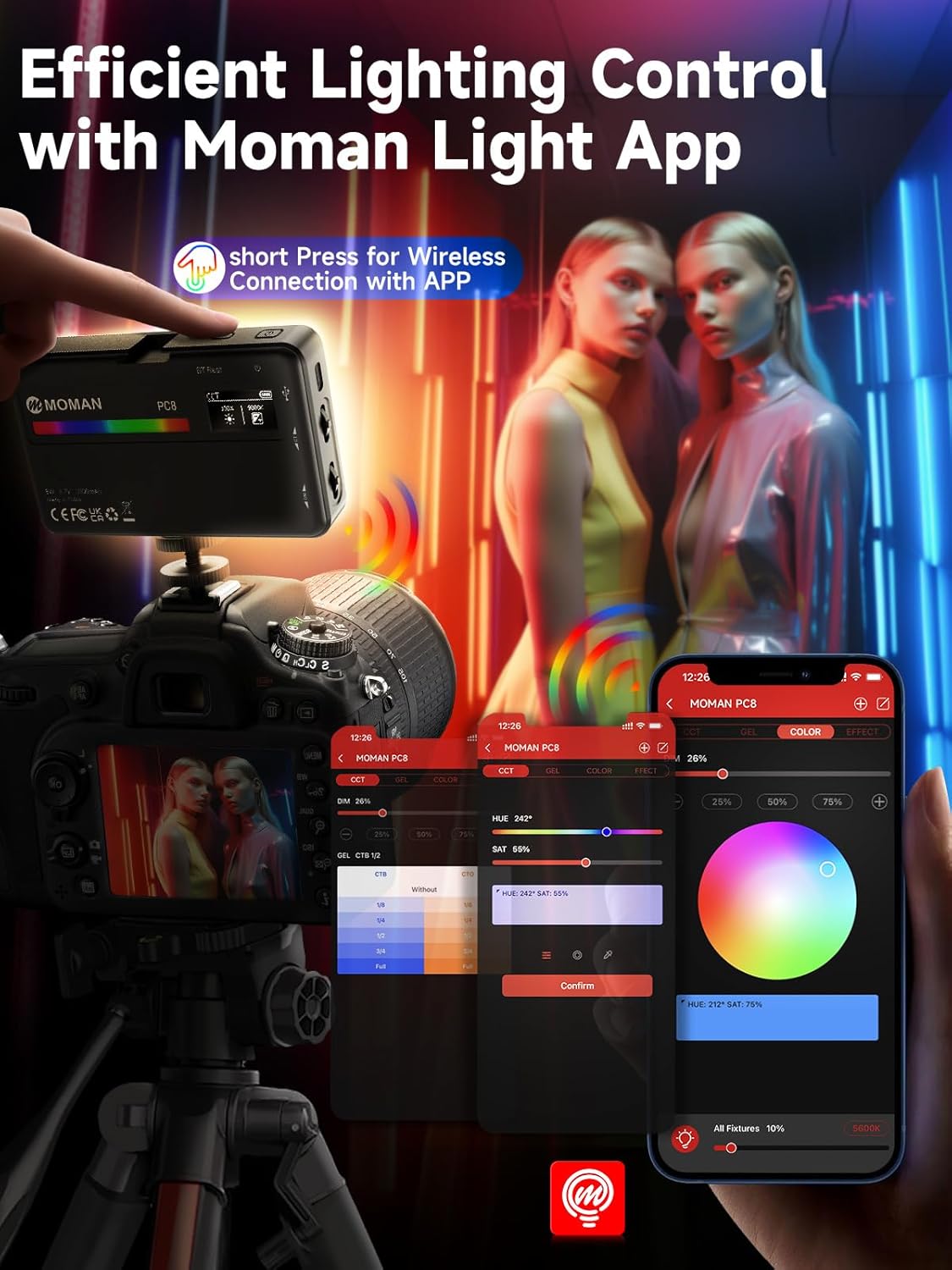
Figure 4.2: The MOMAN PC8 light being controlled wirelessly via the MOMAN Light App on a smartphone, demonstrating efficient lighting control.
5. Operating Instructions
5.1 Power On/Off and Mode Selection
- Power On/Off: Long press the On/Off/Mode Button for 3 seconds to turn the light on or off.
- Mode Switching: Short press the On/Off/Mode Button to switch between the three main modes: CCT (Color Correlated Temperature), HSI (Hue, Saturation, Intensity), and EFF (Effects).
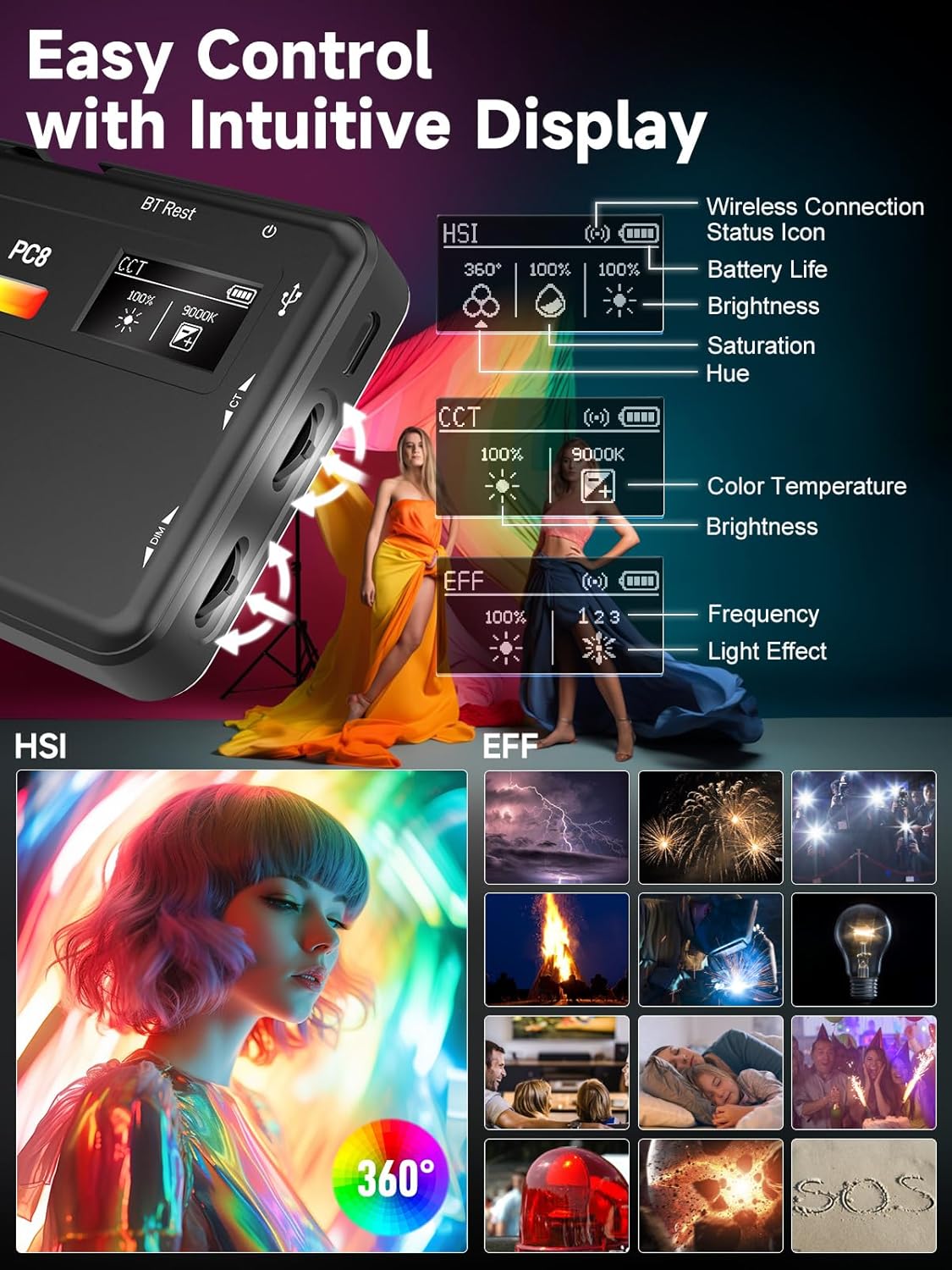
Figure 5.1: The intuitive OLED display of the MOMAN PC8, illustrating the different lighting modes (HSI, CCT, EFF) and their respective adjustable parameters.
5.2 Adjusting Settings
- Brightness Control: Use the Brightness Control Wheel to adjust the light intensity from 0% to 100%.
- Color Temperature (CCT Mode): In CCT mode, use the Option & Adjustment Wheel to change the color temperature from 2500K (warm) to 9000K (cool).
- Hue/Saturation (HSI Mode): In HSI mode, use the Option & Adjustment Wheel to adjust the hue (0-360°) and saturation (0-100%).
- Light Effects (EFF Mode): In EFF mode, use the Option & Adjustment Wheel to cycle through the 13 built-in lighting effects, including Fire, CCT chase, TV, Explosion, Faulty Bulb, Welding, Strobe, Lightning, and SOS.
5.3 Official Product Video Demonstration
Watch the official product video from Moman_PhotoGears for a comprehensive demonstration of the light's features and operation.
Video 5.1: Moman On Camera Light 2500-9000K with Cold Shoe - Official demonstration by Moman_PhotoGears, showcasing various features and usage scenarios.
6. Charging and Battery
The MOMAN PC8 is equipped with a 3100mAh built-in rechargeable lithium battery. A full charge provides approximately 2 hours of continuous operation at 100% brightness, and up to 15 hours at minimum brightness. The device can be used while charging, ensuring uninterrupted workflow.

Figure 6.1: The compact size and 3100mAh battery capacity of the MOMAN PC8, highlighting its portability and runtime.
7. Maintenance
To ensure the longevity and optimal performance of your MOMAN PC8 light, follow these maintenance guidelines:
- Cleaning: Use a soft, dry cloth to clean the exterior of the light. Do not use harsh chemicals or abrasive materials.
- Storage: Store the light in a cool, dry place away from direct sunlight and extreme temperatures. Use the provided pack bag for protection during storage and transport.
- Battery Care: For optimal battery life, avoid fully discharging the battery frequently. If storing for extended periods, charge the battery to about 50-70%.
8. Troubleshooting
If you encounter any issues with your MOMAN PC8 light, refer to the following common troubleshooting steps:
- Light Does Not Turn On:
- Ensure the battery is charged. Connect the light to a power source using the Type-C cable.
- Perform a long press (3 seconds) on the On/Off/Mode button.
- App Connection Issues:
- Ensure Bluetooth is enabled on your mobile device.
- Short press the APP Pairing Button on the light to activate pairing mode.
- Restart the MOMAN Light APP and try connecting again.
- Light Randomly Shuts Off:
- This could indicate a low battery. Recharge the device.
- Overheating can cause automatic shutdown. Allow the device to cool down before resuming use.
If the issue persists, please contact customer support for further assistance.
9. Specifications
| Product Dimensions | 4.53 x 2.68 x 0.63 inches |
| Item Weight | 6.7 ounces |
| Item Model Number | MTUMO-PC8-BKUK |
| Battery Capacity | 3100mAh (1 Lithium Ion battery required) |
| Battery Life (Max Brightness) | 80 minutes (approx. 2 hours at 100% brightness as per feature bullets) |
| Color Temperature Range | 2500K - 9000K |
| CRI Rating | ≥95 |
| Connectivity Technology | USB (Type C) |
| Manufacturer | Moman |
| Country of Origin | China |
10. Warranty and Support
MOMAN offers a 365-day warranty for the PC8 On-Camera RGB LED Video Light. For any inquiries, technical support, or warranty claims, please contact MOMAN customer service. They aim to reply within 24 hours on working days and provide solutions until you are satisfied.
You can visit the official Moman Store for more information: Moman Store on Amazon
11. Safety Warnings
WARNING: Please read and adhere to the following safety precautions to prevent damage to the product or personal injury.
- Keep the product away from fire.
- Do not expose the product to water or excessive moisture.
- Avoid dropping or subjecting the product to strong impacts.
- Do not attempt to disassemble or modify the product.
- Keep out of reach of children.

Figure 11.1: Important safety warning regarding keeping the product away from fire.


