
Introduction
Thank you for choosing the ODK L-Shaped Desk. This manual provides detailed instructions for assembly, operation, maintenance, and safety to ensure optimal use of your new desk. Please read this manual thoroughly before beginning assembly or use.
Safety Information
WARNING: To prevent injury or damage, always adhere to the following safety guidelines:
- Do not use the desk near water or in excessively humid environments.
- Unplug the desk from the power source when not in use or during cleaning.
- Do not overload the power outlets or USB ports. Ensure connected devices do not exceed the specified electrical ratings.
- Keep the desk away from direct heat sources, open flames, or flammable materials.
- Always follow the manufacturer's instructions for assembly and proper use.
- Ensure all connections are secure before applying power.
- Keep small parts and packaging materials away from children to prevent choking hazards.
Package Contents
Before assembly, verify that all components are present and undamaged. Refer to the included parts list in your physical package for exact quantities. Common components include:
- Desk panels (main desktop, L-extension, monitor shelf)
- Metal frame components (legs, support beams)
- 4 fabric drawers
- Power strip with 2 AC outlets and 2 USB ports
- LED light strip with controller
- Storage bag
- Assembly hardware (screws, bolts, nuts, Allen wrench, screwdriver)
- Instruction manual
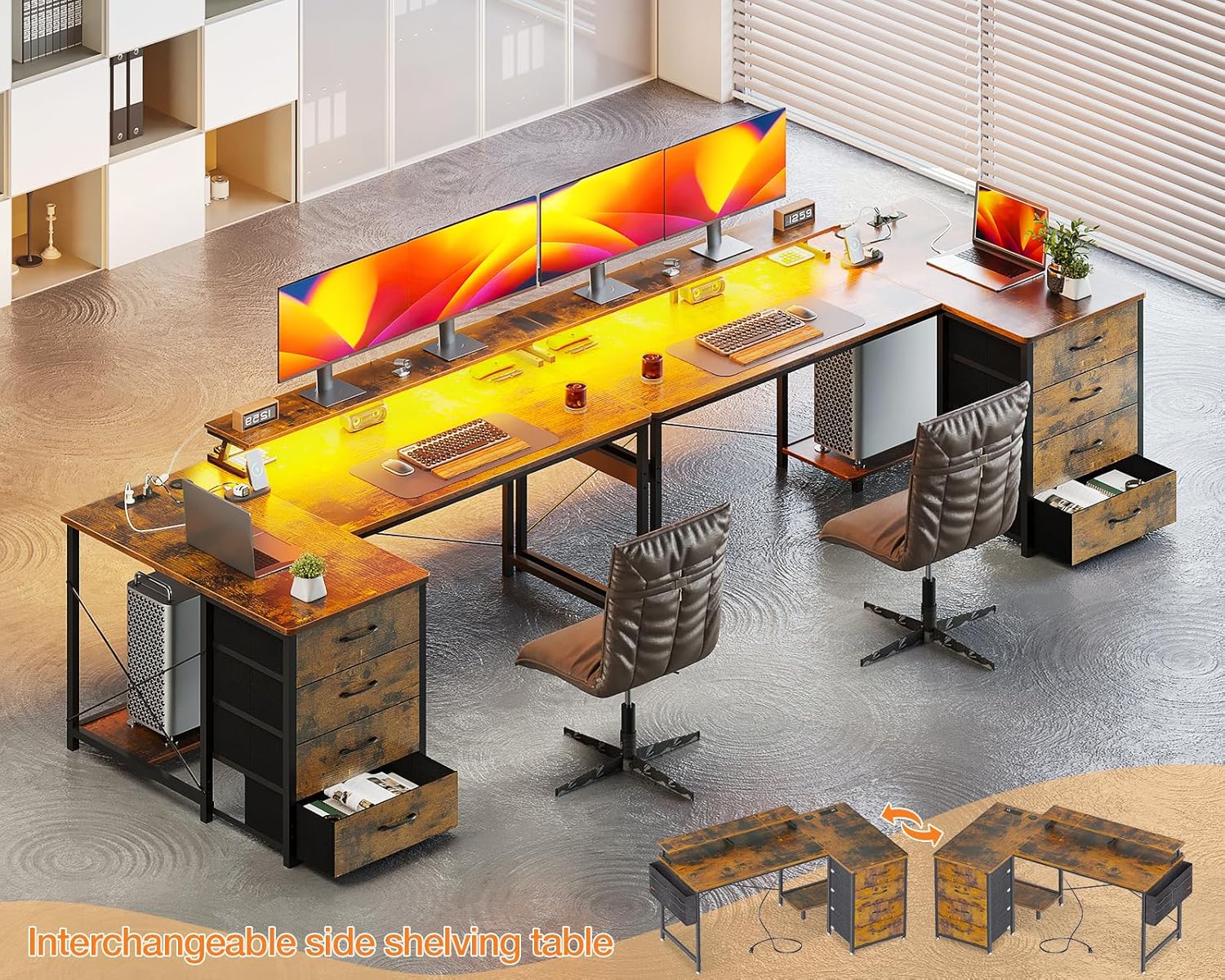
Image: Detailed diagram illustrating the dimensions and various components of the ODK L-shaped desk, including the main desktop, L-extension, monitor shelf, and storage units.
Setup and Assembly Instructions
The ODK L-shaped desk is designed for straightforward assembly. All parts are clearly labeled. Follow the step-by-step instructions provided in your package. A screwdriver and Allen wrench are included.
- Prepare the Area: Clear a spacious area for assembly. Lay down a blanket or cardboard to protect the floor and desk components.
- Identify Components: Unpack all parts and match them with the labels in the instruction manual.
- Assemble the Frame: Begin by assembling the metal frame according to the diagrams. Ensure all screws are tightened securely but do not overtighten until the entire frame is assembled.
- Attach Desk Panels: Secure the main desktop and the L-extension panels to the assembled frame. The L-extension is reversible, allowing you to mount the drawer side on either the left or right, depending on your preference and room layout.
- Install Monitor Shelf: Attach the monitor shelf to the designated area on the desktop.
- Insert Drawers: Assemble the four fabric drawers and slide them into their respective compartments.
- Install Power Strip: Place the power strip with USB ports and AC outlets into its recessed slot on the desktop. Ensure the power cable is routed safely.
- Attach LED Strip: Adhere the LED light strip to the underside of the monitor shelf or desired location. Connect it to the power source.
- Final Tightening: Once all components are in place, go back and fully tighten all screws and bolts.

Image: An overhead view of the fully assembled ODK L-shaped desk, showcasing its spacious design, monitor shelf, and integrated power strip, ready for a complete computer setup.

Image: A visual representation demonstrating the reversible design of the desk's storage unit, allowing it to be configured on either the left or right side of the L-shape.
Operating Instructions
Power Outlets and USB Ports
The desk is equipped with a built-in power strip featuring 2 standard AC outlets (220-250V/16A) and 2 USB charging ports (5V-2A). These are designed for convenient charging of electronic devices such as smartphones, tablets, and other peripherals.
- Plug the desk's main power cable into a wall outlet.
- Insert device power adapters into the AC outlets.
- Connect USB charging cables to the USB ports for charging compatible devices.
- Do not exceed the maximum electrical load for the outlets.

Image: A detailed view of the integrated power strip, highlighting the two AC outlets and two USB charging ports, along with their electrical specifications.
LED Lighting System
The desk includes an LED light strip with a remote control for customizable ambient lighting. This feature can help reduce eye strain and enhance focus.
- Power On/Off: Use the "On/Off" button on the controller to activate or deactivate the LED lights.
- Color Selection: Cycle through 10 static colors using the designated color buttons or mode button.
- Brightness Adjustment: Adjust the light intensity with 6 levels of brightness control.
- Dynamic Modes: Select from 10 dynamic lighting modes for various effects.
- Memory Function: The LED system retains the last selected setting when powered off and on.

Image: A close-up shot of the LED light strip installed under the monitor shelf, along with its control unit, illustrating the various color and mode options.
Maintenance
Regular maintenance will prolong the life and appearance of your ODK L-shaped desk.
- Cleaning: Wipe the desk surfaces with a soft, damp cloth. Avoid harsh chemicals or abrasive cleaners that may damage the finish.
- Spills: Immediately wipe up any spills to prevent staining or water damage.
- Hardware: Periodically check all screws and bolts to ensure they remain tight. Retighten if necessary.
- Drawers: The fabric drawers can be spot cleaned with a mild detergent and damp cloth. Allow to air dry completely.
- Electrical Components: Ensure the power strip and LED lights are kept dry. Do not attempt to repair electrical components yourself.
Troubleshooting
If you encounter issues with your desk, refer to the following common troubleshooting steps:
| Problem | Possible Cause | Solution |
|---|---|---|
| Desk is wobbly. | Loose screws or uneven floor. | Check and tighten all assembly screws. Adjust the leveling feet on the desk legs if your floor is uneven. |
| Power outlets/USB ports not working. | Desk not plugged in, power strip switch off, or overloaded circuit. | Ensure the desk's power cable is securely plugged into a functional wall outlet. Check if the power strip has an on/off switch and it's in the "on" position. Reduce the number of devices connected if overloaded. |
| LED lights not turning on. | LED strip not connected, power issue, or remote control battery dead. | Verify the LED strip is properly connected to its power source. Ensure the main desk power is on. Check the remote control battery and replace if necessary. |
| Drawers do not slide smoothly. | Improper assembly or obstruction. | Recheck drawer assembly. Ensure nothing is obstructing the drawer's path. |
If problems persist, please contact customer support.
Specifications
| Feature | Detail |
|---|---|
| Model Number | SNKLFZDE-01 |
| Dimensions (L x W x H) | 160 x 80 x 84.7 cm (63 x 31.5 x 33.3 inches) |
| Weight | 22.3 kg (49.16 lbs) |
| Color | Brown |
| Material | Engineered Wood, Metal Frame |
| Power Outlets | 2 x AC (220-250V/16A) |
| USB Ports | 2 x USB (5V-2A) |
| LED Lighting | 10 static colors, 6 brightness levels, 10 dynamic modes, memory function |
| Storage | 4 fabric drawers, 1 storage bag |
| Features | Reversible L-shape, Ergonomic monitor shelf |
Warranty and Support
ODK is committed to providing high-quality products. If your ODK desk arrives damaged, has missing parts, or is scratched, please contact our professional customer support team. We aim to resolve issues within 24 hours.
For support, please refer to the contact information provided in your product packaging or visit the official ODK website.


