
Introduction
This manual provides detailed instructions for the setup, operation, maintenance, and troubleshooting of your Bushnell CelluCORE 20 Trail Camera for AT&T. Please read this manual thoroughly before using your camera to ensure optimal performance and longevity.

Image: Front view of the Bushnell CelluCORE 20 Trail Camera, showcasing its compact and rugged design.
Setup
1. Battery Installation
The CelluCORE 20 requires 12 AA batteries for operation. For best performance and extended battery life, it is recommended to use high-quality alkaline or lithium batteries. The camera features a removable battery tray for easy installation.
- Open the camera casing.
- Locate the removable battery tray.
- Insert 12 AA batteries, ensuring correct polarity (+/-).
- Slide the battery tray back into the camera until it clicks securely.

Image: The Bushnell CelluCORE 20 Trail Camera with its casing open, showing the removable battery tray with 12 AA batteries installed.
2. SD Card Insertion
A SanDisk brand SD card (up to 32GB) is highly recommended for reliable cellular service connectivity. Other brands may experience connectivity issues.
- With the camera casing open, locate the SD card slot.
- Insert the SD card with the metal contacts facing down until it clicks into place.

Image: The Bushnell CelluCORE 20 Trail Camera with its casing open, illustrating the location of the SD card slot next to the battery tray.
3. App Download and Camera Connection
The Bushnell CelluCORE 20 is managed via a smartphone application. Follow these steps for initial setup:
- Check Coverage Maps: Verify AT&T cellular coverage in your intended camera deployment area.
- Download the App: Install the official Bushnell Trail Camera app on your smartphone (available for Android and iOS).
- Connect Camera to Phone: Follow the in-app instructions to pair your camera with your smartphone. This typically involves scanning a QR code on the camera or entering its serial number.
- View Images Sent to Phone: Once connected, the camera will begin sending images to your phone according to your settings.

Image: A visual guide outlining the four simple steps for setting up and connecting your CelluCORE camera to your smartphone.
Operating Instructions
Camera Features
- Image Resolution: Captures crystal clear 20 megapixel images.
- Video Capture: Supports HD video recording.
- Trigger Speed: Features a rapid 0.5-second trigger speed to capture fast-moving subjects.
- Night Vision: Equipped with low-glow LEDs for an 80ft night range, providing clear images in low-light conditions.
- Solar Compatibility: Designed to be compatible with external solar power sources (sold separately).
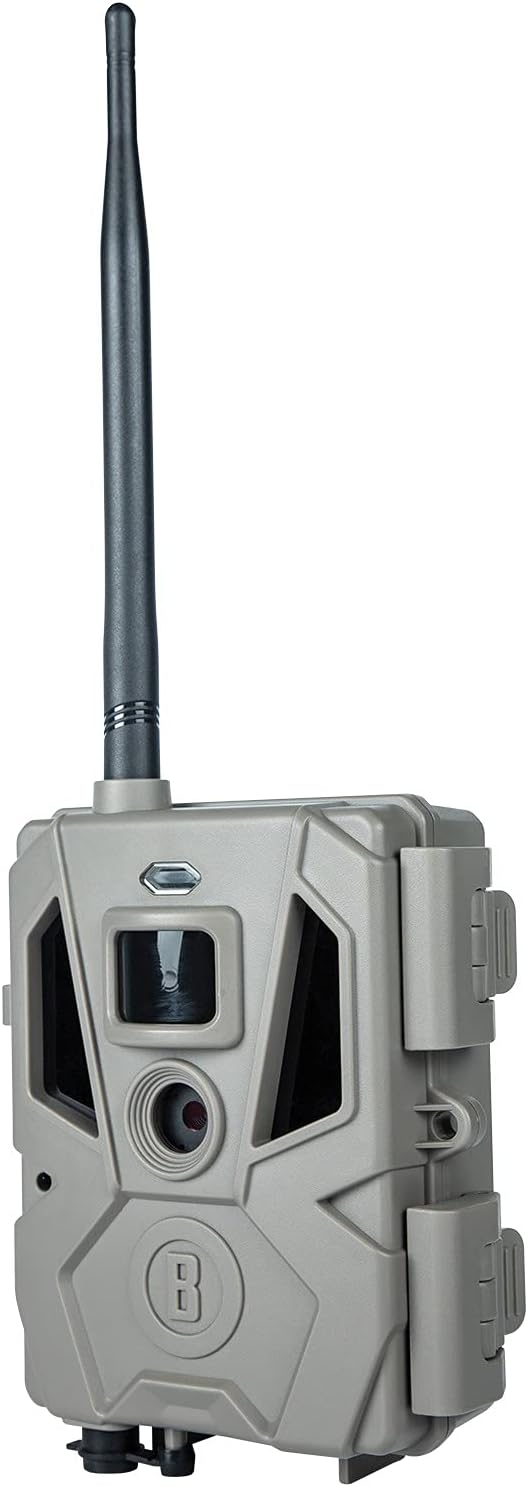
Image: The Bushnell CelluCORE 20 Trail Camera with key features such as night range, LED type, trigger speed, image resolution, and solar compatibility labeled.
Cellular Connectivity and App Usage
The CelluCORE 20 utilizes AT&T cellular networks to transmit images and videos directly to your smartphone. The companion app allows for comprehensive control and management:
- Remote Settings Changes: Adjust camera settings, such as photo resolution, video length, and detection sensitivity, directly through your phone.
- Image Sorting: The app provides tools for convenient image sorting, including by weather, wind, moon phase, and more.
- Weather Data Tagging: Images are tagged with relevant weather data for better analysis.
- Data Plans: Various monthly data plans are available. New users often receive 33 days of free unlimited data. Plans are contract-free, allowing you to start and stop anytime.

Image: A comparison chart illustrating the different monthly data plan options available for CelluCORE cameras, including photo limits, thumbnail counts, and video downloads.
Note: No official product videos were provided for embedding in this manual.
Maintenance
Battery Life and Replacement
The camera is designed for extended use, offering up to 6 months of battery life with 12 AA batteries. Regularly check the battery status via the app or the camera's internal status lights. Replace all batteries simultaneously to ensure consistent power.

Image: An open view of the camera's interior, highlighting the status indicator lights that provide information on camera, battery, and cellular status.
Environmental Protection
The CelluCORE 20 has an IP65 international protection rating, indicating it is protected against dust ingress and low-pressure water jets from any direction. While designed for outdoor use, ensure the camera casing is securely closed to maintain its weather resistance. Avoid direct exposure to extreme weather conditions when possible.
Cleaning
Gently clean the lens and sensors with a soft, lint-free cloth. Do not use abrasive cleaners or solvents. Keep the camera's exterior free from dirt and debris to prevent interference with its operation.
Troubleshooting
- No Cellular Connection:
- Ensure you are using a SanDisk brand SD card. Some users have reported connectivity issues with other brands.
- Verify AT&T cellular coverage in the camera's location using the app's coverage maps.
- Check battery levels; low batteries can affect cellular transmission.
- Confirm your data plan is active and has sufficient data.
- False Alarms/Excessive Photos:
- Adjust the camera's sensitivity settings via the app.
- Ensure the camera is not pointed at areas with excessive moving foliage or objects that could trigger the sensor (e.g., branches swaying in wind).
- Moisture Inside Camera:
- Ensure the camera casing is always securely latched when deployed outdoors.
- If moisture is present, open the camera in a dry environment and allow it to air out completely before re-sealing.
- App Deployment Issues in Low Signal Areas:
- If you are in an area with weak cellular signal, perform the initial camera deployment and setup at your home or an area with strong signal. You can then update the camera's location in the app once it is deployed in the field.
- Short Battery Life:
- Ensure you are using fresh, high-quality alkaline or lithium AA batteries.
- Frequent cellular transmissions, video recording, and cold temperatures can reduce battery life. Adjust settings to optimize.
Specifications
| Feature | Detail |
|---|---|
| Model Name | Bushnell 119904A: Cellucore 20 At&t, Brown |
| Item Model Number | 119904A |
| Brand | Bushnell |
| Indoor/Outdoor Usage | Outdoor |
| Compatible Devices | Smartphone |
| Power Source | Battery Powered (12 AA batteries required) |
| Connectivity Protocol | Wi-Fi, Cellular (AT&T) |
| Controller Type | Android, iOS (via app) |
| Mounting Type | Wall Mount (strap/mount not included) |
| Video Capture Resolution | 1080p (HD Video) |
| Color | Brown |
| Number of Items | 1 |
| Included Components | Primos 119904A: Cellucore 20 At&t, Brown (camera unit) |
| Wireless Communication Technology | Wi-Fi |
| Form Factor | Box |
| Effective Video Resolution | 20 MP |
| Material | Other (durable composite) |
| Voltage | 12 Volts |
| Wattage | 5 watts |
| Item Dimensions (L x W x H) | 9.25 x 5.75 x 3.25 inches |
| Low Light Technology | Night Color (Low Glow LEDs) |
| Effective Still Resolution | 20 MP |
| International Protection Rating | IP65 |
| Control Method | Remote (via app) |
| Item Weight | 1.5 pounds |
| Special Feature | CelluCORE Cellular Trail Camera |
Warranty and Support
Warranty Information
For specific warranty details, please refer to the official Bushnell website or the documentation included with your product. Generally, products purchased through Amazon may be eligible for a 30-day return or replacement policy.
Customer Support
If you encounter issues not covered in this manual or require further assistance, please contact Bushnell customer support. While some users have reported challenges with phone support, it is recommended to visit the official Bushnell website for the most current contact information and support resources.
You can also refer to the official User Manual (PDF) for additional information.


