
Introduction
Welcome and thank you for choosing the Baseus UltraControl Go Series Car Holder. This manual provides instructions for proper installation, operation, and maintenance of your device. Please read it carefully before use to ensure optimal performance and safety.
Product Overview
Product Components
The Baseus UltraControl Go Series Car Holder consists of the following main components:
- Phone Clamp: Securely holds your smartphone.
- Adjustable Arm: Allows for positioning the phone at various angles.
- Suction Cup Base: Provides secure attachment to surfaces.
- Release Button: For easy one-hand operation to release the clamp arms.

Image: Front view of the Baseus UltraControl Go Series Car Holder, showing the phone clamp, adjustable arm, and suction cup base.
Setup and Installation
Choosing an Installation Location
The Baseus UltraControl Go Series Car Holder can be installed on various smooth, flat surfaces within your vehicle, such as the dashboard or windshield. Ensure the chosen location does not obstruct your view or interfere with vehicle controls.

Image: Examples of suitable installation locations for the car holder, including the dashboard, passenger seat area, and windshield.
Attaching the Suction Cup Base
- Clean the desired surface thoroughly to remove dust and grease.
- Place the suction cup base firmly onto the clean surface.
- Press down on the locking lever (if present) on the suction cup to create a vacuum seal.
Note: The suction cup features removable nano adhesive for enhanced grip. Ensure the surface is suitable for adhesive application if using this feature.
Operating Instructions
Inserting Your Phone
- Gently pull open the clamping arms of the holder.
- Place your smartphone into the holder, ensuring it rests securely on the bottom support.
- Release the clamping arms. The damped design will automatically adjust to securely grip your phone.
The holder is compatible with phones ranging from 5.4 to 7.2 inches.

Image: A smartphone held securely by the clamping arms of the car holder, illustrating the tight grip.
Removing Your Phone (Single-Hand Operation)
To remove your phone, press the release button located on the back of the holder's panel. The clamp arms will open, allowing you to easily retrieve your device.

Image: A hand pressing the release button on the back of the phone holder, demonstrating the single-hand operation for phone removal.
Adjusting the Viewing Angle
The adjustable arm and ball joint allow for flexible positioning. Loosen the adjustment knob (if present) to change the angle, then tighten it to secure the desired position.
Care and Maintenance
- Cleaning: Wipe the holder with a soft, damp cloth. Avoid abrasive cleaners or solvents.
- Suction Cup: If the suction cup loses adhesion, rinse it with warm water and let it air dry. This can restore its stickiness.
- Temperature: Avoid prolonged exposure to extreme temperatures, which can affect the material and adhesive properties.
- Silicone Pads: The protective silicone pads on the clamping arms should be kept clean to maintain grip and prevent scratches to your phone.

Image: Illustration highlighting the meticulous craftsmanship and meshing gears designed to prevent squeaking during driving, indicating durability and quality.
Troubleshooting
| Problem | Possible Cause | Solution |
|---|---|---|
| Holder does not stick to surface. | Surface is dirty, uneven, or suction cup is not properly sealed. | Clean the surface. Ensure the suction cup lever is locked. Rinse and air dry the suction cup. |
| Phone is not held securely. | Phone size is outside the compatible range (5.4-7.2 inches) or clamping arms are obstructed. | Verify phone size. Ensure no obstructions prevent the arms from closing fully. |
| Holder makes noise during driving. | Loose connection or component. | Check all adjustable parts and ensure they are tightened. The design is intended to prevent squeaking. |
Product Specifications
- Model Number: BS-CM025 (C40361600111-00)
- Brand: Baseus
- Applicable Phone Size: 5.4 - 7.2 inches
- Material: Silicone (for protective pads)
- Mounting Type: Vehicle Mount (Suction Cup)
- Special Features: Adjustable, Secure Clamping, Wide Compatibility, Secure Installation, Protective Silicone Pads, Single-Hand Operation
- Product Dimensions: 18 x 0.5 x 10 cm
- Item Weight: 120 g
- Color: Black
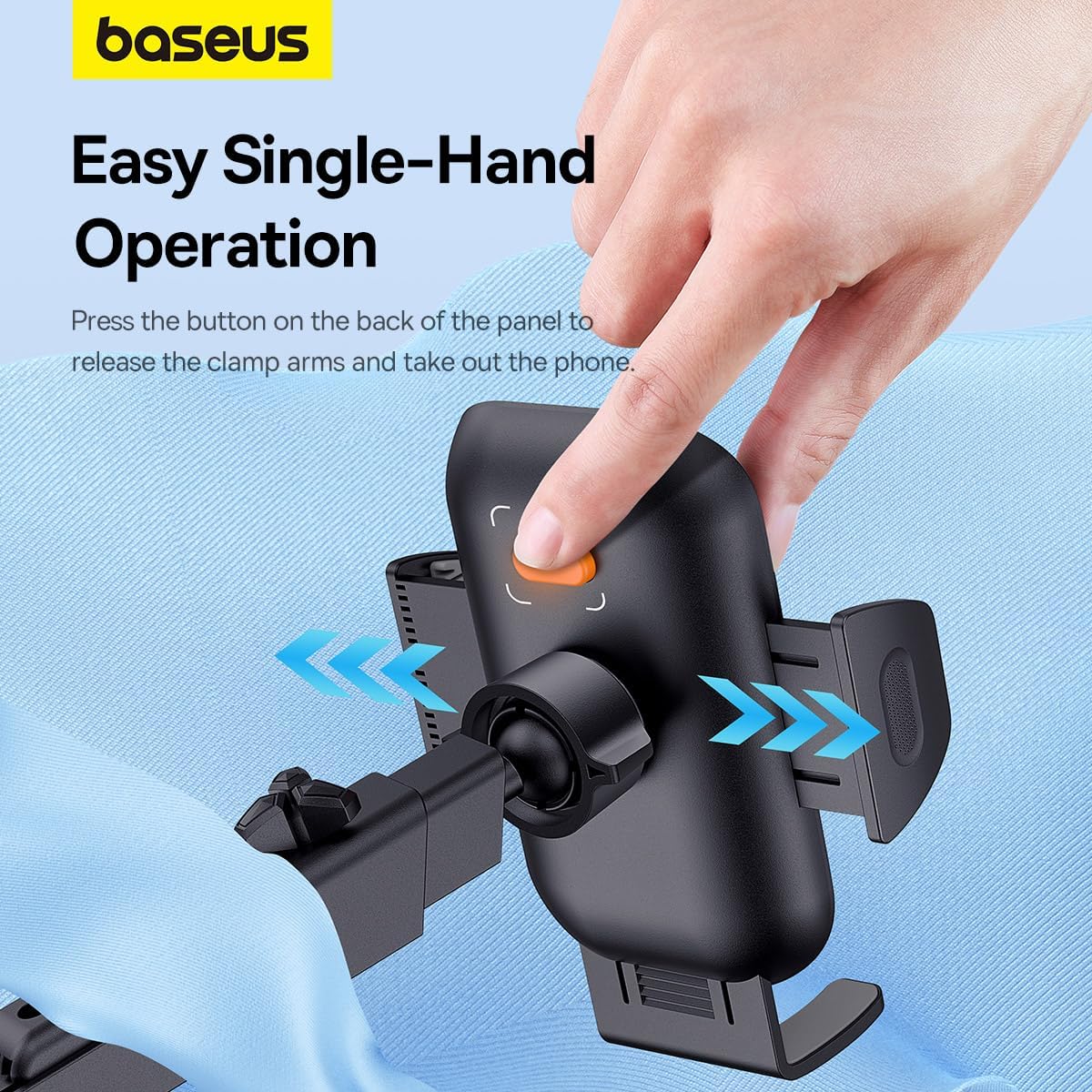
Image: Diagram highlighting key features such as damping clamp arms, vacuum suction cup, removable nano adhesive, and easy operation.
Warranty and Customer Support
For warranty information or technical support, please refer to the official Baseus website or contact your local distributor. Keep your purchase receipt for warranty claims.
Manufacturer: Baseus
Website: www.baseus.com
Contact: Refer to the website for regional contact information.