
ONANOFF Fokus+
ONANOFF Fokus+ Headset Instruction Manual
Model: Fokus+ (BP-FOKUS-GREY)
1. Introduction
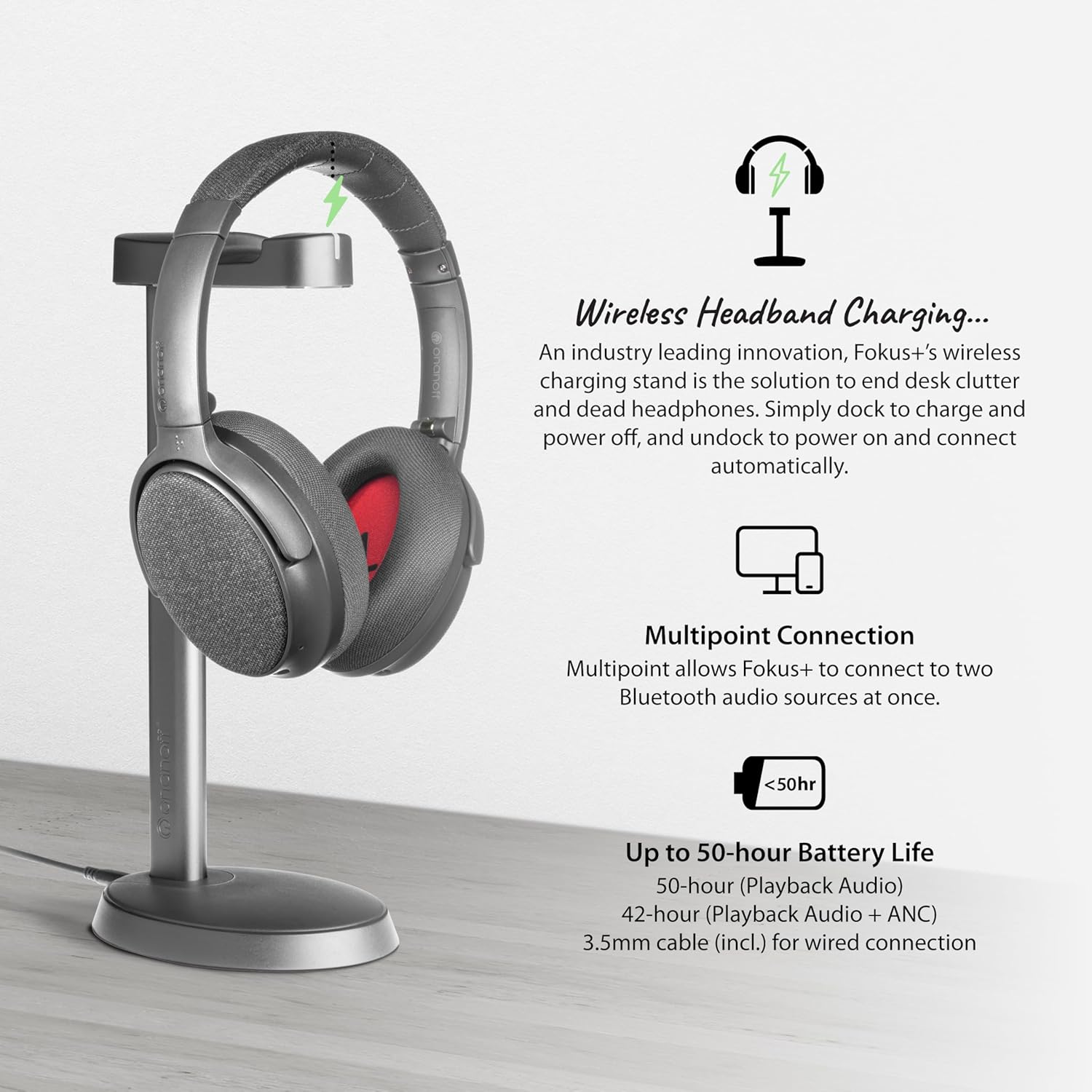
Thank you for choosing the ONANOFF Fokus+ Headset. This manual provides detailed instructions for the setup, operation, and maintenance of your new active noise-cancelling Bluetooth headphones. The Fokus+ headset features hybrid active noise cancellation, a detachable boom microphone, a wireless charging stand, and multipoint connection capabilities, designed to enhance your audio experience for work, travel, and entertainment.
2. What's Included
Carefully unpack your ONANOFF Fokus+ Headset package and ensure all items are present:
- Fokus+ Headphones
- Wireless Charging Stand
- Protective Hard Travel Case
- Detachable Boom Microphone
- 3.5mm Audio Cable (for wired connection)
- USB-C Charging Cable
- USB-C to USB-A Adaptor

3. Setup Guide
3.1 Initial Charging
Before first use, fully charge your Fokus+ headphones. The wireless charging stand provides a convenient charging solution.
- Connect the USB-C charging cable to the wireless charging stand and a power source.
- Place the Fokus+ headphones onto the charging stand. The headphones will automatically begin charging and power off.
- A full charge typically takes approximately 2-3 hours. The LED indicator on the headphones will show charging status.


3.2 Attaching the Detachable Boom Microphone
The Fokus+ headset includes a detachable boom microphone for enhanced voice clarity during calls or online meetings.
- Locate the microphone port on the left earcup of the headphones.
- Align the connector of the boom microphone with the port and gently push until it clicks into place.
- To remove, gently pull the microphone straight out from the port.

3.3 Powering On/Off
- Power On: Undock the headphones from the charging stand, or press and hold the power button (usually located on one of the earcups) for approximately 3 seconds until the LED indicator lights up.
- Power Off: Dock the headphones on the charging stand, or press and hold the power button for approximately 5 seconds until the LED indicator turns off.
3.4 Bluetooth Pairing (Multipoint Connection)
The Fokus+ headset supports multipoint connection, allowing it to connect to two Bluetooth audio sources simultaneously.
- Ensure the headphones are powered on and in pairing mode (the LED indicator will typically flash blue rapidly). If not, press and hold the Bluetooth pairing button for a few seconds.
- On your first device (e.g., smartphone), go to Bluetooth settings and select "ONANOFF Fokus+" from the list of available devices.
- Once connected to the first device, the LED indicator will change to a steady blue.
- To connect a second device (e.g., laptop), put the headphones back into pairing mode (if necessary, by briefly pressing the Bluetooth button again).
- On your second device, select "ONANOFF Fokus+" from the Bluetooth device list.
- The headphones are now connected to both devices. You can switch between audio sources by pausing playback on one device and starting it on the other.
4. Operating Instructions
4.1 Listening Modes
The Fokus+ headset offers three distinct listening modes to optimize your audio experience:
- MusicMode: Immerse yourself in dynamic audio with rich bass and balanced sound, ideal for music listening.
- FokusMode: Optimized for vocal clarity, perfect for podcasts, audiobooks, and online meetings.
- HearThru Mode: Allows you to hear your surroundings and engage in conversations without removing your headphones.
Switch between modes using the dedicated mode button on the earcup (refer to the physical controls on your headset for exact button location).

4.2 Active Noise Cancellation (ANC)
The Fokus+ features hybrid active noise cancellation to reduce ambient noise. Activate or deactivate ANC using the dedicated ANC button (refer to the physical controls on your headset for exact button location).
4.3 Media Controls
The headphones are equipped with media control buttons on the earcups for easy management of audio playback and calls. These typically include:
- Volume Up/Down
- Play/Pause
- Next/Previous Track
- Answer/End Call
- Activate Voice Assistant
Consult the quick start guide included in your package for a detailed diagram of button functions.
4.4 Wired Connection
For situations where Bluetooth is not available or preferred, you can use the included 3.5mm audio cable.
- Plug one end of the 3.5mm audio cable into the audio jack on the Fokus+ headset.
- Plug the other end into the 3.5mm audio output of your device.
- The headphones will function as passive wired headphones. Note that ANC and other electronic features may have limited or no functionality in wired mode without power.
5. Maintenance
Proper care ensures the longevity and performance of your Fokus+ headset.
- Cleaning: Use a soft, dry cloth to wipe the earcups and headband. For stubborn dirt, a slightly damp cloth can be used, but ensure no moisture enters the speaker grilles or ports.
- Storage: When not in use, store the headphones in the provided hard travel case to protect them from dust, scratches, and impacts.
- Avoid Extreme Conditions: Do not expose the headphones to extreme temperatures, humidity, or direct sunlight for extended periods.
- Liquid Contact: Avoid contact with liquids. If the headphones get wet, power them off immediately and allow them to dry completely before use.
6. Troubleshooting
If you encounter issues with your Fokus+ headset, try the following solutions:
- No Power: Ensure the headphones are fully charged. Place them on the wireless charging stand or connect via USB-C cable.
- No Sound:
- Check if the headphones are powered on and connected via Bluetooth or 3.5mm cable.
- Verify the volume level on both the headphones and your connected device.
- Ensure the correct audio output is selected on your device.
- Bluetooth Connection Issues:
- Ensure the headphones are in pairing mode.
- Turn off and on Bluetooth on your device.
- Forget the device in your device's Bluetooth settings and re-pair.
- Move closer to your device to ensure you are within Bluetooth range.
- Microphone Not Working:
- Ensure the detachable boom microphone is securely attached.
- Check microphone settings on your connected device to ensure the Fokus+ is selected as the input device.
- Ensure the microphone is not muted (if a mute function is present).
- ANC Not Effective: Ensure ANC is activated. Check for proper fit of the earcups to create a good seal around your ears.
If problems persist, please contact ONANOFF customer support.
7. Specifications
| Model Name | Fokus+ |
| Item Model Number | BP-FOKUS-GREY |
| Connectivity Technology | Wired, Bluetooth |
| Wireless Communication Technology | Bluetooth |
| Audio Driver Type | Hybrid Driver |
| Earpiece Shape | Over-ear |
| Frequency Range | 20-22kHz |
| Battery Life | Up to 50 hours (Playback Audio), 42 hours (Playback Audio + ANC) |
| Control Type | Media Control |
| Material | Plastic |
| Item Weight | 1.16 Kilograms (2.55 pounds) |
| Color | Dusk Grey |
| UPC | 840173602089 |
8. Warranty and Support
ONANOFF products are designed for quality and durability. For specific warranty information, please refer to the warranty card included with your product or visit the official ONANOFF website. If you require technical assistance or have questions not covered in this manual, please contact ONANOFF customer support through their official channels.
You can find more information and support resources by visiting the ONANOFF Store on Amazon.
Related documentsFokus+


Ask a question about this manual
Ask about setup, troubleshooting, compatibility, parts, safety, or missing instructions. Manuals+ will review the question and use this page’s manual context to help answer it.