
Introduction
Thank you for choosing the TWSOUL LED Grow Light. This full-spectrum grow light is designed to provide optimal lighting conditions for your indoor plants at all growth stages. Please read this manual carefully before installation and operation to ensure proper use and maximize the lifespan of your product.

Image: Overview of the TWSOUL LED Grow Light highlighting its key features such as full spectrum, 135 LED beads, 10 dimmable levels, 3 timing settings, auto on/off function, and ease of installation.
Safety Instructions
- Ensure the power supply matches the product's requirements (AC).
- Do not look directly at the LED lights when they are on, as this may cause eye strain.
- Keep the grow light away from water or any flammable materials.
- Do not attempt to disassemble or modify the product. This will void the warranty.
- Ensure proper ventilation around the light to prevent overheating.
- This product is designed for indoor use only.
Package Contents
Please check the package to ensure all items are present:
- TWSOUL LED Grow Light (1 unit)
- Power Adapter (1 unit)
- Mounting Accessories (e.g., double-sided tapes, twist ties)
- User Manual (this document)
Setup and Installation
The TWSOUL LED Grow Light offers flexible installation options to suit various indoor plant setups, such as shelves, cabinets, and glass greenhouses.
Installation Methods:
- Method 1: Double-sided Tapes
Clean the surface where you intend to mount the light. Peel off the protective film from the double-sided tapes and firmly press the light onto the desired surface. Ensure the surface is smooth and dry for optimal adhesion.
- Method 2: Twist Ties
For wire racks or open structures, use the provided twist ties to secure the grow light. Thread the twist ties through the designated holes on the light fixture and around the support structure, then twist to tighten.
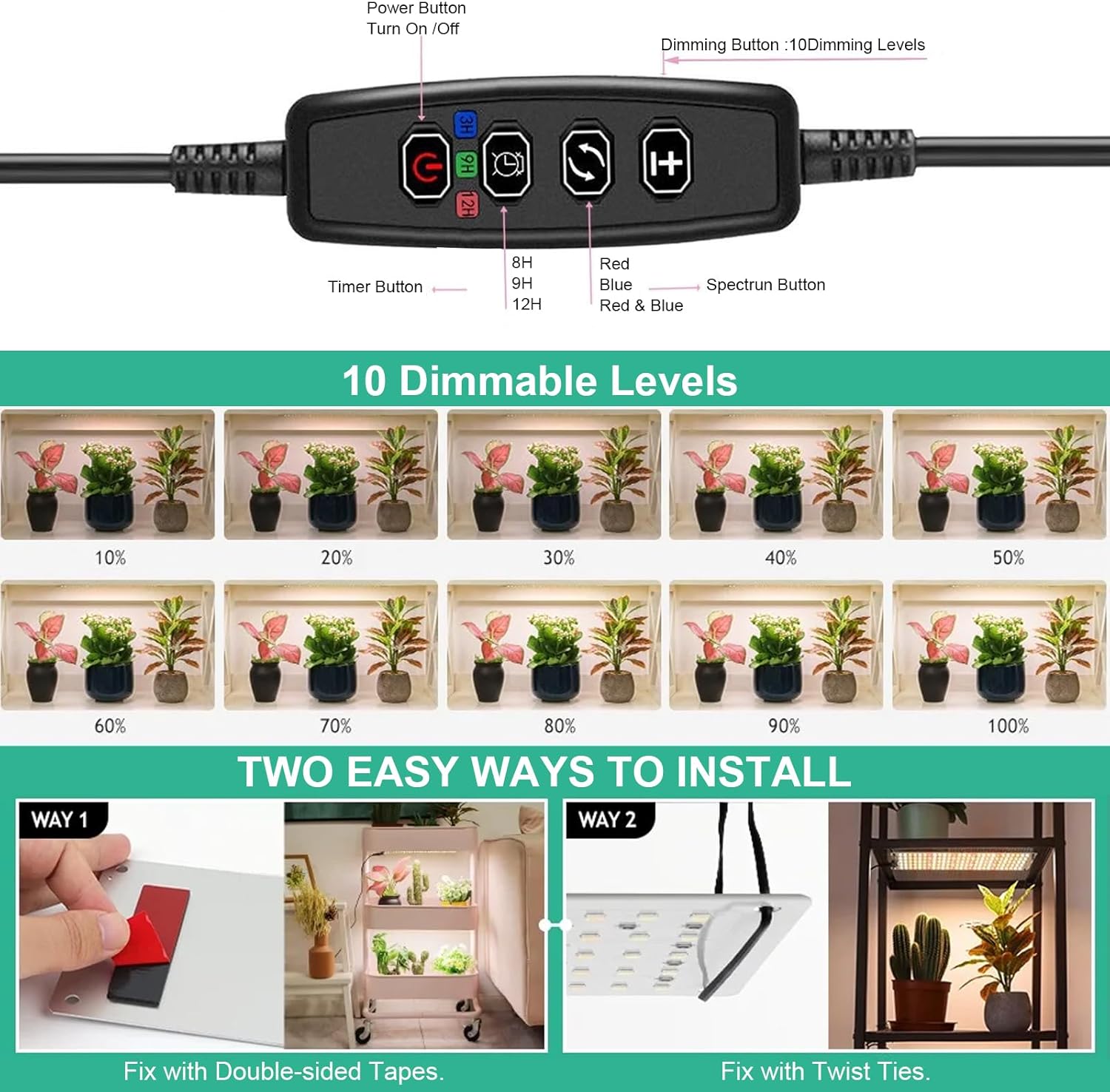
Image: Detailed view of the control panel and two easy installation methods: fixing with double-sided tapes and fixing with twist ties.

Image: Various application scenarios for the grow light, including under cabinets, in indoor gardens, and on plant shelves, demonstrating its simple design and wide usability.
Operating Instructions
Connect the power adapter to the grow light and then plug it into a standard AC outlet.
Control Panel Functions:
- Power Button (On/Off): Press to turn the light on or off.
- Timer Button: Press to set the automatic timer. Available settings are 4 hours, 8 hours, or 12 hours. The light will automatically turn on and off daily according to the set schedule.
- Dimming Button: Press to adjust the brightness level. There are 10 dimmable levels (10% to 100%) to suit different plant needs and growth stages.
- Spectrum Button: Press to cycle through different light spectrum modes (e.g., Red, Blue, Red & Blue, Full Spectrum). This model features a full spectrum with 135 LEDs, suitable for all growth stages.
Image: The control panel showing buttons for power, timer (4H, 8H, 12H), dimming (10 levels), and spectrum selection. Also illustrates the visual difference between 10 dimmable levels from 10% to 100% brightness.
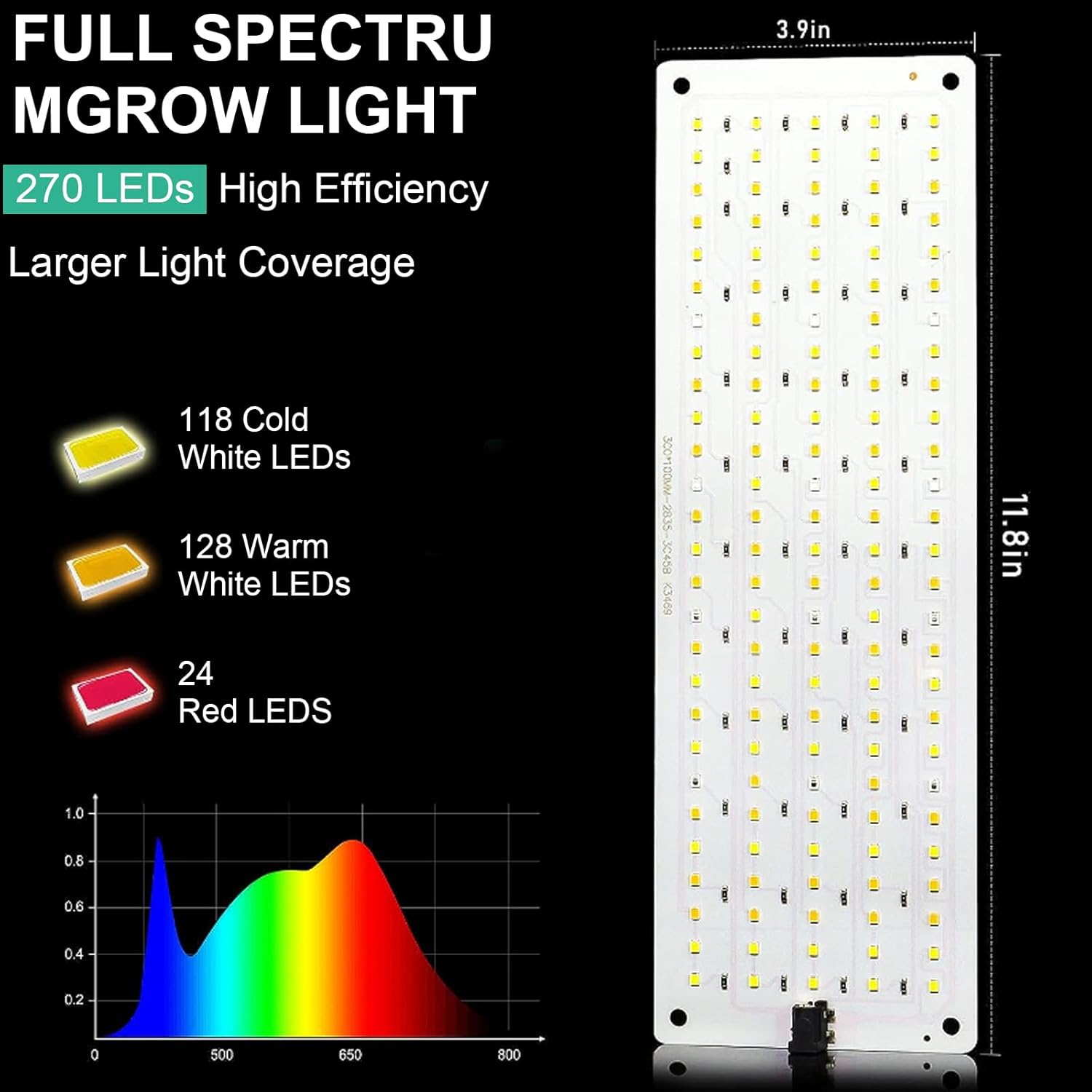
Image: Detailed diagram of the full spectrum grow light, indicating the distribution of different LED types (Cold White, Warm White, Red) and a spectral graph illustrating the light output across various wavelengths. Dimensions of the light are also shown.
Maintenance
- Cleaning: Ensure the light is unplugged before cleaning. Gently wipe the LED panel with a soft, dry cloth to remove dust. Do not use liquid cleaners or abrasive materials.
- Ventilation: Regularly check that the ventilation holes (if any) are not obstructed to ensure proper heat dissipation.
- Storage: If storing the light for an extended period, unplug it and store it in a cool, dry place away from direct sunlight and moisture.
Troubleshooting
| Problem | Possible Cause | Solution |
|---|---|---|
| Light does not turn on. | No power supply; loose connection; faulty outlet. | Check if the power adapter is securely plugged in. Test the outlet with another device. Ensure the power button is pressed. |
| Light flickers or dims unexpectedly. | Unstable power supply; loose connection; timer setting. | Ensure stable power. Check all connections. Verify timer settings are not causing the light to turn off. |
| Timer function not working. | Incorrect timer setting; power interruption. | Re-set the timer. If power was interrupted, the timer may need to be reset manually. |
Specifications
| Brand | TWSOUL |
| Model Number | JX-001 |
| Light Source Type | LED |
| Number of LEDs | 135 |
| Spectrum | Full Spectrum |
| Dimmable Levels | 10 levels |
| Timer Settings | 4H, 8H, 12H |
| Power Source | AC |
| Material | Aluminum |
| Dimensions (approx.) | 38 x 8 cm (15 x 3.15 inches) |
| Color | A |
Note: Specifications are subject to change without prior notice.
Warranty and Support
TWSOUL products are designed for reliability and performance. For warranty information, technical support, or any questions regarding your product, please refer to the contact information provided at the point of purchase or visit the official TWSOUL website.
Please retain your proof of purchase for warranty claims.