
Machenike K600T-B82
MACHENIKE K600T-B82 Gaming Mechanical Keyboard User Manual
Model: K600T-B82 (Green)
Introduction
This manual provides detailed instructions for the setup, operation, maintenance, and troubleshooting of your MACHENIKE K600T-B82 Gaming Mechanical Keyboard. Designed for both gaming and work, this keyboard features tri-mode connectivity (Wired, 2.4G Wireless, Bluetooth), vibrant RGB backlighting, hot-swappable switches, and durable PBT keycaps. Please read this manual thoroughly to ensure optimal performance and longevity of your device.
Package Contents
- MACHENIKE K600T-B82 Mechanical Keyboard
- USB-C to USB-A Cable
- 2.4G Wireless Receiver
- Keycap Puller
- Switch Puller
- Spare Switches (2 included)
- User Manual (this document)
Setup
1. Initial Charging
Before first use, it is recommended to fully charge the keyboard. Connect the provided USB-C cable to the keyboard's USB-C port and the other end to a USB power source (e.g., computer USB port, wall adapter). The charging indicator will show the charging status.
2. Connectivity Modes
The K600T-B82 supports three connection modes: Wired, 2.4G Wireless, and Bluetooth. Use the mode switch knob located on the top right of the keyboard to select your desired connection type.

Image: The MACHENIKE K600T-B82 mechanical keyboard in green, showcasing its compact 82-key layout and RGB backlighting.

Image: A close-up of the connectivity control knob on the keyboard, indicating options for USB (wired), 2.4G wireless, and Bluetooth wireless connections.
2.1. Wired Mode (USB)
- Set the mode switch knob to "USB".
- Connect the USB-C cable from the keyboard to your computer's USB port.
- The keyboard will be automatically recognized by your system.
2.2. 2.4G Wireless Mode
- Set the mode switch knob to "2.4G".
- Insert the 2.4G wireless receiver into an available USB port on your computer.
- The keyboard should connect automatically. If not, press Fn + 4 to initiate pairing.
2.3. Bluetooth Mode
- Set the mode switch knob to "Bluetooth" (indicated by the Bluetooth icon).
- The keyboard supports up to three Bluetooth devices. Press Fn + 1, Fn + 2, or Fn + 3 to select a Bluetooth channel.
- To enter pairing mode, press and hold Fn + 1/2/3 for 3-5 seconds until the indicator light flashes rapidly.
- On your device (PC, tablet, smartphone), search for Bluetooth devices and select "MACHENIKE K600T" (or similar) to connect.
- Once connected, the indicator light will stop flashing.
Operating Instructions
1. Key Features
- Tri-Mode Connectivity: Seamlessly switch between Wired, 2.4G Wireless, and Bluetooth connections.
- Hot-Swappable Switches: Easily change mechanical switches without soldering, allowing for customization of typing feel. The keyboard comes with 3-pin hot-swappable blue switches.
- PBT Keycaps: Durable and resistant to fading and shine, providing a long-lasting premium feel.
- RGB Backlighting: Customizable dynamic RGB lighting with multiple modes.
- Anti-Ghosting & N-Key Rollover: Ensures every keystroke is registered accurately, even during rapid typing or complex gaming commands.
- Gasket Mount Design: Provides a softer, more cushioned typing experience and improved acoustics.

Image: The keyboard illuminated with vibrant RGB lighting, highlighting its "Full-on Aura" and "16 Pre-set Lighting Effects" capabilities.
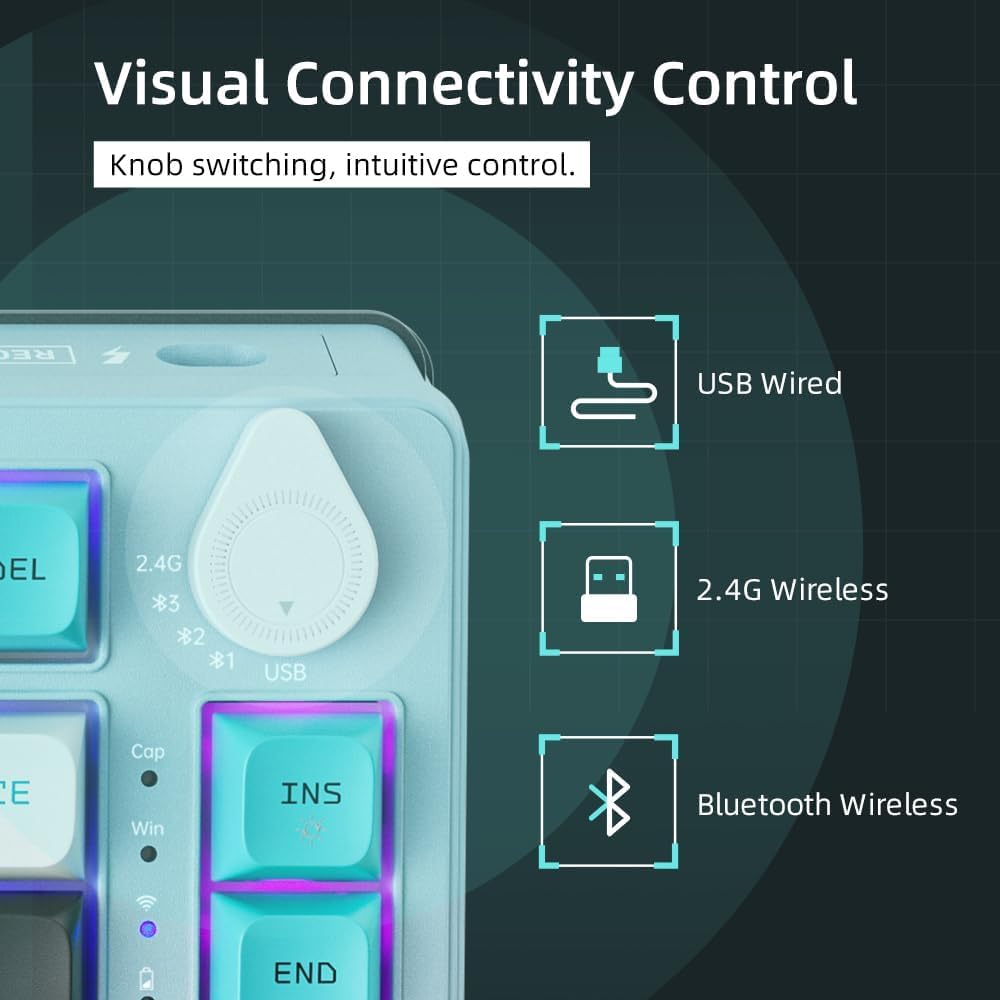
Image: An exploded diagram illustrating the internal components of the keyboard, including keycaps, switches, connection mode switch knob, top cover, flex-cut PC mounting plate, foams (PO, IXPE Switch Pad), PET acoustics pad, per-key flex-cut PCB, and bottom case latex, demonstrating the gasket mount design.
2. Function Key Combinations (Fn Key)
The Fn key (Function key) is used in combination with other keys to access multimedia controls, lighting effects, and other special functions.
| Combination | Function |
|---|---|
| Fn + 1/2/3 | Switch Bluetooth Device (short press) / Enter Bluetooth Pairing Mode (long press) |
| Fn + 4 | 2.4G Wireless Pairing |
| Fn + F1 | My Computer |
| Fn + F2 | Search |
| Fn + F3 | Calculator |
| Fn + F4 | Media Player |
| Fn + F5 | Previous Track |
| Fn + F6 | Next Track |
| Fn + F7 | Play/Pause |
| Fn + F8 | Stop |
| Fn + F9 | Mute |
| Fn + F10 | Volume Down |
| Fn + F11 | Volume Up |
| Fn + F12 | |
| Fn + Win | Lock/Unlock Windows Key |
| Fn + Ins | Change RGB Lighting Mode |
| Fn + Del | Toggle RGB Lighting On/Off |
| Fn + Home | Adjust RGB Brightness Up |
| Fn + End | Adjust RGB Brightness Down |
| Fn + Page Up | Adjust RGB Speed Up |
| Fn + Page Down | Adjust RGB Speed Down |
Maintenance
1. Cleaning the Keyboard
- Disconnect the keyboard from all power sources and devices before cleaning.
- Use a soft, lint-free cloth slightly dampened with water or a mild cleaning solution to wipe the keycaps and keyboard surface.
- For dust and debris between keycaps, use compressed air.
- Avoid using harsh chemicals, abrasive cleaners, or excessive moisture.
2. Keycap and Switch Replacement
The K600T-B82 features hot-swappable switches, allowing for easy replacement without soldering.
- Removing Keycaps: Use the provided keycap puller to gently pull keycaps straight up.
- Removing Switches: Use the provided switch puller. Align the prongs of the puller with the two clips on the top and bottom of the switch. Squeeze the clips and gently pull the switch straight up.
- Installing Switches: Align the pins of the new switch with the holes on the PCB. Gently push the switch straight down until it clicks into place. Ensure the pins are not bent.
- Installing Keycaps: Align the keycap with the switch stem and push down firmly until it is seated.
3. Battery Care
- To preserve battery life, avoid fully discharging the keyboard frequently.
- Store the keyboard in a cool, dry place when not in use for extended periods.
- If the keyboard will not be used for a long time, charge it to about 50% before storing.
Troubleshooting
| Problem | Possible Cause / Solution |
|---|---|
| Keyboard not responding in Wired Mode |
|
| 2.4G Wireless connection issues |
|
| Bluetooth connection issues |
|
| Keys not responding or double-typing |
|
| RGB lighting not working or stuck |
|
Specifications
| Feature | Detail |
|---|---|
| Brand | Machenike |
| Model | K600T-B82 (Green) |
| Connectivity Technology | Bluetooth, 2.4G Wireless, USB Wired |
| Number of Keys | 82 |
| Switch Type | 3-pin Hot-Swappable Blue Mechanical Switches |
| Keycap Material | PBT (Dye-sub) |
| Backlight | RGB (20 different modes) |
| Battery Life | 4000mAh (approx. 50 million keystrokes service life) |
| Operating System | Windows 10 (Compatible with PC) |
| Special Features | Ergonomic, Backlit, Programmable Keys, Hot-Swappable, Anti-Ghosting & N-Key Rollover, Gasket Mount Design |
| Item Weight | 1.07 Kilograms |
| Package Dimensions | 37.5 x 20.5 x 6.5 cm |
Warranty and Support
MACHENIKE products are designed for quality and durability. For information regarding warranty coverage and terms, please refer to the warranty card included with your product or visit the official Machenike website.
For technical support, troubleshooting assistance beyond this manual, or inquiries about replacement parts, please contact Machenike customer service through their official channels. Keep your purchase receipt as proof of purchase for warranty claims.
Note: Extended warranty plans may be available for purchase separately. Please check with your retailer for details.
Related documentsK600T-B82


Ask a question about this manual
Ask about setup, troubleshooting, compatibility, parts, safety, or missing instructions. Manuals+ will review the question and use this page’s manual context to help answer it.