
R_volution Player ONE 8k
R-Volution Player ONE 8k User Manual
Model: Player ONE 8k
Product Overview
The R-Volution Player ONE 8k is an advanced media player and server designed to deliver a revolutionary home cinema experience. It supports impressive image quality with Dolby Vision and HDR10+, powered by a robust Realtek RTD1619DR chipset. This device allows streaming content to other R_volution devices within your network using the exclusive R_share Advanced Streaming Protocol.
Key features include:
- Support for Dolby Vision and HDR10+ for superior image quality.
- Internal storage capacity for up to 32 TB (expandable via USB).
- Two HDMI outputs for versatile connectivity.
- UHD 4K content support and upscaling to 4K Ultra HD (3840 x 2160).
- Automatic volume leveling.
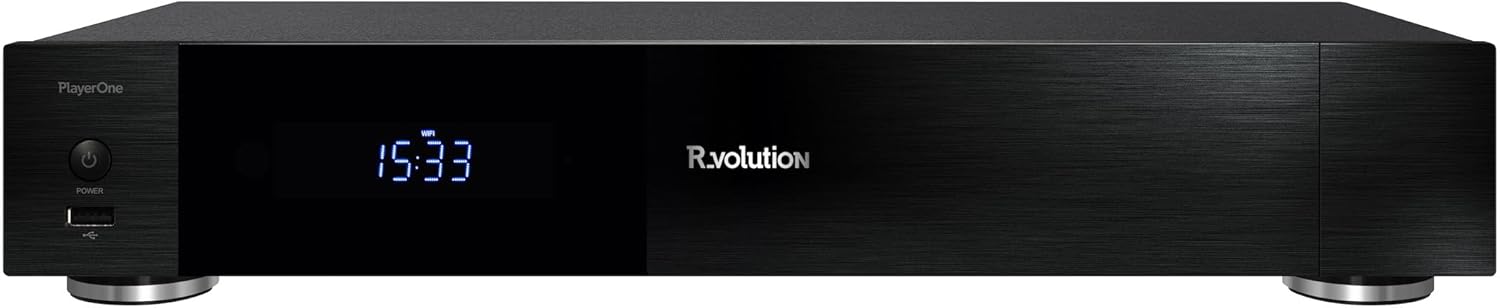
Figure 1: Front view of the R-Volution Player ONE 8k. This image displays the sleek black design of the media player, featuring a power button on the left, a front USB port, and a central digital display showing the time.
Setup
Connecting Your Player ONE 8k
Before operating your R-Volution Player ONE 8k, ensure all necessary connections are made. Refer to the rear panel diagram for port identification.

Figure 2: Rear panel connections of the R-Volution Player ONE 8k. This image shows the comprehensive array of ports on the back of the device, including HDMI outputs, USB ports, Ethernet, optical, coaxial, and analog audio outputs, along with Wi-Fi and Bluetooth antennas.
Port Descriptions:
- HDMI OUT (Audio Only): Connects to an audio receiver for dedicated audio output.
- HDMI OUT (Main): Connects to your TV, monitor, or projector for video and audio.
- USB 3.0 Ports: For connecting external storage devices or other USB peripherals.
- USB Type-C: Additional high-speed connectivity.
- Ethernet (LAN): For wired network connection.
- Wi-Fi Antennas: For wireless network connectivity.
- Bluetooth Antenna: For connecting Bluetooth devices.
- Optical (SPDIF) & Coaxial Audio Outputs: For digital audio connections to compatible audio systems.
- RCA Audio Outputs (L/R): For analog stereo audio connections.
- AC IN: Power input for the device.
Initial Connection Steps:
- Connect the Player ONE 8k to your display (TV, monitor, or projector) using an HDMI cable from the HDMI OUT (Main) port.
- If using a separate audio receiver, connect it via the HDMI OUT (Audio Only) port or digital/analog audio outputs.
- For network access, connect an Ethernet cable to the LAN port or ensure Wi-Fi antennas are attached for wireless setup.
- Connect the power cable to the AC IN port and plug it into a power outlet.
- Press the power button on the front panel or the remote control to turn on the device.
Operating Instructions
Remote Control Functions
The included remote control provides full command over your Player ONE 8k. Familiarize yourself with its layout and button functions.

Figure 3: Remote control for the R-Volution Player ONE 8k. This image displays the ergonomic design of the remote, with clearly labeled buttons for power, volume, navigation, media playback controls, and dedicated R.video and Explorer buttons.
Key Remote Buttons:
- Power Button: Turns the device on or off.
- Navigation Pad (Up/Down/Left/Right/OK): For menu navigation and selection.
- Volume +/-: Adjusts audio volume.
- Playback Controls (Play, Pause, Stop, Fast Forward, Rewind, Skip): Standard media playback functions.
- R.video: Accesses the R.video media library interface.
- Explorer: Accesses file browser for local or network storage.
- Numeric Keypad: For direct input or specific functions.
Media Playback and Interface
The Player ONE 8k features an intuitive interface for managing and playing your media content. The R.video application provides a rich visual experience for your movie and TV show collection.

Figure 4: R.video user interface in action. This image illustrates the Player ONE 8k connected to a display, showcasing the R.video media management system with movie details, cover art, and playback options.
To play media:
- Ensure your media files are accessible, either on an internal hard drive, connected USB storage, or a network share.
- Navigate to the R.video application for an organized library view, or use Explorer to browse files directly.
- Select your desired movie, TV show, or music file and press OK to begin playback.
- Utilize the playback controls on the remote for pause, fast forward, rewind, and chapter navigation.
Advanced Features
- Dolby Vision & HDR10+: The Player ONE 8k supports these advanced HDR formats, providing deeper blacks, brighter highlights, and a wider color gamut. Ensure your display is compatible to fully experience these features. The player supports direct playback of Blu-ray Disc Images in Dolby Vision and various other formats.
- 4K Ultra HD Upscaling: Even if your content is not native 4K, the player can upscale videos to a resolution of 4K Ultra HD (3840 x 2160) for enhanced visual clarity on compatible displays.
- Internal Storage: The device accommodates an internal hard drive of up to 32 TB, allowing for a vast local media library. Additional storage can be connected via USB.
- R_share Advanced Streaming Protocol: Stream content seamlessly to other R_volution devices within your home network.
Maintenance
To ensure the longevity and optimal performance of your R-Volution Player ONE 8k, follow these maintenance guidelines:
- Cleaning: Use a soft, dry cloth to clean the exterior of the device. Avoid using liquid cleaners or abrasive materials.
- Ventilation: Ensure the player is placed in a well-ventilated area. Do not block any ventilation openings.
- Environment: Keep the device away from direct sunlight, heat sources, and excessive moisture.
- Firmware Updates: Periodically check for firmware updates from the R_volution official website to ensure you have the latest features and bug fixes.
Troubleshooting
If you encounter issues with your Player ONE 8k, refer to the following common troubleshooting steps:
| Problem | Possible Cause / Solution |
|---|---|
| No power / Device does not turn on. |
|
| No video output. |
|
| No audio output. |
|
| Remote control not responding. |
|
| Network connection issues. |
|
Specifications
| Feature | Detail |
|---|---|
| Model Name | Player ONE 8k |
| Brand | R_volution |
| ASIN | B0CM2JRBR6 |
| Product Dimensions | 16L x 43B x 8H cm (16 x 43 x 8 cm) |
| Color | Schwarz (Black) |
| Connectivity Technology | Bluetooth, USB, HDMI, WLAN (Wi-Fi) |
| Connector Type | HDMI |
| Resolution | 3840 x 2160 (4K Ultra HD) |
| Special Feature | Automatische Volumennivellierung (Automatic Volume Leveling) |
| Media Type Support | DVD, Blu-Ray-Disc (playback of images/files) |
| Audio Output Mode | Stereo (supports various multi-channel formats via HDMI passthrough) |
| Internal Storage | Supports up to 32 TB internal hard drive (not included) |
Warranty and Support
For warranty information and technical support, please refer to the official R_volution website or contact their customer service directly. Keep your purchase receipt as proof of purchase for warranty claims.
Note: Specific warranty terms and support channels may vary by region.
Ask a question about this manual
Ask about setup, troubleshooting, compatibility, parts, safety, or missing instructions. Manuals+ will review the question and use this page’s manual context to help answer it.