
1. Introduction
Thank you for choosing the Baseus Bowie E5x True Wireless Stereo (TWS) Earphones. These earphones are designed to provide a high-quality audio experience with convenient wireless connectivity. This manual will guide you through the setup, operation, and maintenance of your new earphones.

Figure 1: Baseus Bowie E5x TWS Earphones and Charging Case with Retail Packaging
2. Package Contents
Please check the package contents to ensure all items are present:
- Baseus Bowie E5x TWS Earphones (Left and Right)
- Charging Case
- USB-C Charging Cable
- User Manual (this document)

Figure 2: Baseus Bowie E5x Charging Case and USB-C Charging Cable
3. Product Overview
Familiarize yourself with the components of your Baseus Bowie E5x earphones:
- Earbuds: Left (L) and Right (R) earbuds with touch control areas and charging contacts.
- Charging Case: Used for charging the earbuds and for storage. Features a USB-C charging port and LED indicators.
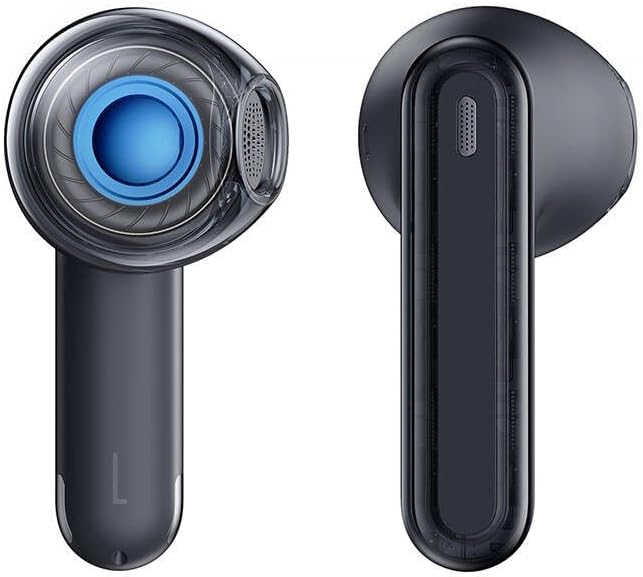
Figure 3: Left and Right Baseus Bowie E5x Earbuds
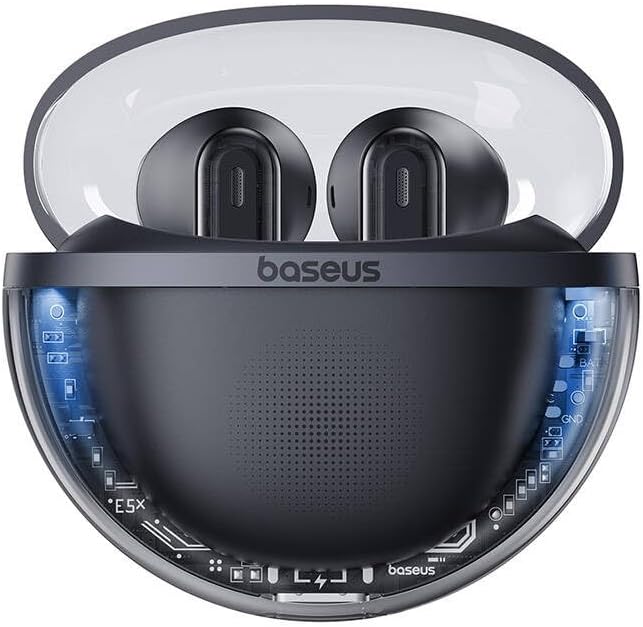
Figure 4: Baseus Bowie E5x Charging Case with Earbuds Inserted
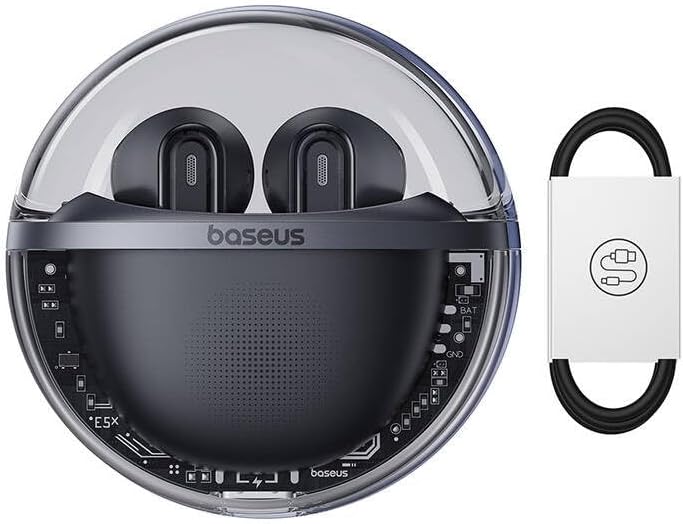
Figure 5: Close-up of an Earbud's Speaker
4. Setup
4.1 Charging the Earphones and Case
- Initial Charge: Before first use, fully charge the charging case and earbuds. Place the earbuds into the charging case.
- Charging the Case: Connect the provided USB-C cable to the charging port on the case and the other end to a USB power adapter (not included). The LED indicator on the case will show charging status.
- Charging the Earbuds: When placed in the charging case, the earbuds will automatically begin charging. The case's indicator lights will show the charging status of the earbuds.
4.2 Bluetooth Pairing
- Power On: Open the charging case. The earbuds will automatically power on and enter pairing mode (indicated by flashing LED lights on the earbuds).
- Activate Bluetooth: On your device (smartphone, tablet, computer), enable Bluetooth.
- Select Device: In your device's Bluetooth settings, search for available devices and select "Baseus Bowie E5x".
- Connect: Once selected, the earbuds will connect to your device. A voice prompt or steady LED light will confirm successful pairing.
- Reconnect: After initial pairing, the earbuds will automatically connect to the last paired device when taken out of the case, provided Bluetooth is enabled on the device.
5. Operating Instructions
The Baseus Bowie E5x earphones feature intuitive touch controls:
| Function | Action (Left/Right Earbud) |
|---|---|
| Power On | Open charging case / Long press touch area (if off) |
| Power Off | Place earbuds into charging case and close lid / Disconnect Bluetooth and wait |
| Play/Pause | Double tap touch area |
| Next Track | Triple tap right earbud |
| Previous Track | Triple tap left earbud |
| Answer/End Call | Double tap touch area |
| Reject Call | Long press touch area for 2 seconds |
| Activate Voice Assistant | Long press touch area for 3 seconds |
| Switch to Gaming Mode (Low Latency) | Specific gesture (refer to product packaging or Baseus app for exact control) |
Note: Specific touch controls for features like volume adjustment or gaming mode may vary. Refer to the official Baseus app or product packaging for the most accurate and customizable controls.
6. Maintenance
To ensure the longevity and optimal performance of your earphones, follow these maintenance tips:
- Cleaning: Regularly clean the earbuds and charging case with a soft, dry, lint-free cloth. Do not use harsh chemicals or abrasive materials.
- Charging Contacts: Ensure the charging contacts on both the earbuds and inside the case are clean and free of debris to ensure proper charging.
- Storage: When not in use, store the earphones in their charging case to protect them from dust and damage.
- Avoid Extreme Conditions: Do not expose the earphones to extreme temperatures, humidity, or liquids.
7. Troubleshooting
If you encounter issues with your Baseus Bowie E5x earphones, try the following solutions:
- No Sound:
- Ensure earbuds are charged.
- Check if Bluetooth is enabled on your device and connected to "Baseus Bowie E5x".
- Adjust volume on both your device and the earphones.
- Try re-pairing the earbuds with your device.
- Earbuds Not Pairing with Each Other:
- Place both earbuds back into the charging case, close the lid, wait a few seconds, then open the lid again.
- Ensure both earbuds have sufficient charge.
- Charging Issues:
- Check the USB-C cable and power adapter.
- Clean the charging contacts on the earbuds and inside the case.
- Ensure the charging case itself is charged.
- Connection Drops/Unstable:
- Move closer to your connected device.
- Avoid environments with strong electromagnetic interference.
- Disconnect and reconnect the Bluetooth connection.
If the issue persists, consult the Baseus official website or customer support for further assistance.
8. Specifications
| Feature | Detail |
|---|---|
| Brand | Baseus |
| Model | Bowie E5x |
| Color | Black |
| Components Included | 1 package (Earphones, Charging Case, USB-C Cable, Manual) |
| Connectivity | True Wireless Stereo (TWS) |
| Charging Port | USB-C |
Note: Specifications are subject to change without prior notice.
9. Warranty and Support
Baseus products come with a manufacturer's warranty. Please refer to the warranty card included in your package or visit the official Baseus website for detailed warranty terms and conditions specific to your region.
For technical support, troubleshooting, or service inquiries, please contact Baseus customer support through their official website or the contact information provided on your product packaging.
Official Website: www.baseus.com


