
1. Introduction
The Scosche FD5000SWF Factory Stereo Replacement Interface Adapter Kit is designed to facilitate the installation of an aftermarket stereo in select 2005-2016 Ford, Lincoln, and Mercury vehicles. This interface allows for the retention of factory steering wheel controls and safety/warning chimes, ensuring integration with your vehicle's existing systems.

Image 1.1: Overview of the Scosche FD5000SWF Factory Stereo Replacement Interface Adapter Kit components.
2. Product Contents
The Scosche FD5000SWF kit typically includes the following components:
- FD5000SWF Interface Module
- Vehicle-Specific Wiring Harness
- Steering Wheel Control (SWC) Interface Cable (3.5mm jack)

Image 2.1: Close-up view of the FD5000SWF interface module.
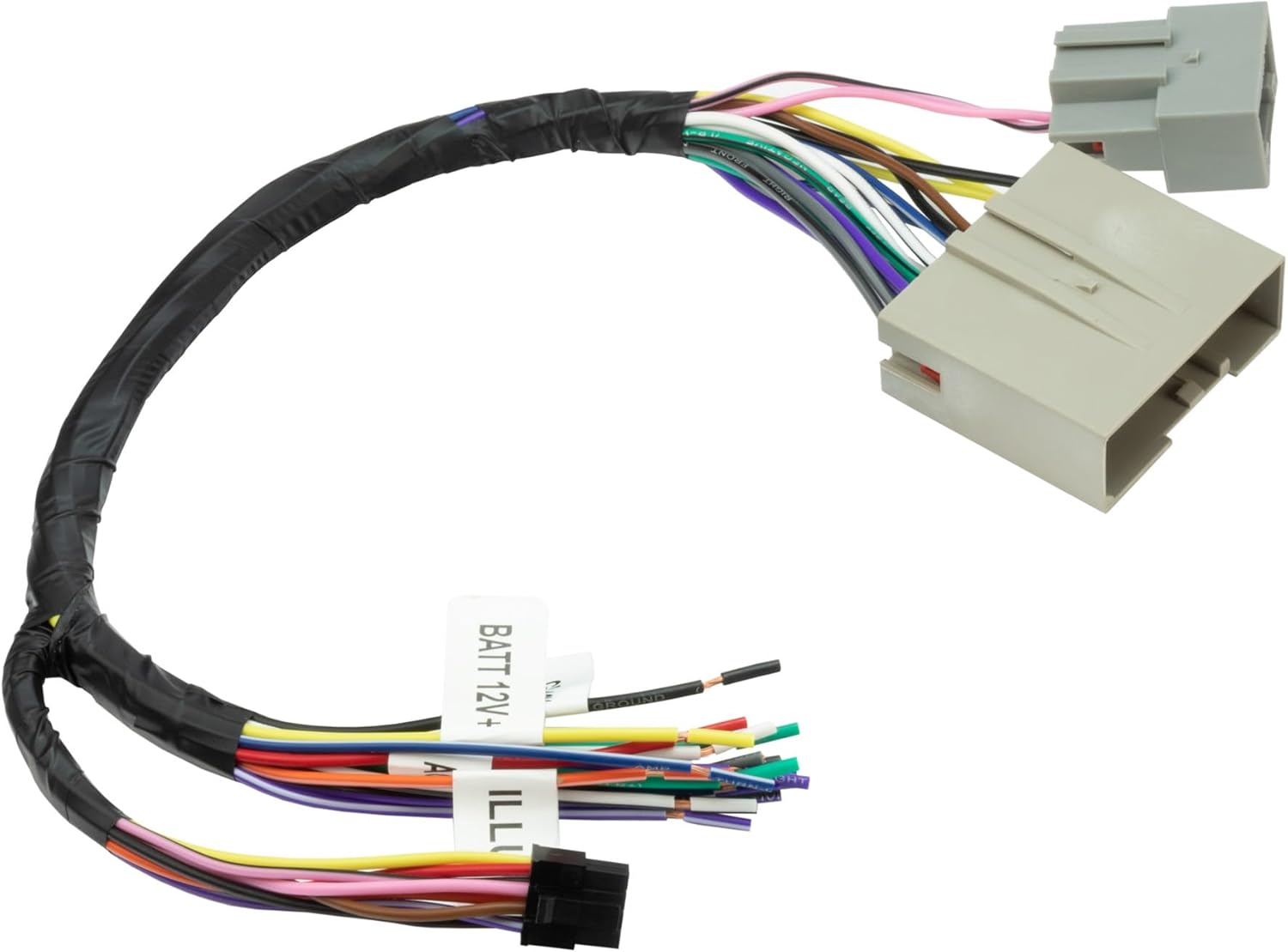
Image 2.2: The main vehicle-specific wiring harness for the FD5000SWF kit.

Image 2.3: The steering wheel control interface cable with a 3.5mm jack.
3. Compatibility
This interface is compatible with select Ford, Lincoln, and Mercury vehicles from 2005-2016. Refer to the detailed fitment guide below to confirm compatibility with your specific vehicle make, model, and year.

Image 3.1: Detailed fitment guide for the FD5000SWF interface.
Compatibility Table:
| Make | Model | Year |
|---|---|---|
| FORD | EDGE | 2007-10 |
| FORD | ESCAPE | 2008-12 |
| FORD | EXPEDITION/L | 2007-14 |
| FORD | EXPLORER | 2006-10 |
| FORD | EXPLORER SPORT TRAC | 2007-11 |
| FORD | F-150 | 2009-12 |
| FORD | F-250 SUPER DUTY | 2008-12 |
| FORD | F-350 SUPER DUTY | 2008-13 |
| FORD | F-450 SUPER DUTY | 2008-14 |
| FORD | F-550 SUPER DUTY | 2008-15 |
| FORD | F-250 SUPER DUTY * | 2013-16 |
| FORD | F-350 SUPER DUTY * | 2013-16 |
| FORD | F-450 SUPER DUTY * | 2013-16 |
| FORD | F-550 SUPER DUTY * | 2013-16 |
| FORD | FUSION | 2010-12 |
| FORD | FREESTYLE | 2005-07 |
| FORD | MUSTANG | 2007-09 |
| FORD | TAURUS | 2008-09 |
| FORD | TAURUS X | 2008-09 |
| LINCOLN | MKX | 2007-10 |
| LINCOLN | NAVIGATOR | 2007-14 |
| MERCURY | MARINER | 2008-11 |
| MERCURY | MILAN | 2010-11 |
| MERCURY | MONTEGO | 2008 |
| MERCURY | MOUNTAINEER | 2006-10 |
| MERCURY | SABLE | 2008-09 |
Installation Notes:
- Not compatible with THX Factory Amplified Systems.
- Specified models marked with * are not compatible with Factory 8.4" Screen Equipped vehicles.
4. Installation Guidelines (Setup)
Professional installation is recommended. Always disconnect the vehicle's battery before beginning any electrical work. Refer to your aftermarket stereo's instruction manual for specific wiring details.
4.1 Wiring Color Codes
The color codes used on this car stereo interface harness conform to the E.I.A. (Electronics Industry Association) standard. These colors may differ from the wiring codes found on your stereo. Always refer to your stereo owner's manual for specific wiring details before making any connections.

Image 4.1: Standard E.I.A. wiring color codes for the FD5000SWF interface.
| Wire Color | Function | Wire Color | Function |
|---|---|---|---|
| YELLOW | 12V BATTERY : CONSTANT (+) | BROWN | PHONE MUTE |
| RED | 12V BATTERY : SWITCHED (+) | WHITE | LEFT FRONT SPEAKER (+) |
| BLACK | CHASIS GROUND (-) | WHITE/BLACK | LEFT FRONT SPEAKER (-) |
| BLACK/WHITE | FACTORY AMPLIFIER GROUND | GRAY | RIGHT FRONT SPEAKER (+) |
| BLUE | ANTENNA POWER | GRAY/BLACK | RIGHT FRONT SPEAKER (-) |
| BLUE/WHITE | AMPLIFIER TURN ON | GREEN | LEFT REAR SPEAKER (+) |
| ORANGE | DASH ILLUMINATION 12V | GREEN/BLACK | LEFT REAR SPEAKER (-) |
| ORANGE/WHITE | DASH LIGHT DIMMER 1V-12V | PURPLE | RIGHT REAR SPEAKER (+) |
| ORANGE/BLACK | DIMMER GROUND | PURPLE/BLACK | RIGHT REAR SPEAKER (-) |
4.2 Connection Steps
- Prepare Wiring: Match the wires from the FD5000SWF harness to the corresponding wires on your aftermarket stereo's harness. Solder or crimp connections for a secure and reliable connection. Pay close attention to the E.I.A. color codes provided.
- Connect Interface Module: Plug the vehicle-specific wiring harness into the FD5000SWF interface module.
- Connect Steering Wheel Control (SWC) Cable: Connect the 3.5mm jack from the FD5000SWF to the SWC input on your aftermarket stereo. If your stereo uses a different SWC input type, an adapter may be required (not included).
- Vehicle Connection: Connect the vehicle-specific harness to the factory wiring harness in your vehicle. Ensure all connections are secure.
- Test System: Reconnect the vehicle's battery. Turn on the ignition and test the aftermarket stereo's functionality, including audio output, power on/off, and steering wheel controls.
For a more detailed installation guide, please refer to the official Installation Manual (PDF).
5. Operating the Interface
The FD5000SWF interface operates automatically once correctly installed. Its primary functions are to:
- Retain Steering Wheel Controls: Allows you to continue using your vehicle's factory steering wheel buttons to control your aftermarket stereo (e.g., volume up/down, track skip, mode).
- Retain Factory Chimes: Preserves essential safety and warning chimes that are part of your vehicle's original system.
- Provide Accessory Power: Supplies a switched 12V accessory output for your aftermarket stereo.
No user configuration is typically required for the interface module itself after proper wiring. Any adjustments to steering wheel control functions (if supported by your aftermarket stereo) should be made through your stereo's settings menu.
6. Troubleshooting
If you encounter issues after installation, review the following common troubleshooting steps:
- No Power to Stereo:
- Check all power connections (constant 12V, switched 12V, ground) from the interface harness to the aftermarket stereo and to the vehicle.
- Ensure the vehicle's battery is fully charged and properly connected.
- Verify that the accessory wire from the interface module is providing switched power.
- Steering Wheel Controls Not Working:
- Confirm the 3.5mm SWC jack is securely connected to the correct input on your aftermarket stereo.
- Check your aftermarket stereo's manual for instructions on programming or configuring steering wheel controls. Some stereos require manual setup.
- Ensure your vehicle model is fully compatible with SWC retention as per the fitment guide.
- No Audio Output:
- Verify all speaker wire connections are correct and secure (positive to positive, negative to negative).
- Check the amplifier turn-on wire (if applicable) to ensure the factory amplifier is receiving power.
- Confirm that the aftermarket stereo is functioning correctly independently.
- Factory Chimes Not Working:
- Ensure the interface module is properly connected and receiving power.
- Verify all vehicle-specific connections to the interface are correct.
If issues persist after reviewing these steps, contact Scosche Technical Support for assistance.
7. Specifications
| Feature | Detail |
|---|---|
| Brand | Scosche |
| Model Number | FD5000SWF |
| Material | Acrylonitrile Butadiene Styrene |
| Item Weight | 7 ounces (0.2 Kilograms) |
| Connector Type | 3.5mm Jack (for SWC) |
| Compatibility | Select 2005-2016 Ford, Lincoln & Mercury Vehicles |
| Features | Retains Steering Wheel Controls, Retains Factory Chimes |
8. Warranty and Support
The Scosche FD5000SWF is backed by Scosche's Lifetime Tech Support and Limited Warranty. For technical assistance or warranty claims, please contact Scosche directly.
Scosche Customer Support:
- Refer to the official Scosche website for contact information and support resources.
- Online resources and FAQs may be available to assist with common inquiries.


