
1. Introduction
The Black Shark Lucifer T7 TWS Gaming Earbuds (Model: BS-T7) are designed to provide an immersive audio experience for both gaming and music. Featuring advanced Bluetooth 5.3 technology, these earbuds offer lightning-fast transmission speeds and low latency, ensuring a responsive and stable connection. With 10mm drivers for powerful bass, Environmental Noise Cancellation (ENC) for clear calls, and smart touch controls, the Lucifer T7 earbuds are built for performance and convenience. They also boast IPX5 water resistance and dynamic lighting effects, enhancing your overall user experience.

Figure 1: Black Shark Lucifer T7 TWS Gaming Earbuds in their open charging case.
2. What's in the Box
Please check the package contents upon unboxing to ensure all items are present:
- Black Shark Lucifer T7 TWS Gaming Earbuds (Left and Right)
- Wireless Charging Case
- User Manual (this document)
- Ear Cushions (various sizes)
- Charging Cable (USB-C) - (Assumed, not explicitly listed but standard for TWS earbuds)

Figure 2: Black Shark Lucifer T7 TWS Gaming Earbuds and their charging case.
3. Setup
3.1 Charging the Earbuds and Case
Before first use, fully charge the earbuds and the charging case.
- Place the earbuds into the charging case. Ensure they are correctly seated in their respective slots.
- Connect the charging case to a power source using the provided USB-C cable.
- The LED indicators on the case will illuminate to show charging status. A full charge is indicated when all LEDs are solid.
The earbuds offer up to 23 hours of total playtime with the charging case.
3.2 Pairing with a Device
The earbuds utilize Bluetooth 5.3 for a stable and efficient connection.
- Open the charging case. The earbuds will automatically enter pairing mode, indicated by flashing LED lights on the earbuds.
- On your device (smartphone, tablet, laptop, etc.), navigate to the Bluetooth settings.
- Search for available devices and select "Black Shark Lucifer T7" from the list.
- Once connected, the earbud LEDs will stop flashing.
- If pairing fails, close the case, wait a few seconds, and repeat the steps.
3.3 Fitting the Earbuds
For optimal sound quality and comfort, choose the ear cushions that best fit your ears. Gently insert the earbuds into your ear canal and twist slightly to secure them.
4. Operating Instructions
4.1 Power On/Off
- Power On: Open the charging case, and the earbuds will automatically power on.
- Power Off: Place the earbuds back into the charging case and close the lid. They will automatically power off and begin charging.
4.2 Smart Touch Controls
The Black Shark Lucifer T7 earbuds feature intuitive touch controls on each earbud. The specific functions are as follows:
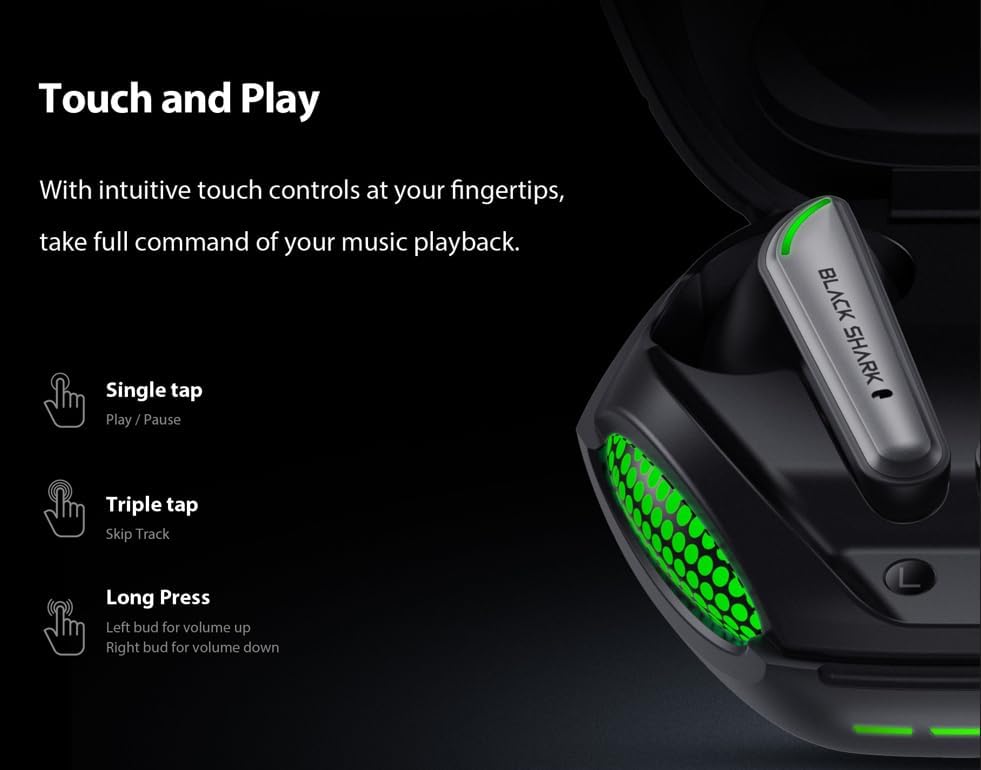
Figure 3: Smart Touch Controls Overview.
- Single Tap: Play/Pause music.
- Triple Tap: Skip to the next track.
- Long Press (Left Earbud): Volume Up.
- Long Press (Right Earbud): Volume Down.
- Answering/Ending Calls: Single tap on either earbud.
- Rejecting Calls: Long press on either earbud.
- Activating Voice Assistant: Double tap on either earbud.
4.3 Game and Music Dual Mode
The earbuds support a dual mode for optimized audio performance in both gaming and music listening. Switch between modes by performing a specific touch gesture (e.g., quadruple tap or specific long press combination). Refer to the quick start guide included in your package for the exact gesture to toggle between game mode (low latency) and music mode (high-fidelity audio).
4.4 Environmental Noise Cancellation (ENC) for Calls
The built-in ENC technology helps reduce background noise during calls, ensuring your voice is clear and distinct to the person on the other end. This feature is automatically active during phone calls.

Figure 4: Environmental Noise Cancellation for clear communication.
5. Maintenance
5.1 Cleaning
- Regularly clean the earbuds, especially the ear tips and charging contacts, with a soft, dry, lint-free cloth.
- Do not use abrasive cleaners, alcohol, or chemical solvents.
- Ensure no moisture enters any openings.
5.2 Water Resistance (IPX5)
The Black Shark Lucifer T7 earbuds are rated IPX5 water resistant, meaning they can withstand low-pressure water jets from any direction. This makes them suitable for workouts and light rain. However, they are not designed for swimming or submersion in water. Do not charge the earbuds if they are wet.
5.3 Storage
When not in use, store the earbuds in their charging case to protect them and keep them charged. Store the case in a cool, dry place away from extreme temperatures.
6. Troubleshooting
6.1 Earbuds Not Pairing
- Ensure both earbuds are charged.
- Place both earbuds back into the charging case, close the lid, and then open it again to re-enter pairing mode.
- Turn off and on your device's Bluetooth.
- Forget "Black Shark Lucifer T7" from your device's Bluetooth list and try pairing again.
- Ensure the earbuds are within the 10-meter wireless range of your device.
6.2 No Sound or Low Volume
- Check the volume level on both your device and the earbuds (using long press controls).
- Ensure the earbuds are properly connected to your device.
- Clean any debris from the earbud speakers and ear tips.
- Try playing audio from a different application or device.
6.3 Charging Issues
- Verify the charging cable is securely connected to both the case and the power source.
- Try a different USB-C cable and power adapter.
- Ensure the charging contacts on the earbuds and inside the case are clean and free of obstruction.
- If the earbuds are wet, dry them completely before attempting to charge.
6.4 Touch Controls Not Responding
- Ensure your fingers are clean and dry when using touch controls.
- Try restarting the earbuds by placing them in the case and closing the lid for a few seconds.
7. Specifications
| Model Name | Black Shark Lucifer T7 |
| Model Number | BS-T7 |
| Connectivity | Bluetooth 5.3 |
| Wireless Range | Up to 10 meters (33 feet) |
| Audio Drivers | 10mm Dynamic Drivers |
| Audio Latency | 65 Milliseconds |
| Noise Control | Environmental Noise Cancellation (ENC) for calls |
| Water Resistance | IPX5 |
| Playtime (Total with Case) | Up to 23 hours |
| Control Method | Touch |
| Dimensions (Case) | 3.5 x 3.5 x 1.54 inches (approximate) |
| Weight | 4.16 ounces (approximate) |
| Material | Plastic |
| Compatible Devices | Cellphones, Gaming Consoles, Laptops, Tablets, iPhone |

Figure 5: Key features of the Black Shark Lucifer T7.
8. Product Overview Video
Watch this official video for a visual overview of the Black Shark Lucifer T7 Gaming Earbuds, highlighting their design and key functionalities.
Video 1: Official overview of the Black Shark Lucifer T7 Gaming Earbuds.
9. Warranty and Support
For detailed warranty information and customer support, please refer to the official Black Shark website or contact their customer service directly. Keep your purchase receipt for warranty claims.
Manufacturer: Black Shark
Brand Store: Black Shark Store on Amazon


