
1. Introduction
Thank you for choosing the Hoco EW39 Bright True Wireless ENC Headset. This manual provides detailed instructions on how to set up, operate, and maintain your new headset. Please read this manual carefully before use to ensure optimal performance and longevity of your device.
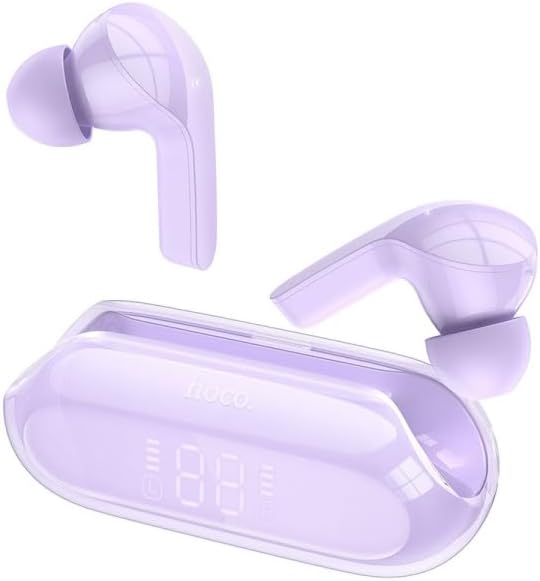
Image 1: The Hoco EW39 Bright True Wireless ENC Headset, featuring two purple earbuds and their matching transparent purple charging case with a digital display.
2. Package Contents
Please check the package contents upon unboxing:
- Hoco EW39 True Wireless Earbuds (Left and Right)
- Charging Case
- USB Charging Cable
- User Manual
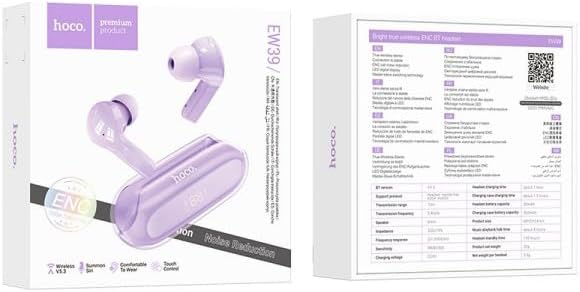
Image 2: The retail packaging for the Hoco EW39 headset, showing the earbuds and case on the front, and product specifications and features on the back.
3. Setup
3.1 Charging the Headset
Before first use, fully charge the headset and charging case.
- Connect the USB charging cable to the charging port on the case and a power source.
- The LED digital display on the charging case will indicate the charging status.
- The charging case has a battery capacity of 300mAh. Each headphone has a 30mAh battery.
- A full charge provides approximately 4 hours of use time and 150 hours of standby time.
3.2 Pairing with a Device
The Hoco EW39 uses Bluetooth 5.3 for stable connectivity.
- Ensure the earbuds are in the charging case and the case has power.
- Open the charging case. The earbuds will automatically enter pairing mode.
- On your device (smartphone, tablet, etc.), enable Bluetooth.
- Search for "Hoco EW39" in the list of available Bluetooth devices.
- Select "Hoco EW39" to connect. Once connected, a voice prompt will confirm the successful pairing.
- The headset supports master-slave switching, allowing either earbud to be used independently.
4. Operating Instructions
The Hoco EW39 features touch controls for various functions.
4.1 Power On/Off
- Power On: Open the charging case, or take the earbuds out of the case. They will power on automatically.
- Power Off: Place the earbuds back into the charging case and close the lid. They will power off automatically and begin charging.
4.2 Music Playback
- Play/Pause: Single tap on either earbud.
- Next Track: Double tap on the right earbud.
- Previous Track: Double tap on the left earbud.
4.3 Call Management
- Answer/End Call: Single tap on either earbud.
- Reject Call: Press and hold either earbud for 2 seconds.
- ENC Call Noise Reduction: The headset features single mark ENC for clearer calls.
4.4 Voice Assistant (Siri)
- Activate Voice Assistant: Triple tap on either earbud to summon Siri or your device's default voice assistant.
5. Maintenance
Proper maintenance ensures the longevity of your Hoco EW39 headset.
- Cleaning: Use a soft, dry, lint-free cloth to clean the earbuds and charging case. Do not use harsh chemicals or abrasive materials.
- Storage: When not in use, store the earbuds in their charging case to protect them and keep them charged.
- Avoid Water: The headset is not waterproof. Avoid exposure to water, moisture, or extreme temperatures.
- Charging: Use only the provided charging cable or a certified equivalent.
6. Troubleshooting
If you encounter issues with your Hoco EW39 headset, try the following solutions:
- No Sound from Earbuds:
- Ensure earbuds are charged.
- Check if the earbuds are properly paired with your device.
- Adjust the volume on your device.
- Try re-pairing the earbuds.
- Earbuds Not Pairing:
- Ensure Bluetooth is enabled on your device.
- Make sure the earbuds are in pairing mode (open case).
- Turn off Bluetooth on other nearby devices that might be connected.
- Try resetting the earbuds (refer to manufacturer's website if a specific reset procedure is available, otherwise, simply place them back in the case and try again).
- Charging Case Not Charging:
- Check the charging cable and power adapter.
- Ensure the charging port is clean and free of debris.
- Poor Call Quality:
- Ensure the earbuds are properly seated in your ears.
- Move closer to your connected device.
- The ENC feature helps reduce environmental noise during calls.
7. Specifications
Detailed technical specifications for the Hoco EW39 Bright True Wireless ENC Headset:
| Feature | Specification |
|---|---|
| Bluetooth Version | 5.3 |
| Charging Case Battery Capacity | 300mAh |
| Headphone Battery Capacity | 30mAh |
| Use Time | Approximately 4 hours |
| Standby Time | Approximately 150 hours |
| Dimensions (Case) | 68 x 29 x 24 mm |
| Total Weight | 32g |
| Noise Control | ENC Call Noise Reduction |
| Form Factor | In Ear |
| Special Feature | Lightweight, LED Digital Display Power, Master-Slave Switching |
8. Warranty and Support
For warranty information and technical support, please refer to the warranty card included with your product or contact the retailer/manufacturer directly. Keep your proof of purchase for warranty claims.
For further assistance, please visit the official Hoco website or contact their customer service.


