
Introduction
This instruction manual provides essential information for the proper installation, operation, and maintenance of your new FURITEK Complete PRE-Build Front AXLE Set with SERVO. This product is specifically designed for the FURITEK FX118 remote control vehicle, offering enhanced performance and supporting 4-wheel steering (4WS) capabilities. Please read this manual thoroughly before installation and use to ensure optimal performance and longevity of your product.
Key Features:
- Full complete pre-built front axle with integrated servo.
- Designed for direct compatibility with the Furitek FX118.
- Supports 4-wheel steering (4WS) configurations for the FX118.
Product Overview

Figure 1: Angled view of the complete Furitek pre-built front axle set, including the integrated servo and wiring.
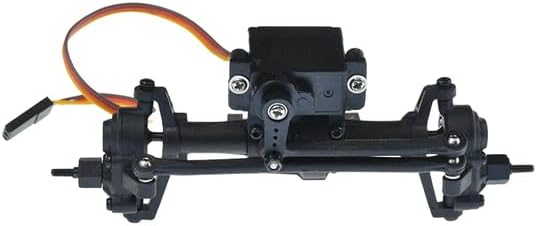
Figure 2: Front view of the Furitek pre-built front axle set, showing the steering links and servo horn.
Installation Guide
This pre-built front axle set is designed for direct replacement on the Furitek FX118. Ensure your vehicle is powered off and the battery is disconnected before beginning installation.
Step-by-Step Installation:
- Prepare the Vehicle: Carefully remove the body of your Furitek FX118 to access the chassis.
- Remove Existing Front Axle: Disconnect the steering servo wire from the receiver/ESC. Unbolt and remove the existing front axle assembly from the chassis. Keep all screws and small parts organized.
- Install New Front Axle: Position the new FURITEK PRE-Build Front AXLE Set onto the chassis. Align the mounting points and secure it using the appropriate screws. Ensure all links and suspension components are correctly attached.
- Connect Servo: Connect the integrated servo's wire from the new axle to the designated steering channel on your FX118's receiver/ESC. Refer to your FX118's manual for specific port locations if needed.
- Verify Connections: Double-check all screw connections for tightness and ensure the servo wire is not pinched or obstructing any moving parts.
- Initial Test: Reconnect the battery and power on your FX118. Test the steering function to ensure the servo responds correctly and the wheels turn smoothly from left to right. Adjust trim settings on your transmitter if necessary for straight tracking.
- Reattach Body: Once satisfied with the installation and function, carefully reattach the vehicle body.
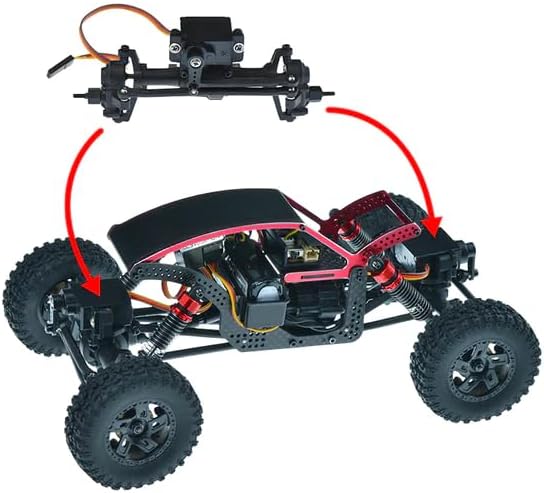
Figure 3: Illustration of the front axle being mounted onto an RC vehicle chassis.
Operation
After successful installation, the FURITEK PRE-Build Front AXLE Set with SERVO will provide precise steering control for your FX118. If your FX118 is configured for 4-wheel steering, this front axle will work in conjunction with a rear steering system (sold separately) to enable advanced maneuverability. Always operate your RC vehicle in a safe environment, away from people, pets, and obstacles.
- Steering Control: Use your transmitter's steering wheel or stick to control the direction of the front wheels.
- 4WS Operation (if applicable): If you have a 4WS setup, familiarize yourself with your transmitter's controls for independent or synchronized front and rear steering.
- Gentle Operation: Avoid sudden, harsh steering inputs at high speeds to prevent damage to the servo and axle components.
Maintenance
Regular maintenance will extend the lifespan and performance of your axle set.
- Cleaning: After each use, especially in dirty or wet conditions, clean the axle assembly to remove dirt, dust, and debris. Use a soft brush or compressed air. Avoid using harsh chemicals.
- Inspection: Periodically inspect all screws, nuts, and bolts for tightness. Check for any signs of wear or damage on the gears, bearings, and steering links.
- Lubrication: Lightly lubricate moving metal parts, such as universal joints and gear teeth, with appropriate RC-grade grease or oil. Avoid over-lubrication, which can attract dirt.
- Servo Check: Ensure the servo operates smoothly and without binding. If the servo exhibits erratic behavior or loss of power, inspect its connections and consider replacement if necessary.
Troubleshooting
If you encounter issues, refer to the following common problems and solutions:
| Problem | Possible Cause | Solution |
|---|---|---|
| No steering response | Loose servo connection, damaged servo, transmitter/receiver issue | Check servo wire connection. Test servo with another channel or replace if faulty. Verify transmitter/receiver functionality. |
| Steering is weak or slow | Low battery, binding in steering linkage, damaged servo | Charge or replace battery. Inspect steering links for obstructions or damage. Replace servo if necessary. |
| Grinding noise from axle | Debris in gears, worn gears, loose components | Clean gears thoroughly. Inspect gears for wear and replace if damaged. Tighten all screws. |
| Vehicle pulls to one side | Steering trim off, bent steering link, uneven suspension | Adjust steering trim on transmitter. Inspect and replace bent steering links. Check suspension for proper setup. |
Product Specifications
| Specification | Detail |
|---|---|
| Brand Name | Furitek |
| Model Name | FRONT AXLE SET |
| Manufacturer Part Number | FUR-2429 |
| Compatibility | Furitek FX118 |
| Included Components | Complete Pre-Built Front Axle Set with Servo |
| Assembly Required | No (Pre-built) |
| Item Weight | 0.13 Pounds |
| Item Dimensions | 5 x 5 x 5 inches |
Warranty and Support Information
For specific warranty details, please refer to the documentation included with your purchase or contact Furitek directly through their official website. If you purchased this product from Amazon, a 30-day return policy may apply. For technical support or assistance with your product, please reach out to the manufacturer, Furitek, or the seller, HeliDirect, for guidance.