
GLAKER HC2022
GLAKER HC2022 Cordless Hair Clipper and Trimmer User Manual
Model: HC2022
1. Introduction
This manual provides detailed instructions for the safe and effective use of your GLAKER HC2022 Cordless Hair Clipper and Trimmer. Please read this manual thoroughly before first use and retain it for future reference.
Safety Information
WARNING:
- Always use this product with care.
- For external use only.
- If any irritation occurs, discontinue use.
- Keep out of reach of children.
- Do not immerse the unit in water.
- Ensure the clipper is switched off before cleaning or maintenance.
Note: The following legal disclaimer was provided with the product information but is typically associated with dietary supplements and may not be directly relevant to this product: Statements regarding dietary supplements have not been evaluated by the FDA and are not intended to diagnose, treat, cure, or prevent any disease or health condition.
2. Product Overview and Package Contents
The GLAKER HC2022 is a versatile cordless hair clipper and trimmer designed for various grooming needs. It features a powerful motor, adjustable length settings, and a durable blade system.

Figure 2.1: GLAKER HC2022 Cordless Hair Clipper and Trimmer with all included accessories, including the clipper, various guide combs, charging cable, cleaning brush, blade oil, and a barber cape.
Package Contents:
- GLAKER HC2022 Hair Clipper/Trimmer
- 8 Guide Combs (3mm, 6mm, 9mm, 13mm, 16mm, 19mm, 22mm, 25mm)
- USB-C Charging Cable
- Cleaning Brush
- Blade Oil
- Barber Cape
- Instruction Manual
3. Setup and Charging
Initial Charging:
Before first use, fully charge the clipper. Connect the USB-C charging cable to the clipper and a compatible USB power adapter (not included). The battery indicator lights will show charging progress. A full charge takes approximately 180 minutes and provides up to 300 minutes of run time.

Figure 3.1: The GLAKER HC2022 clipper connected to a USB-C charging cable, illustrating the Type-C charging port.
Attaching Guide Combs:
Select the desired guide comb for your preferred hair length. Align the comb with the clipper blade and push it firmly until it clicks into place. To remove, gently pull the comb away from the blade.

Figure 3.2: A selection of guide combs for the GLAKER HC2022 clipper, showing different lengths from 3mm to 25mm.
Adjusting Blade Length (Precision Dial):
The clipper features a built-in precision dial for fine-tuning cutting lengths from 0.5mm to 2.5mm. Rotate the dial to select the desired length. This is particularly useful for fading and blending.

Figure 3.3: The precision dial on the GLAKER HC2022 clipper, allowing for fine adjustments of blade length between 0.5mm and 2.5mm, ideal for fading and blending.
4. Operating Instructions
Powering On/Off and Speed Modes:
Press the power button to turn the clipper on. The GLAKER HC2022 offers two speed modes:
- Normal Mode (6000 rpm): Suitable for normal and curly hair, and for quieter operation.
- Turbo+ Mode (7000 rpm): Designed for coarse or thick hair, providing increased cutting power.
Toggle between modes by pressing the power button again. Press and hold the power button to turn the clipper off.

Figure 4.1: Illustration of the GLAKER HC2022's dual-speed motor, indicating 6000 RPM for normal/curly hair and 7000 RPM for coarse hair.
Hair Cutting and Trimming:
- Ensure hair is clean and dry.
- Attach the appropriate guide comb and adjust the precision dial if necessary.
- Hold the clipper with the blade teeth pointing upwards.
- Begin cutting from the nape of the neck, moving upwards against the direction of hair growth.
- Use smooth, overlapping strokes for an even cut.
- For fading and blending, gradually reduce the guide comb size or adjust the precision dial as you move up the head.
- For beard trimming, use smaller guide combs or the precision dial for desired length and shaping.

Figure 4.2: Visual guide demonstrating various hair lengths and styles achievable using the GLAKER HC2022 clipper and its multiple guide combs.
5. Maintenance
Cleaning the Blades:
Regular cleaning ensures optimal performance and hygiene. The blades are detachable for easy cleaning.
- Turn off the clipper.
- Gently push the blade assembly forward to detach it from the clipper body.
- Use the provided cleaning brush to remove loose hairs from the blades and the clipper body.
- Rinse the detached blades under running water. Ensure the clipper body does not get wet.
- Allow the blades to air dry completely before reattaching.
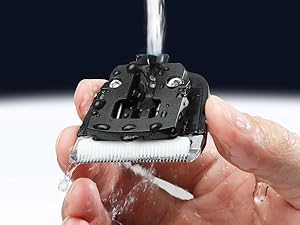
Figure 5.1: The detachable blade of the GLAKER HC2022 clipper being rinsed under water for cleaning.
Oiling the Blades:
After every few uses, or after cleaning, apply a small drop of the included blade oil to the teeth of the blades. This helps maintain blade sharpness and smooth operation.

Figure 5.2: A bottle of blade oil, essential for maintaining the performance of the clipper blades.
Storage:
Store the clipper and its accessories in a dry, cool place, away from direct sunlight and moisture.
6. Troubleshooting
| Problem | Possible Cause | Solution |
|---|---|---|
| Clipper does not turn on. | Battery is depleted. | Charge the clipper fully. |
| Clipper pulls hair or cuts unevenly. | Blades are dull, dirty, or not oiled. Guide comb is incorrectly attached. | Clean and oil the blades. Ensure guide comb is securely attached. Consider replacing blades if dull. |
| Clipper makes unusual noise. | Blades require oiling or are obstructed. | Clean and oil the blades. Check for any hair or debris obstructing the blade mechanism. |
| Battery does not hold charge. | Battery lifespan reached or charging cable/adapter issue. | Ensure charging cable and adapter are functional. If problem persists, contact customer support. |
7. Specifications
| Feature | Detail |
|---|---|
| Brand | GLAKER |
| Model Name | HC2022 |
| Item Model Number | HC-G |
| Product Dimensions | 6 x 1.8 x 2 inches |
| Item Weight | 1.15 Pounds |
| Charging Time | Approx. 180 minutes for full charge |
| Run Time | Up to 300 minutes |
| Battery Type | Lithium-Ion |
| Included Components | Clipper, 8 Guide Combs, USB-C Cable, Cleaning Brush, Blade Oil, Barber Cape |
8. Warranty and Support
GLAKER provides a 1-year warranty for the HC2022 Cordless Hair Clipper and Trimmer. This warranty covers manufacturing defects and ensures reliable support.
If you encounter any issues or have questions regarding your product, please contact GLAKER customer support. Our team is ready to assist you.
For further assistance, please visit the official GLAKER store or contact their customer service channels.
Related documentsHC2022

Ask a question about this manual
Ask about setup, troubleshooting, compatibility, parts, safety, or missing instructions. Manuals+ will review the question and use this page’s manual context to help answer it.