
Important Safety Information
- Keep the desk away from walls to prevent scratches or damage during height adjustments.
- This product is designed for indoor use only. Avoid exposure to liquids or excessive moisture.
- The desk features an overheating protection system. If the desk is raised or lowered continuously for approximately 2 minutes, the system will activate. Allow an 18-minute cool-down period before attempting further height adjustments.
- Ensure all cables are properly managed and secured to prevent tripping hazards or damage to the desk mechanism.
- Do not exceed the maximum weight capacity of 154 lbs (70 kg).
Setup and Assembly
Assembly of the VASAGLE Electric Standing Desk is required. For optimal safety and efficiency, it is recommended that two people assemble the desk. An electric drill may be helpful for faster assembly, though all necessary tools are typically included.
Assembly Video Guide
Official assembly video for the VASAGLE Electric Standing Desk, demonstrating step-by-step installation.
General Assembly Steps
- Unpack Components: Carefully remove all parts from the packaging and verify against the included parts list.
- Assemble Desk Frame: Attach the lifting columns to the desk feet, ensuring all screws are tightened securely. Pay close attention to the orientation of the frame components as indicated in the manual.
- Attach Desktop: Secure the desktop to the assembled frame.
- Install Control Box and Motor: Mount the control box and connect the motor cables as per the instructions.
- Install Accessories: Attach the drawers, middle shelf, power strip, and cable management components.
- Connect Power: Plug the desk into a suitable power outlet.

Image: The VASAGLE Electric Standing Desk fully assembled and set up for use.

Image: Detailed dimensions of the desk, including height range, desktop size, and drawer measurements.
Operating Instructions
Height Adjustment
The desk's height can be adjusted electrically from 28.3 inches (72 cm) to 47.2 inches (120 cm). The motor operates smoothly with a noise level of 48 dB or less and a setting speed of 25 mm/s.
- Raise/Lower: Use the up and down arrow buttons on the controller to adjust the desk height.
- Memory Presets: The controller features 3 memory buttons (1, 2, 3) to save your preferred sitting and standing heights. To save a height, adjust the desk to the desired level, then press the 'S' button followed by one of the memory buttons (1, 2, or 3). To recall a saved height, simply press the corresponding memory button.
- Initialization: After initial setup or if the desk is unresponsive, perform an initialization by holding the down arrow button for approximately 5 seconds until the desk reaches its lowest point and resets.
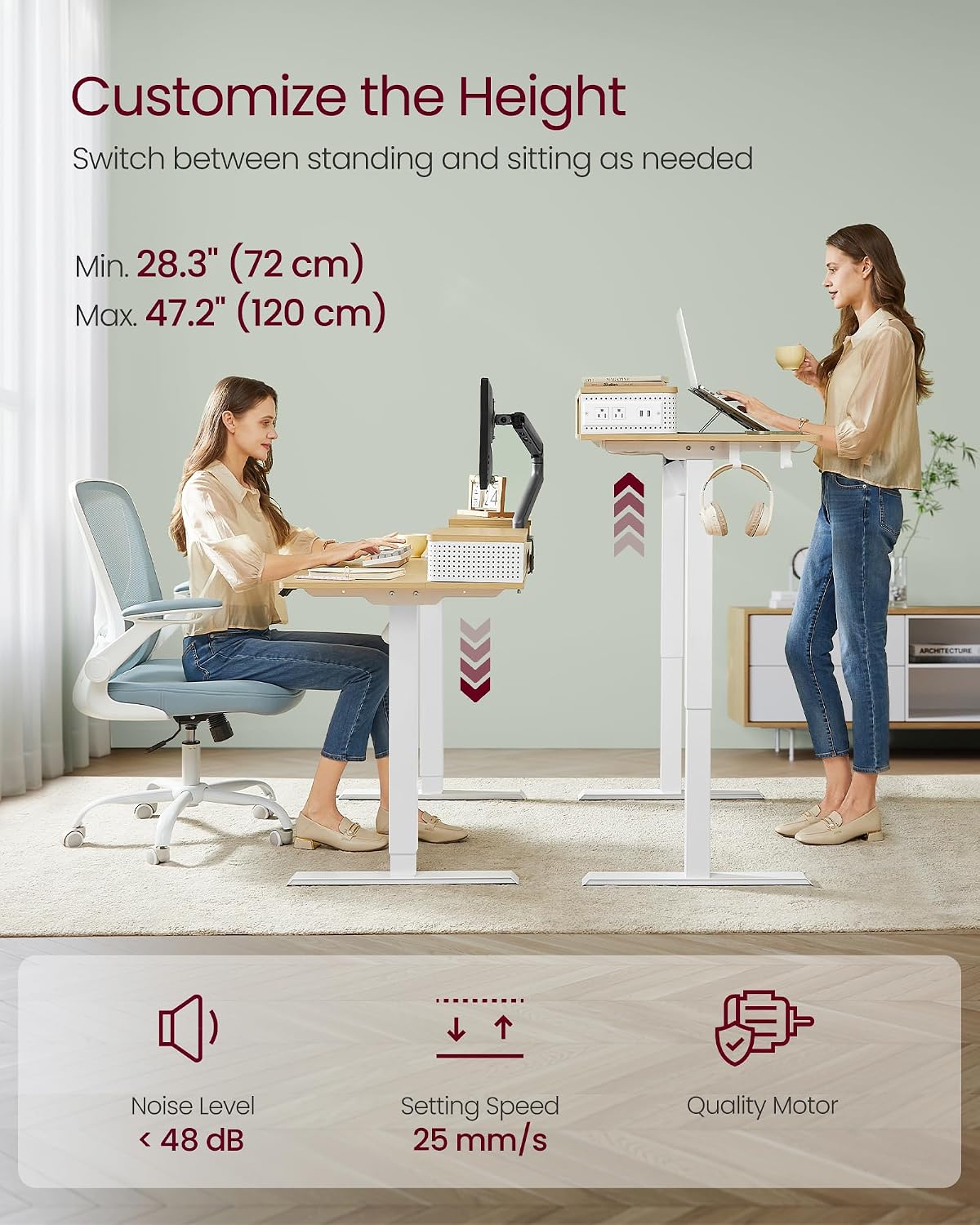
Image: Illustration of the desk's adjustable height range, showing both sitting and standing positions.

Image: The desk's multifunctional controller, highlighting its USB port, LED display, memory function, and height adjustment buttons.
LED Lights
The built-in LED lights offer 20 colors and 5 brightness levels. Use the dedicated controls (usually on the power strip or a separate remote, refer to your specific manual for exact location) to cycle through colors and adjust brightness.

Image: The integrated LED lights providing customizable illumination under the middle shelf.
Power Outlet and USB Ports
The integrated power strip includes 2 AC outlets (125V/12A) and 2 USB-A ports (5V/2A) for convenient charging of your devices. The power strip can be mounted on either the left or right side of the desk.

Image: The built-in power strip providing convenient access to AC and USB charging.
Adjustable Middle Shelf
The middle shelf is adjustable, allowing you to raise your screen to eye level for improved ergonomics and reduced neck and shoulder strain. It also provides space for office supplies underneath or can accommodate monitor arms.
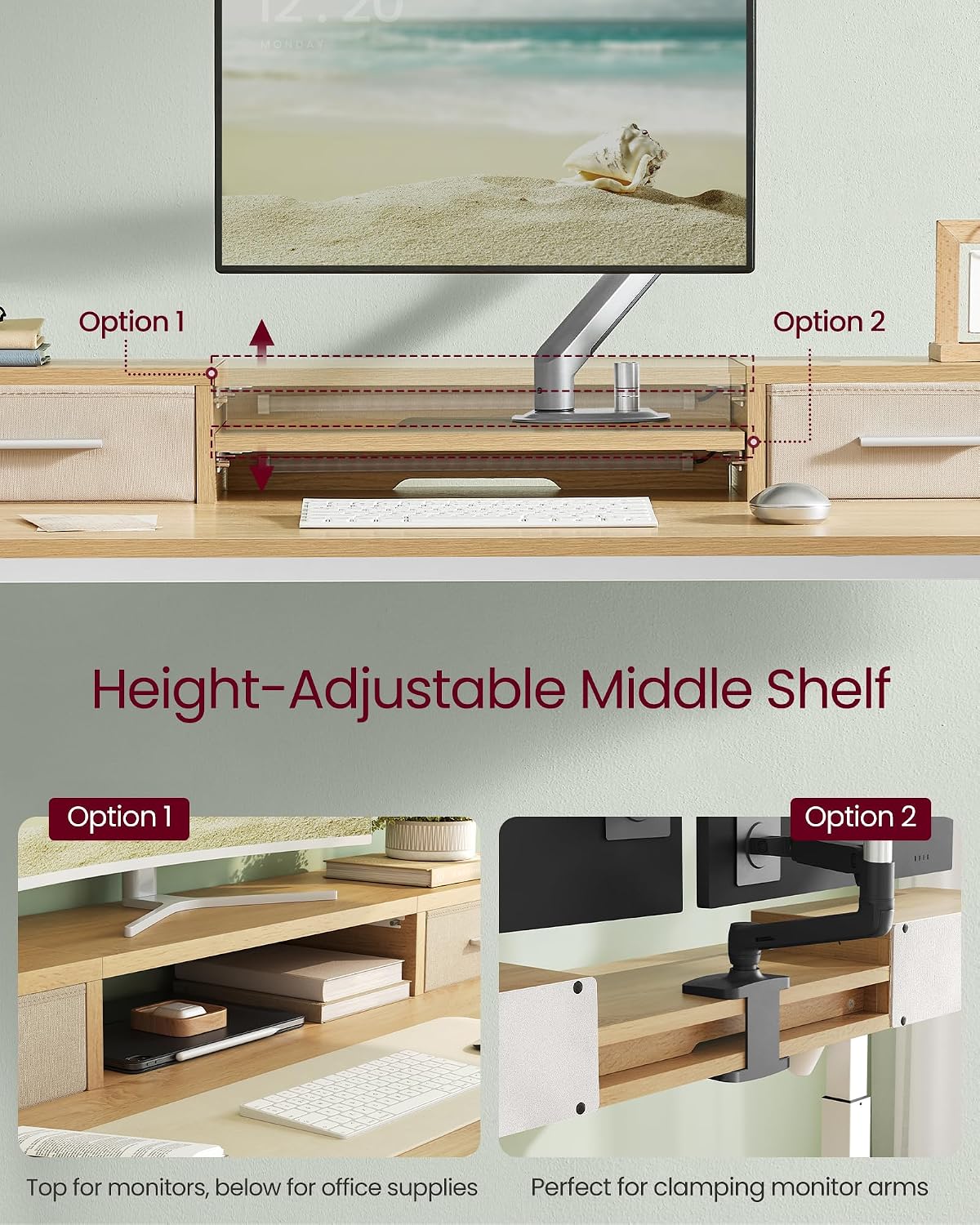
Image: Options for configuring the adjustable middle shelf, either for monitor placement or to support monitor clamping arms.
Storage Features
- Drawers: Two fabric drawers are provided for organizing office essentials.
- Hooks: Two hooks are included for hanging headphones, bags, or managing charging cables.
- Cable Management: Integrated cable management boxes help keep cables tidy and prevent tangles.

Image: The two practical fabric drawers designed to keep your workspace organized.
Maintenance
To ensure the longevity and proper function of your VASAGLE Electric Standing Desk, follow these maintenance guidelines:
- Cleaning: Wipe the desk surfaces with a dry, soft cloth. Avoid using abrasive cleaners or harsh chemicals that could damage the finish.
- Spills: In case of spills, immediately wipe them dry to prevent moisture damage to the particleboard or electrical components.
- Cable Inspection: Periodically check all power cords and connections for any signs of wear or damage. Replace damaged cables immediately.
- Screw Tightness: Occasionally check and tighten any loose screws on the desk frame to maintain stability.
Troubleshooting
If you encounter issues with your electric standing desk, refer to the following common troubleshooting steps:
- Desk Not Moving:
- Ensure the power cord is securely plugged into both the desk and a working wall outlet.
- Check if the overheating protection is active (desk was used continuously for 2 minutes). Wait 18 minutes before attempting to adjust the height again.
- Perform an initialization: Press and hold the down arrow button on the controller for approximately 5 seconds until the desk moves to its lowest position and resets.
- Uneven Height Adjustment:
- Ensure the desk is placed on a level surface.
- Check that all frame connections are securely tightened.
- Perform an initialization as described above.
- LED Lights Not Working:
- Verify that the LED light strip is properly connected to its power source.
- Check the power strip for functionality.
- Power Outlets/USB Ports Not Working:
- Ensure the power strip is correctly installed and connected to the desk's power supply.
- Check if the main power cord for the desk is plugged in.
If these steps do not resolve the issue, please contact customer support for further assistance.
Specifications
| Feature | Specification |
|---|---|
| Model Number | ULSD182N21 |
| Brand | VASAGLE |
| Product Dimensions (D x W x H) | 23.6" x 47.2" x 47.2" (60 cm x 120 cm x 120 cm) |
| Desktop Width | 47.2 inches (120 cm) |
| Desktop Depth | 23.6 inches (60 cm) |
| Minimum Height | 28.3 inches (72 cm) |
| Maximum Height | 47.2 inches (120 cm) |
| Item Weight | 31 Pounds (14.06 kg) |
| Maximum Weight Recommendation | 154 Pounds (70 kg) |
| Material Type | Particleboard, Steel, Oxford Fabric |
| Number of Drawers | 2 |
| Power Outlets | 2 AC Outlets (125V/12A) |
| USB Ports | 2 USB-A Ports (5V/2A) |
| Lifting Mechanism | Electric |
| Noise Level | ≤ 48 dB |
| Color | Straw Yellow |
Warranty Information
This product does not come with an explicit manufacturer's warranty type. Please refer to the retailer's return policy or contact the seller directly for information regarding product guarantees or defects.
Customer Support
For any questions, concerns, or assistance with your VASAGLE Electric Standing Desk, please contact the seller or manufacturer's customer support. Refer to your purchase documentation for specific contact details.


