
1. Introduction
The PROHEAR 037 Bluetooth 5.0 Hearing Protection Headphones are designed to provide effective noise reduction while allowing for wireless audio streaming and call management. These headphones are ideal for use in noisy environments such as workshops, during lawn mowing, or snowblowing, ensuring your hearing is protected while you remain connected and entertained.
2. Safety Information
Always prioritize your hearing safety. Ensure the headphones are worn correctly to achieve the stated Noise Reduction Rating (NRR). Prolonged exposure to noise levels above 85dB can cause permanent hearing damage.
- Ensure a proper seal around your ears for maximum noise reduction.
- Do not modify the headphones, as this may compromise their protective capabilities.
- Keep the headphones away from extreme temperatures and liquids.

3. Package Contents
Upon opening your PROHEAR 037 package, you should find the following items:
- PROHEAR 037 Hearing Protection Headphones
- USB Charging Cable
- Black Leather Carry Bag
- User Manual (this document)

4. Product Features
The PROHEAR 037 headphones are equipped with advanced features for superior performance and user convenience:
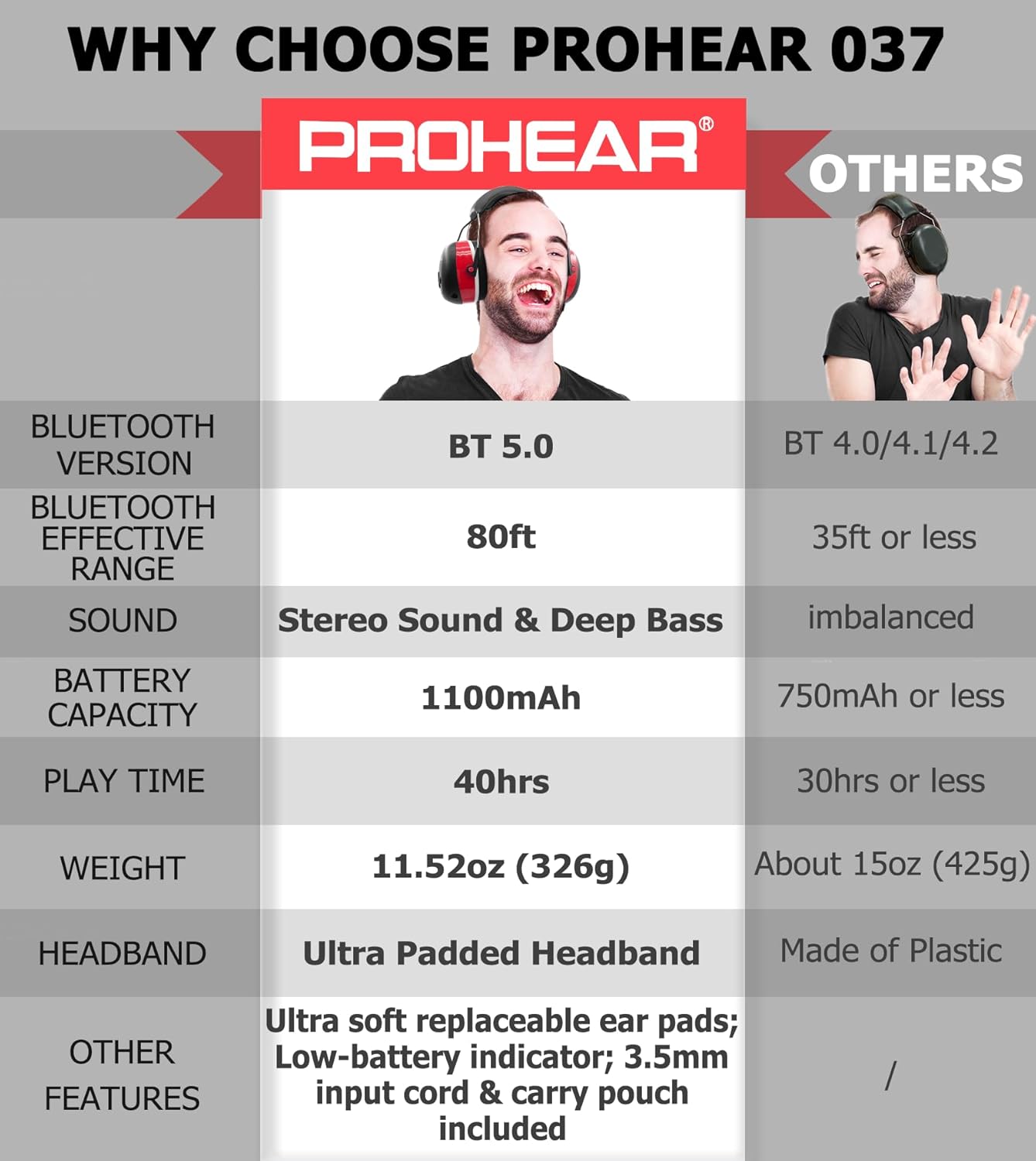
- Bluetooth 5.0 Technology: Provides a stable and fast wireless connection with an effective range of up to 80 feet.
- 25dB Noise Reduction Rating (NRR): Effectively protects your hearing in loud environments.
- High-Quality Stereo Sound: Enjoy clear audio for music and calls.
- Long Battery Life: Built-in 1100mAh rechargeable lithium battery offers up to 40 hours of playtime.
- Comfortable Design: Features an ultra-padded headband and soft, breathable ear pads for extended wear.
- Easy-to-Use Controls: Intuitive buttons allow for volume adjustment, track skipping, and call management without removing the muffs.
- Built-in Microphone: For hands-free communication.
- Wired Mode: Includes a 3.5mm connector for continuous use even when the battery is depleted.

5. Setup
5.1. Charging the Headphones
Before first use, fully charge your PROHEAR 037 headphones.
- Connect the provided USB charging cable to the charging port on the headphones.
- Plug the other end of the USB cable into a compatible USB power source (e.g., computer USB port, power bank, or car charger).
- The LED indicator will show charging status (refer to the LED indicator section for details).
- Once fully charged, disconnect the charging cable.

5.2. Bluetooth Pairing
To connect your headphones to a Bluetooth-enabled device:
- Ensure the headphones are powered off. Press and hold the Power/Multi-function button until the LED indicator flashes blue and red, indicating pairing mode.
- On your device (smartphone, tablet, etc.), enable Bluetooth and search for available devices.
- Select "PROHEAR 037" from the list of devices.
- Once connected, the LED indicator will show a solid blue light.
6. Operating Instructions
6.1. Controls Overview
The control buttons are located on the right earcup for easy access.

- Power/Multi-function Button (Center 'M' button):
- Press and hold: Power On/Off
- Single press: Play/Pause music, Answer/End call
- Double press: Redial last number
- Triple press: Activate voice assistant (if supported by device)
- Volume Up Button ('+' button): Single press to increase volume.
- Volume Down Button ('-' button): Single press to decrease volume.
- Next Track Button ('>' button): Single press to skip to the next song.
- Previous Track Button ('<' button): Single press to go to the previous song.
6.2. Wired Mode
If the battery is low or you prefer a wired connection, use the included 3.5mm audio cable. Simply plug one end into the headphone's audio jack and the other into your audio device. In wired mode, controls on the headphones may be limited, and you will operate audio playback directly from your connected device.

7. Adjustability and Comfort
The PROHEAR 037 headphones are designed for a comfortable and secure fit for various head sizes.
- Headband Adjustment: Gently slide the earcups up or down along the metal frame to adjust the headband length until the earcups comfortably cover your ears.
- Ear Pad Seal: Ensure the soft ear pads create a complete seal around your ears to maximize noise reduction. The ultra-padded headband and soft ear pads are designed to reduce pressure during long periods of wear.


8. Maintenance
Proper care will extend the life and performance of your PROHEAR 037 headphones:
- Cleaning: Wipe the earcups and headband with a soft, damp cloth. Do not use harsh chemicals or abrasive cleaners.
- Storage: Store the headphones in the provided carry bag when not in use to protect them from dust and damage. Keep them in a cool, dry place.
- Ear Pad Replacement: The ear pads are designed to be snap-in for easy maintenance and replacement.
9. Troubleshooting
If you encounter issues with your PROHEAR 037 headphones, try the following solutions:
- No Power: Ensure the headphones are fully charged. Connect them to a power source using the USB cable.
- Cannot Pair via Bluetooth:
- Make sure the headphones are in pairing mode (LED flashing blue and red).
- Ensure Bluetooth is enabled on your device and it is within the 80ft range.
- Forget the device from your phone's Bluetooth settings and try pairing again.
- Restart both the headphones and your device.
- Poor Sound Quality:
- Check the Bluetooth connection strength; move closer to your device.
- Ensure the earcups form a good seal around your ears.
- Test with a different audio source or in wired mode.
- Microphone Not Working: Ensure the microphone is not obstructed and the headphones are correctly oriented (microphone near your face). Check device settings for microphone input.
10. Specifications
| Feature | Specification |
|---|---|
| Model | PROHEAR 037 |
| Bluetooth Version | 5.0 |
| Noise Reduction Rating (NRR) | 25dB |
| Battery Capacity | 1100mAh |
| Playtime | Up to 40 hours |
| Charging Time | Approximately 4 hours |
| Wireless Range | Up to 80 feet |
| Weight | 11.52 oz (326g) |
11. Warranty and Support
PROHEAR products are manufactured to high-quality standards. For warranty information, product support, or to inquire about replacement parts, please refer to the warranty card included in your package or visit the official PROHEAR website. Please retain your proof of purchase for warranty claims.

