
Lost Vape Ursa Nano 2
Lost Vape Ursa Nano 2 Pod System Kit User Manual
Model: Ursa Nano 2
Introduction
Thank you for choosing the Lost Vape Ursa Nano 2 Pod System Kit. This manual provides detailed instructions for the safe and efficient operation, maintenance, and troubleshooting of your device. Please read this manual thoroughly before use to ensure optimal performance and longevity of your product.
The Ursa Nano 2 combines a robust zinc alloy construction with a lightweight design. It features an integrated 900mAh battery, delivering up to 22 watts of power. A distinctive blacklight LED system illuminates the device in multiple colors. Designed for ease of use, it includes intelligent auto-draw activation and a button-free interface, suitable for both new and experienced users.
The magnetic 2.5ml Ursa Nano Pro Pod ensures convenient daily use, featuring an easy side-fill system for quick and clean liquid refills. The kit includes a 0.6 Ohm integrated coil pod, with an option to use an 0.8 Ohm pod (sold separately) to accommodate different Mouth-to-Lung (MTL) preferences. Fixed coils and adjustable side airflow provide dense vapor and an authentic flavor experience.
Package Contents
- 1x Lost Vape Ursa Nano 2 Mod Device
- 1x Lost Vape Ursa Nano Pro Pod (0.6 Ohm, 2.5ml)
- 1x Lanyard
- 1x USB Type-C Charging Cable
- 1x User Manual
Product Overview

Image: The Lost Vape Ursa Nano 2 Pod System Kit in black, showcasing its sleek design and integrated pod.
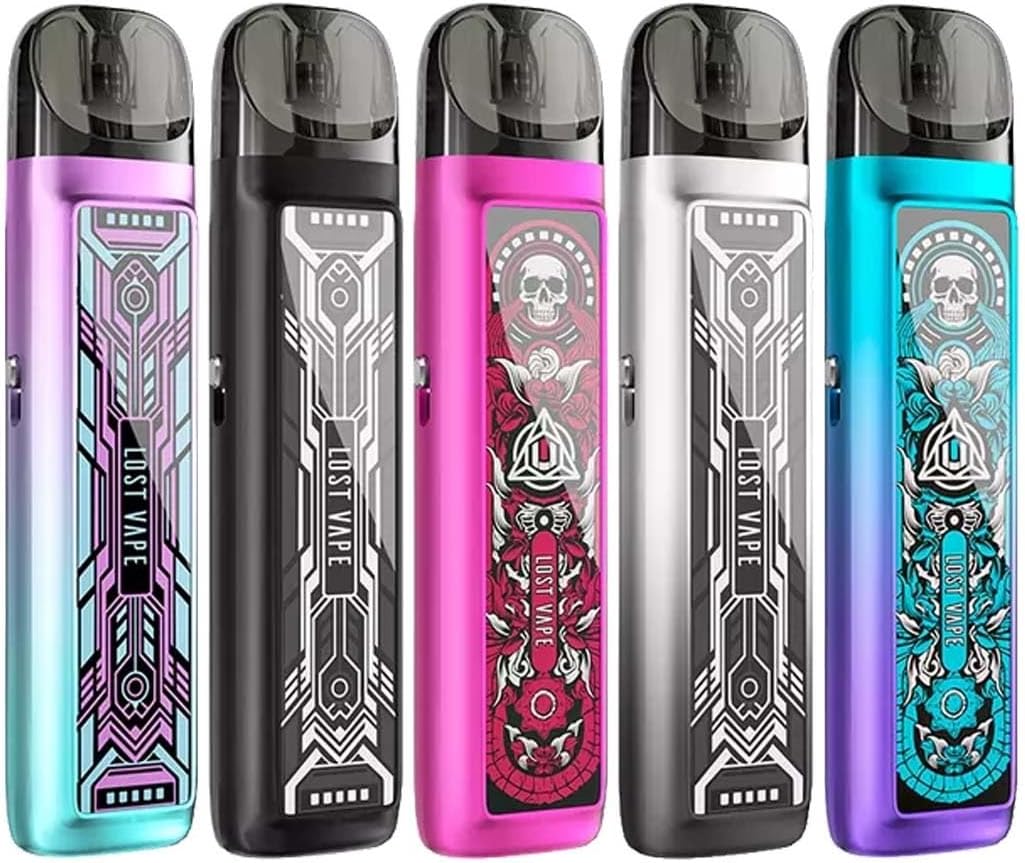
Image: A lineup of Lost Vape Ursa Nano 2 Pod System Kits in different color variations, highlighting the diverse aesthetic options.
The Ursa Nano 2 features a compact and ergonomic design. Key components include the main device body (mod) with an integrated battery, and a detachable pod that holds the e-liquid and coil. The device is activated by drawing on the mouthpiece, eliminating the need for buttons.
An adjustable airflow slider is located on the side of the device, allowing users to customize their draw preference from a tighter to a looser inhale.
Setup
- Unpack the Device: Carefully remove all components from the packaging.
- Charge the Device: Before first use, fully charge the Ursa Nano 2 device using the provided USB Type-C cable. Connect the cable to the charging port on the device and to a suitable USB power source (e.g., computer, wall adapter). The LED indicator will show charging status and turn off or change color when fully charged.
- Fill the Pod:
- Remove the pod from the device.
- Locate the rubber stopper on the side of the pod.
- Gently open the stopper to reveal the filling port.
- Insert the nozzle of your e-liquid bottle into the filling port and slowly fill the pod with up to 2.5ml of e-liquid.
- Close the rubber stopper securely to prevent leaks.
- Prime the Coil: After filling, allow the pod to sit for at least 5-10 minutes before first use. This allows the e-liquid to fully saturate the coil, preventing dry hits and extending coil life.
- Insert the Pod: Reinsert the filled and primed pod firmly into the device. The magnetic connection will secure it in place.
Operating Instructions
- Power On/Off: The Ursa Nano 2 is an auto-draw device and does not have a power button. It activates automatically when you inhale.
- Vaping: Place your lips on the mouthpiece and inhale gently. The device will automatically activate and produce vapor.
- Adjusting Airflow: Locate the airflow slider on the side of the device. Slide it up or down to adjust the airflow to your preferred draw tightness. Moving the slider towards the top typically results in a tighter draw, while moving it towards the bottom provides a looser draw.
- Battery Indicator: The integrated blacklight LED system will indicate the battery level during use and charging. Refer to the device's specific LED patterns for detailed battery status (e.g., green for high, blue for medium, red for low).
Maintenance
- Cleaning the Device: Regularly wipe the device body with a soft, dry cloth to remove dust and e-liquid residue. Ensure no liquid enters the charging port or airflow sensor.
- Cleaning the Pod Connection: Periodically remove the pod and clean the magnetic connection points on both the pod and the device with a cotton swab. This helps maintain a good connection and prevents e-liquid buildup.
- Replacing the Pod: The coils in the Ursa Nano Pro Pods are fixed. When you notice a burnt taste, reduced vapor production, or diminished flavor, it's time to replace the entire pod. Simply pull out the old pod and insert a new one after filling and priming.
- Charging: Always use the provided USB Type-C cable for charging. Avoid overcharging the device.
- Storage: Store the device in a cool, dry place away from direct sunlight and extreme temperatures. Keep out of reach of children and pets.
Troubleshooting
| Problem | Possible Cause | Solution |
|---|---|---|
| No vapor production |
|
|
| Burnt taste |
|
|
| Leaking pod |
|
|
| Device not charging |
|
|
Specifications
Lost Vape Ursa Nano 2 Mod
- Dimensions: 83.7mm x 25.5mm x 16.1mm
- Battery: Integrated 900mAh
- Output Power: Max. 22 Watts
- Charging: USB Type-C, 5V / 1A
- Connection: Magnetic Plug&Play
- Material: Zinc Alloy
Lost Vape Ursa Nano Pro Pod
- Material: PCTG
- Capacity: 2.5ml
- Coil: Fixed 0.6 Ohm Mesh (included), 0.8 Ohm (optional, sold separately)
- Filling System: Side-Fill
- Connection: Magnetic Plug&Play
Important Safety Information
- This product is nicotine-free and contains no liquids.
- Keep out of reach of children and pets.
- Do not expose the device to extreme temperatures, direct sunlight, or water.
- Do not disassemble or modify the device.
- Use only the provided charging cable.
- Dispose of the device and its components responsibly according to local regulations.
Warranty and Support
For warranty information and customer support, please refer to the official Lost Vape website or contact your authorized retailer. Keep your proof of purchase for warranty claims.
Manufacturer: Lost Vape
Website: www.lostvape.com (Example link, actual link might vary)
Related documentsUrsa Nano 2


Ask a question about this manual
Ask about setup, troubleshooting, compatibility, parts, safety, or missing instructions. Manuals+ will review the question and use this page’s manual context to help answer it.