
Introduction
This manual provides essential instructions for the safe and efficient operation of your JVC 40W Portable Party Speaker, Model XS-N5223PB. Please read this manual thoroughly before using the device and retain it for future reference.
The JVC 40W Portable Party Speaker features integrated Bluetooth technology for wireless audio streaming, a built-in USB port for multimedia file playback (MP3, picture, video), TF card support, Karaoke function, and an LED light show. It delivers 40W output through two 8-inch speakers and is powered by a 4000mAh battery.
Important Safety Information
- Do not expose the speaker to water or excessive moisture.
- Avoid placing the speaker near heat sources or in direct sunlight.
- Do not attempt to disassemble or modify the speaker. Refer all servicing to qualified personnel.
- Use only the specified charging adapter.
- Keep out of reach of children.
- Ensure proper ventilation around the speaker during operation.
Package Contents
Please check that all items are present in the package:
- 1 x JVC 40W Portable Party Speaker (Model XS-N5223PB)
- 1 x Charging Cable
- 1 x User Manual (this document)
Product Overview
Familiarize yourself with the main components and controls of your JVC Portable Party Speaker.
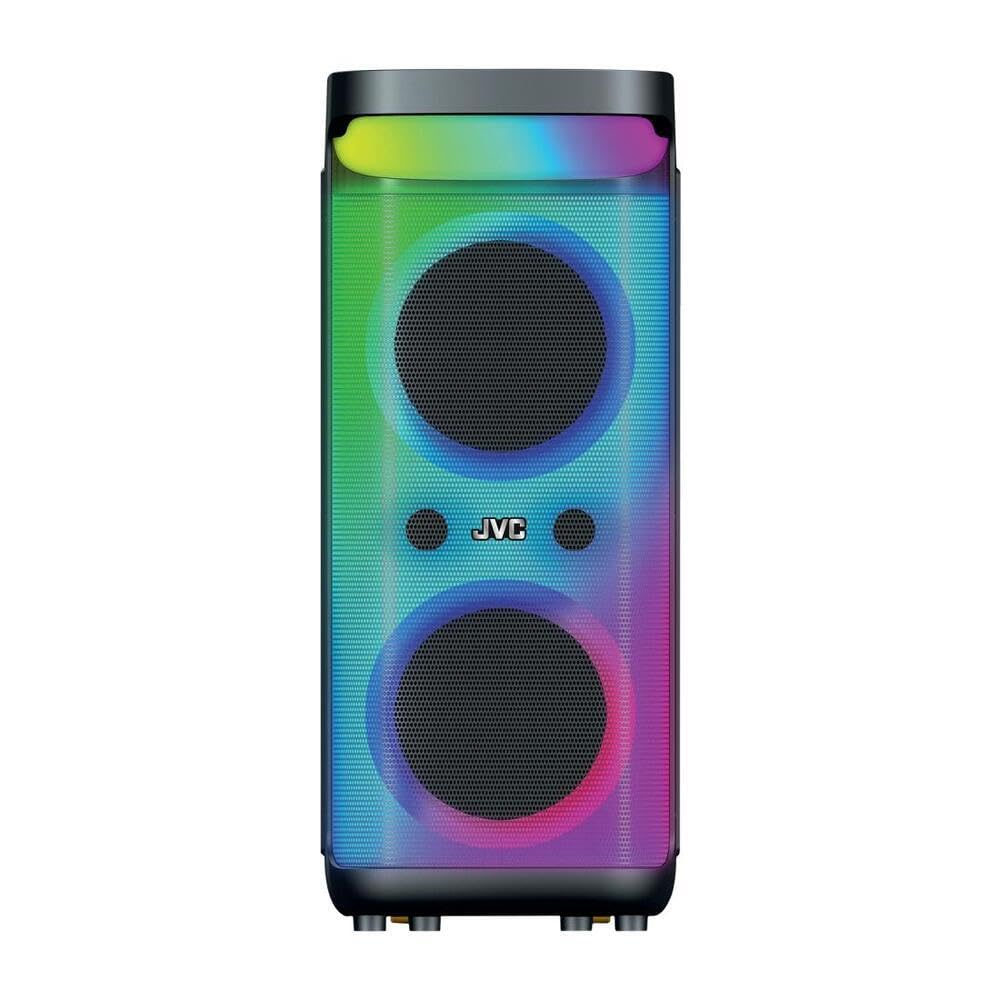
Image 1: Front and top view of the JVC 40W Portable Party Speaker, showing the control panel, LED lights, and speaker grille.

Image 2: Detailed view of the speaker's top control panel, highlighting buttons for mode selection, volume, playback, and input ports.
Control Panel Functions:
- Power Button: Turns the speaker on/off.
- Mode Button: Switches between Bluetooth, USB, TF Card, and AUX input modes.
- Volume Knobs: Adjusts master volume and microphone volume (if applicable).
- Play/Pause Button: Controls media playback.
- Previous/Next Track Buttons: Navigates through tracks.
- LED Light Button: Toggles or changes LED light show patterns.
- USB Port: For USB drive playback of MP3, picture, and video files.
- TF Card Slot: For TF (MicroSD) card playback of MP3, picture, and video files.
- AUX Input: For connecting external audio devices via a 3.5mm cable.
- Microphone Input: For karaoke function.
Setup
Charging the Speaker
- Connect the charging cable to the speaker's charging port.
- Plug the other end of the charging cable into a suitable power adapter (9 Volts input) and then into a wall outlet.
- The charging indicator light will illuminate, typically red, during charging. It will change color or turn off when fully charged.
- For first use, fully charge the speaker for approximately 4-6 hours.
Initial Placement
Place the speaker on a stable, flat surface. Ensure there is adequate space around the speaker for optimal sound dispersion and ventilation. The speaker is designed for floorstanding placement.
Operating Instructions
Power On/Off
- To turn on: Press and hold the Power button until the display illuminates.
- To turn off: Press and hold the Power button again until the display turns off.
Bluetooth Connection
- Turn on the speaker. It will automatically enter Bluetooth pairing mode, indicated by a flashing "BLUE" on the display or an audible prompt.
- On your mobile device (smartphone, tablet, etc.), enable Bluetooth and search for available devices.
- Select "JVC XS-N5223PB" (or similar name) from the list of devices.
- Once paired, the speaker will confirm the connection with an audible sound, and "BLUE" on the display will stop flashing.
- You can now stream audio wirelessly from your device to the speaker.
USB/TF Card Playback
- Insert a USB flash drive or TF (MicroSD) card into the respective port/slot on the speaker.
- The speaker will automatically switch to USB or TF card mode and begin playing supported audio, picture, or video files. If it does not switch automatically, press the Mode button to select the correct input.
- Use the Play/Pause and Previous/Next Track buttons to control playback.
AUX Input
- Connect one end of a 3.5mm audio cable (not included) to the AUX input port on the speaker.
- Connect the other end of the cable to the audio output jack of your external device (e.g., MP3 player, laptop).
- Press the Mode button on the speaker until "AUX" mode is selected.
- Control playback and volume from your external device.
Karaoke Function
- Connect a microphone (not included) to the Microphone Input port.
- Adjust the microphone volume using the dedicated knob on the control panel.
- Play music via Bluetooth, USB, TF card, or AUX, and sing along.
LED Light Show
Press the LED Light button to cycle through different light patterns or to turn the LED lights on/off.
True Wireless Stereo (TWS) Function
The TWS function allows you to pair two JVC XS-N5223PB speakers together for a stereo sound experience.
- Ensure both speakers are powered on and in Bluetooth mode, but not connected to any device.
- On one speaker (this will be the primary speaker), press and hold the TWS button (refer to your speaker's specific button layout if not explicitly labeled).
- The primary speaker will search for the secondary speaker. Once connected, both speakers will emit a confirmation sound.
- Now, connect your mobile device to the primary speaker via Bluetooth as described above. Audio will play through both speakers in stereo.
Maintenance
- Cleaning: Use a soft, dry cloth to clean the exterior of the speaker. Do not use liquid cleaners or abrasive materials.
- Storage: When not in use for extended periods, store the speaker in a cool, dry place. It is recommended to charge the battery every 3-6 months to maintain its lifespan.
- Battery Care: Avoid fully discharging the battery frequently. Charge the speaker when the low battery indicator appears.
Troubleshooting
| Problem | Possible Cause | Solution |
|---|---|---|
| Speaker does not power on. | Battery is discharged. | Connect the speaker to a power source and charge it. |
| No sound. | Volume is too low; incorrect input mode; device not connected. | Increase volume on speaker and connected device. Ensure correct input mode is selected. Reconnect Bluetooth or check cable connections. |
| Bluetooth pairing fails. | Speaker is not in pairing mode; device is too far; interference. | Ensure speaker is in Bluetooth pairing mode. Move device closer to speaker. Avoid strong electromagnetic interference. Try restarting both devices. |
| USB/TF card not playing. | Unsupported file format; card/drive not inserted correctly; corrupted files. | Ensure files are in supported formats (e.g., MP3). Reinsert the USB drive/TF card. Try with a different USB drive/TF card or different files. |
| LED lights not working. | LED lights are turned off. | Press the LED Light button to turn them on or change patterns. |
Specifications
| Model Number | XS-N5223PB |
| Output Power | 40W |
| Speaker Size | 8-inch x 2 |
| Connectivity | Bluetooth, USB, TF Card, AUX |
| Battery Capacity | 4000mAh |
| Input Voltage | 9 Volts |
| Dimensions (D x W x H) | 33 cm x 28.5 cm x 66 cm |
| Material | Plastic |
| Mounting Type | Floorstanding |
| Additional Features | TWS Function, Karaoke, LED Light Show |
Warranty Information
This JVC Portable Party Speaker (Model XS-N5223PB) comes with a 1 Year Manufacturer's Warranty from the date of purchase. This warranty covers manufacturing defects in materials and workmanship under normal use.
The warranty does not cover:
- Damage caused by accident, abuse, misuse, flood, fire, earthquake, or other external causes.
- Damage caused by operating the product outside the permitted or intended uses described by JVC.
- Damage caused by service performed by anyone who is not an authorized service provider of JVC.
- Products or parts that have been modified to alter functionality or capability without the written permission of JVC.
Please retain your proof of purchase for warranty claims.
Support and Contact Information
For technical support, warranty claims, or further assistance, please contact JVC customer service.
- Website: www.jvc.com (Please check your regional JVC website for local support details)
- Email: Refer to the JVC website for specific contact email addresses.
- Phone: Refer to the JVC website for specific contact phone numbers.
When contacting support, please have your product model number (XS-N5223PB) and proof of purchase readily available.


