
Introduction
Thank you for choosing the ODK Small Desk. This manual provides detailed instructions for the assembly, operation, maintenance, and troubleshooting of your new desk. Designed for versatility and convenience, this desk features an integrated power strip with AC outlets and USB charging ports, along with a reversible and adjustable shelving unit.
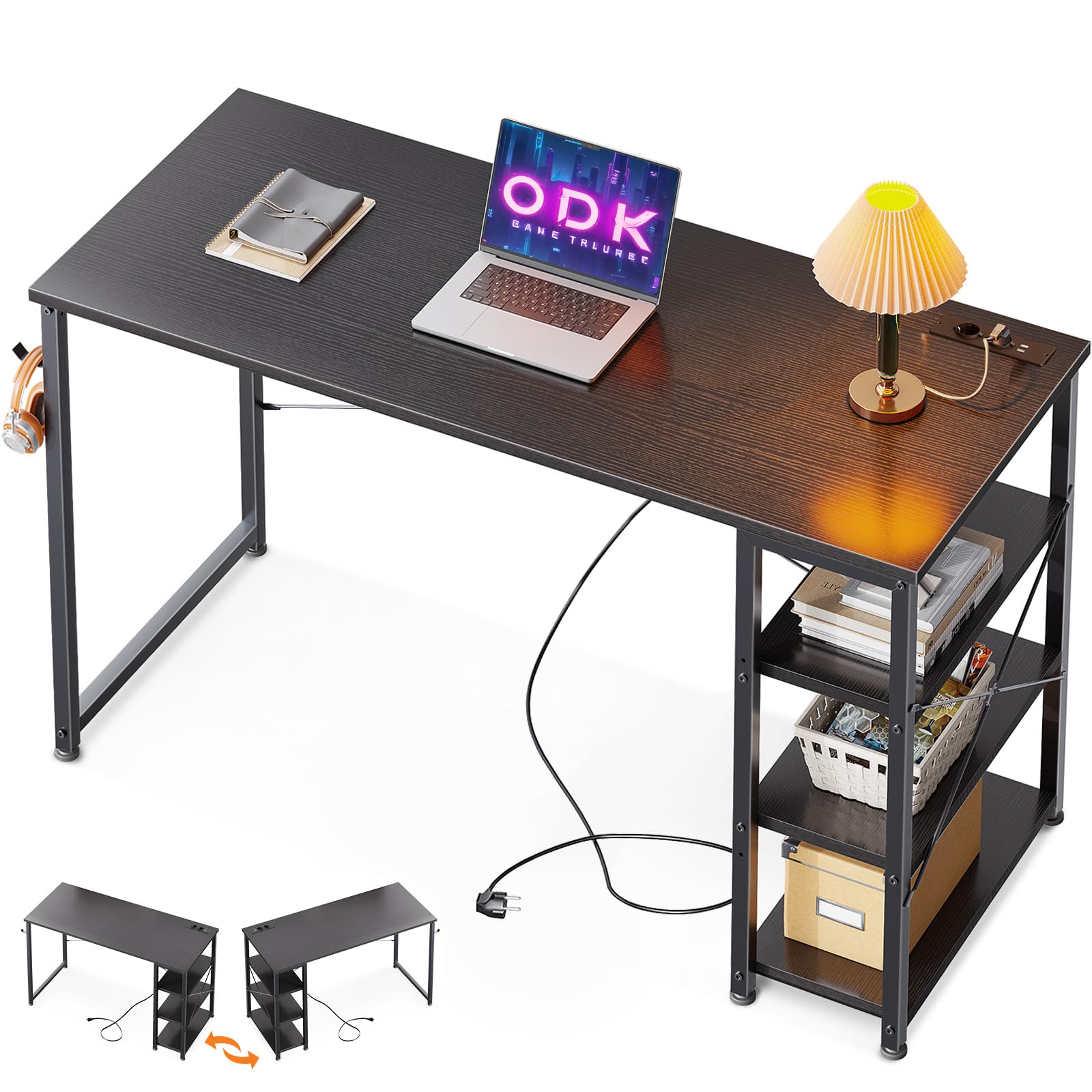
The ODK Small Desk in a typical home office setup.
Important Safety Information
Please read and understand all safety instructions before assembly and use. Failure to follow these instructions may result in injury or damage to the product.
- Follow the assembly instructions carefully and ensure the desk is securely and stably mounted.
- Do not overload the power strip. Refer to the specifications for maximum electrical load.
- Keep liquids away from the power strip and electrical components.
- Ensure all screws and fasteners are tightened before use and periodically check for looseness.
Setup and Assembly
The ODK Small Desk is designed for straightforward assembly. All necessary tools and detailed instructions are included. It is recommended that one person performs the assembly.
Package Contents:
- Desk components (engineered wood top, metal frame, shelves)
- Integrated power strip with cable
- Assembly hardware (screws, bolts, etc.)
- Assembly tools
Assembly Steps:
- Unpack all components and verify against the parts list provided in the separate assembly guide.
- Assemble the metal frame according to the diagrams. Ensure all connections are secure.
- Attach the desk top to the assembled frame.
- Reversible Shelf Installation: Decide whether you want the 3-tier shelving unit on the left or right side of the desk. Follow the specific instructions in the assembly guide for your chosen orientation.
- Adjustable Shelf Configuration: The shelves are adjustable. You can remove one or more shelves to create larger storage compartments for items of different sizes, such as computers, books, or office supplies. Refer to the assembly guide for details on adjusting shelf height or removing shelves.
- Install the integrated power strip into the designated slot on the desk top.
- Connect the power cable to the power strip.
- Ensure all screws are fully tightened and the desk is stable before placing any items on it.

Desk dimensions and illustration of the reversible shelf unit.

Visual guide for configuring the reversible shelf on either the left or right side.

Examples of adjustable storage space by reconfiguring or removing shelves.
Operating Instructions
The ODK Small Desk includes a convenient integrated power strip to power your electronic devices.
Using the Integrated Power Strip:
- Plug the desk's main power cable into a standard wall outlet.
- The power strip provides 3 AC outlets (220-250V/15A) for devices like computers, monitors, or lamps.
- It also includes 1 USB-A port (5V/2A) and 1 USB-C port (5V/2A) for charging smartphones, tablets, and other compatible USB devices.
- Ensure devices are compatible with the provided voltage and current ratings before plugging them in.

Detail of the integrated power strip with AC and USB ports.

The integrated power strip in use, charging devices.
Maintenance
Proper care will extend the life and appearance of your ODK Small Desk.
- Cleaning: Wipe the desk surfaces with a soft, damp cloth. Avoid harsh chemicals or abrasive cleaners, which can damage the engineered wood finish.
- Spills: Immediately wipe up any spills to prevent water damage or staining.
- Electrical Components: Keep the power strip and its ports clean and free of dust. Do not attempt to disassemble or repair the power strip yourself.
- Stability Check: Periodically check all screws and fasteners to ensure they remain tight. Retighten if necessary to maintain desk stability.
Troubleshooting
If you encounter issues with your ODK Small Desk, refer to the following common solutions:
| Problem | Possible Cause | Solution |
|---|---|---|
| Desk is wobbly or unstable. | Loose screws or uneven floor. | Ensure all assembly screws are fully tightened. Adjust leveling feet if present, or place shims under legs on uneven surfaces. |
| Power outlets or USB ports are not working. | Desk power cable not plugged in, wall outlet issue, or overloaded power strip. | Check if the desk's power cable is securely plugged into a working wall outlet. Test the wall outlet with another device. Reduce the number of devices plugged into the power strip. |
| Shelf does not fit correctly. | Incorrect orientation or assembly. | Review the assembly instructions for the reversible shelf. Ensure components are oriented correctly and not forced into place. |
If the problem persists, please contact ODK customer support.
Specifications
Detailed specifications for the ODK DBXCDJ-01 Small Desk:
- Brand: ODK
- Model Number: DBXCDJ-01
- Product Dimensions (L x W x H): 120 x 40 x 75 cm (47.2 x 15.7 x 29.5 inches)
- Item Weight: 6.5 kg (14.3 lbs)
- Color: Black
- Style: Modern
- Desk Design: Computer Desk
- Top Material Type: Engineered Wood
- Base Material: Metal (Alloy Steel)
- Number of Shelves: 3 (Reversible and Adjustable)
- Special Feature: Built-in USB Outlet
- Power Strip: 3 AC Outlets (220-250V/15A), 1 USB-A Port (5V/2A), 1 USB-C Port (5V/2A)
- Assembly Required: Yes (1 person recommended)
- Included Components: Integrated Power Outlet, All Assembly Tools
Warranty
This ODK Small Desk comes with a Limited Warranty. Please refer to the warranty card included in your package for specific terms, conditions, and duration of coverage. Keep your proof of purchase for warranty claims.
Customer Support
If you have any questions regarding the assembly, operation, or maintenance of your ODK Small Desk, please do not hesitate to contact us. Our professional customer service team is available to assist you and will help resolve any issues within 24 hours.
For support, please visit the ODK store on Amazon or refer to the contact information provided in your product packaging.


