
1. Introduction
The PQWT-CL200 is a professional-grade water leak detector designed for identifying pipeline leaks under pressure in various environments, including water supply utilities, heating systems, and municipal infrastructure. This device utilizes advanced acoustic amplification and spectral analysis technology to pinpoint leakage sources with high accuracy, offering a maximum detection depth of 2 meters. This manual provides detailed instructions for the proper setup, operation, and maintenance of your PQWT-CL200 device.
2. Product Overview and Components
The PQWT-CL200 system includes the main detection unit, a sensor, a connector cable, headphones, and listening rods. Familiarize yourself with all components before operation.

Figure 2.1: Main components of the PQWT CL200 Water Leak Detector, including the central processing unit, ground sensor, headphones, and extension rods.

Figure 2.2: Detailed view of the PQWT CL200 main unit, highlighting the USB Port, System Reset Button, SD Memory Card Port, Microphone, Power Light, Headset Port, Connector Port, Main Switch, and LCD Touch Screen. Also shown are the Listening Rod, Sensor Port, Connector, and Headphones.
Key Components:
- Main Unit: Features an LCD touch screen for interface navigation, control buttons, and various ports for connectivity.
- Sensor: The primary component for detecting acoustic signals from leaks.
- Connector Cable: Connects the sensor to the main unit.
- Headphones: For clear audio monitoring of leak sounds.
- Listening Rods: Extendable rods used with the sensor for ground contact and deeper detection.
- Case: Provides protection and portability for the entire system.
3. Setup and Initial Use
Before operating the PQWT-CL200, ensure all components are properly connected and the device is powered on.
- Charge Batteries: Ensure the internal lithium-ion batteries are fully charged using the provided 8.4V DC Smart Charger. The device requires 2 AAA batteries (included) for operation.
- Connect Sensor: Attach the sensor to the main unit using the connector cable. Ensure a secure connection to the Connector Port.
- Connect Headphones: Plug the headphones into the Headset Port on the main unit.
- Assemble Listening Rods: If using, connect the listening rods to the sensor for extended reach.
- Power On: Press the Main Switch to power on the device. The Power Light will illuminate.
- Language Selection: Upon first use or after a reset, select your preferred language from the available options: English, Turkish, Italian, or Arabic.
4. Operational Principle
The PQWT-CL200 operates on the principle of acoustic leak detection. When pressurized fluid escapes from a pipeline leak, it generates distinct acoustic signals. The equipment amplifies these signals, allowing for their analysis. Advanced spectral analysis technology then processes these amplified sounds to accurately pinpoint the source of the leakage.
5. Operation Modes
The PQWT-CL200 features two primary detection modes to facilitate quick and accurate identification of water leaks:
5.1. Rough Measurement Mode
This mode is used for initial scanning and broad area assessment. It provides a general indication of noise levels, helping to identify areas with potential leaks. The display shows instantaneous values of ambient noise, minimum leakage noise, and suspected water leak indicators.
5.2. Filtering Analysis Mode
Once a potential leak area is identified, switch to Filtering Analysis Mode for more precise localization. This mode provides real-time display of noise signals across various frequency bands, allowing for detailed spectral analysis. It helps to filter out ambient noise and focus on the specific frequencies associated with leaks, enabling accurate judgment of the leakage point.
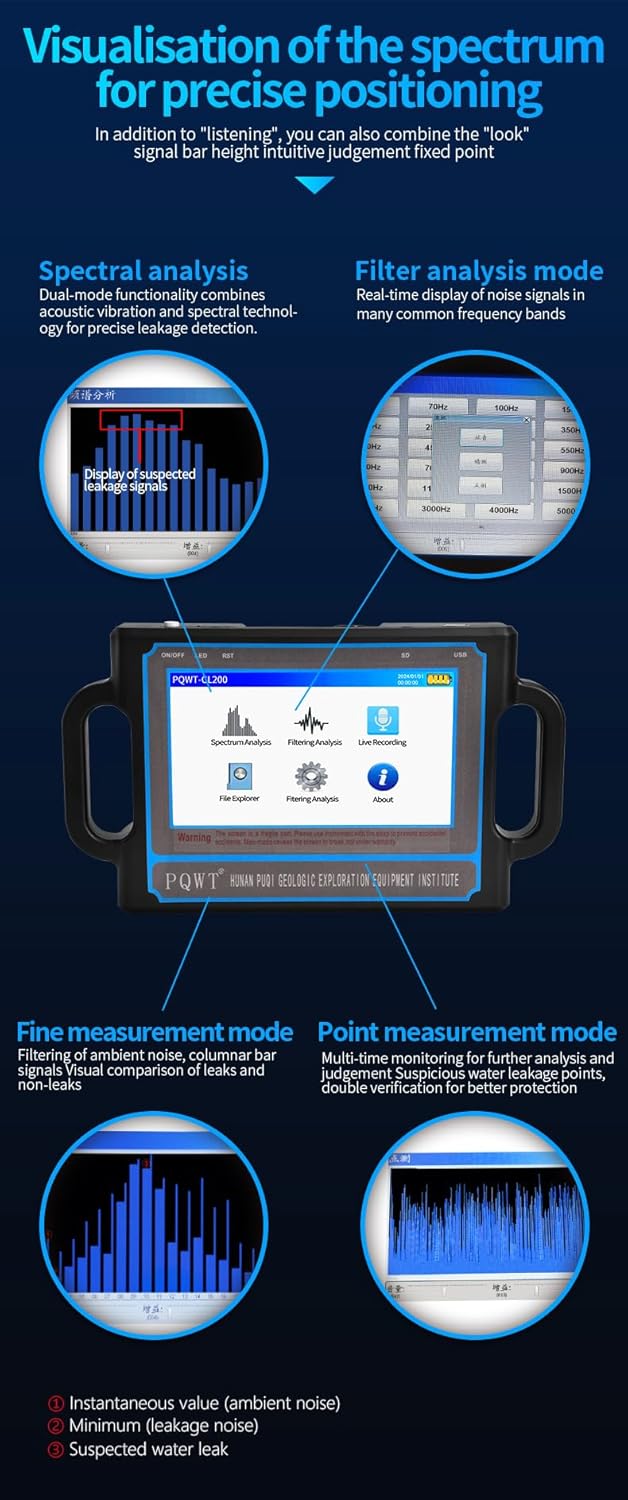
Figure 5.1: Visualization of the spectrum for precise positioning, demonstrating both Spectral Analysis and Filter Analysis modes. The display shows real-time noise signals and helps in identifying leakage points.
5.3. General Operation Steps
- Placement: Place the sensor directly on the ground surface above the suspected pipeline. Use listening rods for deeper or harder-to-reach areas.
- Mode Selection: Select either "Spectrum Analysis" (Rough Measurement) or "Filtering Analysis" mode from the main menu on the LCD touch screen.
- Listen and Observe: Wear the headphones to listen for leak sounds. Observe the visual display for signal patterns and intensity.
- Pinpoint Leak: Move the sensor systematically across the area. A significant increase in signal strength and specific frequency patterns in Filtering Analysis Mode indicates a leak location.
- Recording: The device supports live recording and playback functions for later analysis.
6. Maintenance
Proper maintenance ensures the longevity and optimal performance of your PQWT-CL200.
- Cleaning: Wipe the main unit, sensor, and cables with a soft, dry cloth after each use. Avoid using abrasive cleaners or solvents.
- Storage: Store the device and all accessories in the provided case in a cool, dry place, away from direct sunlight and extreme temperatures.
- Battery Care: Recharge the batteries regularly, even if the device is not in frequent use, to maintain battery health. Do not overcharge.
- Software Updates: Check the manufacturer's website periodically for any available software updates for improved performance or new features.
- Handle with Care: Avoid dropping the device or subjecting it to strong impacts.
7. Troubleshooting
If you encounter issues with your PQWT-CL200, refer to the following common problems and solutions:
- Device does not power on:
- Ensure the batteries are fully charged.
- Check if the Main Switch is in the "ON" position.
- If the issue persists, try pressing the System Reset Button.
- No sound through headphones:
- Verify that the headphones are securely plugged into the Headset Port.
- Check headphone volume settings on the device.
- Ensure the sensor is properly connected and making good contact with the surface.
- Inaccurate leak detection:
- Ensure the sensor is placed directly over the suspected pipeline.
- Try switching between Rough Measurement and Filtering Analysis modes for better signal isolation.
- Minimize ambient noise in the detection area.
- Calibrate the device if a calibration option is available in the settings menu.
- Screen unresponsive:
- Restart the device.
- If unresponsive, press the System Reset Button.
For further assistance or issues not covered here, please contact PQWT technical support.
8. Specifications
Detailed technical specifications for the PQWT-CL200 Water Leak Detector.
Figure 8.1: Product parameter table showing specifications for various PQWT CL series models, including CL200.
| Feature | Specification |
|---|---|
| Model | CL200 |
| Maximum Detection Depth | 2 Meters |
| Voltage | 3 Volts (DC) |
| Control Method | Touch Screen |
| Sensor Technology | Ultrasonic Sensor |
| Host Unit Dimensions (L×W×H) | 27 cm × 16 cm × 5 cm (approx. 10.6 × 6.3 × 2 inches) |
| Host Unit Weight | 8.7 kg (approx. 19.2 pounds) |
| Package Dimensions (L×W×H) | 7.5 x 19.69 x 18.5 inches (approx. 19 x 50 x 47 cm) |
| Package Weight | 15.97 pounds (approx. 7.24 kg) |
| Main Unit Battery | Two 3.7V 4000mAh rechargeable Lithium Ion batteries |
| Auxiliary Batteries | 2 AAA Alkaline batteries (included) |
| Charger | 8.4V Direct Charge Smart Charger |
| Included Components | Main unit, Sensor, Connector, Headphones, Listening Rods, Case |
| Preservation Temperature | -10°C to +50°C |
| Display | 7-inch high-definition digital touch color crystal screen |
| Frequency Interval | 1-5000 Hz |
| Audio Amplification Gain | Adjustable within 100dB |
| Operating Modes | Spectral Analysis Mode, Filtering Analysis Mode, Precision Measurement Mode |
| Recording Function | Long time recording and storage, playback function |
9. Warranty and Support
The PQWT-CL200 Water Leak Detector is backed by a 24-month manufacturer's warranty covering defects in materials and workmanship from the date of purchase.
For technical assistance, troubleshooting support, or warranty claims, please contact PQWT customer service. Refer to your purchase documentation for specific contact details.


