1. Introduction
This manual provides essential information for the safe and efficient operation of your newpad KJ-460 Wall-Mounted HEPA Air Purifier. Please read it thoroughly before use and retain it for future reference.
Key Features:
- Versatile Placement: Designed for wall mounting, floor standing, or desktop use.
- Wide Coverage: Effectively purifies air in rooms up to 1345 sq.ft.
- Smart Operation: Features an LCD display with real-time air quality (PM2.5) readings and an intelligent Auto Mode that adjusts fan speed based on detected air quality.
- Advanced Filtration: Utilizes a 3-stage filtration system including a washable nylon pre-filter, H13 HEPA filter, and activated carbon filter to capture 99.97% of particles as small as 0.3 microns and remove odors.
- Connectivity: Supports WiFi control via Google Assistant, Amazon Alexa, and Tuya Smart app, along with a dedicated remote control.
- Quiet Operation: Sleep Mode operates at a low 22dB, ensuring minimal disturbance.
- Certified Quality: CARB, ETL, EPA, FCC, and Energy Star certified.

2. Safety Information
Please observe the following safety precautions to prevent damage to the product or personal injury.
- Always unplug the air purifier before cleaning, performing maintenance, or when not in use for extended periods.
- Do not operate the unit with a damaged cord or plug. If the cord or plug is damaged, contact customer support.
- Keep the air inlet and outlet clear of obstructions. Do not insert fingers or foreign objects into any openings.
- Do not use the air purifier in wet or damp environments, such as bathrooms or laundries.
- This appliance is not intended for use by persons (including children) with reduced physical, sensory, or mental capabilities, or lack of experience and knowledge, unless they have been given supervision or instruction concerning use of the appliance by a person responsible for their safety.
- Ensure the unit is placed on a stable, level surface if not wall-mounted.
- Use only newpad authorized replacement filters.
3. Package Contents
Verify that all items are present in the package:
- newpad KJ-460 Air Purifier Unit
- Pre-installed Filter (H13 HEPA, Activated Carbon, Washable Nylon Pre-filter)
- Remote Control
- Power Adapter
- Instruction Manual
- Wall Mounting Hardware (screws, anchors)
4. Setup
4.1 Unpacking and Filter Installation
- Carefully remove the air purifier from its packaging.
- Open the filter cover (usually located on the back or side of the unit).
- Remove the plastic packaging from the filter.
- Insert the filter back into the unit, ensuring it is seated correctly.
- Close the filter cover securely.
4.2 Placement Options
The newpad KJ-460 offers flexible placement:
- Floor Standing: Place the unit on a flat, stable surface, ensuring adequate clearance (at least 6 inches) from walls and furniture for optimal airflow.
- Desktop: Position on a sturdy desk or table, maintaining proper clearance.
- Wall Mounting:
- Choose a suitable wall location, away from direct sunlight or heat sources.
- Use the provided template (if included) or measure the mounting points on the back of the unit.
- Drill pilot holes and insert wall anchors if necessary.
- Securely fasten the mounting screws into the wall, leaving a small gap for the unit to hang.
- Carefully hang the air purifier onto the screws, ensuring it is level and stable.

5. Operating Instructions
5.1 Power On/Off
Plug the power adapter into a suitable electrical outlet. Press the power button on the control panel or remote control to turn the unit on or off.
5.2 Modes of Operation
- Auto Mode: The air purifier automatically adjusts its fan speed based on real-time air quality readings from its integrated sensor. This mode optimizes purification efficiency.
- Sleep Mode: Activates the lowest fan speed for quiet operation (22dB) and turns off all display lights to ensure an undisturbed environment.
5.3 Fan Speed Adjustment
Manually adjust the fan speed using the control panel or remote control. Multiple speed settings are available to suit your preference.
5.4 LCD Display
The LCD display shows real-time PM2.5 levels and indicates the current fan speed and operating mode. The display color or numerical value may change to reflect air quality status (e.g., green for good, yellow for moderate, red for poor).


5.5 Smart Control (WiFi/App)
The newpad KJ-460 can be controlled via a mobile application (Tuya Smart recommended) and integrated with smart home systems like Google Assistant and Amazon Alexa.
- Download the Tuya Smart app from your device's app store.
- Follow the in-app instructions to connect your air purifier to your home WiFi network.
- Once connected, you can control power, modes, fan speed, set schedules, and monitor filter life remotely.
- For voice control, enable the Tuya Smart skill in your Google Home or Amazon Alexa app and link your account.
5.6 Remote Control
The included remote control provides convenient access to all primary functions of the air purifier, including power, mode selection, and fan speed adjustment.

6. Maintenance
6.1 Filter System
The newpad KJ-460 utilizes a 3-stage filtration system:
- Washable Nylon Pre-filter: Captures large particles like pet hair, dander, lint, and fibers. This filter can be gently washed and reused.
- H13 HEPA Filter: Traps 99.97% of airborne particles as small as 0.3 microns, including dust, pollen, mold spores, and smoke.
- Activated Carbon Filter: Absorbs odors from pets, cooking, smoke, and volatile organic compounds (VOCs).

6.2 Filter Replacement
The filter typically lasts 5-12 months, depending on usage and air quality. The unit will indicate when a filter change is required.
- Unplug the air purifier from the power outlet.
- Open the filter cover and remove the old filter.
- Dispose of the old filter responsibly.
- Insert a new newpad KJ-460 replacement filter (search B0BJZPMW53 for official filters), ensuring it is correctly oriented.
- Close the filter cover.
- Plug in the air purifier and perform a filter reset.
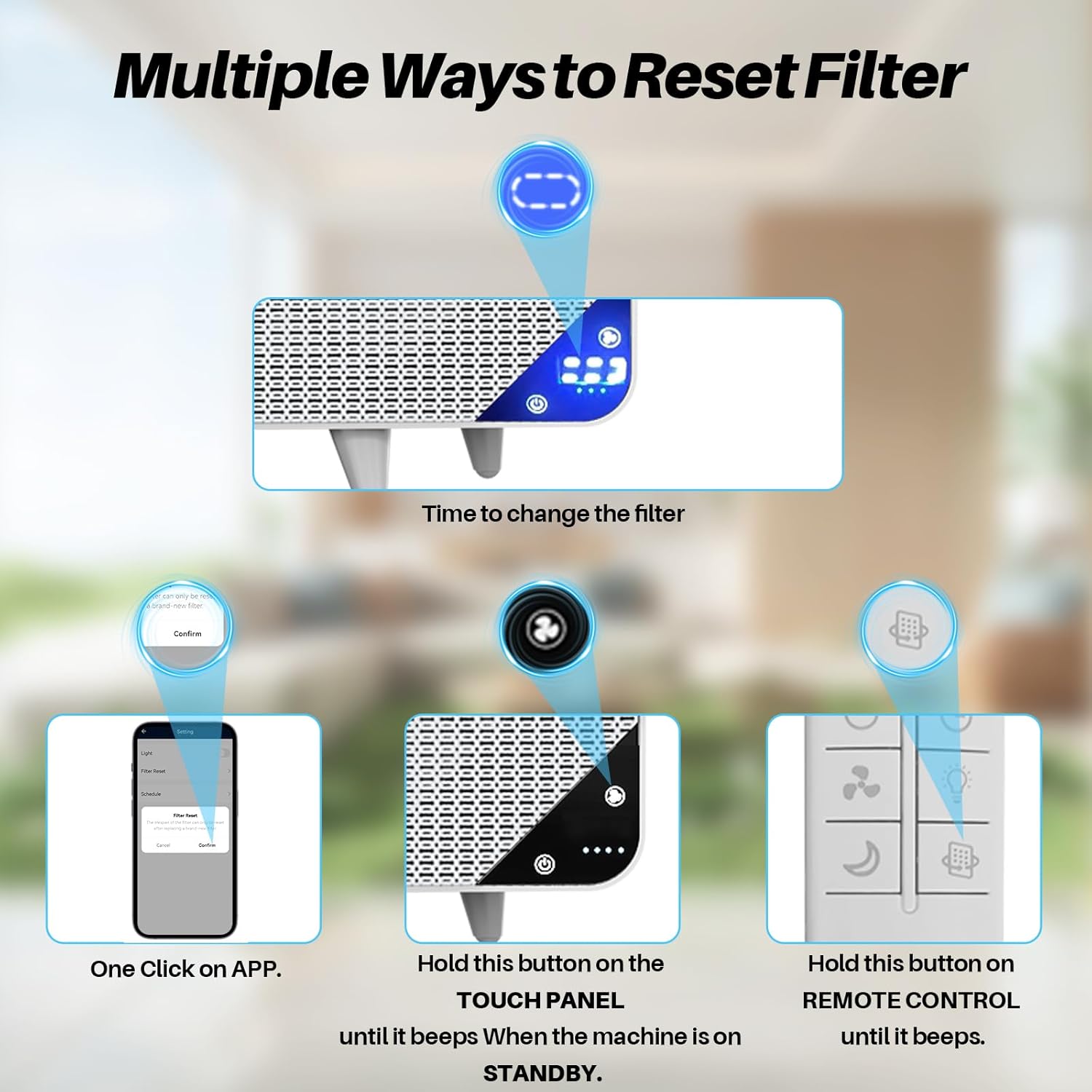
6.3 Filter Reset
After replacing the filter, you must reset the filter life indicator:
- Via App: Use the mobile application to perform a one-click filter reset.
- Via Touch Panel: With the machine in standby, press and hold the designated filter reset button on the touch panel until it beeps.
- Via Remote Control: Press and hold the filter reset button on the remote control until it beeps.
6.4 Cleaning the Unit
- Wipe the exterior of the air purifier with a soft, dry cloth.
- For the washable nylon pre-filter, gently rinse under running water and allow it to air dry completely before reinstallation.
- Do not use abrasive cleaners or solvents.
7. Troubleshooting
Refer to this section for common issues and their solutions.
| Problem | Possible Cause | Solution |
|---|---|---|
| Unit does not turn on | No power supply; Power cord not connected; Power button not pressed. | Ensure unit is plugged in; Check power outlet; Press power button firmly. |
| Poor air purification performance | Filter is dirty or expired; Air inlets/outlets blocked; Room size exceeds capacity. | Replace filter; Clear obstructions; Ensure unit is used in appropriate room size. |
| Filter indicator remains on after replacement | Filter reset not performed. | Perform filter reset using app, touch panel, or remote control (refer to Section 6.3). |
| WiFi connection issues | Incorrect WiFi password; Router too far; App setup incomplete. | Verify WiFi password; Move unit closer to router; Re-follow app setup instructions. |
| Remote control not working | Batteries depleted; Obstruction between remote and unit. | Replace batteries; Ensure clear line of sight to the unit's sensor. |
8. Specifications
| Feature | Detail |
|---|---|
| Model Number | KJ-460 |
| Brand | newpad |
| Product Dimensions | 4.5"D x 20.3"W x 15.2"H (7.2 x 20.3 x 15.2 inches) |
| Item Weight | 8.82 Pounds |
| Floor Area Coverage | Up to 1345 sq.ft. |
| Filtration Type | 3-Stage (Washable Nylon Pre-filter, H13 HEPA, Activated Carbon) |
| Noise Level (Sleep Mode) | 22dB |
| Control Methods | Touch Panel, Remote Control, WiFi App (Tuya Smart), Voice Control (Alexa, Google Assistant) |
| Certifications | CARB Certified, EPA Certified, ETL Certified, Energy Star Certified, FCC Certified |
| Color | White and Light Grey |
9. Warranty and Support
9.1 Warranty Information
newpad products are manufactured to high-quality standards. This product is covered by a limited warranty against defects in materials and workmanship from the date of purchase. Please refer to the warranty card included in your package or contact newpad customer support for specific warranty terms and conditions.
9.2 Customer Support
For technical assistance, troubleshooting, or warranty claims, please contact newpad customer support. Contact details can typically be found on the newpad official website or on the product packaging. Please have your model number (KJ-460) and purchase information ready when contacting support.


