1. Introduction
1.1 Product Overview
The Bosch Purion 200 is an integrated display and control unit designed for eBikes equipped with the Bosch Smart System. This all-in-one solution provides a compact color display for essential ride data and offers ergonomic control of all eBike functions directly from the handlebar, near the rider's thumb. It can also be combined with an additional display for enhanced convenience.

Image: The Bosch Purion 200 display and control unit, showing its compact design and color screen with battery and speed information.
1.2 Key Features
- All-in-one Design: Combines display and control unit for streamlined eBike operation.
- Smart System Compatibility: Fully networked within the Bosch Smart System ecosystem.
- Compact Color Display: Provides clear, razor-sharp display of ride data.
- Ergonomic Control: Positioned for easy access and intuitive operation near the thumb.
- Versatile Integration: Can be used standalone or in conjunction with other Bosch displays.
- Connectivity: Features USB connectivity for system integration.
2. Safety Information
Please read all safety instructions carefully before installing and operating the Bosch Purion 200. Failure to follow these instructions may result in damage to the product, property, or personal injury.
- Always ensure your eBike is turned off before performing any installation or maintenance.
- Installation should be performed by a qualified technician if you are unsure about any steps.
- Do not attempt to open or modify the Purion 200 unit. This will void the warranty and may cause damage.
- Keep the unit dry. Avoid exposure to excessive moisture or submersion in water.
- Clean the display with a soft, damp cloth only. Do not use abrasive cleaners or solvents.
- Ensure all connections are secure and properly seated before riding.
- The interface is not suitable for charging smartphones or other external devices.
3. Package Contents
Verify that all items are present in the package:
- Bosch Purion 200 Display and Control Unit
- Rubber Spacer
- Clamp Screw
4. Setup
4.1 Installation on Handlebars
The Purion 200 is designed for handlebar mounting. Follow these general steps for installation:
- Ensure your eBike's power is completely off.
- Position the Purion 200 on your handlebar in a location that is easily accessible by your thumb and does not obstruct other controls.
- Use the provided rubber spacer to ensure a snug fit and protect your handlebar surface.
- Secure the unit using the clamp screw. Do not overtighten.
- Connect the Purion 200 cable to the corresponding port on your eBike's Smart System. Ensure the two white markings on the connector align for proper connection.

Image: The Purion 200 unit mounted on an eBike handlebar, showing its position relative to the grip and brake lever.
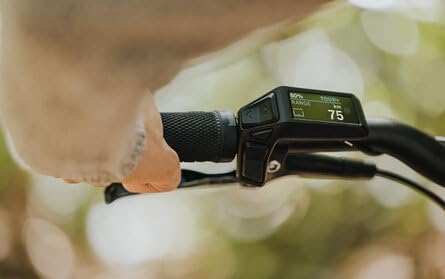
Image: A close-up view of the Purion 200 mounted on a handlebar, with a hand demonstrating how the thumb can easily reach the control buttons.
4.2 Initial Pairing with Bosch eBike Flow App
For full functionality and firmware updates, the Purion 200 needs to be paired with the Bosch eBike Flow app. Before starting, it is recommended to deactivate any eBike alarm in your app and remove the bike from your app and Bluetooth settings if it was previously paired with another Bosch component.
- Download and install the Bosch eBike Flow app on your smartphone.
- Turn on your eBike.
- Put the Purion 200 into pairing mode (refer to the on-screen instructions on the Purion 200 or the app for specific steps).
- In the eBike Flow app, select "Add Bike" and follow the prompts to connect to your Purion 200.
- Once connected, the app may prompt you for a firmware update. It is crucial to follow official Bosch guidelines for any updates.

Image: The Purion 200 unit displayed alongside a graphic indicating "The Smart System" and the eBike Flow App icon, illustrating its connectivity.
5. Operating Instructions
5.1 Display Overview
The Purion 200 features a 1.6-inch color display that provides essential ride information at a glance. Information typically displayed includes:
- Current Speed
- Battery Charge Level (e.g., 80%)
- Assistance Mode (e.g., TOUR+, ECO, SPORT, TURBO)
- Trip Distance
- Total Distance
- Estimated Range
- Time
5.2 Button Functions
The Purion 200 is operated using intuitive buttons located on the unit. These buttons allow you to navigate menus, change assistance modes, and access various functions.
- Power Button: Turns the eBike system on/off.
- "+" / "-": Increases/decreases assistance level.
- Arrow Buttons (< / >): Navigates through display screens and menu options.
- Walk Assist Button: Activates walk assist function (hold down).
- Light Button: Toggles eBike lights on/off (if connected to the system).
5.3 Navigating the Display
Use the arrow buttons to cycle through different information screens on the Purion 200 display. The available screens may vary depending on your eBike's configuration and whether an additional display (like Kiox) is connected.
- When no additional display is connected, the Purion 200 allows you to switch between various data screens directly.
- If an additional display (e.g., Kiox) is connected, the Purion 200 typically remains on the last selected screen, and its buttons are used to navigate the screens of the additional display.
6. Maintenance
6.1 Cleaning
To maintain the clarity of the display and the functionality of the buttons:
- Wipe the display and unit housing with a soft, slightly damp cloth.
- Do not use harsh chemicals, abrasive cleaners, or solvents, as these can damage the display or casing.
- Avoid spraying water directly onto the unit.
6.2 Storage
When storing your eBike for extended periods, ensure the Purion 200 is clean and dry. Store the eBike in a cool, dry place away from direct sunlight and extreme temperatures.
7. Troubleshooting
This section addresses common issues you might encounter with your Purion 200 unit.
| Problem | Possible Cause | Solution |
|---|---|---|
| Display does not turn on. | eBike battery is low or off; loose connection; unit malfunction. | Ensure eBike battery is charged and turned on. Check all cable connections to the Purion 200. If problem persists, contact Bosch service. |
| No data displayed (speed, range). | Sensor issue; loose connection; system error. | Check speed sensor for obstructions or damage. Verify all system connections. Restart the eBike system. |
| Difficulty pairing with eBike Flow App. | Previous pairing conflicts; Bluetooth issues; app version. | Ensure eBike alarm is deactivated in the app. Remove the bike from the app and your phone's Bluetooth settings. Restart phone and eBike. Ensure app is updated. |
| Firmware update issues. | Interruption during update; corrupted file. | Always ensure a stable connection and sufficient battery during updates. Follow official Bosch instructions precisely. If an error occurs, consult Bosch support or an authorized dealer. |
8. Specifications
Technical specifications for the Bosch Purion 200 Display and Control Unit:
| Feature | Detail |
|---|---|
| Brand | BOSCH |
| Model Name | Purion 200 |
| Model Number | FS0042410 |
| Color | Black |
| Screen Size | 1.6 Inches |
| Display Type | Color Display |
| Sensor Type | Cycling Speed Sensor (System Dependent) |
| Connectivity Technology | USB (for system connection) |
| Included Components | Display Purion 200, rubber spacer, clamp screw |
| Mounting Type | Handlebar Mount |
| Human Interface Input | Buttons |
| Material | Plastic |
| Item Dimensions (L x W x H) | 3.39 x 2.56 x 2.09 inches (86 x 65 x 53 mm) |
| Package Weight | 0.27 Kilograms |
| Suggested Users | Unisex-adult |
| Model Year | MJ2024 |
9. Warranty and Support
Specific warranty details for the Bosch Purion 200 are not included in this manual. For information regarding warranty coverage, terms, and conditions, please refer to the official Bosch eBike Systems website or contact your authorized Bosch eBike dealer.
For technical support, service, or spare parts, please contact your local Bosch eBike Systems service center or an authorized dealer. Do not attempt to repair the unit yourself.
You can find more information and contact details on the official Bosch website: www.bosch-ebike.com


