
AULA AWK310
AULA AWK310 Wireless Bluetooth Multi-Device Keyboard User Manual
Model: AWK310
Introduction
Thank you for choosing the AULA AWK310 Wireless Bluetooth Multi-Device Keyboard. This compact and versatile keyboard is designed for seamless connectivity across various operating systems, including Windows, Apple iOS, Android, and Chrome OS. Its space-saving design and comfortable typing experience make it ideal for use with PCs, Macs, laptops, smartphones, and tablets.
This manual provides detailed instructions to help you set up, operate, maintain, and troubleshoot your new keyboard, ensuring optimal performance and longevity.
Package Contents
- AULA AWK310 Wireless Bluetooth Keyboard
- 2 x AAA Batteries (pre-installed or included)
- User Manual
Setup
Battery Installation
The AULA AWK310 keyboard requires 2 AAA batteries for operation. Ensure the batteries are installed correctly according to the polarity markings inside the battery compartment.
Note: The keyboard comes with batteries included.
Bluetooth Pairing Instructions
Follow these steps to connect your AULA AWK310 keyboard to your device:
- Install the batteries correctly.
- Flip the power switch at the bottom of the keyboard to the left, to the "ON" position. The keyboard indicator light will illuminate.
- Press and hold the FN key and the 1 key simultaneously for 5 seconds. At this point, the first indicator light on the keyboard will begin to flash rapidly, indicating it is in pairing mode.
- On your computer or other Bluetooth-enabled device, search for available Bluetooth devices.
- Select "AWK310" from the list of found devices and click to connect.
Important: The device you are connecting to must support Bluetooth 4.0 or above for successful pairing.

Image: The bottom of the keyboard with the ON/OFF switch and a visual representation of pressing FN+1 for pairing.

Image: A visual guide to the Bluetooth connection process, showing the keyboard and a device with connection instructions.
Operating the Keyboard
Multi-Device Compatibility
The AULA AWK310 keyboard is designed for wide compatibility, supporting most PCs, smartphones, iPhones, and tablets that have Bluetooth 4.0 or above. It can be used with Android, Chrome OS, Linux, Windows 8, Windows XP Professional Edition, and iOS operating systems.

Image: The keyboard positioned below illustrations of a laptop, tablet, and smartphone, demonstrating its broad compatibility.

Image: The keyboard shown with a laptop and a tablet, emphasizing its ability to connect to multiple devices.
Integrated Cradle
The keyboard features an integrated cradle designed to hold your phone or tablet at an optimal angle for reading while you type. This cradle accommodates most phones and tablets up to 0.5 inches thick and 13 inches wide.

Image: The keyboard with a tablet and smartphone securely resting in its built-in stand, demonstrating the integrated cradle feature.
Maintenance
Cleaning
To clean your keyboard, gently wipe the surface with a soft, damp cloth. Avoid using harsh chemicals or abrasive materials, as these can damage the keyboard's finish. Ensure the keyboard is powered off before cleaning.
Battery Replacement
When the keyboard's performance diminishes or the indicator light suggests low power, replace the AAA batteries. Always use new batteries and dispose of old ones responsibly.
Troubleshooting
- Keyboard not connecting:
- Ensure the keyboard is powered on.
- Verify that Bluetooth is enabled on your device.
- Make sure your device supports Bluetooth 4.0 or above.
- Re-enter pairing mode on the keyboard (FN+1 for 5 seconds) and try connecting again.
- Check battery levels and replace if necessary.
- Remove the keyboard from your device's Bluetooth list and attempt to pair again.
- Keys not responding or delayed input:
- Check battery levels and replace if low.
- Ensure the keyboard is within the effective wireless range (up to 10 meters).
- Minimize interference from other wireless devices.
- Restart both the keyboard (turn off/on) and your connected device.
Specifications
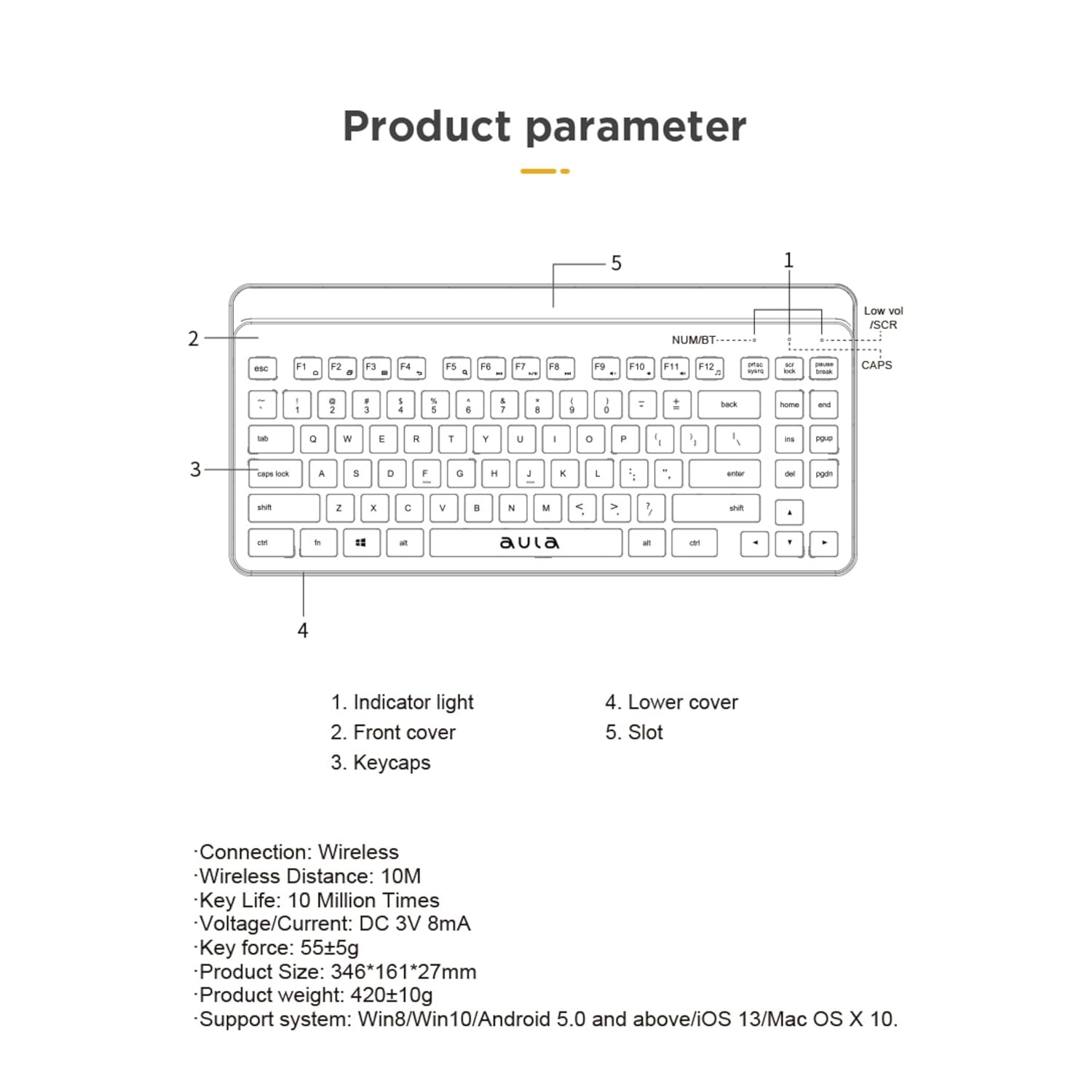
Image: A technical diagram of the keyboard highlighting its components and listing key specifications.
| Feature | Detail |
|---|---|
| Brand | AULA |
| Model Number | AWK310 |
| Connectivity Technology | Bluetooth |
| Wireless Type | Bluetooth |
| Wireless Distance | Up to 10 meters |
| Compatible Devices | Desktop, Laptop, Smartphone, Tablet |
| Operating System Support | Android, Chrome OS, Linux, Windows 8, Windows XP Professional Edition, iOS |
| Power Source | Battery Powered |
| Batteries Required | 2 AAA batteries (included) |
| Average Battery Life | 2 Years |
| Key Life | 10 Million Times |
| Voltage/Current | DC 3V 8mA |
| Key Force | 55±5g |
| Product Dimensions (LxWxH) | 346 x 161 x 27 mm (approx. 15 x 35 x 2 cm) |
| Item Weight | 550 g |
| Color | Black |
| Country of Origin | China |
Warranty and Support
Warranty Information
The AULA AWK310 Wireless Bluetooth Multi-Device Keyboard comes with a 1-year warranty from the date of purchase. This warranty covers manufacturing defects only.
Customer Support
For any technical assistance, troubleshooting, or warranty claims, please contact the seller or the manufacturer's customer support. Refer to your purchase documentation for specific contact details.
Related documentsAWK310


Ask a question about this manual
Ask about setup, troubleshooting, compatibility, parts, safety, or missing instructions. Manuals+ will review the question and use this page’s manual context to help answer it.