
1. Introduction
The EPEVER IPT 3000-12 is a high-frequency pure sine wave inverter designed for converting 12V DC power to 230V AC power. It features a fully digital intelligent design with a dual closed-loop voltage and current control algorithm, ensuring fast response, high conversion efficiency, low total harmonic distortion (THD), and high operational reliability. This inverter is suitable for various off-grid DC-AC systems, including vehicle systems, security surveillance systems, emergency lighting, domestic electrical systems, and field electrical systems that require high-quality power.
Please read this manual thoroughly before installation and operation to ensure proper use and to prevent damage to the inverter or connected equipment.
2. Safety Instructions
Observe the following safety precautions during installation and operation:
- Ensure the inverter is installed in a well-ventilated area, away from flammable materials, moisture, and direct sunlight.
- Do not expose the inverter to rain, snow, spray, or any liquids.
- Ensure all wiring connections are tight and correct to prevent loose connections that can cause overheating.
- Do not connect the inverter to an AC utility power source or generator.
- Always disconnect the battery before performing any maintenance or wiring.
- The inverter generates high voltage. Do not open the casing or attempt to service the unit yourself. Refer all servicing to qualified personnel.
- Keep children away from the inverter.
- Use appropriate DC input cables and AC output cables with sufficient gauge for the power rating.
3. Product Overview
3.1 Key Features
- Pure sine wave output.
- Electrical isolation between input and output.
- Output power factor up to 1.
- Input protection: low voltage, overvoltage.
- Output protection: overload, short circuit, over-temperature.
- RS485 communication port for remote monitoring.
- Remote ON/OFF control port (RJ11).
- High conversion efficiency and reliability.
- Low Total Harmonic Distortion (THD).
3.2 Component Identification
Familiarize yourself with the main components of the EPEVER IPT 3000-12 inverter.

Figure 1: Front view of the EPEVER IPT 3000-12 Pure Sine Wave Inverter. This image shows the overall design of the inverter, highlighting its compact and robust casing.
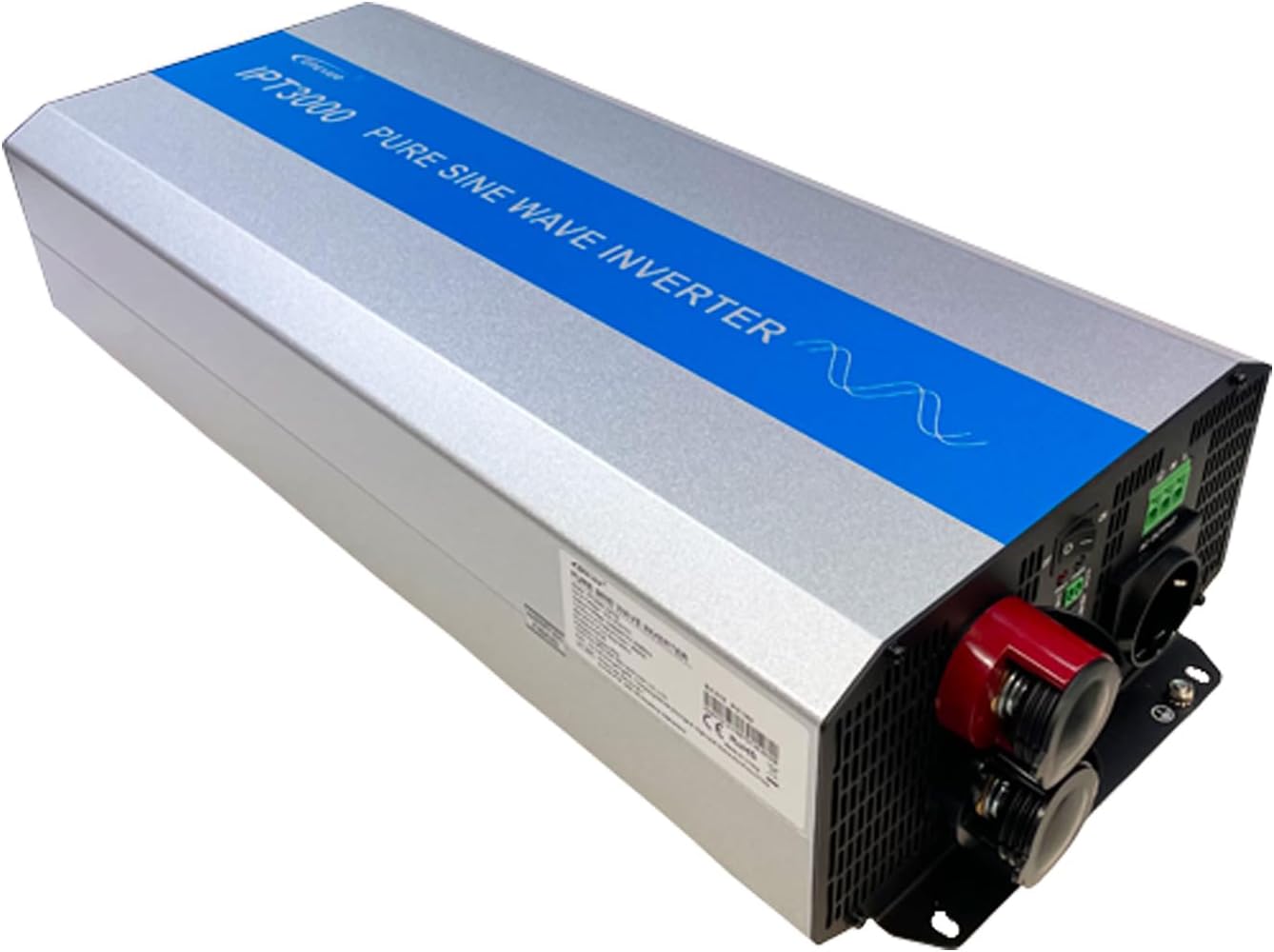
Figure 2: Front panel of the EPEVER IPT 3000-12 Inverter. This view details the AC output sockets, DC input terminals (red for positive, black for negative), the ON/OFF switch, and communication ports (REMOTE, RS-485). Status indicators for 'FAULT' and 'POWER' are also visible.

Figure 3: Rear panel of the EPEVER IPT 3000-12 Inverter. This image displays the two integrated cooling fans, essential for maintaining optimal operating temperature and preventing overheating.
4. Setup and Installation
4.1 Installation Environment
- Install the inverter indoors, protected from direct sunlight, rain, and moisture.
- Ensure adequate airflow around the inverter for proper cooling. Maintain at least 15 cm (6 inches) of clear space around the unit.
- Avoid installing the inverter in areas with corrosive gases, excessive dust, or high humidity.
- Mount the inverter horizontally on a stable, non-flammable surface.
4.2 Wiring Connections
Follow these steps for connecting the inverter to your battery bank and AC loads. Always ensure the inverter is switched OFF before making any connections.

Figure 4: Wiring diagram illustrating the connection of 12V batteries. It also depicts how AC loads like mobile devices and lamps are connected to the inverter's AC output.

Figure 5: System diagram showing the EPEVER IPT inverter integrated into a typical solar power system. This includes a solar charge controller, battery bank, and both DC and AC loads. The RS485 communication link to an MT75 remote meter is also shown.
4.2.1 Battery Connection
- Connect the positive (+) terminal of the 12V battery bank to the red DC input terminal of the inverter.
- Connect the negative (-) terminal of the 12V battery bank to the black DC input terminal of the inverter.
- Ensure the battery cables are of appropriate gauge and length to minimize voltage drop.
- Tighten all connections securely.
4.2.2 AC Load Connection
- Plug your AC appliances directly into the AC output sockets on the front panel of the inverter.
- Ensure the total power consumption of all connected AC loads does not exceed the inverter's continuous power rating (3000W).
- The inverter supports various AC outlet types, as shown in Figure 6.
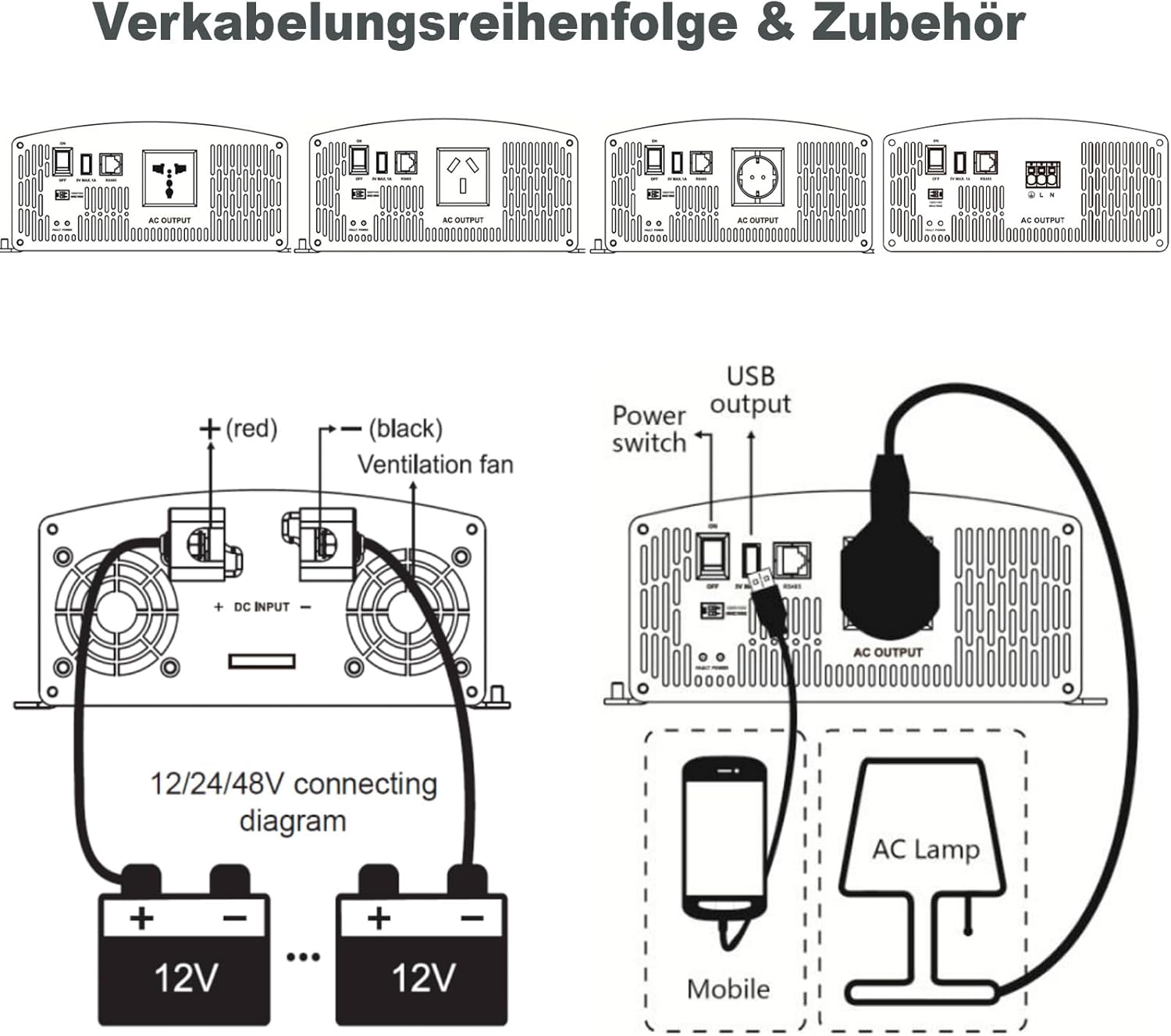
Figure 6: Illustration of different AC outlet configurations that can be supported by EPEVER inverters, demonstrating versatility for various regional standards.
4.2.3 Remote Control and Monitoring (Optional)
- Connect an external remote ON/OFF switch to the RJ11 port for convenient control.
- Utilize the RS485 communication port for remote monitoring with compatible EPEVER devices, such as the MT75 remote meter (see Figure 5).
5. Operating Instructions
5.1 Turning the Inverter On/Off
- To Turn On: After all connections are secure, switch the ON/OFF button on the inverter's front panel to the "ON" position. The "POWER" indicator should illuminate.
- To Turn Off: Switch the ON/OFF button to the "OFF" position. The "POWER" indicator should turn off.
When using the remote ON/OFF switch, ensure the main switch on the inverter is in the "ON" position for the remote switch to function.
5.2 Status Indicators
- POWER Indicator: Illuminates when the inverter is operating normally.
- FAULT Indicator: Illuminates or flashes to indicate a fault condition (e.g., overload, over-temperature, low voltage). Refer to the Troubleshooting section for details.
6. Maintenance
Regular maintenance ensures the longevity and optimal performance of your EPEVER IPT 3000-12 inverter.
- Cleaning: Periodically clean the exterior of the inverter with a dry cloth. Ensure the cooling vents and fans (Figure 3) are free from dust and debris to maintain proper airflow.
- Connections: Regularly check all wiring connections (DC input, AC output) to ensure they are tight and free from corrosion. Loose connections can cause overheating and damage.
- Environment: Verify that the installation environment remains within recommended conditions (temperature, humidity, ventilation).
- Battery Health: Monitor the health of your battery bank, as poor battery performance can affect inverter operation.
Do not attempt to open the inverter casing for internal cleaning or repairs. This should only be done by authorized service personnel.
7. Troubleshooting
If the inverter is not functioning correctly, refer to the following table for common issues and their solutions.
| Problem | Possible Cause | Solution |
|---|---|---|
| No AC output, POWER indicator OFF. | Inverter is OFF; Low battery voltage; Loose DC connections. | Turn ON the inverter; Charge or replace battery; Check and tighten DC connections. |
| FAULT indicator ON/flashing. | Overload; Over-temperature; Short circuit; Input overvoltage/undervoltage. | Reduce AC load; Ensure proper ventilation, allow cooling; Check AC wiring for shorts; Verify battery voltage is within range (10.8-16VDC). |
| Low AC output voltage or unstable output. | Battery voltage too low; Excessive load; Poor DC connections. | Charge battery; Reduce load; Check and tighten DC connections. |
| Inverter makes unusual noise. | Overload; Fan obstruction. | Reduce AC load; Clean cooling fans and vents. |
If the problem persists after attempting these solutions, contact EPEVER customer support or your local dealer.
8. Specifications
Technical specifications for the EPEVER IPT 3000-12 Pure Sine Wave Inverter:
| Parameter | Value |
|---|---|
| Model | IPT3000-12 |
| Rated Input Voltage | 12 VDC |
| Input Voltage Range | 10.8 ~ 16 VDC |
| Output Voltage | 220 V AC (±3%) / 230 V AC (-7% ~ +3%) |
| Continuous Power | 3000 W (Power Factor: 1) |
| Surge Power | 6000 W @ 5S |
| Nominal Output Efficiency | > 87% |
| Max. Output Efficiency (30% load) | > 94% |
| Load Power Factor | 0.2 ~ 1 (Load power ≤ Continuous power) |
| Battery Type | Lithium-ion / Lead-acid |
| Communication Port | RS485 (5VDC/200mA), RJ11 for remote ON/OFF |
| Dimensions (L x W x H) | 55.7 x 22.8 x 11.8 cm (21.9 x 9.0 x 4.6 inches) |
| Weight | 9.5 kg (20.9 lbs) |
| Certifications | EN/IEC62109-1/2, EN61000-6-2/4, FCC |
9. Warranty and Support
9.1 Warranty Information
The EPEVER IPT 3000-12 Pure Sine Wave Inverter comes with a 2-year manufacturer's warranty from the date of purchase. This warranty covers defects in materials and workmanship under normal use. It does not cover damage caused by improper installation, misuse, accidents, unauthorized modifications, or natural disasters. Please retain your proof of purchase for warranty claims.
9.2 Customer Support
For technical assistance, troubleshooting beyond this manual, or warranty inquiries, please contact your authorized EPEVER dealer or visit the official EPEVER website for support resources.
EPEVER Official Website: www.epever.com


