
Introduction
This manual provides detailed instructions for the safe and effective use of your Godox TT350 Mini Thinklite TTL Flash for Nikon Cameras (TT350N). Please read this manual thoroughly before use to ensure optimal performance and to prevent damage to the product or injury to yourself.
The Godox TT350N is a compact and versatile on-camera flash designed for Nikon cameras, featuring TTL autoflash, 2.4G wireless X system, High-Speed Sync (HSS), and a zoomable flash head.
What's in the Box
Upon opening your package, please verify that all the following items are included:
- 1x Godox TT350 Flash
- 1x Protection Bag
- 1x H-type Bracket
- 1x Filter
- 1x White Diffuser

Image: Contents of the Godox TT350N package.
Setup
1. Battery Installation
The TT350N flash requires two AA batteries (sold separately). For best performance and recycle times, use high-quality rechargeable Ni-MH batteries.
- Open the battery compartment cover located on the side of the flash unit.
- Insert two AA batteries according to the polarity indicators (+ and -) inside the compartment.
- Close the battery compartment cover securely.

Image: Godox TT350N flash unit with battery compartment visible.
2. Mounting on Camera
The TT350N flash is designed to mount onto the hot shoe of compatible Nikon cameras.
- Slide the flash's mounting foot into the camera's hot shoe.
- Rotate the locking ring on the flash unit clockwise until it is securely tightened. Do not overtighten.
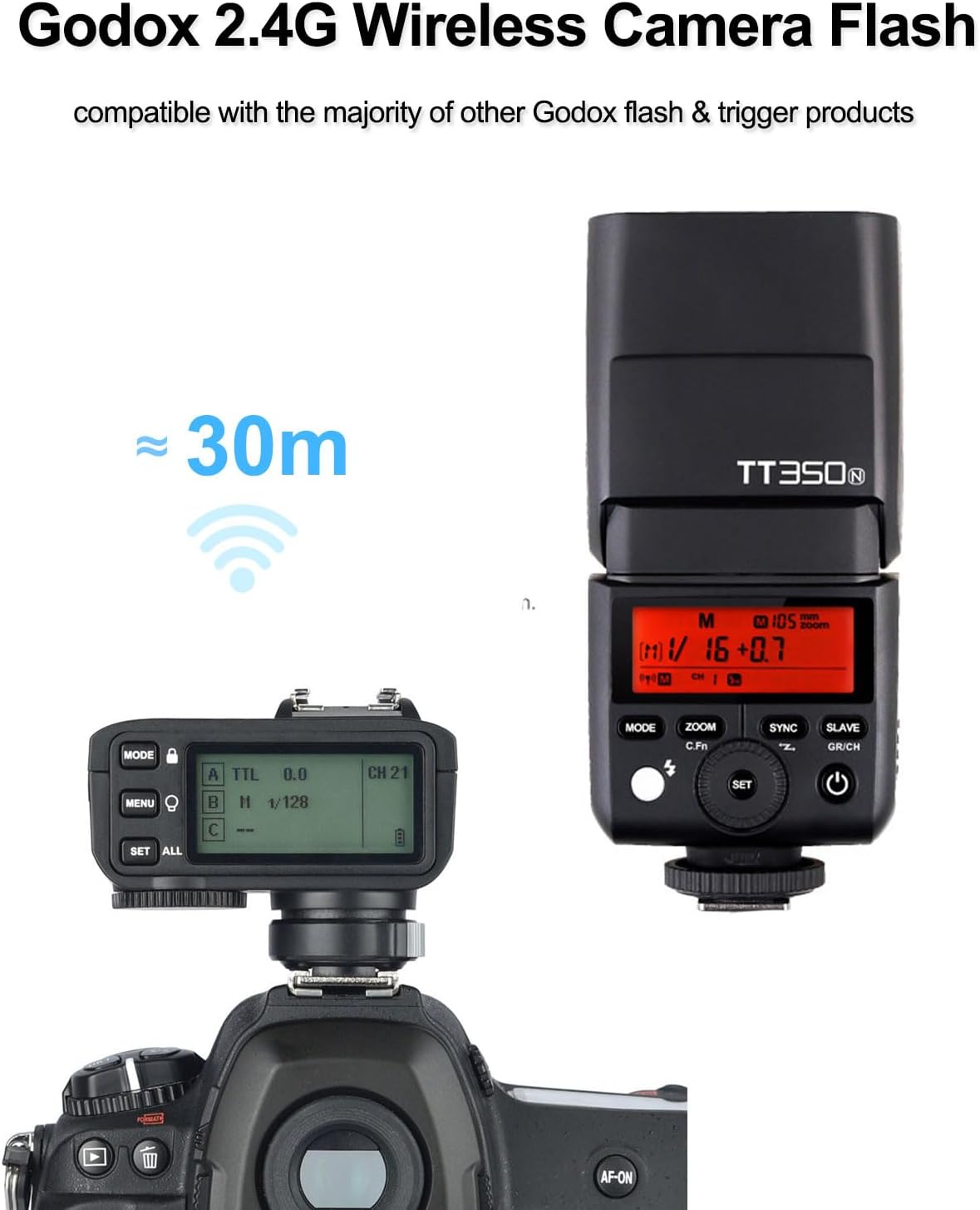
Image: Godox TT350N flash mounted on a camera.
3. Initial Power-On
Press and hold the power button on the flash unit to turn it on. The LCD panel will illuminate, displaying the current settings.
Operating Instructions
LCD Panel and Controls
The TT350N features a clear LCD panel and intuitive buttons for easy operation. Use the four function buttons to change various settings and the select dial to adjust values.

Image: Godox TT350N LCD panel and control layout.
Flash Modes
The TT350N supports several flash modes for diverse photographic needs:
- TTL Autoflash Mode: Automatically sets flash output for correct exposure.
- Manual Flash Mode: Allows manual control of flash power from 1/1 to 1/128 in 1/3 EV steps.
- Multi Flash Mode (Stroboscopic): Fires a series of rapid flashes during a single exposure to capture multiple movements.
Wireless X System (2.4G Transmission)
The integrated 2.4 GHz X radio system allows the TT350N to function as a transmitter or receiver for wireless triggering. It supports 16 channels and three groups, with a range of up to 328 feet (100 meters). It can also be used with optional Godox X series transmitters (e.g., X1T, X2T, XPro) for more advanced setups.

Image: Godox 2.4G Wireless X System setup.
High-Speed Sync (HSS)
The TT350N supports High-Speed Sync up to 1/8000s, allowing you to use flash with fast shutter speeds, ideal for freezing action or using wide apertures in bright conditions.

Image: High-Speed Sync (HSS) in action.
Flash Head Adjustment
The flash head can be tilted from -7° to 90° vertically and rotated a total of 270° horizontally. This flexibility allows for bounce flash photography, directing light off ceilings or walls for softer, more natural illumination.

Image: Adjustable flash head angles.
Auto Zoom Lamp Head
The built-in zoom motor automatically adjusts the flash coverage from 24mm to 105mm to match the lens's focal length, ensuring efficient light distribution. A 14mm wide-angle panel is also included for broader coverage.

Image: Auto Zoom Lamp Head functionality.
Video Tutorial: Setup and X Trigger Use
Video: "How to Set Up Godox TT350 Mini Flash & Use with X Trigger" by CONXTRUE. This video demonstrates the setup and operation of the Godox TT350 flash, including its use with an X trigger system.
Maintenance
- Cleaning: Use a soft, dry cloth to clean the flash unit. For stubborn dirt, a slightly damp cloth can be used, followed by immediate drying. Avoid harsh chemicals or abrasive materials.
- Battery Care: Remove batteries when the flash is not in use for extended periods to prevent leakage. Store batteries in a cool, dry place.
- Firmware Updates: The TT350N features a USB connection for installing future firmware updates. Visit the official Godox website for the latest firmware and instructions.
- Storage: Store the flash in its protection bag in a dry, dust-free environment away from direct sunlight and extreme temperatures.
Troubleshooting
| Problem | Possible Cause | Solution |
|---|---|---|
| Flash does not fire. | Low or dead batteries; incorrect camera/flash settings; flash not securely mounted. | Replace or recharge batteries; check flash mode (TTL/M) and camera settings; ensure flash is securely attached to hot shoe. |
| Flash output is too dark/bright. | Incorrect exposure compensation; manual power setting too low/high; distance to subject. | Adjust flash exposure compensation (FEC); change manual power setting; ensure subject is within flash range. |
| Wireless triggering fails. | Incorrect channel/group settings; interference; flash not in wireless mode. | Verify channel and group settings on both flash and trigger; ensure flash is set to Master/Slave mode; reduce distance or obstacles. |
| Flash recycle time is slow. | Low battery power; high flash output setting. | Replace or recharge batteries; reduce flash power output. |
Technical Specifications
| Model Name | TT350N |
| Brand | GODOX |
| Compatible Devices | Nikon Cameras |
| Compatible Mountings | Hot Shoe mount |
| Exposure Control Type | TTL |
| Guide Number | GN36 (ISO 100, 105mm) |
| Flash Sync Speed | Up to 1/8000s (HSS) |
| Wireless Technology | 2.4G RF (Godox X system) |
| Wireless Flash Function | Master, Slave, Off |
| Channels | 16 |
| Groups | 3 |
| Flash Coverage | 24-105mm (Auto/Manual Zoom), 14mm with wide panel |
| Flash Head Rotation | Horizontal: 0-270°, Vertical: -7-90° |
| Power Source | 2x AA batteries (Ni-MH or Alkaline) |
| Full Power Flashes | Approx. 210 (with 2500mAh Ni-MH batteries) |
| Recycle Time | Approx. 0.1-2.2 seconds |
| Dimensions (D x W x H) | 5.5" x 1.5" x 2.4" (140mm x 38mm x 62mm) |
| Weight (without batteries) | Approx. 200g (7oz) |
| Connectivity | USB port for firmware updates |
Warranty Information
The Godox TT350N flash unit comes with a 1-year warranty from the date of purchase. This warranty covers manufacturing defects and malfunctions under normal use. Please retain your proof of purchase for warranty claims. The warranty does not cover damage caused by misuse, accidents, unauthorized repairs, or normal wear and tear.
Support
For technical support, troubleshooting assistance, or service inquiries, please contact Godox customer service. You can find contact information and additional resources on the official Godox website or through the retailer where you purchased the product.
You may also visit the GODOX Store on Amazon for more product information and accessories.


