
1. Introduction
This manual provides detailed instructions for the assembly, operation, and maintenance of your ODK L-Shaped Gaming Desk, Model ZJZ-JJYJZ. Please read this manual thoroughly before assembly and use to ensure proper setup and safe operation. This desk is designed for gaming, computer use, and general office tasks, featuring a corner design and an integrated monitor stand.

Image 1.1: Overview of the ODK L-Shaped Gaming Desk setup, highlighting its spacious design.
2. Safety Instructions
Observe the following safety precautions to prevent injury or damage to the product:
- Read all instructions: Ensure you understand all assembly steps before beginning.
- Keep children and pets away: Small parts can be a choking hazard.
- Assemble on a soft, clean surface: This prevents scratches to the desk and flooring.
- Do not overtighten screws: This can damage the material.
- Ensure all connections are secure: Before placing items on the desk, verify stability.
- Distribute weight evenly: Avoid placing heavy items solely on one side or corner.
- Use appropriate tools: A ratchet wrench with desired bits may speed up assembly.
3. Package Contents
Before assembly, verify that all components are present and undamaged. If any parts are missing or damaged, contact customer support.
- Desk panels (L-shaped top, monitor stand shelf)
- Metal frame components (legs, crossbars, X-shaped supports)
- Hardware pack (screws, bolts, Allen key)
- Adjustable foot pads
- Switchable storage bag
- Helmet hook
- Instruction manual
4. Assembly Instructions
Follow these steps for assembling your ODK L-Shaped Gaming Desk. It is recommended to have two people for easier assembly.
- Unpack and Identify Parts: Lay out all components on a clean, soft surface. Refer to the parts list in the package contents to ensure everything is present.
- Assemble the X-shaped Frame: Attach the X-shaped metal frame components to the main leg structures using the provided screws. Do not fully tighten screws until all parts are aligned.
- Attach Desk Panels: Carefully place the L-shaped desk panels onto the assembled frame. Align the pre-drilled holes with the frame and secure with screws.
- Install Monitor Stand: Position the monitor stand shelf on the designated area of the desk. Secure it using the provided screws.
- Attach Accessories: Install the helmet hook underneath the desk and the switchable storage bag to your preferred side using the provided attachments.
- Final Tightening: Once all components are in place and aligned, fully tighten all screws.
- Adjust Foot Pads: Adjust the foot pads at the bottom of the desk legs to ensure stability and level the desk on uneven floors.

Image 4.1: Detail of the X-shaped frame for stability.
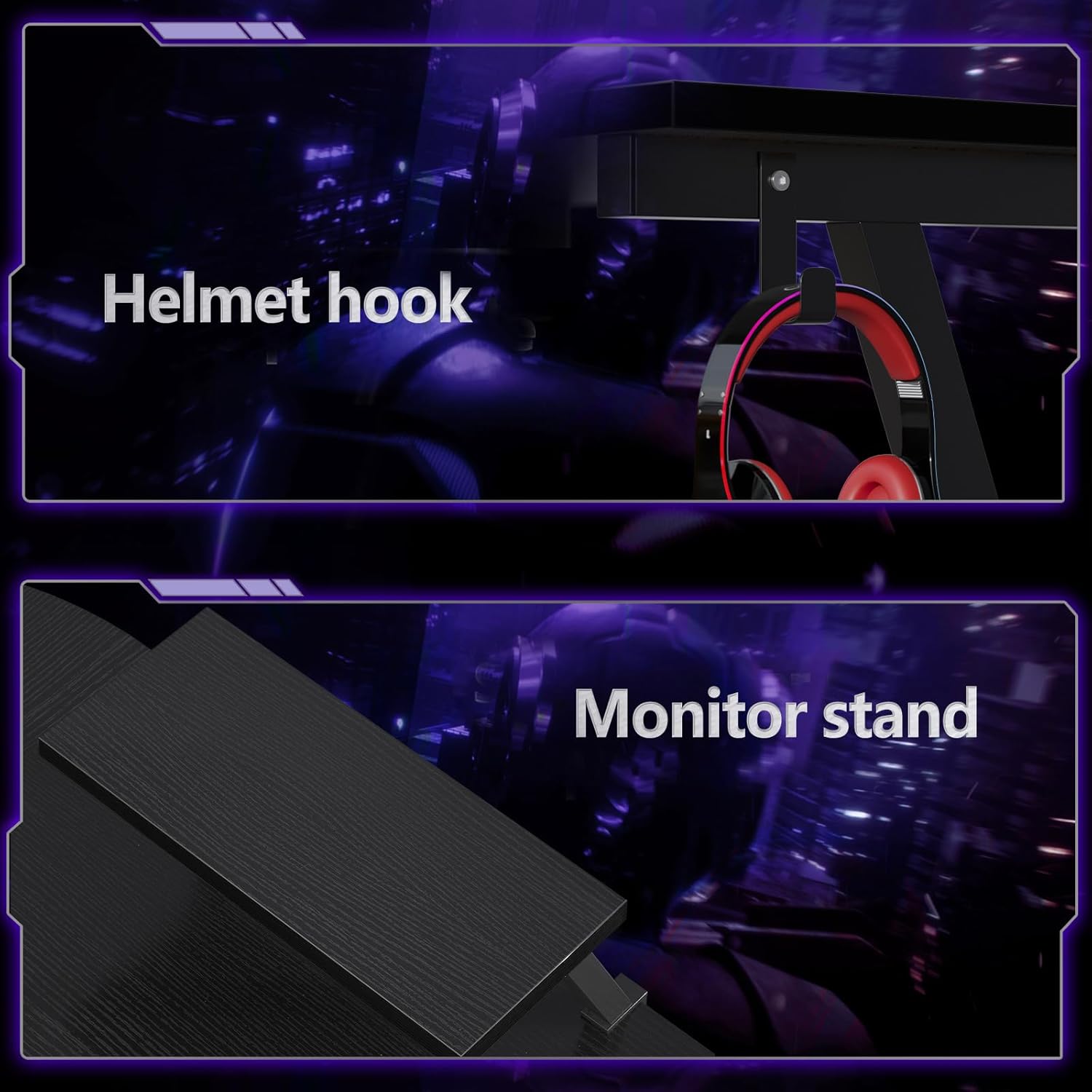
Image 4.2: Monitor stand and helmet hook installation points.

Image 4.3: The switchable storage bag for organizing files and small objects.
5. Operating Instructions
Your ODK L-Shaped Gaming Desk is designed for versatile use. Here are some tips for optimal operation:
- Monitor Stand Usage: The integrated monitor stand elevates your screen to an ergonomic height, reducing neck strain. It can also be used for storing small items underneath.
- L-Shaped Configuration: Utilize the L-shape for multi-tasking, separating your gaming setup from your work area, or accommodating multiple monitors.
- Storage Bag: The switchable storage bag can be attached to either side of the desk to keep essential items like documents, headphones, or small accessories organized and within reach.
- Helmet Hook: Use the helmet hook to hang your gaming headset or other accessories, keeping your desk surface clear.

Image 5.1: The L-shaped desk configured for space-saving and efficient use.
6. Maintenance
Proper care will extend the life of your desk:
- Cleaning: Wipe the desk surface with a soft, damp cloth. Avoid abrasive cleaners or harsh chemicals that could damage the wood finish.
- Spills: Clean up spills immediately to prevent staining or damage to the material.
- Regular Checks: Periodically check all screws and connections to ensure they remain tight. Retighten if necessary.
- Avoid Extreme Conditions: Do not expose the desk to direct sunlight for prolonged periods or extreme humidity, which can cause warping or discoloration.
7. Troubleshooting
If you encounter issues with your desk, refer to the following common problems and solutions:
| Problem | Possible Cause | Solution |
|---|---|---|
| Desk wobbles | Uneven floor; loose screws; incorrect assembly. | Adjust the foot pads at the bottom of the legs. Ensure all screws are fully tightened. Review assembly steps. |
| Parts do not fit | Incorrect orientation of parts; manufacturing defect. | Double-check the assembly diagrams. If parts still do not fit, contact customer support. |
| Missing hardware | Packaging error. | Contact customer support with details of the missing items. |
8. Specifications
Key specifications for the ODK L-Shaped Gaming Desk (Model ZJZ-JJYJZ):
- Brand: ODK
- Model Number: ZJZ-JJYJZ
- Color: Black
- Dimensions (L x W x H): 127 x 127 x 76.4 cm (50 x 50 x 30.1 inches)
- Weight: 16 Kilograms (35.3 lbs)
- Material: Wood (top), Metal (base frame)
- Special Features: Monitor stand, Helmet hook, Switchable storage bag
- Recommended Uses: Gaming, Work, Writing

Image 8.1: Dimensional overview of the ODK L-Shaped Gaming Desk.
9. Warranty and Support
Information regarding specific warranty terms and conditions is not provided in the product details. For any support inquiries, missing parts, or warranty claims, please contact the retailer or manufacturer directly using the contact information provided at the point of purchase.
Spare parts availability information is currently unavailable.


