
Introduction
This manual provides comprehensive instructions for the setup, operation, and maintenance of your Geevon Indoor Outdoor Thermometer Wireless Weather Station, Model 238647. This device is designed to monitor indoor and outdoor temperature and humidity, provide a 12-hour weather forecast, and function as an alarm clock with a backlight display.
Safety Information
- The main unit and the remote sensor must be within 60 meters (200 feet) of each other for optimal wireless communication.
- Ensure both units are placed at least 1 meter (3 feet) away from electronic devices that may interfere with wireless communication, such as televisions, microwaves, computers, or radios.
- Do not use heavy-duty or rechargeable batteries. The outdoor sensor requires lithium batteries in low-temperature conditions, as alkaline batteries may not function properly in cold environments.
- Do not mix old and new batteries.
- Ensure no water or other liquid enters the sensor unit. The outdoor sensor is IP44 splash-proof, but direct exposure to heavy rain or submersion should be avoided.
Package Contents
- Main Display Unit
- Wireless Outdoor Sensor
- USB Power Cable
- User Manual (this document)
Product Overview
The Geevon Weather Station features a 4-inch color HD display for clear visibility of indoor and outdoor conditions. The system includes a main display unit and a wireless remote sensor.

Image: The main display unit and the wireless outdoor sensor, along with the USB power cable.
Main Display Unit Features:
- Color HD Display: Shows indoor/outdoor temperature and humidity, time, alarm status, and weather forecast.
- Backlight: Activated by the SNZ/LIGHT button. Continuous backlight when powered by USB.
- Alarm Clock with Snooze: Features a 5-minute snooze function.
- Max/Min Records: Displays past 24-hour maximum and minimum temperature and humidity.
- Weather Forecast: Provides a 12-hour forecast.
- Temperature Units: Switchable between Celsius (°C) and Fahrenheit (°F).
- Low Battery Indicator: Alerts when batteries need replacement.
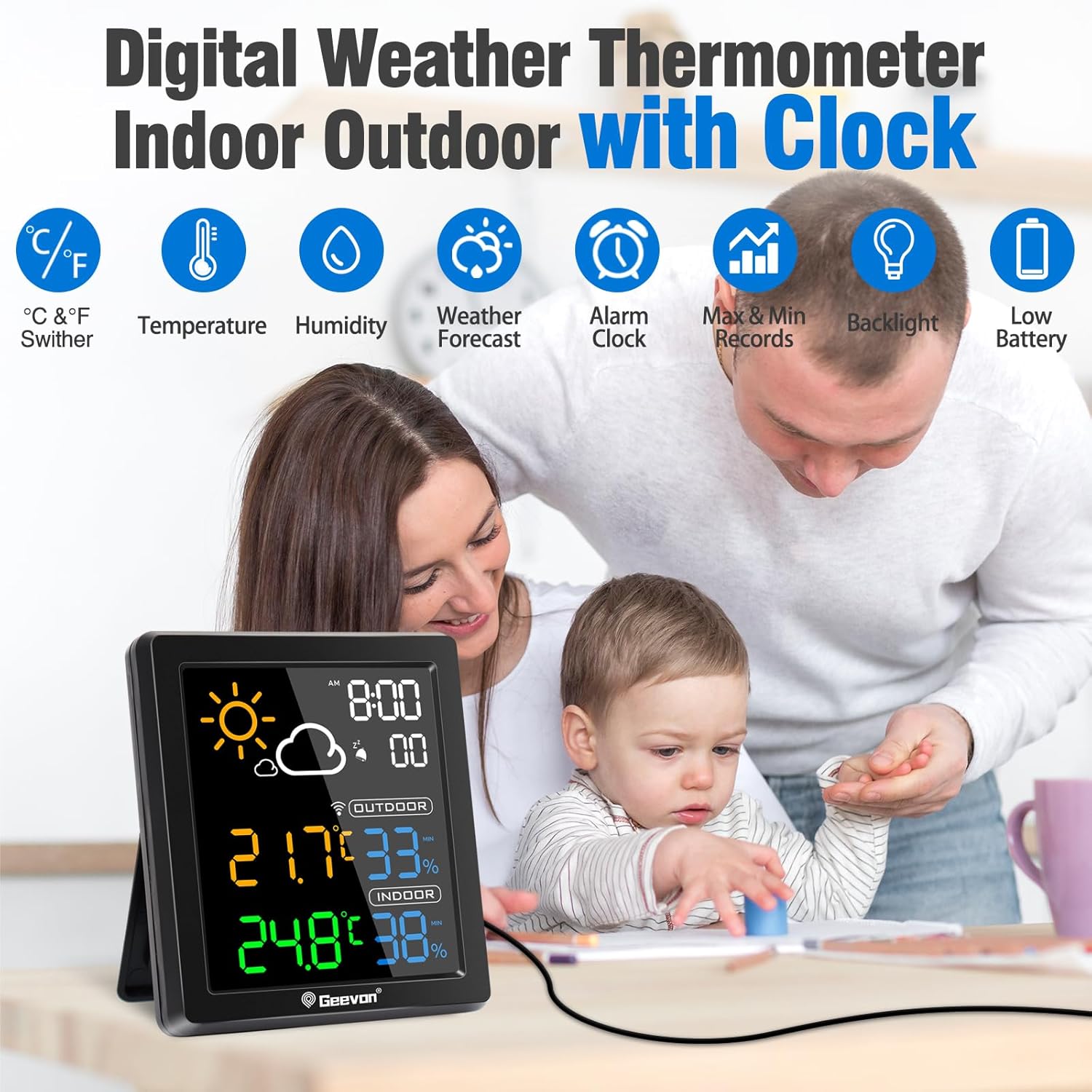
Image: The main display unit highlighting its various features including temperature, humidity, weather forecast, alarm, max/min records, backlight, and low battery indicator.
Wireless Outdoor Sensor:
- Wireless Transmission: Operates at 433 MHz, with a range of up to 60 meters (200 feet) in open areas.
- IP44 Splash-Proof: Designed to withstand light splashes, but should be protected from direct heavy rain and sunlight.

Image: Diagram illustrating the 200ft/60m wireless transmission range between the main unit and the outdoor sensor, with the sensor mounted on an exterior wall.
Setup
1. Power Supply
The main unit can be powered by either the included USB cable or 2 AAA batteries (not included). The outdoor sensor requires 2 AAA batteries (not included).
- Main Unit: Insert 2 AAA batteries into the battery compartment, observing polarity. For continuous backlight, connect the USB cable to the main unit and a power adapter (not included). When operating on battery power alone, the backlight will turn off after 10 seconds to conserve energy.
- Outdoor Sensor: Insert 2 AAA batteries into the battery compartment, observing polarity.

Image: Illustration showing the two power modes for the main unit: battery-powered (backlight turns off after 10s) and USB cable powered (backlight stays on).
2. Initial Synchronization
Before placing the sensor outdoors, ensure both the main unit and the sensor are placed together. Once batteries are installed in both units, they should automatically connect. If connection is not established, refer to the Troubleshooting section.
3. Sensor Placement
Place the outdoor sensor in a shaded area, protected from direct sunlight and heavy precipitation, to ensure accurate readings and prolong battery life. The sensor is splash-proof (IP44) but not waterproof. Ensure it is within the 60-meter (200-foot) transmission range of the main unit.

Image: The main unit shown with both wall mount and tabletop stand options, demonstrating flexible placement.
Operating Instructions
1. Display Overview
The main display unit shows the following information:
- Time: Current time with AM/PM indicator.
- Weather Forecast: Icons representing sunny, cloudy, overcast, rain, or snow for the next 12 hours.
- Outdoor Temperature & Humidity: Readings from the wireless sensor.
- Indoor Temperature & Humidity: Readings from the main unit.
- Max/Min Records: Highest and lowest temperature/humidity recorded in the past 24 hours.

Image: The weather station display showing various weather forecast icons for the next 12 hours, including sunny, cloudy, overcast, rain, and snow.
2. Backlight Operation
Touch the SNZ/LIGHT button on the top of the main unit to activate the backlight. If the unit is powered by the USB cable, the backlight will remain continuously on. If powered by batteries, the backlight will illuminate for 10 seconds and then turn off to save power.

Image: Comparison of the display with backlight during day and night, demonstrating enhanced visibility.
3. Alarm Clock and Snooze Function
The unit includes an alarm clock with a 5-minute snooze function.
- To activate the snooze function when the alarm sounds, touch the SNZ/LIGHT button on the top.
- To turn off the alarm, press any other button on the back of the unit.

Image: The weather station displaying the alarm clock and snooze icons, with an illustration of pressing the SNZ/LIGHT button for snooze.
4. Switching Temperature Units (°C/°F)
Refer to the buttons on the back of the main unit to switch between Celsius and Fahrenheit temperature displays. Consult the button labels for specific functionality.
Maintenance
- Cleaning: Wipe the display unit and sensor with a soft, dry cloth. Do not use abrasive cleaners or solvents.
- Battery Replacement: Replace batteries in both the main unit and the outdoor sensor when the low battery indicator appears on the display. Ensure correct polarity.
- Sensor Protection: Periodically check the outdoor sensor for any debris or moisture accumulation. Ensure it remains in a protected location.
Troubleshooting
| Issue | Possible Cause | Solution |
|---|---|---|
| No outdoor temperature/humidity reading | Sensor out of range, low sensor battery, interference. | Move sensor closer to main unit. Replace sensor batteries. Relocate units away from electronic interference. |
| Inaccurate readings | Sensor exposed to direct sunlight/rain, poor ventilation. | Relocate sensor to a shaded, well-ventilated area. Allow time for readings to stabilize after relocation. |
| Backlight not continuous | Main unit running on battery power. | Connect the main unit to a power source using the USB cable for continuous backlight. |
| Weather forecast inaccurate | The weather forecast is based on atmospheric pressure changes and is an estimation for the next 12 hours, not a real-time forecast. | Understand that the forecast is predictive and may not always match current conditions perfectly. |
Specifications
- Indoor Temperature Range: 14°F ~ 122°F (-10°C ~ 50°C)
- Outdoor Temperature Range: -58°F ~ 158°F (-50°C ~ 70°C)
- Temperature Accuracy: ±1°C (±3°F)
- Indoor/Outdoor Humidity Range: 20% - 95%
- Humidity Accuracy: ±5%
- Wireless Transmission Frequency: 433 MHz
- Wireless Transmission Range: Up to 60m (200ft) in open area
- Main Unit Power: USB cable (included) or 2 x AAA batteries (not included)
- Outdoor Sensor Power: 2 x AAA batteries (not included)
- Product Dimensions: 1 x 8 x 9 cm; 200 g
- Model Number: 238647
Warranty and Support
This Geevon product is covered by a 12-month warranty. Additionally, lifetime technical support is provided. For assistance, please contact support@geevon.com.


