
JIGOO T600
JIGOO T600 Mattress Vacuum Cleaner User Manual
Model: T600
Brand: JIGOO
Introduction
Thank you for choosing the JIGOO T600 Mattress Vacuum Cleaner. This powerful appliance is designed to provide a deep and hygienic cleaning for your mattresses, sofas, and other upholstered surfaces, effectively removing dust mites, allergens, and bacteria. Please read this manual carefully before use to ensure safe and optimal operation.
Important Safety Instructions
- Read all instructions before using the appliance.
- Do not use outdoors or on wet surfaces.
- Always unplug the appliance from the power outlet before cleaning or maintenance.
- Keep hair, loose clothing, fingers, and all parts of the body away from openings and moving parts.
- Do not pick up anything that is burning or smoking, such as cigarettes, matches, or hot ashes.
- Do not use without dust cup and filters in place.
- Use only as described in this manual. Use only manufacturer's recommended attachments.
- If the supply cord is damaged, it must be replaced by the manufacturer, its service agent or similarly qualified persons in order to avoid a hazard.
- This appliance is not intended for use by persons (including children) with reduced physical, sensory or mental capabilities, or lack of experience and knowledge, unless they have been given supervision or instruction concerning use of the appliance by a person responsible for their safety.
- Children should be supervised to ensure that they do not play with the appliance.
Product Overview
The JIGOO T600 combines powerful suction with advanced features to ensure a thorough clean:
- 700W Motor with 15kPa Suction: Provides strong suction to lift dust mites and debris.
- UV-C Light: Sterilizes surfaces and kills bacteria and mites.
- High-Frequency Vibration: Loosens embedded dust and mites from deep within fabrics.
- 60℃ Fast Heating: Dries and disinfects surfaces, creating an unfavorable environment for mites.
- LED Display: Shows real-time dust mite index and operational status.
- Dual Dust Cups: Separates dust and mites for easier disposal and improved filtration.
- HEPA Filter: Captures fine particles and allergens.

Front view of the JIGOO T600 Mattress Vacuum Cleaner, showcasing its sleek design and dust collection system.

Illustration demonstrating the 700W power and 15kPa suction of the JIGOO T600, highlighting its effectiveness against dust mites.

Diagram showing the thorough filtration system of the JIGOO T600, including the stainless steel filter screen and static filter sponge, and the detachable dust cup.

Close-up of the 800mW UV light on the JIGOO T600, with an inset showing the automatic safety protection that turns off the UV light when tilted.

Visual representation of the ultrasonic sterilization feature of the JIGOO T600, showing how high-frequency waves disrupt the dust mite reproductive cycle, with a before and after comparison of mite density.

Image illustrating the LED display of the JIGOO T600, showing the real-time dust mite index before and after cleaning, indicating the effectiveness of the device.

Collage of images demonstrating the versatile use of the JIGOO T600 on various surfaces, including mattresses, carpets, and sofas, in different household settings.
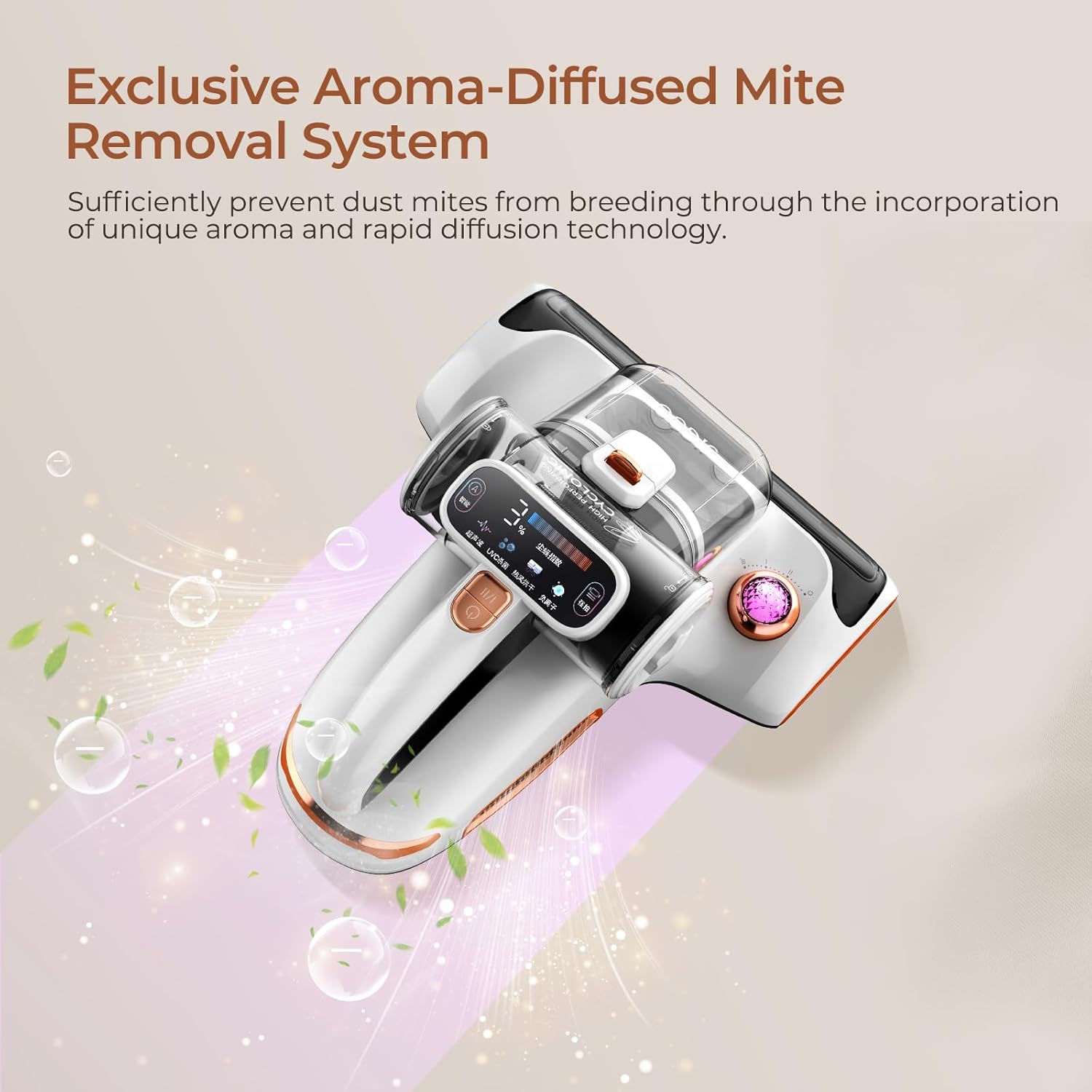
Image highlighting the exclusive aroma-diffused mite removal system of the JIGOO T600, showing pleasant scents being released during operation to prevent mite breeding.
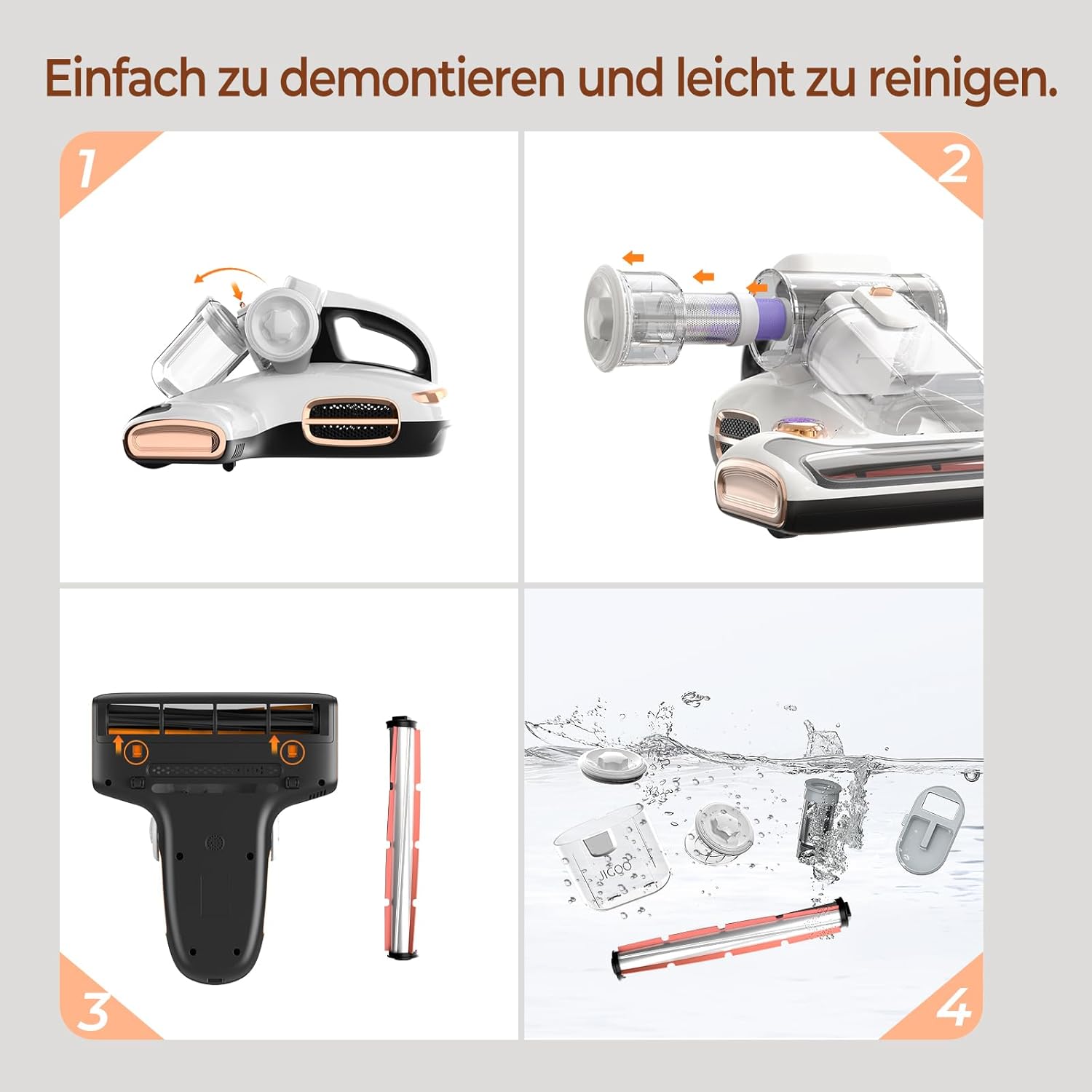
Step-by-step visual guide on how to easily disassemble and clean the JIGOO T600, including removing the dust cup, filter, and brush roll, and washing components.
Setup
Unpacking
Carefully remove the JIGOO T600 from its packaging. Retain the packaging for future storage or transport. Check all components against the packing list:
- JIGOO T600 Mattress Vacuum Cleaner unit
- Power cord
- User Manual (this document)
- Replacement HEPA filter (if included)
Assembly
The JIGOO T600 typically comes pre-assembled. Ensure the dust cups and filters are correctly installed before first use.
- Ensure the main dust cup is securely attached to the unit.
- Verify that the stainless steel filter screen and static filter sponge are properly seated inside the dust cup.
- Connect the power cord to the appliance and then to a suitable power outlet.
Operating Instructions
Powering On/Off
To turn the appliance on, press the power button located on the handle. Press it again to turn off.
Cleaning Modes
The JIGOO T600 features different cleaning modes for optimal performance:
- Smart Mode (A):
For daily cleaning. The device automatically adjusts suction and vibration based on the detected dust mite level. This mode provides efficient cleaning while conserving energy.
- Pat Mode (Pat):
For deep cleaning. This mode provides continuous maximum suction and vibration for thorough removal of deeply embedded dust mites and allergens.

Illustration of the LED display showing "Smart" and "Pat" modes, indicating their respective functions for daily and deep cleaning.
Using the UV-C Light and Heating Function
The UV-C light and 60℃ heating function activate automatically when the vacuum is in contact with a flat surface. For safety, the UV-C light will turn off if the device is lifted or tilted more than 15 degrees from the surface.
Monitoring Dust Mite Index
The integrated LED display provides a real-time dust mite index, allowing you to see the cleanliness level of your mattress. A higher percentage indicates more dust mites, while a lower percentage indicates a cleaner surface.
Aroma Diffusion (Optional)
If your model includes the aroma diffusion feature, you can insert an aroma capsule into the designated slot to release a pleasant scent during cleaning. This feature helps to create a fresh environment and can deter dust mites.
Maintenance
Regular maintenance ensures optimal performance and extends the lifespan of your JIGOO T600.
Emptying the Dust Cups
It is recommended to empty the dust cups after each use, especially if the dust mite index remains high. The dual dust cup design allows for easy and hygienic disposal.
- Press the release button to detach the dust cup assembly from the main unit.
- Open the dust cup and carefully empty its contents into a waste bin.
- For thorough cleaning, the dust cups can be rinsed with water. Ensure they are completely dry before reattaching.
Cleaning the Filters
The stainless steel filter screen and static filter sponge should be cleaned regularly to maintain suction power.
- Remove the filters from the dust cup.
- Tap the filters gently to remove loose dust.
- Rinse the filters under running water. Do not use hot water or detergents.
- Allow the filters to air dry completely for at least 24 hours before reinserting them. Using wet filters can damage the motor.
Cleaning the Brush Roll
Periodically check the brush roll for tangled hair or debris.
- Turn off and unplug the appliance.
- Locate the brush roll cover on the bottom of the unit and open it.
- Remove the brush roll.
- Use scissors or a cleaning tool to cut and remove any tangled hair or fibers.
- Reinsert the brush roll and close the cover securely.
Visual guide demonstrating the easy disassembly of the JIGOO T600 components (dust cup, filters, brush roll) for cleaning, including rinsing parts with water.
Troubleshooting
| Problem | Possible Cause | Solution |
|---|---|---|
| Appliance does not turn on. | Not plugged in; Power outlet not working; Power button not pressed. | Ensure power cord is securely plugged into a working outlet. Press the power button firmly. |
| Low suction power. | Dust cups full; Filters clogged; Brush roll tangled; Obstruction in nozzle. | Empty dust cups. Clean or replace filters. Remove tangled hair from brush roll. Check for and remove any obstructions. |
| UV-C light not working. | Appliance not in contact with surface; Tilted too much; UV lamp faulty. | Ensure the appliance is flat on the surface. Avoid tilting the unit during operation. Contact customer support if the lamp is faulty. |
| Unusual noise. | Obstruction in brush roll or air path; Damaged motor. | Check for and remove any obstructions. If noise persists, contact customer support. |
| Dust mite index not changing. | Sensor dirty; No mites detected (already clean). | Clean the sensor area. If the area is already clean, the index will remain low. |
If the problem persists after trying the above solutions, please contact JIGOO customer support.
Specifications
- Model: T600
- Brand: JIGOO
- Power: 700W
- Suction Power: 15kPa
- Noise Level: 72 dB
- Heating Temperature: 60℃ (reaches in 5 seconds)
- Dust Cup Capacity: 0.5L (approx. 479 grams)
- Filter Type: HEPA Filter, Stainless Steel Filter Screen, Static Filter Sponge
- Special Features: UV-C Light, High-Frequency Vibration, LED Display, Dual Dust Cups, Aroma Diffusion (optional), Corded
- Product Dimensions: 32.89 x 27.18 x 18.8 cm
- Weight: 2.72 kg
Warranty and Support
JIGOO products are manufactured to the highest quality standards. This product comes with a standard manufacturer's warranty. Please refer to the warranty card included in your packaging for specific terms and conditions, or visit the official JIGOO website for more information.
For technical support, troubleshooting assistance, or warranty claims, please contact JIGOO customer service through the following channels:
- Website: www.jigoo.com
- Email: support@jigoo.com
- Phone: Refer to your regional JIGOO support contact information.
When contacting support, please have your product model (T600) and purchase information ready.
Related documentsT600


Ask a question about this manual
Ask about setup, troubleshooting, compatibility, parts, safety, or missing instructions. Manuals+ will review the question and use this page’s manual context to help answer it.