
1. Introduction
The KAIWEETS KM201 Digital Multimeter is a smart auto-ranging voltage tester designed for daily use. It features True RMS measurement, 2000 counts display, Non-Contact Voltage (NCV) function, Live wire detection, Phase Sequence, and Zero/Live Wire Check. This manual provides essential information for safe and effective operation of your multimeter.
2. Safety Information
WARNING:
- Do not use the meter to test voltage over 600V, as this may damage the instrument.
- Always test known voltage with the meter before using it to confirm the instrument function is intact.
- Ensure proper connection of test leads to the source or load being measured.
- Do not short-circuit or reverse the polarity of batteries.
- Remove batteries when not in use for a long period to prevent leakage.
This device complies with CAT II 600V and CAT III 300V safety standards.
3. Product Features
- True RMS 2000 Counts Display: Provides accurate readings for various measurements.
- Smart Auto-Ranging: Automatically recognizes and measures AC/DC voltage, resistance, and continuity.
- Non-Contact Voltage (NCV) Function: Detects AC voltage without direct contact.
- Live Wire Check: Identifies live wires for safety.
- Phase Sequence: Determines the phase sequence in three-phase systems.
- Built-in Test Leads: Integrated leads with storage clips for convenience.
- Flashlight: Integrated LED flashlight for illumination in dark areas.
- Backlight: Display backlight for improved visibility.
- Data Hold: Freezes the current measurement on the display.
- Compact Design: Portable and easy to store.
4. Setup
4.1 Battery Installation
The multimeter requires 2x 1.5V AAA batteries. To install or replace batteries:
- Locate the battery compartment on the back of the device.
- Unscrew the screw holding the battery cover with a Phillips screwdriver.
- Carefully remove the cover. Note that the screw is not captive, so ensure it is not lost.
- Insert the 2x AAA batteries, observing correct polarity (+/-).
- Replace the battery cover and secure it with the screw.
4.2 Probe Handling
The built-in test leads have protective caps on their tips. These caps can be removed to expose more of the probe for certain measurements or to achieve a CAT III rating.

Figure 1: KAIWEETS Digital Multimeter with built-in test leads.
5. Operating Modes
5.1 Power On/Off
To power on or off the multimeter, long press the Power button ( ).
).
5.2 Auto Mode (Default)
Upon powering on, the meter defaults to Auto Mode, indicated by "Auto" on the display. In this mode, the meter automatically recognizes and measures voltage, resistance, and continuity.

Figure 2: Multimeter display in Auto Mode.
Voltage Measurement: Connect the test leads to the source or load. The meter will display the voltage (AC or DC) and polarity automatically.
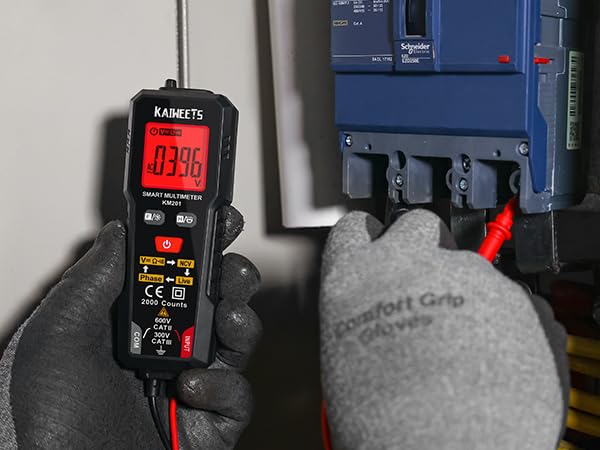
Figure 3: Measuring voltage with the multimeter.
Resistance & Continuity: If the measured resistance is less than 50Ω, the buzzer will beep and the green backlight will illuminate, indicating continuity.
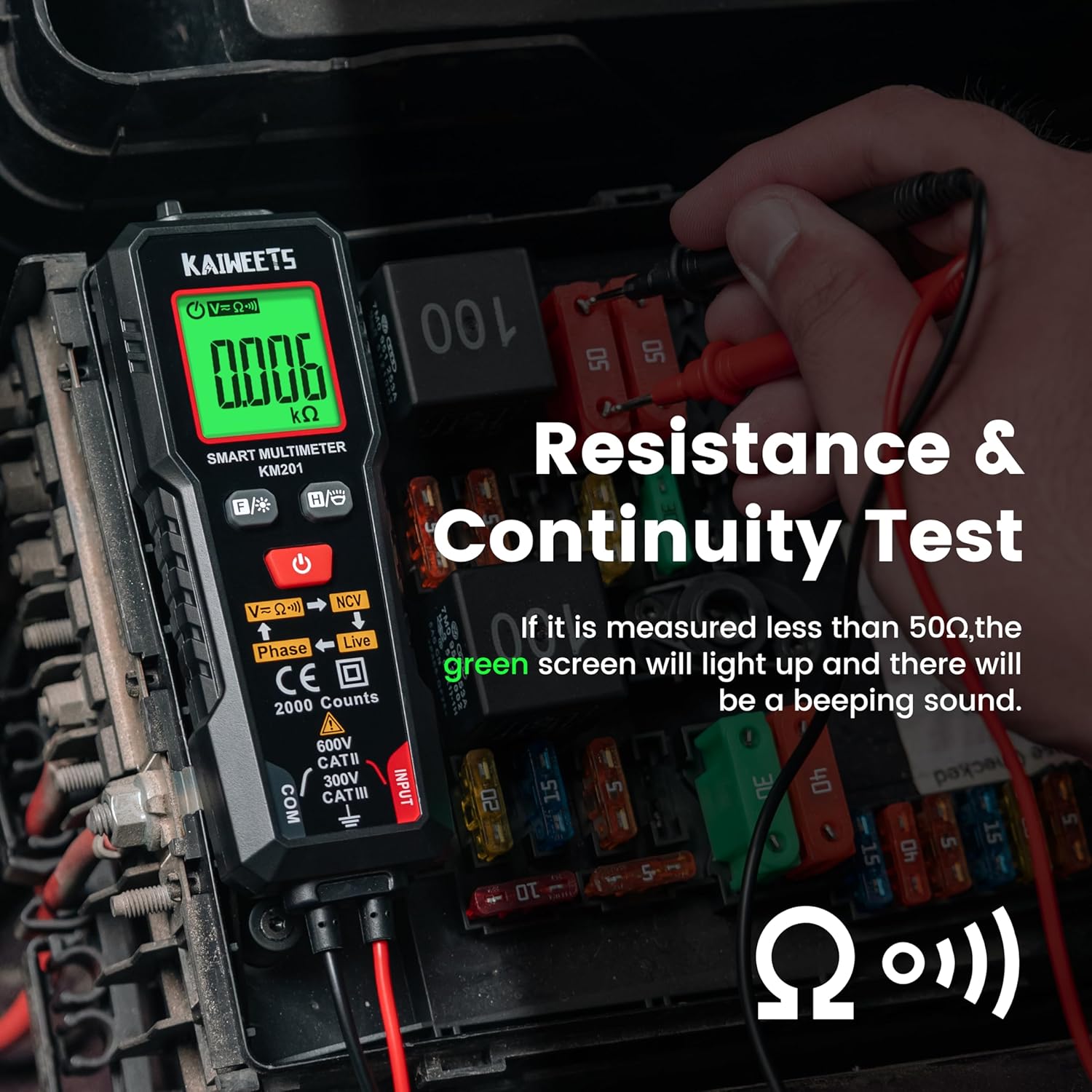
Figure 4: Resistance and Continuity Test.
5.3 Function Selection (FUNC Button)
Short press the FUNC button () to cycle through different measurement functions if you do not wish to use Auto Mode.
5.4 Non-Contact Voltage (NCV) Measurement
Short press the FUNC button until "NCV" is displayed. Place the NCV probe (top of the meter) near the detected point.
- When weak AC signals are sensed, the green backlight lights and the meter beeps slowly. The display shows "---L".
- When strong AC signals are sensed, the red backlight lights and the meter beeps fast. The display shows "---H".
5.5 Live Measurement
Short press the FUNC button until "Live" is displayed. Connect the red test lead to the test point.
- When weak AC signals are sensed, the green backlight lights and the meter beeps slowly. The display shows "---L".
- When strong AC signals are sensed, the red backlight lights and the meter beeps fast. The display shows "---H".
5.6 Phase Measurement
Short press the FUNC button until "Phase" is displayed. This function is used for three-phase wire detection.
- The display flashes the "PABC" symbol (A and B fixed, C flashing) for the first phase wire.
- Place the NCV sense probe against the second phase wire to show the "PAB" symbol (A fixed, B flashing).
- Place the NCV sense probe against the third phase wire to show the "P" symbol (A, B, C fixed).
- The "P---L" symbol indicates phase sequence left rotation.
- The "P---R" symbol indicates phase sequence right rotation.
5.7 Backlight Control
Long press the FUNC button to turn the display backlight on or off.
5.8 Data Hold (H/O Button)
Short press the H/O button () to activate or deactivate the data hold function. This will freeze the current reading on the display.
5.9 Flashlight
Long press the H/O button to turn the integrated flashlight on or off.
5.10 Sleep Mode
The meter automatically enters sleep mode if there is no operation for 15 minutes to conserve battery energy. To disable auto-off, long press the FUNC button and the Power button simultaneously when turning on the meter.
6. Maintenance
To ensure the longevity and accuracy of your KAIWEETS Multimeter, follow these maintenance guidelines:
- Cleaning: Keep the instrument clean and dry. Wipe contacts in each input terminal with a clean, damp cloth and mild detergent. Do not use abrasives or solvents.
- Battery Replacement: Replace batteries when the battery power is low. Refer to Section 4.1 for instructions.
- Storage: If the meter will not be used for a long period, remove the batteries to prevent leakage and damage. Store in a cool, dry place.
7. Troubleshooting
If you encounter issues with your multimeter, consider the following common troubleshooting steps:
- No Display/Power: Check if the batteries are correctly installed and have sufficient charge. Replace them if necessary.
- Inaccurate Readings: Ensure test leads are properly connected and clean. Verify that the correct measurement mode is selected (or use Auto Mode).
- No NCV/Live Detection: Ensure the NCV probe is correctly positioned and that the function is activated. Test against a known live source to confirm functionality.
- Meter Not Responding: Try turning the meter off and on again. If the issue persists, remove batteries for a few minutes and reinsert them.
For further assistance, please contact KAIWEETS customer support.
8. Specifications
| Feature | Specification |
|---|---|
| Display Measurements | 2000 counts, True - RMS |
| Maximum Voltage | CAT II 600V |
| Battery Type | 2x 1.5V AAA Batteries |
| Operating Temperature | 0°C ~ 40°C |
| Storage Temperature | -10°C ~ 60°C |
| Operating Humidity | <80% RH |
| Storage Humidity | <70% RH |
| Auto-Off Function | 15 minutes of no operation |
| Input Polarity Indication | "-" is displayed automatically |
| Resistance Range | Up to 20.00MΩ |
| Resistance Accuracy | ±(1.0%+3) |
| Continuity Threshold | <50Ω |
9. Warranty and Support
For warranty information or technical support, please visit the official KAIWEETS website or contact their customer service directly. You can also visit the KAIWEETS Store on Amazon for more product details and support options.


