

1. Introduction and Product Overview
The ELRO FC5003 Carbon Monoxide (CO) Detector is designed to provide reliable protection against the dangers of carbon monoxide gas in your home. This device features a high-quality electrochemical sensor with a 10-year lifespan, ensuring long-term safety. It includes a practical display for easy status monitoring and provides both audible and visual alarms in case of CO detection.

Image: Front view of the ELRO FC5003 Carbon Monoxide Detector, showing the display and indicator lights.
Carbon monoxide is a colorless, odorless, and tasteless gas that can be fatal. This detector is an essential safety device for any household, especially those with fuel-burning appliances such as boilers, fireplaces, and gas heaters.

Image: Visual representation emphasizing that carbon monoxide cannot be seen, smelled, or heard, highlighting the necessity of a detector.
2. Setup and Installation
2.1 Included Components
Before installation, ensure all components are present in the package:
- ELRO FC5003 Carbon Monoxide Detector
- 2 x AA batteries (1.5V)
- User Manual
- Mounting materials (screws and wall plugs)

Image: Product packaging of the ELRO FC5003, illustrating the detector and included accessories like batteries and mounting hardware.
2.2 Battery Installation
The detector requires 2 AA batteries, which are included. These batteries provide approximately 2 years of operation. To install:
- Open the battery compartment on the back of the detector.
- Insert the 2 AA batteries, ensuring correct polarity (+/-).
- Close the battery compartment securely.

Image: Illustration demonstrating the activation process and battery insertion for the CO detector, indicating a 3-year battery life after activation.
2.3 Mounting and Placement
Proper placement of your CO detector is crucial for effective protection. Carbon monoxide is slightly lighter than air and mixes readily with it. For optimal detection, consider the following:
- General Placement: Install the detector in rooms containing fuel-burning appliances (e.g., boiler rooms, kitchens with gas stoves, living rooms with fireplaces). Also, consider placing one in sleeping areas or hallways leading to them.
- Height: Mount the detector on a wall, between 1 to 1.5 meters (approximately 3 to 5 feet) from the floor.
- Distance from Appliances: If placing near a fuel-burning appliance, ensure it is at least 1.85 meters (approximately 6 feet) horizontally from the appliance to avoid false alarms from normal combustion fumes.
- Avoid: Do not place the detector in direct sunlight, in damp or humid areas, directly above heat sources, or in areas with strong drafts.
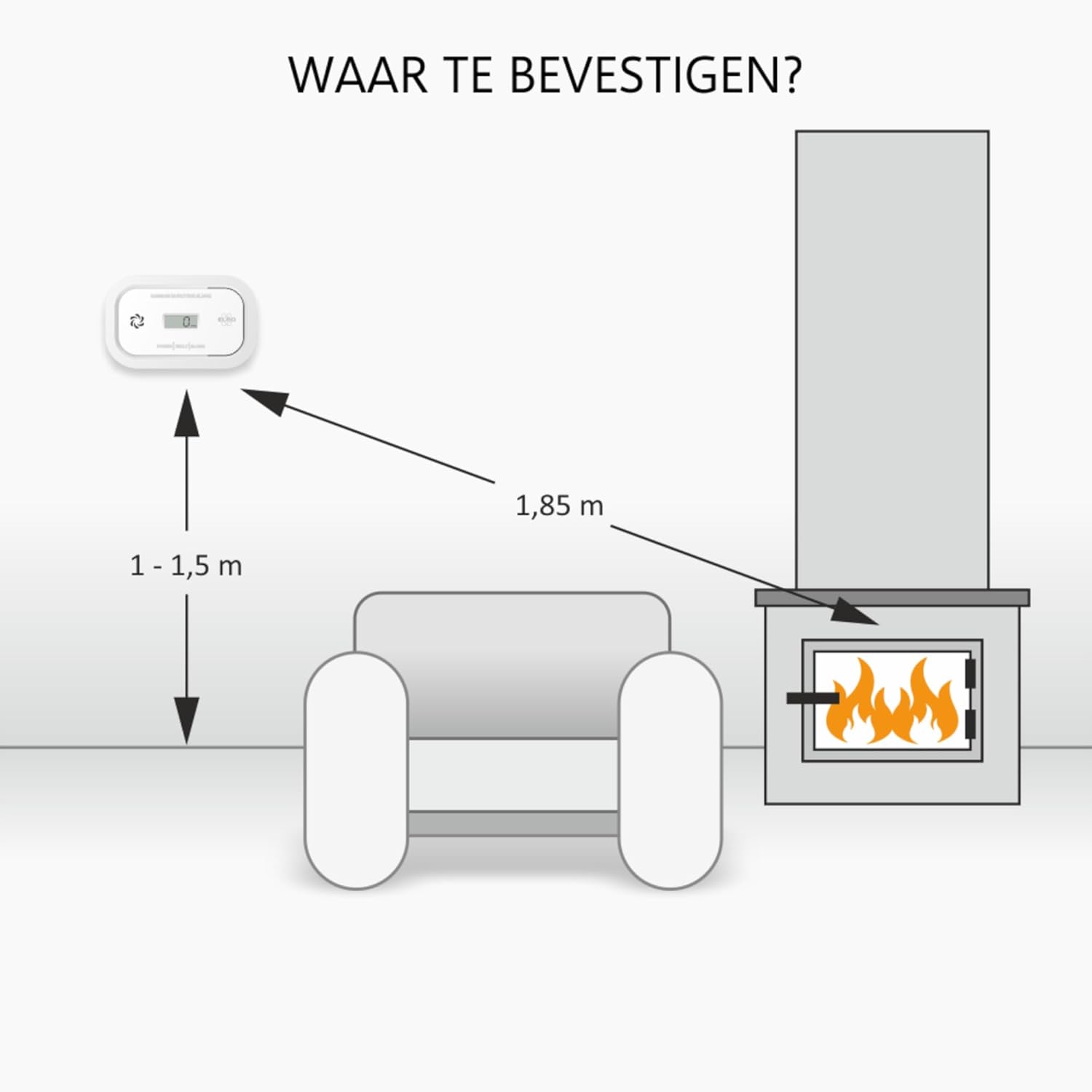
Image: Diagram illustrating recommended mounting height (1-1.5m) and distance (1.85m) from a fireplace for the CO detector.

Image: Examples of where to use the CO detector, including near a central heating boiler, a fireplace, and a geyser (water heater).
Use the provided mounting materials to secure the detector to the wall. Mark the drill holes, drill, insert wall plugs, and then screw the detector into place.

Image: The back of the ELRO FC5003 detector, showing the mounting bracket and the included screws and wall plugs for easy installation.
3. Operating the Detector
3.1 Power On and Self-Test
Once batteries are installed, the detector will automatically power on and perform a self-test. The display will show "0 PPM" under normal conditions, and the green "POWER" indicator light will illuminate.
3.2 Display Information
The integrated display shows the current carbon monoxide concentration in Parts Per Million (PPM). Under normal conditions, it should read "0 PPM".
3.3 Alarm Functionality
The detector is equipped with a highly sensitive electrochemical sensor that quickly detects dangerous levels of carbon monoxide gas. When CO is detected at hazardous levels, the alarm will activate:
- Audible Alarm: A loud alarm of 85 dB will sound.
- Visual Alarm: The red "ALARM" indicator light will flash, and the display will show the detected CO concentration.

Image: Diagram illustrating the audible alarm (85dB) and visual alarm indicators on the ELRO FC5003 detector.
The detector is designed to react quickly to dangerous CO levels, minimizing false alarms while ensuring prompt warning.

Image: Illustration depicting carbon monoxide (CO) molecules in the air and the detector's high-quality sensor reacting quickly to dangerous levels.
3.4 Test/Hush Button
The "TEST/HUSH" button allows you to:
- Test the Alarm: Press and hold the button to perform a functional test of the alarm. The alarm will sound, and indicator lights will flash.
- Hush the Alarm: In case of a nuisance alarm (e.g., from cooking fumes, though less common with CO detectors), pressing the button can temporarily silence the alarm. However, if CO is still present at dangerous levels, the alarm will reactivate.
4. Maintenance
4.1 Battery Replacement
The detector will provide a low battery warning when the batteries are nearing depletion. This is typically indicated by a chirp sound and/or a flashing "FAULT" indicator light. Replace the batteries immediately when this warning occurs to ensure continuous protection. Refer to section 2.2 for battery installation instructions.
4.2 Cleaning
To maintain optimal performance, clean your CO detector regularly:
- Gently wipe the exterior of the detector with a soft, damp cloth.
- Do not use cleaning agents, solvents, or abrasive materials.
- Do not paint the detector.
- Do not block the ventilation openings.
4.3 Regular Testing
It is recommended to test your CO detector weekly by pressing the "TEST/HUSH" button. This verifies that the alarm and internal circuitry are functioning correctly.
5. Troubleshooting
If your ELRO FC5003 Carbon Monoxide Detector is not functioning as expected, refer to the following common issues and solutions:
| Problem | Possible Cause | Solution |
|---|---|---|
| Detector chirps periodically. | Low battery warning. | Replace the 2 AA batteries immediately. |
| "FAULT" indicator light is on. | Internal fault or end-of-life warning. | If the fault persists after battery replacement, the unit may need to be replaced. The sensor has a 10-year lifespan. |
| Alarm sounds continuously. | High concentration of carbon monoxide detected. |
|
| No display or power. | Batteries are dead or incorrectly installed. | Check battery polarity or replace batteries. |
6. Specifications
| Feature | Detail |
|---|---|
| Model Number | FC5003 |
| Sensor Type | Electrochemical |
| Sensor Lifespan | 10 years |
| Power Source | Battery powered |
| Battery Type | 2 x AA Alkaline batteries (included) |
| Battery Life | Approximately 2 years |
| Alarm Loudness | 85 dB |
| Product Dimensions | 119 x 73 x 34 mm |
| Weight | 206 grams |
| Color | White |
| Manufacturer | ELRO |
| First Available Date | 18 October 2023 |

Image: Technical drawing with dimensions of the ELRO FC5003 Carbon Monoxide Detector (119mm length, 73mm height, 34mm depth).
7. Warranty and Support
ELRO provides a 5-year factory warranty for the FC5003 Carbon Monoxide Detector, ensuring peace of mind and protection against manufacturing defects.
For technical support, warranty claims, or further inquiries, please refer to the contact information provided in your product packaging or visit the official ELRO website. Always ensure you have your model number (FC5003) and purchase details ready when contacting support.
You can find more information about ELRO products and safety tips on their official brand store: ELRO Brand Store.


