
KAIWEETS KM601
KAIWEETS KM601 Digital Multimeter User Manual
Model: KM601 | Brand: KAIWEETS
Product Overview
The KAIWEETS KM601 Digital Multimeter is a smart electrical tester designed for diagnosing automotive, industrial, and household electrical problems. It features a large LCD color screen and flashlight for easy reading in various lighting conditions. The device defaults to Smart Mode, automatically identifying and ranging for voltage, resistance, and continuity measurements. It also includes advanced functions such as AC/DC current, capacitance, frequency, diode testing, duty cycle, temperature measurement, NCV (Non-Contact Voltage) detection, and live wire detection. Built with safety in mind, it is IEC Rated CAT.III 1000V, CAT.IV 600V, CE and RoHS certified, featuring anti-burn double fuses and overload protection. A silicone cover provides additional drop protection.

Figure 1: KAIWEETS KM601 Digital Multimeter and included accessories.
What's in the Box
- 1x KAIWEETS KM601 Multimeter
- 1x Storage Bag
- 2x Test Leads (Red and Black)
- 1x Thermocouple
- 6x AAA Batteries
- 1x User Manual

Figure 2: All items included with the KAIWEETS KM601 Digital Multimeter.
Setup
1. Battery Installation
The KAIWEETS KM601 requires 3 AAA batteries for operation. To install the batteries:
- Locate the battery compartment on the back of the multimeter.
- Use a screwdriver to open the battery cover.
- Insert 3 AAA batteries, ensuring correct polarity (+/-).
- Replace the battery cover and secure it with the screw.
2. Connecting Test Leads
Connect the test leads to the appropriate input jacks on the multimeter:
- Insert the black test lead into the "COM" (Common) jack.
- Insert the red test lead into the "VΩHz" (Voltage, Resistance, Frequency) jack for most measurements. For current measurements (mA/A), use the "10A" or "mA" jacks as indicated by the multimeter.

Figure 3: Rear view of the multimeter, highlighting the battery compartment and test lead input jacks.
Operating Instructions
Power On/Off
Press the power button located on the top side of the multimeter to turn it on or off. The device will automatically power off after 15 minutes of inactivity to conserve battery life.

Figure 4: The multimeter's auto power-off feature, activating after 15 minutes of inactivity.
Smart Mode (Auto Identification)
Upon powering on, the KM601 defaults to Smart Mode. In this mode, the multimeter automatically identifies and measures voltage (AC/DC), resistance, and continuity. This eliminates the need for manual range selection, simplifying common electrical tests.

Figure 5: The multimeter's display in Smart Mode, indicating automatic measurement selection.
Manual Mode and Function Selection
To access specific measurement functions not covered by Smart Mode, or to manually select a range, press the "FUNC" or "SEL" button. Repeatedly pressing this button will cycle through available functions such as AC/DC current, capacitance, frequency, diode, and duty cycle.

Figure 6: Overview of the various measurement functions available on the KAIWEETS KM601.
Common Measurements
- Voltage Measurement: Connect the test leads across the circuit or component to measure AC or DC voltage. The multimeter will automatically detect the type of voltage in Smart Mode.
- Continuity Test: Touch the test leads to both ends of a circuit or wire. A continuous beep indicates a complete circuit.
- Resistance Measurement: Place the test leads across the component to measure its resistance.
- Temperature Measurement: Connect the included thermocouple to the multimeter and place the probe at the desired measurement point.
- NCV (Non-Contact Voltage) Detection: Use the NCV sensor on the top of the multimeter to detect live AC voltage without direct contact. The device will beep and indicate voltage presence.
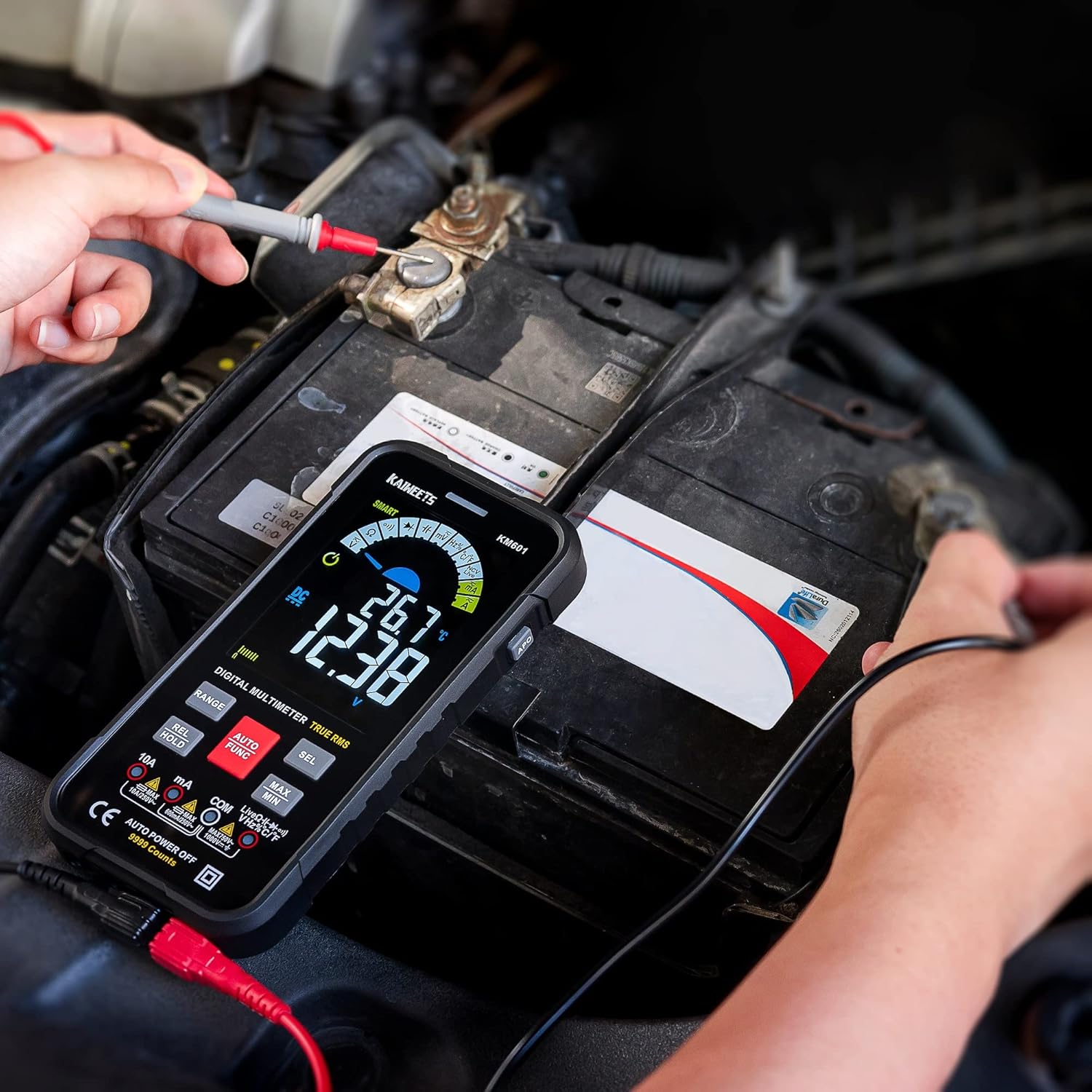
Figure 7: The multimeter being used to measure voltage on a car battery.

Figure 8: Non-Contact Voltage (NCV) detection in progress near an electrical outlet.

Figure 9: Measuring temperature using the included thermocouple probe.
Maintenance
- Cleaning: Use a soft, damp cloth to clean the multimeter's surface. Do not use abrasive cleaners or solvents.
- Battery Replacement: Replace batteries when the low battery indicator appears on the display. Refer to the "Setup" section for installation instructions.
- Fuse Replacement: The KM601 is equipped with double fuses for anti-burn protection. If a fuse blows, the display will show a "damaged fuse" prompt. To replace, open the battery compartment and carefully replace the blown fuse with one of the correct rating (refer to specifications).
- Storage: Store the multimeter in its carrying case in a cool, dry place when not in use.
Troubleshooting
| Problem | Possible Cause | Solution |
|---|---|---|
| No display/Multimeter won't turn on | Low or dead batteries; Incorrect battery installation; Blown fuse. | Replace batteries; Ensure correct polarity; Check and replace fuses if necessary. |
| Inaccurate readings | Incorrect function/range selected (in Manual Mode); Poor test lead connection; Environmental factors. | Switch to Smart Mode or select appropriate function/range; Ensure leads are firmly connected; Test in a stable environment. |
| Continuity test not beeping | Open circuit; Test leads not making good contact. | Check the circuit for breaks; Ensure firm contact with test leads. |
Specifications
| Feature | Detail |
|---|---|
| Model Number | KM601 |
| Brand | KAIWEETS |
| Display | Large LCD Color Screen, 10000 Counts |
| Safety Rating | IEC Rated CAT.III 1000V, CAT.IV 600V |
| Certifications | CE, RoHS |
| Power Source | 3 AAA batteries (included) |
| Dimensions | 6.5 x 3.35 x 0.98 inches |
| Weight | 9.35 ounces (265 Grams) |
| Features | Smart Mode, Auto Ranging, TRMS, Flashlight, Analog Bar, Real-time Temperature, Low Battery Prompt, Damaged Fuse Prompt, NCV, Live Wire Detection |
Warranty and Support
KAIWEETS provides 3 years of after-sale service and technical support for the KM601 Digital Multimeter. For any inquiries or assistance, please contact KAIWEETS customer service.
You can also refer to the official user guide PDF available at: KAIWEETS KM601 User Guide (PDF)
Related documentsKM601


Ask a question about this manual
Ask about setup, troubleshooting, compatibility, parts, safety, or missing instructions. Manuals+ will review the question and use this page’s manual context to help answer it.